Free SEO Automation Tools: The International Stack for SMEs, and Where AYSA Fits
A deep international guide to free SEO automation tools: what each tool does well, where free stacks are enough, and why AYSA is stronger when SMEs need approved execution, not more dashboards.
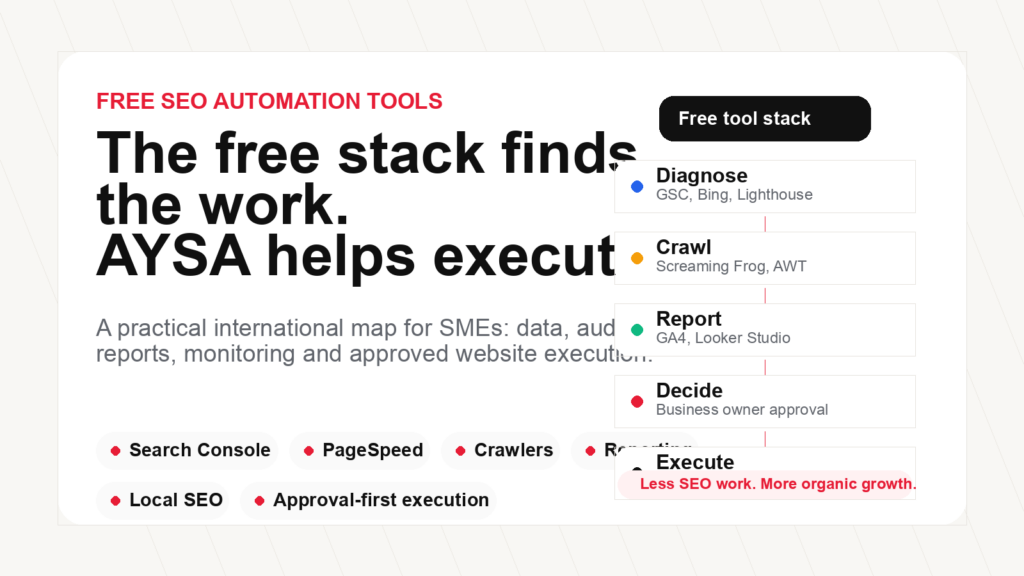
Executive summary: Free SEO Automation tools are useful. Some are excellent. Google Search Console, Bing Webmaster Tools, PageSpeed Insights, Lighthouse, Google Analytics, Looker Studio, Microsoft Clarity, Google Business Profile, Google Trends, Keyword Planner, Screaming Frog’s free crawler, Ahrefs Webmaster Tools and Structured data validators can give a small business a serious amount of search intelligence without a large monthly bill.
But in my opinion, the strongest free stack still has one major problem: it shows work more often than it finishes work. It can tell you that pages are slow, keywords are underperforming, schema is invalid, content is thin, rankings moved, or links are broken. It usually does not understand your business, prioritize the work, prepare approval-ready changes and execute accepted updates inside your website workflow. That is where AYSA is designed to be different.
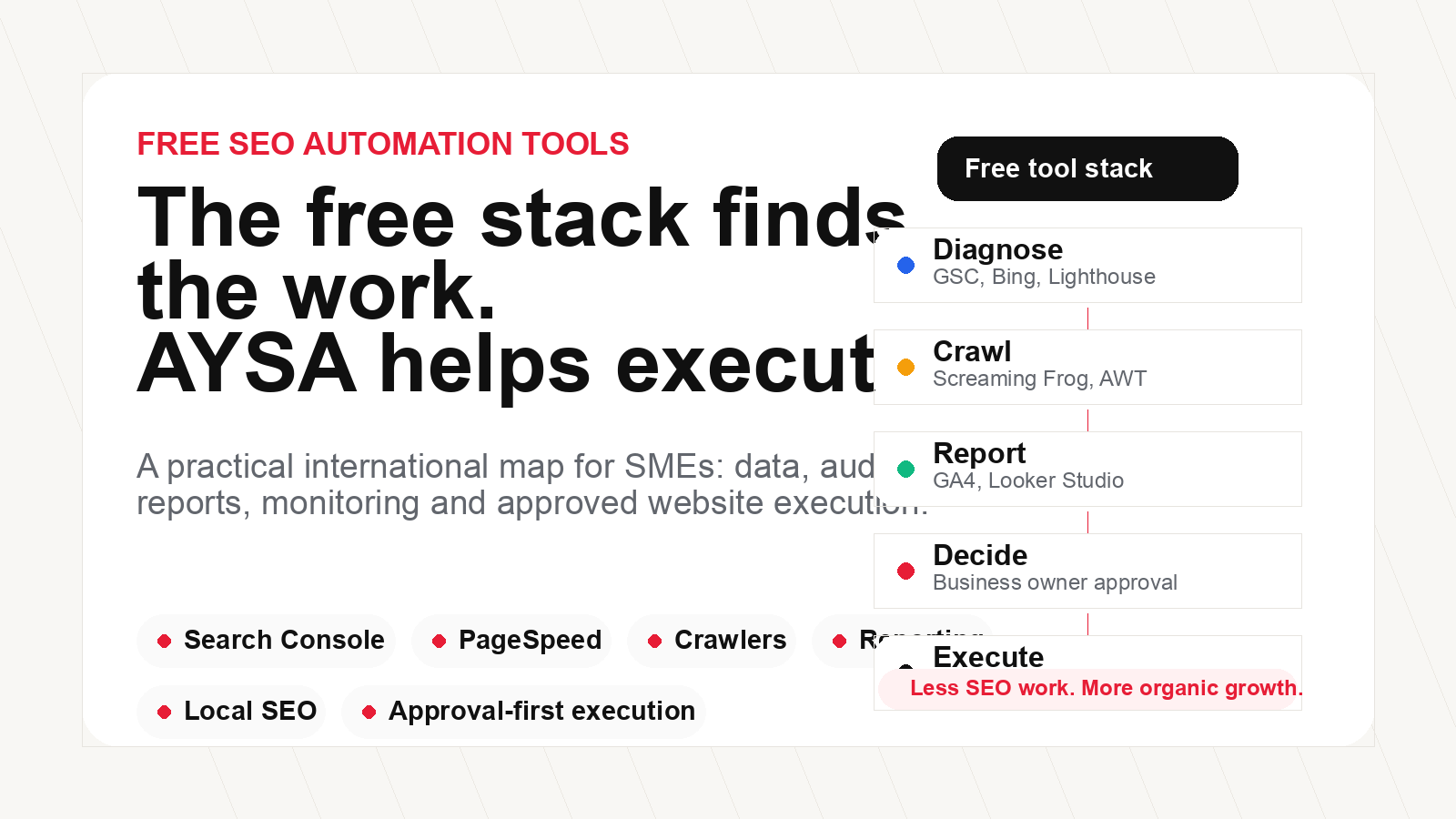
What “free SEO automation tools” really means
“Free SEO automation tools” sounds simple, but it is not one category. It usually means a mix of tools that automate small parts of the SEO workflow: collecting search data, crawling a website, checking technical issues, measuring speed, validating structured data, tracking local visibility, creating dashboards, monitoring user behavior, finding content ideas, or producing basic on-page recommendations.
That is useful. A founder, ecommerce manager or marketer should not pay for every small diagnostic task. Many of the best raw signals in SEO come from free tools created by Google, Microsoft and browser ecosystems. Google Search Console tells you how your site appears in Google Search. Bing Webmaster Tools adds a second search engine view. PageSpeed Insights and Lighthouse expose performance problems. Google Business Profile is central to local visibility. Looker Studio can automate reporting. Microsoft Clarity can show where users struggle. These tools are not toys.
The important distinction is this: most free tools automate measurement, diagnosis or reporting. They rarely automate the full operating loop. A real SEO operating loop looks like this: monitor the website, detect an opportunity, understand business context, prepare a specific action, explain the risk, ask for approval, execute the accepted work, keep a history and measure the result. Free tools usually cover fragments of that loop.
For a trained SEO specialist, fragments are enough. A specialist can interpret Search Console, crawl the site, compare competitors, prepare a content plan, write briefs, update titles, coordinate developers, fix redirects, manage schema and report progress. For most SMEs, that is the problem. They do not want one more interface. They want less manual SEO work and more organic growth.
Search data and indexing tools
Google Search Console
Google Search Console is the first free SEO automation tool every website should use. It gives verified site owners data about search performance, indexing, sitemaps, page experience, rich result eligibility, manual actions and many crawl-related signals. For SEO automation, its value is not only the interface. It is the data stream: impressions, clicks, average position, queries, pages, countries, devices and indexing issues.
What it does best: it shows what Google already sees. If a page receives impressions but low clicks, you may have a title or intent problem. If important URLs are excluded from the index, you may have a technical or content quality problem. If Core Web Vitals are weak, you have performance work to prioritize. Search Console is also where sitemap submission and indexing diagnostics become operational.
Where it is limited: it does not fix your website. It can tell you that a page has search potential, but it will not rewrite the title, build internal links, improve the page, update schema and publish changes. It also requires interpretation. A business owner can easily see many charts and still not know what to do next.
Bing Webmaster Tools
Bing Webmaster Tools is underrated. It gives site owners another search engine’s view of crawling, indexing, backlinks, keyword performance, URL inspection and SEO reports. For international SEO work, ignoring Bing is not wise, especially now that Microsoft’s search and AI ecosystem is connected to broader discovery experiences.
What it does best: it adds a second source of search diagnostics. Bing’s URL inspection, SEO reports and site scan tools can reveal issues that do not appear in the same way in Google tools. It is also relevant for IndexNow workflows and faster URL discovery in supported ecosystems.
Where it is limited: like Search Console, it is diagnostic. It does not become a project manager, writer, developer and QA system. It gives signals; someone still has to execute.
Google Analytics 4
Google Analytics 4 is not an SEO tool in the narrow sense, but it is important for SEO decisions. Search traffic without engagement or conversions is not business growth. GA4 can help connect organic traffic to events, conversions, pages, users and journeys.
What it does best: it tells you what happens after the click. If Search Console says a page gets impressions and clicks, GA4 can help show whether those visits engage, convert, return, or bounce quickly. That helps separate traffic vanity from business value.
Where it is limited: GA4 does not know why rankings changed, what content to update, what technical issue to fix or whether an SEO recommendation is safe to apply. It is an analytics layer, not an execution layer.
Technical SEO and performance tools
PageSpeed Insights
PageSpeed Insights is one of the simplest free tools for performance diagnosis. It combines lab diagnostics from Lighthouse with field data from the Chrome User Experience Report when enough data is available. It helps identify problems around Largest Contentful Paint, Interaction to Next Paint, Cumulative Layout Shift, render-blocking resources, image delivery, caching and JavaScript overhead.
What it does best: it turns performance into a concrete checklist. For SMEs, this is helpful because “site speed” becomes less abstract. You can see if the hero image is too heavy, CSS blocks rendering, fonts delay text, scripts create long tasks, or the mobile experience is poor.
Where it is limited: performance recommendations often need technical changes. Compressing images, changing font loading, removing unused CSS, reducing plugins, improving cache rules and fixing JavaScript are not one-click tasks in many WordPress websites. PageSpeed tells you what hurts. It does not negotiate with the theme, plugins and hosting stack.
Lighthouse
Lighthouse is available through Chrome DevTools and can audit performance, accessibility, best practices and SEO checks. It is useful for repeatable testing during development and publishing workflows.
What it does best: it is fast, free and reproducible. Developers can run it locally, marketers can inspect pages, and teams can use it as a QA layer before launching important pages.
Where it is limited: Lighthouse is a diagnostic audit, not a complete SEO audit. A 100 SEO score in Lighthouse does not mean the page has search demand, topical depth, strong internal links, authority, conversion value, or AI visibility. It is a useful floor, not the full strategy.
Screaming Frog SEO Spider free version
Screaming Frog SEO Spider is one of the most important technical SEO crawlers. The free version is limited, commonly used for smaller crawls and quick checks, while the paid version unlocks larger crawls and advanced features.
What it does best: it shows the structure of the website. You can find broken links, redirect chains, duplicate titles, missing meta descriptions, canonical problems, thin pages, status codes, headings, indexability signals and internal link patterns. For a small website, even the free version can reveal issues that are invisible in normal browsing.
Where it is limited: it is built for people who know how to interpret crawl data. A business owner can export a spreadsheet with hundreds of rows and still not know which issue matters first. The crawler finds the problem; execution still needs prioritization, approval and implementation.
Ahrefs Webmaster Tools
Ahrefs Webmaster Tools gives verified website owners access to free site audit and backlink/organic search data for their own properties. It is a strong option for businesses that want more external SEO perspective without immediately paying for a full SEO suite.
What it does best: it brings technical audit and backlink visibility into one place for owned websites. That matters because search performance is rarely only on-page. Broken pages, internal links, backlinks, redirects, content issues and authority signals interact.
Where it is limited: the free access is tied to verified owned properties and is still a tool interface. It helps find issues, but it does not become the owner’s execution team.
Cloudflare Free
Cloudflare’s free plan is not an SEO tool, but for many SMEs it can improve the technical environment around SEO: DNS, CDN, basic security, caching and performance controls. A faster, safer and more stable website is easier to crawl and better for users.
What it does best: it adds infrastructure leverage. Many WordPress sites suffer from poor hosting, weak caching, image delivery issues and security exposure. Cloudflare can help with some of that, especially when configured carefully.
Where it is limited: it can also be misconfigured. Bad cache rules, blocked crawlers, wrong redirects or aggressive security settings can create SEO problems. Infrastructure is powerful, but it needs governance.
Content, keyword and topic research tools
Google Trends
Google Trends is one of the best free tools for understanding relative search interest, seasonality and topic movement. It is especially useful for ecommerce, local services, publishers and businesses with seasonal demand.
What it does best: it shows direction. If demand for a topic is rising, seasonal, regional or declining, Trends can help decide when to publish, what to compare and which markets deserve attention.
Where it is limited: it does not give a complete keyword database, exact conversion potential or execution plan. It is a directional research tool.
Google Keyword Planner
Google Keyword Planner is built for Google Ads, but it is still useful for SEO research because it helps discover keyword ideas and demand ranges. It is especially useful when organic and paid search strategy overlap.
What it does best: it provides keyword discovery connected to Google’s advertising ecosystem. For SMEs, it can reveal how customers phrase demand, compare service terms and identify commercial intent.
Where it is limited: SEO is not the same as ad planning. Keyword Planner does not map content clusters, identify all ranking opportunities, prioritize pages, analyze SERP complexity or execute updates.
AnswerThePublic and AlsoAsked
AnswerThePublic and AlsoAsked are useful for question-led research and topic expansion. Their free access can change over time, but the workflow is valuable: start with a topic, discover questions, group intent and build content that answers real needs.
What they do best: they make content gaps visible. If people ask “how,” “why,” “best,” “near me,” “cost,” “comparison,” “can I,” and “what happens if” questions around a topic, those questions can shape better pages and FAQs.
Where they are limited: question lists are not content strategy by themselves. A website can answer dozens of questions badly. The opportunity is to connect questions to buyer journey, business expertise, content quality and approved publication.
Google Alerts
Google Alerts is a simple free monitoring tool for brand mentions, competitors, topics and industry changes. It is not advanced AI visibility monitoring, but it can be useful for PR, reputation and authority awareness.
What it does best: it is lightweight and fast to set up. SMEs can track brand names, important competitors, niche topics and public mentions without buying a media monitoring suite.
Where it is limited: it is noisy, incomplete and not designed for SEO execution. It can alert you that something happened; it will not turn that into a link reclamation, content update or authority-building workflow.
Local SEO and business visibility tools
Google Business Profile
Google Business Profile is essential for local businesses. It controls how a business appears across Google Search and Maps, including business details, hours, categories, services, photos, reviews, posts and local discovery signals.
What it does best: it gives local businesses a public operating layer in Google’s ecosystem. For restaurants, clinics, salons, stores, service companies and local ecommerce pickups, it can influence discovery and trust before users even visit the website.
Where it is limited: it is not a full SEO strategy. GBP must match the website, service pages, local content, reviews, citations and real business operations. If the website is weak, confusing or technically broken, local visibility suffers.
Microsoft Clarity
Microsoft Clarity is a free behavior analytics tool with heatmaps and session recordings. It is not strictly local SEO, but it helps understand whether users can actually use the pages that SEO brings traffic to.
What it does best: it shows friction. If users rage click, scroll past important information, abandon forms, miss CTAs or struggle on mobile, Clarity can reveal the problem.
Where it is limited: behavior analytics needs interpretation. A heatmap does not automatically tell you which SEO page to rewrite, which internal link to add or which service detail is missing.
Reporting and automation layers
Looker Studio
Looker Studio is one of the best free reporting layers for SMEs that want recurring dashboards. It can connect to Google Analytics, Search Console and many other data sources through connectors.
What it does best: it makes reporting repeatable. Instead of manually exporting data every month, a team can build dashboards for organic traffic, landing pages, conversions, queries, countries, devices and campaign performance.
Where it is limited: a dashboard is not a strategy. Many businesses already have dashboards they do not use. Reporting is valuable only if it creates decisions and execution.
Google Sheets and Apps Script
Google Apps Script can automate simple SEO workflows inside Google Sheets: pulling data from APIs, checking URLs, creating reports, monitoring changes, generating templates and scheduling recurring tasks. For technical marketers, it is a powerful free or low-cost automation layer.
What it does best: it lets technical teams build custom workflows without buying a new platform. A small script can fetch Search Console data, compare titles, check status codes or send alerts.
Where it is limited: it requires technical skill and maintenance. Scripts break, APIs change, quotas apply, and business owners usually do not want to maintain spreadsheet automation.
Browser extensions and validators
Detailed SEO Extension, SEOquake and SEO Minion
Detailed SEO Extension, SEOquake and SEO Minion are useful browser tools for quick on-page checks. Depending on the tool, they can inspect titles, meta descriptions, headings, canonicals, links, hreflang, robots directives and SERP-related details.
What they do best: they save time during manual review. Instead of opening source code or crawling a page, a marketer can inspect important SEO elements directly in the browser.
Where they are limited: they are page-level tools. They do not replace site-wide crawling, Search Console data, content strategy, technical execution or business context.
Rich Results Test and Schema Markup Validator
Google’s Rich Results Test and the Schema Markup Validator are essential for structured data QA. They help verify whether markup is valid and whether a page may be eligible for supported rich result types.
What they do best: they reduce schema mistakes. This matters because structured data that does not match visible content, invalid JSON-LD and duplicated schema can create SEO noise.
Where they are limited: valid schema is not automatic visibility. It supports understanding and eligibility, but it does not compensate for weak content, poor UX, thin pages or lack of authority.
In my opinion: the best free SEO automation stack for an SME
If I had to build a serious free stack for a small business, I would not look for one magical tool. I would combine tools by job:
For Google search data: Google Search Console.
For second-source search diagnostics: Bing Webmaster Tools.
For behavior and conversions: Google Analytics 4.
For reporting: Looker Studio.
For performance: PageSpeed Insights and Lighthouse.
For crawling: Screaming Frog free version for smaller websites, plus Ahrefs Webmaster Tools for verified sites.
For local visibility: Google Business Profile.
For topic direction: Google Trends, Keyword Planner, AnswerThePublic or AlsoAsked.
For UX friction: Microsoft Clarity.
For structured data: Rich Results Test and Schema Markup Validator.
For fast page checks: a browser SEO extension.
This stack can take a business far. It can reveal the majority of common SEO problems: low click-through pages, indexing errors, slow templates, broken links, weak local data, duplicate metadata, poor internal linking, missing schema, page experience problems and content gaps. A disciplined marketer can use this stack to build a solid SEO process.
The problem is that most SMEs do not fail because they lack data. They fail because the work is not executed consistently. The free stack creates a long list of tasks. Somebody still has to decide which tasks matter, prepare the changes, avoid risky edits, get approval and publish.
Free tools are strongest at
AYSA is stronger when you need
Where AYSA is better, in our opinion
AYSA does not replace every free tool. That would be the wrong way to explain it. Google Search Console remains important. PageSpeed Insights remains useful. Bing Webmaster Tools, GA4, Looker Studio, Clarity and validators all have a role. AYSA’s advantage is that it sits above the fragmented tool stack and turns SEO signals into work a business can approve and execute.
In my opinion, AYSA is better for SMEs in five specific ways.
First, AYSA understands the business context. A free crawler does not know whether a page is important to sales, whether a service is profitable, whether the business wants more leads or ecommerce orders, whether a location matters, or whether a tone of voice is appropriate. AYSA is designed to learn the business profile and use that context when preparing SEO work.
Second, AYSA reduces interpretation overhead. Free tools expose data. AYSA explains what matters in plain language. A business owner should not need to understand every crawl status, schema warning, CTR anomaly and indexing nuance before making progress.
Third, AYSA prepares approval-ready actions. This is the key difference. A report says “meta descriptions are missing.” AYSA can prepare the descriptions. A crawler says “internal links are weak.” AYSA can prepare internal link opportunities. A research workflow finds missing topics. AYSA can prepare content plans and drafts. The output is closer to execution.
Fourth, AYSA keeps approval in the workflow. Automation without approval is risky. SEO touches brand, legal, medical, ecommerce, pricing, local information and customer expectations. AYSA’s model is not blind autopilot. It prepares the work, asks for approval where it matters and executes accepted changes.
Fifth, AYSA supports the new search reality. SEO is no longer only title tags and rankings. Businesses also need answer readiness, entity clarity, AI visibility, useful content, technical crawlability, authority and continuous monitoring. AYSA’s direction is to connect SEO, AEO, GEO and AI visibility into one execution model.
Where free tools are enough
Free tools are enough when the website is small, the owner has SEO knowledge, the workload is light and the team can execute. If you have ten pages, one location, a simple website and a person who understands Search Console, PageSpeed, basic crawling and WordPress publishing, you can do a lot without paying for an SEO platform.
Free tools are also enough for learning. Anyone serious about SEO should know Search Console, PageSpeed Insights, Lighthouse, GA4, Google Business Profile and basic crawling. These tools teach the fundamentals. They make SEO less mysterious.
But free tools become expensive when the hidden cost is time. A business owner spending ten hours a week interpreting dashboards is paying with attention. A marketer copy-pasting tasks across tools is paying with operational drag. A developer receiving vague SEO tickets is paying with rework. A website that does not execute improvements is paying with missed organic growth.
Where free tools break down
The breakdown usually happens in five places.
Prioritization: free tools can produce too many warnings. Not every warning is equally important. Some issues are cosmetic, some are structural, and some can affect revenue. SMEs need prioritization based on business impact.
Connected context: one tool sees performance, another sees queries, another sees crawl issues, another sees user behavior. The business needs a connected view, not ten disconnected tabs.
Content execution: tools can suggest topics, but useful pages require angle, structure, examples, trust, business knowledge and ongoing updates.
Technical implementation: many SEO problems require changes in WordPress, templates, redirects, schema, sitemaps, internal links or content. Seeing the issue is the easy part.
Accountability: dashboards do not create accountability. Workflows do. Someone or something must prepare the task, get approval, execute and measure.
Comparison: free SEO automation stack vs AYSA
Search visibility data: free tools are strong. AYSA uses and interprets signals as part of the execution workflow.
Technical diagnosis: free tools are strong for audits. AYSA is stronger when the goal is turning the audit into safe approved actions.
Content planning: free tools can help with questions and keyword direction. AYSA is stronger when the business needs research, mapping, drafts and approval-ready content work.
Local SEO: free tools are essential for profile management and diagnostics. AYSA is stronger when local pages, reviews, business profile context and website execution need to move together.
AI visibility: free tools are emerging and fragmented. AYSA’s position is to treat AI visibility as part of the same SEO operating system: clarity, structure, authority, monitoring and approved execution.
Ease for non-specialists: free tools require learning. AYSA is built for business owners, ecommerce teams, agencies and non-SEO users who want the agent to explain and prepare the work.
My practical recommendation
Use the free tools. Connect Search Console. Connect Bing Webmaster Tools. Set up GA4. Use PageSpeed Insights. Crawl small sites with Screaming Frog. Validate schema. Use Google Business Profile properly. Build Looker Studio dashboards if they help. Do not reject free tools because they are free; some of them are foundational.
But do not confuse a free tool stack with an SEO operating system. The free stack gives you visibility into problems. AYSA is built to help you move from visibility to approved execution. That is the difference that matters for SMEs.
If you are a specialist, free tools can make you more efficient. If you are a business owner, free tools can make you more informed. But if you want less SEO work and more organic growth, the winning layer is the one that prepares the work, asks for approval and executes accepted changes inside your website.
Less SEO work. More organic growth.
Turn free SEO diagnostics into approved website execution.
AYSA monitors your website, prepares SEO, AEO and AI visibility actions, asks for approval and executes accepted changes inside your website workflow.
Sources and official links
This guide was built from official product documentation and public product pages, including Google Search Console, Bing Webmaster Tools, Google Analytics 4, PageSpeed Insights, Lighthouse, Screaming Frog SEO Spider, Ahrefs Webmaster Tools, Google Trends, Google Keyword Planner, Google Business Profile, Looker Studio, Microsoft Clarity, Cloudflare plans, Google Rich Results Test, Schema Markup Validator, Google Alerts, Detailed SEO Extension, SEOquake, SEO Minion, AnswerThePublic and AlsoAsked.
Continue the AI search topic inside AYSA.
Use these pages to connect the article with AI SEO tools, AI visibility monitoring, AI Overviews and approved website execution.
Turn this topic into a website action plan.
Use these AYSA hubs to move from reading to technical fixes, AI visibility monitoring, research, glossary context and approval-first SEO execution.