WordPress SEO: The Practical Guide to Rankings, AI Visibility and Approved Execution
A deeply practical WordPress SEO guide covering technical foundations, content, site structure, schema, speed, local SEO, AI visibility and the execution workflow that turns recommendations into approved website updates.
Executive summary
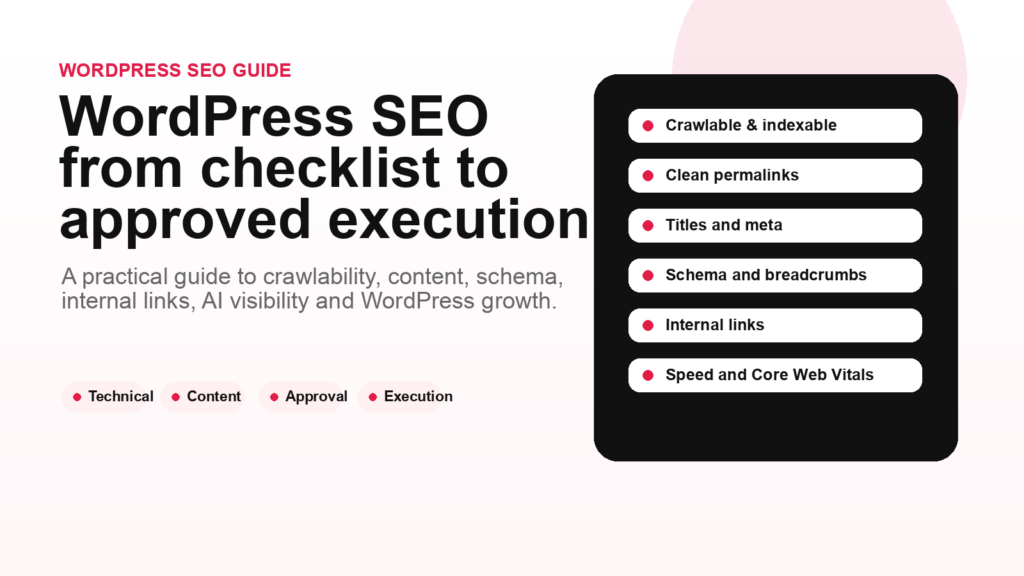
WordPress SEO is not one plugin setting. It is a full operating system: Crawlability, Indexability, clean structure, helpful content, internal links, schema, speed, reviews, authority, Monitoring and Approved Execution. Yoast’s WordPress SEO guide is one of the best-known educational resources in this space, and it correctly emphasizes foundations such as site structure, content quality, technical setup and ongoing optimization. The missing business layer is execution: who prepares the work, who approves it and how accepted changes get published consistently.
- Start with crawlability, indexability, permalinks, sitemap, Robots.txt and canonical control.
- Build a clear WordPress structure: homepage, product/service pages, categories, articles, glossary and internal links.
- Write content for humans first, but structure it for search engines, AI Overviews and answer engines.
- Use schema only where it matches visible content and supports real understanding.
- Measure Search Console, analytics, rankings, conversions and AI visibility, then turn findings into approved actions.
WordPress powers a large part of the web because it makes publishing accessible. That accessibility is also the reason WordPress SEO can become messy. A site can grow from five pages to five hundred posts, dozens of categories, old tags, duplicate archives, thin pages, slow plugins, forgotten redirects, missing schema, inconsistent internal links and content that once made sense but no longer matches search intent.
The Yoast guide to WordPress SEO is a strong reference because it treats WordPress SEO as a complete discipline rather than a single checkbox. It covers technical setup, content quality, site structure, performance, mobile, security, structured data and ongoing improvement. This article builds on that foundation, adds an execution layer, and adapts the workflow to the reality of AI search, AI Overviews, answer engines and approval-first website updates.
The practical truth is simple: WordPress SEO does not fail because business owners lack advice. It fails because advice does not become approved website action. A plugin can warn you. A report can list problems. A consultant can recommend changes. But rankings, visibility and conversions improve only when the right work is actually prepared, reviewed and published.
What WordPress SEO actually means
WordPress SEO is the process of making a WordPress website easier for search engines, users and AI-assisted discovery systems to crawl, understand, trust and use. It includes technical SEO, content strategy, on-page optimization, site architecture, structured data, performance, internal linking, authority building, local signals, ecommerce signals, analytics and continuous improvement.
That definition matters because many people reduce WordPress SEO to “install Yoast” or “fill the green lights.” SEO plugins are useful. Yoast SEO, Rank Math, SEOPress and other plugins can help with titles, meta descriptions, XML sitemaps, schema, canonical tags, robots directives and content checks. But the plugin is not the strategy. It is a control layer.
A strong WordPress SEO system answers five questions:
- Can search engines crawl and index the right pages?
- Can users and search systems understand what every important page is about?
- Does the site structure help authority flow toward important pages?
- Does the content satisfy search intent better than competing pages?
- Is there a workflow for finding, approving and executing improvements over time?
The last question is the one most guides mention only indirectly. In real businesses, execution is the bottleneck. Someone has to decide what matters, rewrite titles, merge duplicate pages, improve internal links, add FAQs, update schema, fix broken links, improve category pages and monitor outcomes.
Technical foundation: crawlability, indexability and control
Technical WordPress SEO begins with access. If search engines cannot crawl the site, or if important URLs are accidentally noindexed, canonicalized, blocked or duplicated, content quality will not save the website.
Start with the basics:
- Search engine visibility: confirm that WordPress is not discouraging search engines in Settings > Reading.
- Permalinks: use clean, stable URLs that describe the page topic.
- XML sitemap: make sure the sitemap includes the pages you want indexed and excludes low-value archives where appropriate.
- Robots.txt: avoid blocking important content, CSS, JavaScript or resources that Google needs to render pages.
- Canonical tags: prevent duplicate versions of similar pages from competing with each other.
- Noindex rules: use them deliberately for thin archives, private pages, search result pages or low-value duplicates.
- Redirects: use 301 redirects when URLs change and avoid redirect chains.
- 404s: fix broken internal links and redirect valuable old URLs where there is a relevant replacement.
Google’s SEO Starter Guide is clear that making a site crawlable and useful is foundational. Google’s crawling and indexing documentation also emphasizes that pages need to be discoverable, accessible and eligible for indexing. For WordPress sites, this means the CMS settings, theme, plugins and content architecture all matter.
The common WordPress risk is plugin sprawl. A site may have one plugin for SEO, another for redirects, another for schema, another for caching, another for page building, another for images and another for security. Each can be useful. Together, they can create conflicts. A technical SEO workflow should detect these conflicts before they damage visibility.
Site structure and internal linking
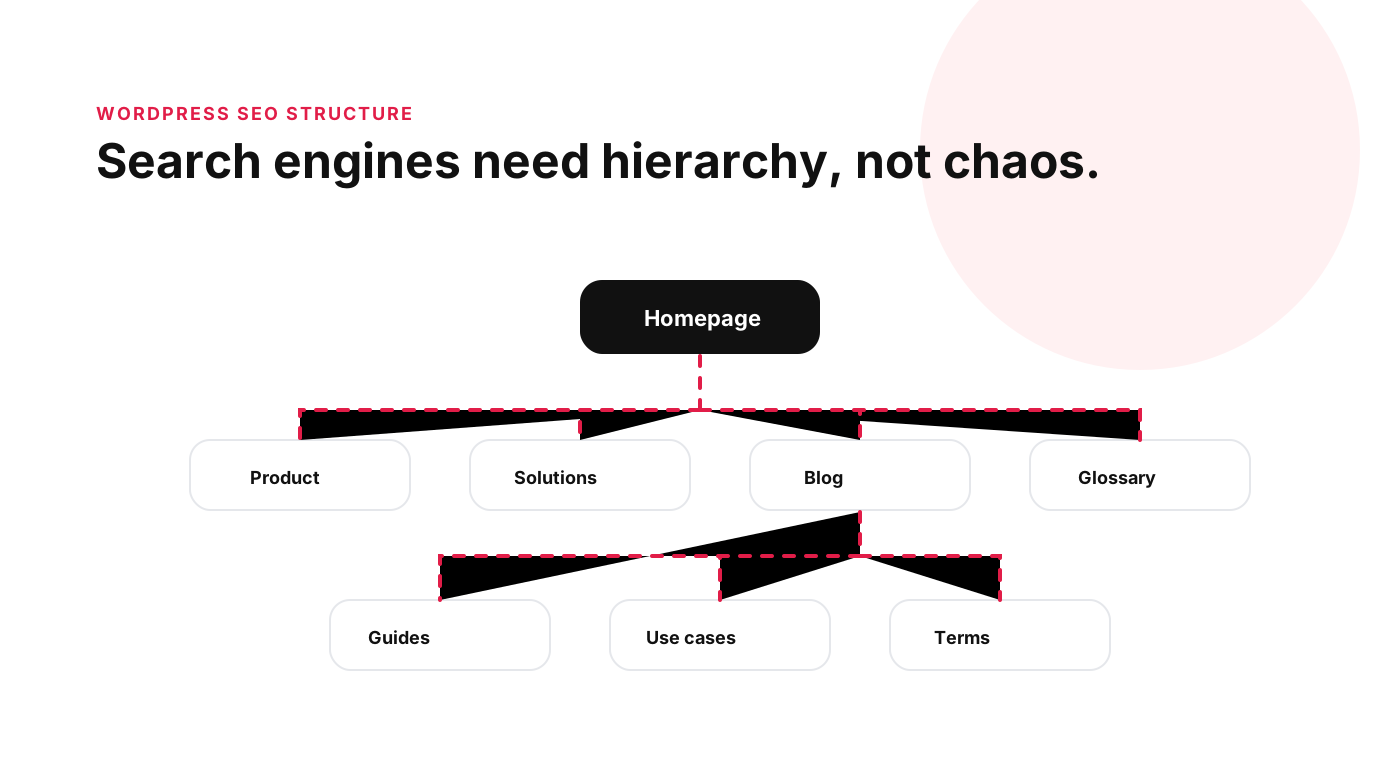
WordPress makes it easy to publish posts, but easy publishing does not automatically create a strong site architecture. Without structure, a website becomes a pile of URLs. Search engines and users need a hierarchy.
A good WordPress structure usually includes:
- A homepage that clearly explains the business or publication.
- Core product, service or solution pages.
- Category pages that group related content intentionally.
- Guides, articles and glossary pages that support commercial pages.
- Breadcrumbs that show hierarchy.
- Internal links that connect related concepts.
- Navigation that prioritizes what matters commercially.
Internal linking is one of the most underused WordPress SEO levers. A blog post about on-page SEO should link to related terms such as title tag, meta description, internal linking, schema markup and topical authority. A glossary page about canonical tags should link to duplicate content, indexability, technical SEO and URL canonicalization. A service page should link to supporting proof, FAQs, case studies and relevant articles.
Internal links help users discover related content. They also help search engines understand relationships and importance. Google’s documentation on crawlable links makes clear that links should be accessible and meaningful. In WordPress, this means avoiding buried links, JavaScript-only navigation and orphan pages that no important page links to.
Content and on-page SEO
Content is where WordPress SEO becomes visible. Users do not experience your sitemap. They experience pages. A page has to answer a real question, solve a problem, explain a product, support a decision or make a next step clear.
On-page SEO for WordPress includes:
- Clear title tags that match search intent.
- Meta descriptions written for click-through, not keyword stuffing.
- One clear H1 and a logical heading hierarchy.
- Helpful introductions that confirm the reader is in the right place.
- Direct answers for important questions.
- Examples, screenshots, tables or diagrams where they help understanding.
- Internal links to related pages.
- Optimized images with useful alt text.
- Updated information when facts, dates or product details change.
Google’s guidance on helpful, reliable, people-first content is especially relevant for WordPress. The CMS makes it easy to publish quickly, but speed can create thin content, duplicated topics and old posts that no longer help users. Content pruning and content refresh are often as important as creating new articles.
For AI search, content also needs to be answer-ready. That does not mean writing robotic FAQ spam. It means making important information explicit. If a service has pricing, process, eligibility, limitations, location coverage or approval requirements, the page should say so clearly. If a product supports WordPress now but plans Shopify later, say that accurately. If a feature requires approval before execution, explain that directly.
Schema, rich results and AI readiness
Structured data helps search engines understand certain types of content. WordPress SEO plugins can generate schema for articles, breadcrumbs, organizations, products, FAQs, local businesses and other entities. But schema should not be treated as decoration. Google’s structured data guidelines say structured data should represent visible content and follow specific type requirements.
Use schema where it helps describe real page content:
- Organization schema: for company identity and official profiles.
- Breadcrumb schema: for site hierarchy.
- Article schema: for blog and editorial content.
- Product schema: for ecommerce product pages where details are visible.
- LocalBusiness schema: for local entities with real contact/location data.
- FAQ schema: only where visible FAQs exist and where it remains appropriate for the target surface.
Schema is not a ranking guarantee. It is a clarity layer. It can improve eligibility for certain search features when policies allow it, but it cannot compensate for weak content, bad UX or an untrustworthy page.
For AI readiness, schema should be combined with clear visible content. AI systems need extractable facts, entity clarity and source-worthy explanations. A page that hides important details while adding schema is not a strong source. A page that explains the topic clearly, links to related concepts, shows proof and uses appropriate schema is much stronger.
Speed, mobile and Core Web Vitals
WordPress performance is a recurring SEO issue because the CMS is flexible. Themes, plugins, fonts, images, scripts, analytics tags, page builders and third-party embeds can slow pages down. Google documents Core Web Vitals and page experience as part of the broader search experience. Even when performance is not the only factor, slow pages reduce user satisfaction and conversion.
Common WordPress speed improvements include:
- Compressing and resizing images.
- Using modern image formats where appropriate.
- Reducing render-blocking CSS and JavaScript.
- Using caching and long cache lifetimes for static assets.
- Removing unused plugins and scripts.
- Optimizing fonts and avoiding excessive font weights.
- Lazy-loading non-critical media.
- Testing real mobile layouts, not only desktop scores.
The mobile version matters because many searches happen on phones, and Google uses mobile-first indexing. A beautiful desktop page that collapses into oversized headings, hidden CTAs, layout shifts or intrusive popups on mobile is not a good SEO page.
Local and ecommerce WordPress SEO
WordPress is used by publishers, local businesses, agencies, SaaS companies and ecommerce stores. The SEO workflow changes by business type.
Local WordPress SEO
A local business needs clear services, locations, opening hours, contact details, reviews, Google Business Profile alignment, local citations, service-area clarity and pages that answer local customer intent. For medical clinics, legal services, home services and local ecommerce, trust matters heavily. The website should make the business easy to verify.
WooCommerce and ecommerce SEO
Ecommerce SEO needs optimized category pages, product pages, filters, canonicals, structured product data, internal links, image optimization, reviews, inventory clarity and content that supports buying decisions. Faceted navigation can create duplicate URLs if not controlled. Product variations can create thin pages. Category pages often need stronger copy and internal links.
Publisher SEO
Publishers need clean category architecture, author credibility, topical clusters, evergreen refreshes, article schema, internal links, index management and a plan for content decay. Old posts can either become assets or liabilities depending on whether they are maintained.
Monitoring and approved execution
WordPress SEO should be monitored continuously. Search Console can show queries, impressions, CTR, indexing issues and page performance. Analytics can show engagement and conversions. Rank tracking can show movement. AI visibility monitoring can show whether a brand appears in AI answers and whether competitors are cited instead.
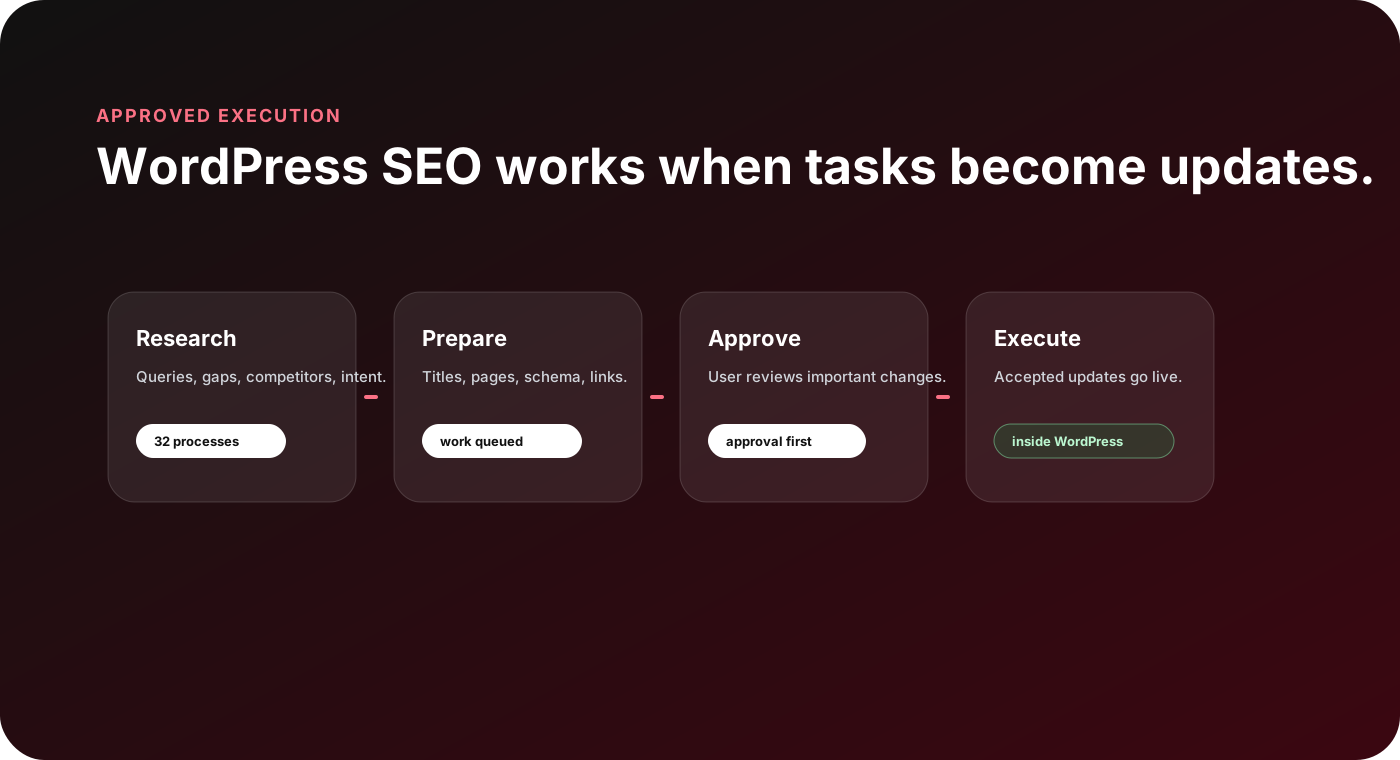
But monitoring is not the end. The useful workflow is:
- Detect the issue or opportunity.
- Decide whether it matters commercially.
- Prepare the technical, content or authority action.
- Explain the tradeoff and expected benefit.
- Ask for approval where the change affects the public website.
- Execute accepted changes.
- Measure the result.
This is where AYSA fits naturally. AYSA is not trying to replace WordPress SEO fundamentals. It is trying to remove the execution gap. The agent can analyze the website, learn the business context, find SEO/AEO/GEO opportunities, prepare approval-ready actions and execute accepted changes inside the website workflow.
Common WordPress SEO mistakes
The most expensive WordPress SEO mistakes are rarely dramatic. They are usually small decisions repeated over months or years. A category is created for one post and forgotten. A tag archive is indexed with almost no content. A page builder creates heavy markup. A product goes out of stock without a plan. A blog post ranks but never links to the commercial page. A redesign changes URLs without redirects. A caching plugin hides a JavaScript issue until Google renders the page differently from the user.
Here are the mistakes I would watch first:
- Publishing without structure: lots of posts, but no clear topical map or internal linking plan.
- Indexing everything: tags, author archives, search pages and thin templates can dilute quality.
- Ignoring Search Console: impressions, CTR drops and indexing warnings often reveal the next SEO task.
- Writing titles only for plugins: a green score does not mean a title is persuasive or aligned with intent.
- Forgetting old content: outdated posts can lose trust, rankings and AI answer usefulness.
- Using schema as a shortcut: structured data should describe visible content, not invent missing content.
- Letting plugins decide strategy: plugin defaults are not the same as business-specific SEO decisions.
- Separating content and technical SEO: a page can fail because the answer is weak, the URL is wrong, the internal links are missing, or the template is slow.
The fix is not to panic-audit the whole website every week. The fix is to build a steady execution system. Find the issue, decide whether it matters, prepare the change, approve it and measure the result.
A practical 90-day WordPress SEO plan
If a WordPress site has never had a serious SEO workflow, start with a 90-day plan. Do not try to fix everything at once. Use the first month to stabilize technical foundations, the second month to improve content and structure, and the third month to build a repeatable monitoring and execution rhythm.
Days 1-30: clean the foundation
Check crawlability, indexability, sitemap quality, robots.txt, permalink structure, canonical tags, redirects, broken internal links, speed, mobile layout, duplicate titles and duplicate meta descriptions. Connect Search Console and analytics. Make sure important pages are visible in the sitemap and low-value pages are controlled.
Days 31-60: improve the pages that already have demand
Use Search Console to find pages with impressions but weak click-through rate, pages ranking outside the top positions, and queries that show intent the current content does not satisfy. Improve titles, meta descriptions, introductions, headings, internal links, answer sections, images and calls to action. Refresh old content that still has search potential.
Days 61-90: build topical authority and execution cadence
Map the main commercial topics and supporting informational content. Create or improve glossary terms, guides, comparison pages and use-case pages. Link them together. Monitor rankings, clicks, conversions and AI visibility. Turn new findings into weekly or bi-weekly approval batches instead of waiting for a giant audit every quarter.
This is the difference between WordPress SEO as a one-time setup and WordPress SEO as a growth system.
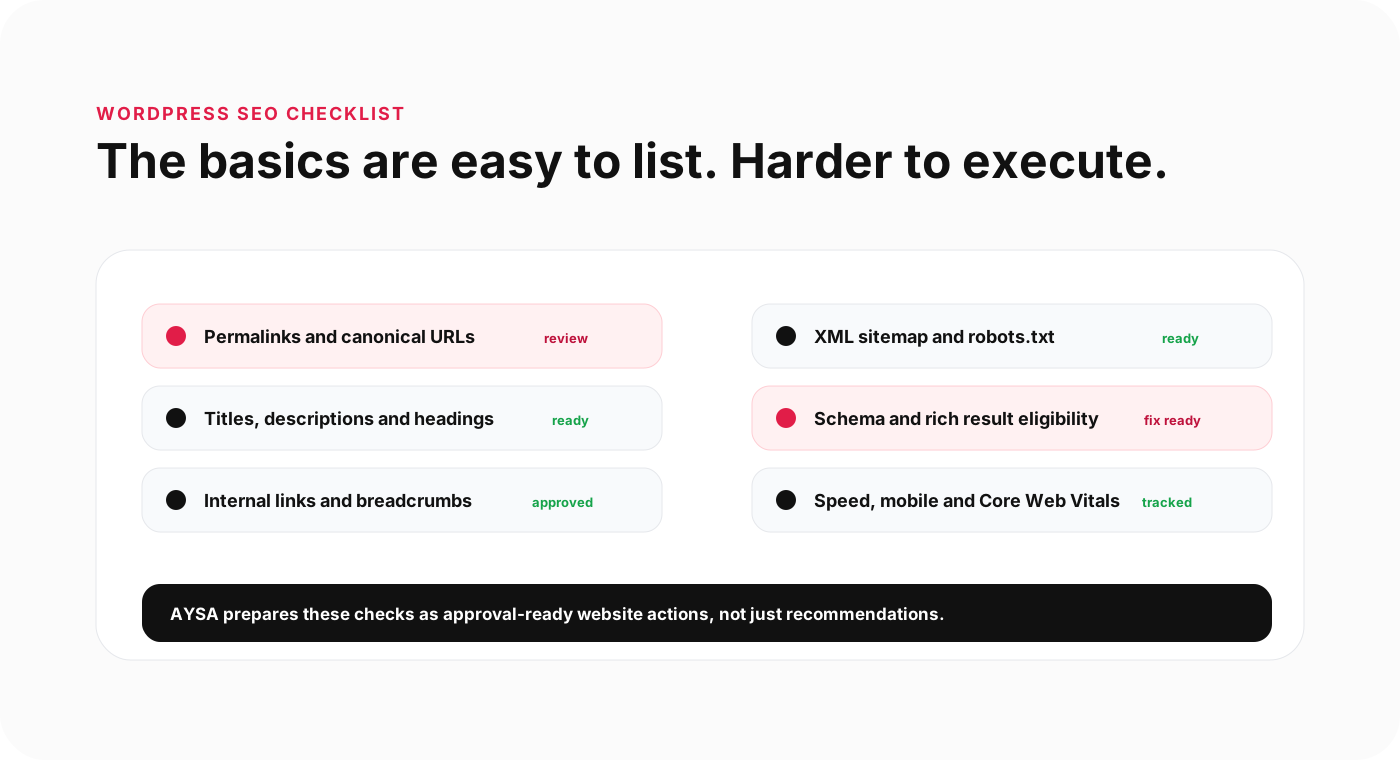
WordPress SEO checklist
Use this checklist as a practical audit framework.
Technical setup
- Search engine visibility is enabled.
- HTTPS works across the whole site.
- Permalinks are clean and stable.
- XML sitemap includes only useful indexable URLs.
- Robots.txt does not block important resources.
- Canonical tags are correct.
- Redirects are clean and avoid chains.
- 404 pages and broken internal links are monitored.
Content and on-page
- Each important page has a unique title and meta description.
- Each page has one clear H1.
- Headings follow a logical outline.
- Content answers the search intent directly.
- Images have descriptive alt text where useful.
- Old posts are refreshed, merged or pruned.
- Commercial pages have proof, process and next steps.
Structure and links
- Navigation reflects the most important business areas.
- Breadcrumbs are enabled.
- Orphan pages are found and fixed.
- Topic clusters link to pillar pages.
- Glossary terms link semantically to related articles and pages.
- Important pages receive enough internal links.
Schema and AI visibility
- Organization and breadcrumb schema are valid.
- Article schema is used for editorial content.
- Product or LocalBusiness schema is used only where relevant.
- Structured data matches visible content.
- Important pages include direct answers where useful.
- Entity signals for brand, founder, products and services are clear.
Performance and monitoring
- Images are compressed and sized correctly.
- Critical CSS and scripts are controlled.
- Static assets have efficient cache lifetimes.
- Core Web Vitals are monitored.
- Search Console and analytics are connected.
- AI visibility and answer engine mentions are monitored.
- Findings become approved actions, not forgotten reports.
FAQ
Is Yoast enough for WordPress SEO?
No. Yoast can help with important SEO controls, but it does not replace strategy, content quality, internal linking, performance, authority building or execution. A plugin supports SEO; it does not do all SEO work by itself.
What is the most important WordPress SEO setting?
There is no single setting. The foundation is making the right pages crawlable and indexable, using clean URLs, creating helpful content and maintaining a clear site structure.
Do WordPress tags hurt SEO?
Tags are not bad by default, but thin tag archives can create low-value pages. Use tags deliberately, avoid duplicates and noindex or clean up archives that do not help users.
Does schema help WordPress SEO?
Schema can help search engines understand content and may support eligibility for certain search features, but it must match visible content and follow Google’s structured data guidelines.
How does WordPress SEO connect to AI visibility?
AI visibility depends on many SEO fundamentals: crawlability, content clarity, entity signals, authority, internal links and technical quality. A well-structured WordPress site is easier for both search engines and AI-assisted systems to understand.
How can AYSA help with WordPress SEO?
AYSA analyzes the website, prepares SEO, AEO, GEO and AI visibility actions, asks for approval and executes accepted changes inside the website workflow. It helps turn WordPress SEO from a checklist into an operating system.
The AYSA point of view
WordPress made publishing accessible. SEO now needs the same shift for execution. Business owners should not have to interpret every report, manually rewrite every title, chase every broken link or copy recommendations between tools and WordPress.
The future of WordPress SEO is not more dashboards. It is approved execution: the right work prepared, explained, approved and applied consistently. Less SEO work. More organic growth.
Sources and further reading
- Yoast: WordPress SEO guide
- Google Search Central: SEO Starter Guide
- Google Search Central: Creating helpful, reliable, people-first content
- Google Search Central: Make your links crawlable
- Google Search Central: Structured data general guidelines
- Google Search Central: Core Web Vitals and Google Search results
- WordPress.org Documentation: Permalink settings
Continue the AI search topic inside AYSA.
Use these pages to connect the article with AI SEO tools, AI visibility monitoring, AI Overviews and approved website execution.
Turn this topic into a website action plan.
Use these AYSA hubs to move from reading to technical fixes, AI visibility monitoring, research, glossary context and approval-first SEO execution.