The 90-Day WordPress SEO Action Plan for Romanian SMEs
A practical 90-day WordPress SEO roadmap for Romanian SMEs: measurement, technical cleanup, content priorities, approvals and execution.
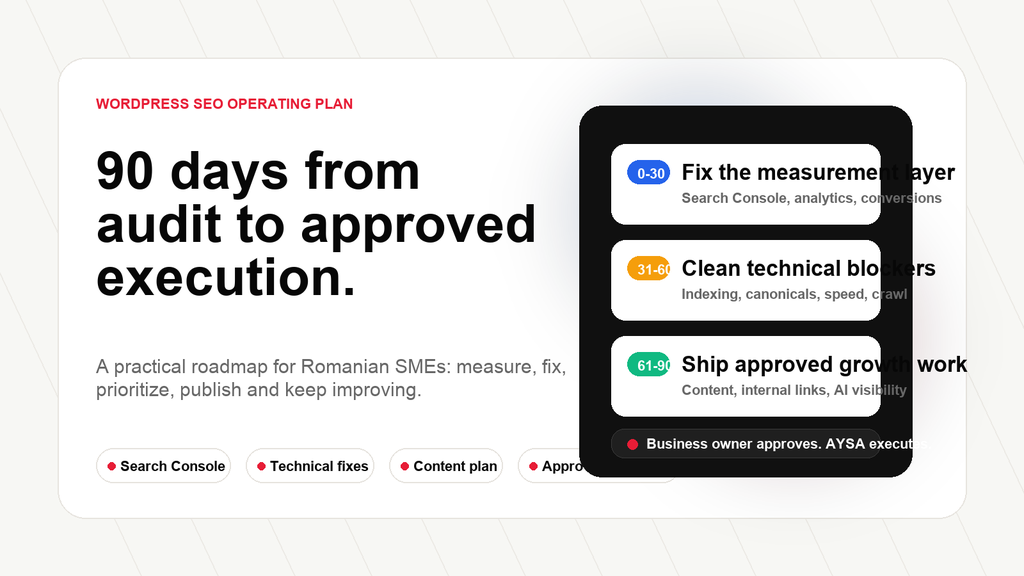
Executive summary: Romanian SMEs do not need another vague SEO checklist. They need a 90-day operating plan that turns WordPress SEO from plugin settings and scattered recommendations into measurable, Approved Execution. The plan below starts with data and technical foundations, then moves into priority pages, content, internal links, local or ecommerce improvements and monthly governance.
This is article 3 in the AYSA WordPress SEO in Romania series. Start with the pillar research, WordPress SEO in Romania: The 20 Problems Holding Entrepreneurs Back, then read Why an SEO Plugin Is Not a WordPress SEO Strategy. This article answers the next question: what should a business actually do in the first 90 days?
Related article: The 90-day roadmap depends on choosing the right demand. Read Romanian Search Intent for WordPress SEO to map price, local, trust and action queries correctly.
Related article: The first 90 days depend on technical cleanup. Read Technical SEO for Romanian WordPress Websites for the detailed speed, crawl, sitemap and redirect checklist.
Why a 90-day plan works better than a random SEO checklist
Most WordPress SEO projects fail because they start with tasks instead of sequence. Someone installs a plugin. Someone writes a blog post. Someone compresses images. Someone changes a Title tag. Someone looks at Search Console once. Each action may be useful, but the business still does not have an operating system.
A 90-day plan is useful because it creates order. The first month establishes measurement and removes the most dangerous technical uncertainty. The second month improves the pages that can create business value fastest. The third month turns the work into a repeatable growth rhythm. This does not mean SEO is finished in 90 days. It means the business stops treating SEO as a set of disconnected chores.
For Romanian SMEs, the sequence matters even more. Many websites are built quickly, often with WordPress themes, page builders, WooCommerce extensions, old plugins, unplanned categories, multilingual experiments, blog posts written without intent mapping and tracking that was added after launch. The result is not one dramatic failure. It is accumulation: slow pages, unclear URLs, weak commercial content, thin categories, duplicate archives, missing measurement and no owner for monthly execution.
Google’s own documentation supports this operational view. Search Console is described as a tool that helps site owners monitor, maintain and troubleshoot their presence in Google Search, including Crawlability, Indexing, traffic data and issues. Google Search Essentials separates technical requirements, spam policies and best practices. WordPress documentation also makes a useful point: WordPress is search-friendly by design, but themes, customization and plugins can break useful search-engine-friendly behavior. In other words, the platform gives you a starting point. The system still has to be managed.
The goal of the 90-day plan is not to promise rankings. No serious SEO plan should do that. The goal is to create evidence, priorities and execution velocity. By the end of the first 90 days, the business should know what pages matter, what is broken, what has been fixed, what content is missing, what has been approved, what has been shipped and what should happen next.
Days 1-30: make the website measurable and crawlable
The first month should not be glamorous. It should be disciplined. A business cannot improve what it cannot measure, and it cannot grow through search if important pages are not crawlable, indexable or technically stable.
Start with Google Search Console. Verify the website, submit the sitemap, inspect the most important URLs and review the Pages report. The questions are simple: can Google find the important pages, can it crawl them, are they indexable, and are there patterns of exclusion that matter? Do not start with every URL. Start with the pages that should create revenue: service pages, category pages, location pages, product categories, comparison pages and content hubs.
Then connect analytics and conversions. GA4 alone is not magic, but the business needs to know whether organic visitors become leads, calls, form submissions, appointments, carts, purchases or newsletter subscribers. For local businesses, phone calls, booking clicks and contact forms may matter more than ecommerce revenue. For WooCommerce, product revenue, cart starts and checkout completion matter. For B2B, assisted conversions and qualified leads matter. SEO cannot be evaluated only by traffic.
Next, crawl the website. Look for indexable URLs that should not exist in search: tag archives, search result pages, thin author archives, parameter URLs, staging leftovers, duplicate category paths, old landing pages and pages created by plugins. Also look for the opposite: pages that should be indexed but are blocked, canonicalized away, redirected, noindexed or missing from the internal link structure.
WordPress-specific checks matter here. Permalink settings should be clean. Sitemap output should not include junk. Canonical tags should be consistent. Robots.txt should not block important resources. The theme should output one clear H1. Menus and breadcrumbs should support important sections. Plugin-generated pages should be reviewed. If WooCommerce is active, product categories, filters, pagination and product schema need attention.
Performance belongs in the first month because mobile experience affects both users and conversion. Google’s Core Web Vitals documentation centers on real-user experience signals such as Largest Contentful Paint, Interaction to Next Paint and Cumulative Layout Shift. A founder does not need to become a performance engineer, but they should know whether the homepage, major service pages and commercial categories are painfully slow on mobile.
By day 30, the deliverable should not be a beautiful report. It should be a decision-ready foundation: a measurement setup, a technical issue list, a priority URL list and a short backlog. Every item should have an owner, a reason and an expected business impact.
Day 30 checklist
- Google Search Console verified and sitemap submitted.
- Analytics and core conversions configured.
- Top 20-50 business-critical URLs identified.
- Indexability, canonical, robots and sitemap issues reviewed.
- Mobile speed and Core Web Vitals checked on priority templates.
- Obvious broken links, redirect chains and 404 patterns collected.
- Plugin and theme risks documented.
- SEO backlog created with owner, priority and next action.
Days 31-60: improve the pages that can move the business
The second month is where many SEO projects become inefficient. Teams try to optimize everything. That is a mistake. A small business needs momentum, not perfection. Start with pages that already have evidence of opportunity or business value.
Search Console can reveal pages with impressions but weak click-through rate. These pages may need better titles, descriptions, headings, clearer angle, stronger proof or a better answer to the query. A plugin can help edit metadata, but it cannot decide the new positioning. The page should be rewritten around the user’s actual decision.
For service businesses, the priority pages are often service and location pages. A weak service page usually says what the company does but not enough about who it is for, when the customer should choose it, what the process looks like, what pricing or quote logic exists, what proof is available and what action the visitor should take next. That is not only an SEO issue. It is a sales issue.
For ecommerce, category pages often matter more than individual blog posts. A category page should not be a product grid with a thin paragraph at the bottom. It should help the buyer understand options, filters, use cases, delivery, materials, sizes, trust signals, comparison criteria and related categories. WooCommerce makes it easy to create categories. It does not automatically make them useful.
Internal linking should also happen in this phase. A Romanian SME usually has useful pages scattered across the site: old articles, product guides, FAQs, location pages, category descriptions and blog posts. The problem is that the pages do not support each other. A good internal link system helps users move from informational content to commercial pages and helps search engines understand topical relationships.
This is also the right moment to review content quality. A page about “best pediatric clinic in Bucharest” should not look like a generic directory. It should help a parent compare options, understand when to choose emergency care, see real criteria, evaluate trust signals and decide what to do next. A page about “technical SEO audit” should not only define the term. It should explain the checks, risks, examples, prioritization and what happens after issues are found.
By day 60, the business should have improved a focused set of high-impact pages. The deliverable is not “we worked on SEO.” The deliverable is concrete: these pages were rewritten, these titles were changed, these internal links were added, these schema opportunities were prepared, these technical fixes were accepted, these content gaps are now planned.
Ready for approval
✓ Service page title and intro rewritten around buyer intent.
✓ Product category FAQ prepared for answer readiness.
✓ Internal links mapped from guides to money pages.
Needs business input
• Pricing language for service page.
• Trust proof and examples.
• Delivery/service-area clarification.
Executed
✓ Redirect chain removed.
✓ Canonical conflict fixed.
✓ Image delivery improved on mobile.
Days 61-90: build the content and authority system
The third month turns the foundation into a growth engine. By now, the website should have better measurement, fewer technical blockers and improved priority pages. The next question is: what content and authority does the business need to grow beyond the pages it already has?
This is where keyword research becomes useful, but only if it is connected to business reality. The goal is not to collect thousands of keywords. The goal is to understand what people ask before, during and after the buying decision. For a local clinic, that may include symptoms, services, locations, emergency questions, prices, doctor credentials and comparison queries. For ecommerce, it may include product comparisons, materials, use cases, delivery questions, gift intent, sizes, compatibility and care instructions.
Topic authority matters because isolated articles rarely build durable organic growth. A website needs clusters: a central commercial page, supporting guides, comparison pages, FAQs, internal links and clear entity signals. This is also important for AEO, GEO and AI search visibility because answer engines need structured, trustworthy and context-rich information to identify and explain a business accurately.
The content plan should be selective. Do not publish 50 generic articles because a spreadsheet says the keywords exist. Choose topics where the business has real knowledge, commercial relevance, customer questions and a reason to be the useful result. Every article should have a job: educate, compare, reassure, convert, support a category, explain a service, answer objections or build authority around a topic.
Authority building also starts in this phase, but it must be controlled. Search engines evaluate the web around your website, not only the pages inside it. Relevant mentions, quality publisher opportunities, local citations, partner pages, industry references and digital PR can help. But businesses should avoid spammy link schemes and uncontrolled spending. Extra authority actions should be reviewed, explained and approved before execution.
By day 90, the company should have a roadmap for the next quarter: content clusters, technical maintenance, monitoring, internal linking, local or ecommerce improvements, authority opportunities and a monthly review process. The business should no longer ask “did we do SEO?” It should ask “what did we approve, what did we ship, what changed and what is next?”
The common mistakes that break the first 90 days
The first mistake is trying to fix every warning at once. A WordPress crawl can produce hundreds or thousands of items: missing alt text, duplicated titles, thin tags, slow images, unused CSS, redirect chains, 404s, noindex rules, sitemap conflicts and metadata gaps. If the business treats every warning as equal, the team becomes busy but not effective. Prioritization should start with revenue pages, indexability, technical blockers and pages that already show search demand.
The second mistake is starting with blog volume before fixing commercial pages. Many SMEs publish articles because content feels productive. But if the main service page is unclear, the category page is thin, the contact path is weak or the local landing page lacks trust signals, more blog content will not solve the commercial gap. Content should support the business model, not distract from it.
The third mistake is treating technical SEO as a one-time cleanup. WordPress changes constantly: plugin updates, theme edits, new products, removed pages, new categories, media uploads, builder changes, hosting changes and tracking scripts. A site that is technically clean in May can be messy again in August. Technical SEO needs monitoring, not a single heroic audit.
The fourth mistake is ignoring approval friction. Some SEO recommendations are easy: fix a broken link, compress an image, update a sitemap. Others require business judgment: rewriting service claims, changing price language, adding medical or legal content, redirecting an old page, approving a publisher placement or publishing a new comparison article. If approval is not designed into the workflow, recommendations pile up.
The fifth mistake is measuring only rankings. Rankings matter, but they are not enough. A business should also monitor impressions, click-through rate, indexed priority pages, organic conversions, technical issue counts, speed on important templates, content published, internal links added, approved actions executed and pages with growing or declining demand. SEO is not only visibility. It is a business operating system for demand capture.
The KPI dashboard a non-specialist can actually use
A practical SEO dashboard for a Romanian SME should be simple enough to read in ten minutes. It should answer four questions: are we visible, are important pages healthy, are people taking action and are we executing the work?
For visibility, track impressions, clicks, average position and click-through rate from Search Console, but group them by page type. Homepage traffic is different from service-page traffic. Blog traffic is different from product-category traffic. Local landing pages behave differently from informational guides. Grouping pages prevents misleading averages.
For technical health, track indexed priority URLs, excluded priority URLs, 404 patterns, redirect issues, sitemap status, canonical conflicts and Core Web Vitals status for the templates that matter. A founder does not need to inspect every Lighthouse detail. They need to know whether the pages that make money are technically blocked or unpleasant on mobile.
For conversion, track the actions that matter to the business: form submissions, quote requests, phone clicks, WhatsApp clicks, booking actions, checkout starts, purchases, newsletter signups or file downloads. Organic traffic without action can still be useful for awareness, but commercial SEO should eventually connect to measurable outcomes.
For execution, track shipped work. This is the metric most SEO dashboards miss. How many approved title changes went live? How many pages were improved? How many internal links were added? How many technical fixes were completed? How many content briefs became published pages? How many recommendations are waiting for approval? Execution velocity turns SEO from a reporting habit into a growth habit.
Clicks, impressions, CTR and priority queries.
Indexability, canonicals, redirects, sitemap and speed.
Forms, calls, bookings, carts and qualified leads.
Approved changes shipped, not just recommendations received.
The simplest SEO backlog format
The best SEO backlog is not complicated. Each item needs six fields: page, issue, evidence, proposed action, approval state and owner. “Optimize service pages” is not a backlog item. “Rewrite the title and first section of /servicii/ because Search Console shows impressions for high-intent queries and CTR is weak” is a backlog item.
Evidence matters because it protects the team from opinion-driven SEO. Evidence can be a Search Console query, a crawl screenshot, a PageSpeed finding, a customer question, a competitor comparison, a broken URL, a missing H1, a duplicate title, a thin category, a missing schema opportunity or a conversion issue. If there is no evidence, the action should be questioned.
Approval state matters because business owners are busy. They need to see which decisions are waiting for them, which actions are safe to execute and which actions require more context. A good backlog reduces anxiety. It does not bury the owner in technical language.
Owner matters because SEO often falls between teams. The developer thinks it is content. The copywriter thinks it is technical. The founder thinks the agency will handle it. The agency thinks the developer must implement it. A backlog item without an owner is usually a future unresolved issue.
This is why the 90-day plan should produce not only fixes, but a rhythm. Every month: review evidence, prepare actions, approve decisions, execute accepted work and measure the result. That rhythm is what most small businesses are missing.
The missing ingredient: SEO governance for non-specialists
Governance sounds corporate, but for SMEs it can be simple. Someone must own the system. That person does not need to be an SEO specialist, but they must be responsible for decisions, approvals and monthly rhythm.
A practical governance model has five parts. First, a single backlog where every SEO action is written in plain language. Second, evidence for each action: URL, screenshot, metric, query, issue or customer question. Third, an approval state: ready, approved, rejected, waiting for input or executed. Fourth, a monthly review of results. Fifth, a record of what changed on the website.
This matters because SEO recommendations often die in translation. The specialist says “fix canonicalization.” The founder hears technical noise. The developer asks which URL. The content person waits for copy. The agency sends a PDF. Nothing happens. Governance turns advice into work.
It also protects the business. Not every SEO recommendation should be executed blindly. Some changes affect positioning, pricing, legal claims, medical claims, product availability, local service promises or brand tone. Approval-first execution respects the fact that the business owner remains in control.
For agencies, governance is also the path to scale. An agency cannot manually babysit every client task forever. It needs repeatable workflows, clear approvals, evidence, action history and execution support. The future is not fewer experts. It is experts supported by better systems.
Where AYSA fits in a 90-day WordPress SEO plan
AYSA is built around the execution gap. A traditional SEO process often ends with a report. A plugin process often ends with a score. AYSA is designed to move further: it learns the business, connects website and Google context, monitors opportunities, prepares approval-ready work and executes accepted changes inside the website workflow.
In the first 30 days, AYSA helps establish context: website profile, business goals, Google data, technical signals and priority pages. In days 31-60, it can prepare titles, descriptions, content improvements, internal links, technical fixes and page-level actions for review. In days 61-90, it can support content planning, monitoring, AI visibility readiness and authority-building workflows.
The key point is not that AI replaces judgment. The key point is that AI can reduce repetitive SEO labor. The business owner should not spend nights copying recommendations from a PDF into WordPress. The owner should review important decisions, approve what makes sense and keep control of publishing. AYSA handles the operational work around that approval.
My opinion is that this is the only realistic model for many Romanian SMEs. The volume and speed required by modern SEO, AEO, GEO and AI visibility are too high for occasional manual work. Agencies can help, but even good agencies struggle when implementation depends on slow approvals, disconnected developers and scattered tools. The winning model is a system that prepares the work continuously and makes approval easy.
The 90-day plan is not a magic formula. It is a way to stop drifting. Measure. Clean. Prioritize. Execute. Review. Repeat. That is how WordPress SEO becomes a business asset instead of another unfinished digital project.
Next in the series: for ecommerce-specific catalog, product data and filter issues, read WooCommerce SEO in Romania: Categories, Products, Filters and Marketplace Pressure.
Local SEO layer: for Google Business Profile, reviews, service pages and local trust signals, read Local SEO in Romania for WordPress Websites.
Content SEO layer: for useful pages, topic authority and AEO-ready content, read Content SEO for Romanian WordPress Websites.
Less SEO work. More organic growth.
Turn your first 90 days into approved website execution.
AYSA helps Romanian SMEs move from audits and plugin checks to prepared, approved and executed SEO work inside the website workflow.
Sources and further reading
- AYSA: WordPress SEO in Romania: The 20 Problems Holding Entrepreneurs Back
- AYSA: Why an SEO Plugin Is Not a WordPress SEO Strategy
- Google Search Console Help: About Search Console
- Google Search Central: Search Essentials
- Google Search Central: SEO Starter Guide
- Google Search Central: Introduction to structured data
- Google Search Central: Canonicalization and duplicate URLs
- Google Search Central: Sitemaps overview
- Google Search Central: Core Web Vitals and Google Search results
- WordPress.org: Search Engine Optimization documentation
Continue the AI search topic inside AYSA.
Use these pages to connect the article with AI SEO tools, AI visibility monitoring, AI Overviews and approved website execution.
Turn this topic into a website action plan.
Use these AYSA hubs to move from reading to technical fixes, AI visibility monitoring, research, glossary context and approval-first SEO execution.