Technical SEO for Romanian WordPress Websites: Speed, Indexing, Crawl and Execution
A practical technical SEO guide for Romanian WordPress websites: performance, Core Web Vitals, plugin bloat, indexing, crawl control, sitemap, canonicals, 404s and redirects.
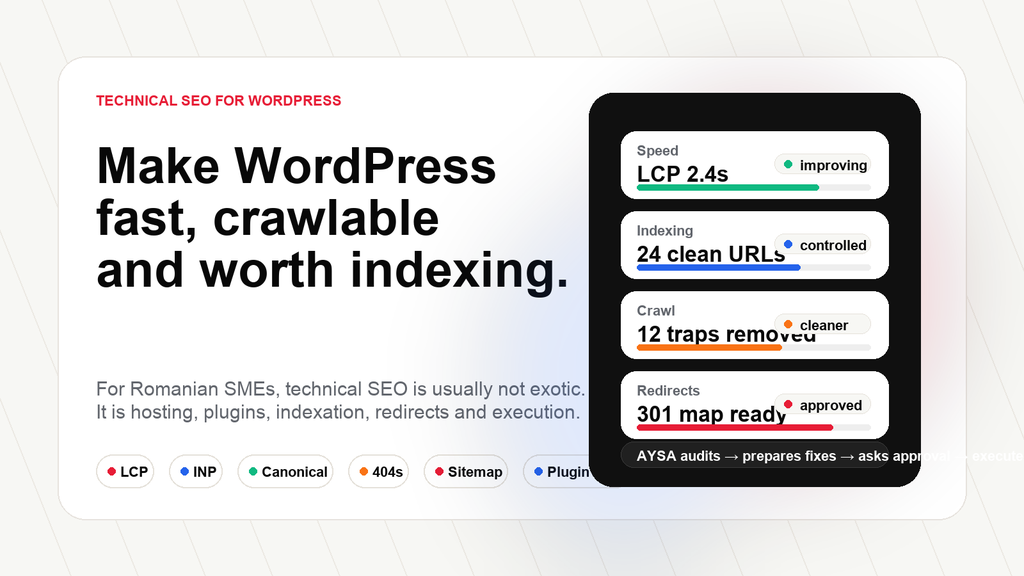
Executive summary: Technical SEO for Romanian WordPress websites is usually not about exotic SEO tricks. It is about infrastructure, speed, indexation control, crawl efficiency, canonical discipline, redirect strategy, Image optimization, plugin hygiene and continuous Monitoring. For SMEs, the real problem is rarely “we do not know one advanced tactic.” The real problem is that technical issues pile up faster than anyone approves and fixes them.
This is article 5 in the AYSA WordPress SEO in Romania series. It follows the pillar research, WordPress SEO in Romania: The 20 Problems Holding Entrepreneurs Back, the article on why an SEO plugin is not a strategy, the 90-day WordPress SEO action plan, and the guide to Romanian search intent for WordPress SEO.
Technical SEO is the operational layer that keeps WordPress from collapsing under its own flexibility
WordPress is a brilliant platform because it lets a business launch quickly. That same flexibility becomes a technical SEO problem when nobody owns the system. A theme is installed. A page builder is added. Then a SEO plugin, a cache plugin, a security plugin, a contact form plugin, a pop-up plugin, a chat widget, a cookie plugin, analytics scripts, Facebook Pixel, TikTok Pixel, sliders, addon packs, image galleries, WooCommerce extensions, translation tools and old plugins nobody remembers.
At first, the site works. Then it becomes slow. The admin becomes heavy. The DOM grows. JavaScript blocks interaction. Images are too large. Sitemaps include useless URLs. Old pages return 404. Redirect chains appear after redesigns. Tag archives get indexed. Canonical tags conflict. Some pages are crawled but not indexed. The owner sees traffic stagnate and thinks SEO does not work.
For Romanian SMEs, this pattern is extremely familiar. Many businesses start with shared hosting, a multipurpose theme and a fast launch budget. That is understandable. But SEO pressure arrives later. When the website needs to compete with marketplaces, directories, local packs, AI summaries and better-funded competitors, the technical foundation starts to matter.
Google’s Search Essentials separate technical requirements, spam policies and key best practices. At a minimum, Google needs to be able to find, crawl, render and understand the important pages. Google’s SEO Starter Guide also frames SEO as helping search engines understand content and helping users decide. Technical SEO is the layer that makes that possible. If the site is slow, blocked, duplicated, unstable or filled with low-value URLs, content work becomes less effective.
The important point is this: technical SEO is not a one-time cleanup. WordPress changes every time someone publishes, installs a plugin, modifies a template, changes a category, deletes a product, updates a builder or adds a tracking script. A Romanian WordPress website needs continuous technical governance, not only an audit once every two years.
Speed and Core Web Vitals: WordPress performance is usually a business problem before it is an SEO problem
Performance problems on Romanian WordPress sites usually have a familiar stack: cheap shared hosting, heavy themes, page builders, too many plugins, unoptimized images, external fonts, sliders, tracking scripts, chat widgets and cookie banners. Each item may look harmless. Together, they create a slow mobile experience.
Google’s Core Web Vitals focus on real user experience: Largest Contentful Paint, Interaction to Next Paint and Cumulative Layout Shift. In plain language, LCP asks how fast the main content becomes visible, INP asks how responsive the page feels when a user interacts, and CLS asks whether the layout jumps around. Google’s documentation uses thresholds such as LCP within 2.5 seconds, INP under 200 milliseconds and CLS under 0.1 as “good” field experience targets.
For a business owner, these metrics are not abstract. A slow product category means fewer people browse. A delayed contact button means fewer leads. A jumping layout means distrust. A cookie banner that shifts the page can create friction. A hero image that is too large can delay the first useful impression. Performance SEO is conversion work.
The biggest WordPress performance issue I see is plugin bloat. Many websites do not have one clear plugin stack. They have layers of historical decisions: two form plugins, multiple analytics plugins, a slider plugin no one uses, unused Elementor addons, inactive plugins still installed, duplicated SEO tools, redundant schema plugins and heavy visual effects. Every plugin is not automatically bad, but every plugin has a cost: code, updates, security risk, database queries, CSS, JavaScript or admin complexity.
Images are another easy loss. Romanian SMEs often upload original photos directly from cameras or phones. A 4000-pixel image is used in a card that displays at 400 pixels. PNG files are used where WebP or compressed JPEG would be enough. Lazy loading is inconsistent. Width and height attributes are missing. The mobile page pays the price.
CSS and JavaScript are harder. Page builders can output large DOM structures and unused CSS. Tracking stacks can load multiple third-party scripts. GTM can become a container for everything. Chat widgets and heatmaps can affect responsiveness. The answer is not “never use tools.” The answer is to decide what is necessary, load it responsibly and monitor impact.
A healthy 2026 WordPress stack is usually boring: modern hosting, server-level cache, Redis object cache where appropriate, local fonts, optimized images, a lightweight theme or custom theme, a small plugin set, carefully configured analytics and a CDN such as Cloudflare when useful. The goal is not to chase a perfect lab score. The goal is a fast, stable, usable mobile experience on the pages that matter.
Performance checklist for SMEs
- Test homepage, top service pages, top category pages and top product pages, not only the homepage.
- Identify the LCP element and optimize it first.
- Compress and resize images; use modern formats where possible.
- Review every plugin and remove what has no current business purpose.
- Avoid sliders and animations that delay the first useful content.
- Load fonts locally and avoid unnecessary font weights.
- Review GTM and remove scripts that nobody uses.
- Test cookie banners and chat widgets on mobile.
Hero image, server response, CSS, fonts and above-the-fold layout.
Heavy JavaScript, page builders, widgets and third-party scripts.
Image dimensions, banners, ads, embeds and font behavior.
Duplicate tools, inactive plugins, builders, add-ons and tracking clutter.
Indexing and crawl control: not every WordPress URL deserves to be in Google
Indexation is one of the biggest hidden problems on WordPress sites. Many owners believe that more indexed pages means better SEO. That is not true. A site with 300 indexable URLs and only 40 useful pages may be sending weak signals. Google does not need every tag archive, attachment URL, empty category, internal search page, filtered URL, duplicate product variant or thin AI-generated article.
Google’s documentation on crawling and indexing makes a simple reality clear: Google must discover pages, crawl them, understand them and decide whether to index them. “Crawled – currently not indexed” is common when Google has seen the page but does not choose to include it. The reason can vary: thin content, duplication, weak value, low internal importance, crawl quality, or simply that Google does not consider the page worth indexing at that time.
For Romanian WordPress and WooCommerce sites, indexation waste often comes from tags, archives, product filters, pagination, attachments, search result pages and old landing pages. WooCommerce adds more complexity: product categories, product tags, attributes, variations, out-of-stock products, sorting parameters and filtered navigation can produce many URLs that do not deserve indexation.
Noindex accidents are another problem. A staging site may be blocked and the setting stays after launch. A SEO plugin may noindex a post type by mistake. A developer may block crawling during a redesign and forget to remove it. A migration may leave canonical tags pointing to the old domain. These are not theoretical issues. They happen often enough that every serious WordPress SEO process needs indexation QA.
The goal is not to hide everything from Google. The goal is to make the important pages easy to find and the useless URLs less distracting. This requires decisions. Which tags are useful? Which archives should be indexed? Which category pages have content? Which filters deserve static landing pages? Which URLs should be noindexed? Which should redirect? Which should be canonicalized? Which should be removed from the sitemap?
Search Console, crawl tools and server logs can help, but the business logic matters. A URL is not valuable because it exists. It is valuable when it answers a demand, supports a journey, contributes to authority or helps conversion.
Sitemaps and canonicals: signals must agree
A sitemap is not a magic ranking file. Google describes sitemaps as a way to inform search engines about pages, videos and files on a site and their relationships. A sitemap helps discovery, especially for larger sites or sites with poor internal linking. But a sitemap filled with low-value URLs can reflect a weak website structure.
Romanian WordPress websites often have overloaded sitemaps. They include tags, authors, attachments, thin pages, out-of-stock products, old content, test pages or URLs that redirect. Some sites have multiple sitemap sources because more than one plugin generates them. Others have cached sitemap problems where deleted URLs remain visible. This creates confusion and wastes attention.
The sitemap should include canonical, indexable, valuable URLs. In a healthy WordPress site, sitemaps are segmented: pages, posts, products, categories, maybe important custom post types. This makes diagnosis easier. If the product sitemap has problems, you can isolate them. If the tag sitemap is useless, you can remove it.
Canonical tags are more subtle. Google’s canonicalization documentation explains that a canonical URL is the representative URL from a group of duplicate or similar pages. Canonicals help consolidate signals, but they are hints, not commands. If internal links, redirects, sitemap entries and canonical tags disagree, Google may choose differently.
WooCommerce is especially vulnerable to canonical confusion. Filters, sorting parameters, product variants, duplicate categories and trailing slash inconsistencies can create many similar URLs. If canonicals point to the wrong page, the important page may not perform. If every filtered URL self-canonicalizes, Google may see too much duplication. If a canonical points to the homepage accidentally, the page may lose its own relevance.
The practical rule is simple: sitemap, canonical, redirect and internal links should tell the same story. If the sitemap includes URL A, the canonical points to URL B, internal links point to URL C and redirects pass through URL D, the site is not technically disciplined.
404s, soft 404s and redirect chains: migrations can destroy organic visibility quietly
Many Romanian businesses lose organic traffic after redesigns, WooCommerce restructuring or slug changes. The reason is often not mysterious. Old URLs disappear. Categories are renamed. Products are removed. Blog URLs change. Service pages are merged. The old URLs return 404 or redirect through chains. Backlinks, internal links and search signals are weakened.
A 404 is not always bad. If a page is truly gone and has no replacement, a 404 or 410 can be appropriate. The problem is uncontrolled 404s on URLs that had traffic, links, impressions or business value. Those need a redirect strategy.
Redirect chains are another common issue. A URL redirects to another URL, which redirects to another, which redirects again. This often happens after HTTPS migrations, www/non-www changes, slug updates and category restructures. Chains slow crawling, waste signals and make diagnosis harder. The clean target is one direct 301 redirect from the old URL to the best relevant new URL.
Soft 404s are pages that technically return 200 but look empty, useless or equivalent to “not found.” Examples include empty search pages, unavailable products with no useful replacement, blank category pages or pages with only a generic message. Google may treat them as soft 404s because they do not provide meaningful content.
The redirect rule for business owners is practical: never delete a page without asking whether it had organic value, backlinks, internal links, conversions or a relevant replacement. If it did, map it. If it did not, remove it cleanly. If the replacement is not equivalent, do not redirect everything to the homepage. That creates poor user experience and weak relevance.
Found
• 184 old URLs after redesign.
• 31 URLs with impressions.
• 12 URLs with backlinks.
Prepared
✓ Relevant 301 target map.
✓ Chain cleanup list.
✓ Soft 404 review queue.
Approval
✓ Business owner reviews sensitive redirects.
✓ Accepted redirects are executed.
WordPress-specific technical risks in Romania
Elementor and page builders deserve a fair discussion. They are popular because they help businesses build quickly without custom development. The problem is not that every Elementor site is doomed. The problem is that many sites use builders without technical discipline: nested sections, unused widgets, addon packs, sliders, animations, multiple fonts, duplicated templates and heavy DOM output. This can hurt LCP, INP and maintainability.
Multipurpose themes create a similar issue. They promise every design option, which often means large CSS and JavaScript bundles. A custom lightweight theme or a disciplined builder setup is usually healthier than a theme trying to do everything.
Plugin conflicts are another recurring issue. Some sites run multiple SEO plugins or separate schema plugins that duplicate output. Some run several cache layers that conflict. Some use image optimization and CDN plugins incorrectly. Some leave inactive plugins installed. Some use abandoned plugins. In Romania, another risk still appears: nulled plugins and themes. These can introduce malware, hidden links, redirects and index poisoning. A cheap plugin can become an expensive security and SEO problem.
Multilingual WordPress adds complexity. WPML, Polylang, TranslatePress and custom translation systems can work well, but hreflang, canonicals, translated slugs, language switchers and duplicate content need care. A Romanian page and an English page should not canonicalize incorrectly across languages. Hreflang should point to equivalent localized versions. Machine-translated thin pages should not be pushed into the index without review.
WooCommerce brings its own technical SEO layer: product schema, category content, variant URLs, discontinued products, out-of-stock handling, faceted navigation, pagination, product images, breadcrumbs, reviews and Merchant Center data. A store can have thousands of URLs while only a fraction deserve search attention. That is why WooCommerce SEO should always include crawl control and category strategy.
Security also affects SEO. WordPress hardening is not only an IT concern. Malware can inject spam pages, hidden links, redirects, doorway pages or cloaked content. A hacked site can lose trust and visibility. Regular updates, strong authentication, reputable plugins, backups, monitoring and server security are part of technical SEO governance.
AI crawling, AEO and the new readability layer
Technical SEO is expanding because search is expanding. Websites are no longer read only by traditional search crawlers. Content may be discovered, summarized, referenced or evaluated by AI-assisted search experiences, answer engines and AI browsing systems. The exact behavior differs by platform, but the practical foundation is familiar: clean HTML, crawlable pages, fast loading, clear structure, visible content, strong internal links, entity clarity and useful answers.
Google’s documentation on AI features and websites emphasizes that existing Search fundamentals still matter. If content is blocked, hard to crawl, low quality or not useful, AI visibility will not be solved by a trick. AEO and GEO do not replace SEO foundations. They raise the cost of weak foundations.
For WordPress sites, this means avoiding hidden or inaccessible content, relying less on bloated client-side rendering, structuring headings clearly, using schema only when it matches visible content, building topical relationships and maintaining fast, clean pages. An answer engine cannot confidently cite a business it cannot understand.
Technical SEO in 2026 is therefore part performance engineering, part crawl engineering, part indexation control and part AI readability. It is not glamorous, but it is the infrastructure of organic growth.
Where AYSA fits: continuous technical SEO execution, not another audit PDF
Traditional technical SEO often ends with a PDF or spreadsheet. The audit lists problems: slow pages, redirect chains, canonical conflicts, duplicate titles, missing schema, 404s, crawl traps, sitemap errors, plugin bloat and pages that should not be indexed. The business owner looks at the list, feels overwhelmed and postpones implementation.
AYSA is designed around the next step. The agent can monitor the website, detect technical issues, prioritize them, prepare fixes, explain the business impact, ask for approval where needed and execute accepted changes inside the website workflow. The value is not only detecting the issue. The value is moving the issue toward resolution.
For example, AYSA can prepare a redirect map instead of only saying “404 errors found.” It can identify internal linking opportunities instead of only saying “orphan pages exist.” It can surface canonical conflicts, sitemap problems, indexation drift, page-speed issues and duplicate metadata in a workflow the business can approve. Some actions may be safe to automate after approval. Others need developer review. The point is that the system separates what can be executed from what needs judgment.
This matters for Romanian SMEs because the volume of technical work is too high for occasional manual attention. A small team cannot inspect every crawl issue every week. An agency cannot manually push every small fix through a slow approval chain. A modern SEO system needs monitoring, prepared recommendations, approval control and execution history.
My opinion is that the future of WordPress technical SEO is not “more audits.” It is continuous technical operations. Fast pages, controlled indexing, clean crawl paths, reliable redirects, disciplined plugins, useful sitemaps and readable content are not one-off deliverables. They are maintenance habits. AYSA exists to make those habits easier to run.
Next in the series: for ecommerce-specific catalog, product data and filter issues, read WooCommerce SEO in Romania: Categories, Products, Filters and Marketplace Pressure.
Local SEO layer: for Google Business Profile, reviews, service pages and local trust signals, read Local SEO in Romania for WordPress Websites.
Content SEO layer: for useful pages, topic authority and AEO-ready content, read Content SEO for Romanian WordPress Websites.
Less SEO work. More organic growth.
Turn technical SEO issues into approved website fixes.
AYSA monitors your WordPress website, prepares technical SEO actions, asks for approval and executes accepted changes inside your website workflow.
Sources and further reading
- AYSA: WordPress SEO in Romania: The 20 Problems Holding Entrepreneurs Back
- AYSA: Why an SEO Plugin Is Not a WordPress SEO Strategy
- AYSA: The 90-Day WordPress SEO Action Plan for Romanian SMEs
- AYSA: Romanian Search Intent for WordPress SEO
- Google Search Central: Search Essentials
- Google Search Central: Core Web Vitals and Google Search results
- Google Search Central: Managing crawl budget for large sites
- Google Search Central: Canonicalization and duplicate URLs
- Google Search Central: Sitemaps overview
- Google Search Central: HTTP status codes, network errors and DNS errors
- Google Search Central: AI features and your website
- WordPress Developer Resources: Optimization
- WordPress.org: Hardening WordPress
Continue the AI search topic inside AYSA.
Use these pages to connect the article with AI SEO tools, AI visibility monitoring, AI Overviews and approved website execution.
Turn this topic into a website action plan.
Use these AYSA hubs to move from reading to technical fixes, AI visibility monitoring, research, glossary context and approval-first SEO execution.