Why an SEO Plugin Is Not a WordPress SEO Strategy
SEO plugins are useful, but they do not replace strategy, search intent, technical decisions, content quality, analytics, governance or approved execution.
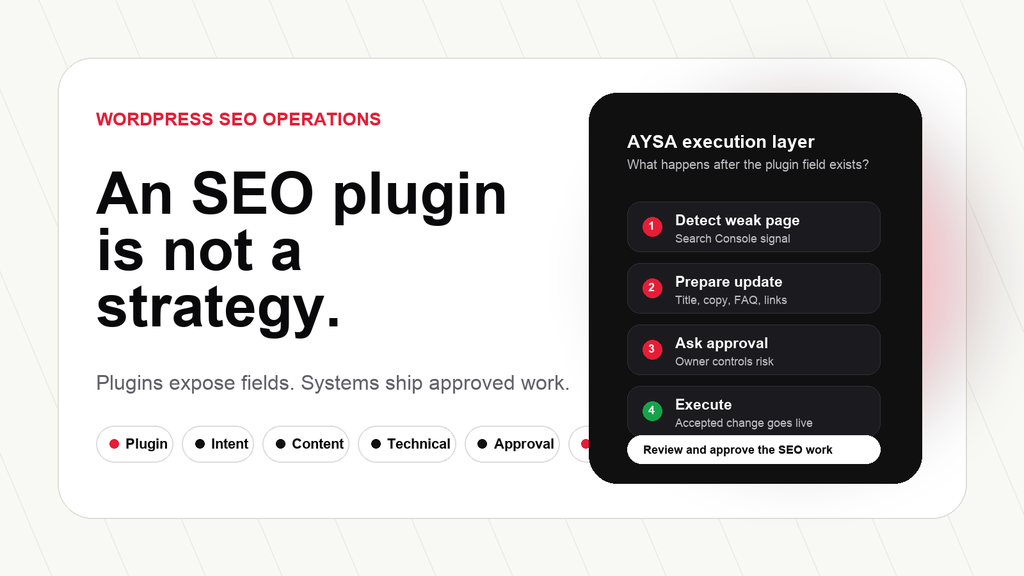
Executive summary: An SEO plugin is useful. It can expose important fields, help with titles and descriptions, generate XML sitemaps, support canonical tags, add Structured data settings and make technical configuration easier for WordPress users. But an SEO plugin is not a strategy. It cannot decide what your business should rank for, which pages deserve investment, what users actually need, which recommendations should be approved, or how quickly the work gets implemented.
This is the second article in our WordPress SEO in Romania series. The first article, WordPress SEO in Romania: The 20 Problems Holding Entrepreneurs Back, explains the full diagnostic model. This article goes deeper into the most common mistake we see with WordPress websites: confusing tool installation with SEO execution.
Next in the series: Once the plugin is in its correct place, use the 90-day WordPress SEO action plan to move from setup to measurable execution.
Related article: A plugin can store keywords, but it cannot understand local demand. Read Romanian Search Intent for WordPress SEO for the next layer of the strategy.
Related article: After plugin setup, the technical layer still needs governance. Read Technical SEO for Romanian WordPress Websites to see what must be monitored and executed.
The uncomfortable truth: a plugin can make SEO visible, but it cannot make SEO happen
Most WordPress SEO conversations start in the wrong place. Someone asks, “Which SEO plugin should I use?” That is not a bad question. It is just not the first question. The first question should be: what does this website need to achieve through organic search, and what system will make the work happen every month?
An SEO plugin can help a WordPress website expose SEO controls. It can make it easier to edit title tags, meta descriptions, canonical URLs, Open Graph previews, schema settings or sitemap behavior. Depending on the plugin, it may provide content checks, redirect settings, breadcrumbs, robots controls or integrations with webmaster tools. These are useful capabilities. But they are capabilities, not outcomes.
The mistake happens when the business owner believes that installing the plugin means SEO has been handled. The plugin becomes a psychological shortcut. A dashboard score appears. A green checkmark appears. A Meta description field is filled. The website feels optimized. But the real questions are still unanswered.
Which pages actually matter for revenue? Which queries are people using in Romanian, with local modifiers, price intent, comparison language, trust questions and service-area context? Which pages have Impressions but poor click-through rates? Which pages are not indexed? Which product categories are thin? Which internal links should support the money pages? Which recommendations require business approval? Which changes have been shipped?
A plugin can help with the interface. It cannot replace the operating model.
What SEO plugins actually do well
It is important to be fair. SEO plugins exist because WordPress core is not a full SEO operations platform. WordPress gives you the content management system. Plugins extend it. The official WordPress plugin ecosystem exists precisely because different websites need different functionality. SEO plugins can be part of a healthy WordPress stack when they are configured carefully and kept updated.
A good SEO plugin can help with metadata. Google’s documentation explains that title links and snippets are generated from several page signals, including visible page content and title elements. A plugin can make it easier to edit title tags and meta descriptions at scale. That matters because titles and descriptions influence how pages appear in search results, even though Google may rewrite them when it believes another representation is more useful.
A plugin can also help with XML sitemaps. Google’s documentation describes sitemaps as a way to tell search engines about pages, videos and files on a site and the relationships between them. WordPress has native sitemap support, and plugins may provide more control. But the sitemap is only as useful as the indexable content strategy behind it. If the sitemap includes low-value URLs, duplicate archives or thin pages, the plugin has not solved the problem. It has only exposed it.
Canonical tags are another common plugin feature. Canonicalization helps search engines understand which URL is the preferred version when similar or duplicate content exists. A plugin can help set or output canonical tags. But it cannot decide the business logic behind every product variant, filter page, translated URL, location page or campaign landing page. That decision requires understanding the website architecture.
Structured data is similar. Plugins can output schema markup for articles, products, organizations, breadcrumbs and other entities. But Google’s structured data guidelines are clear: markup should match visible page content. Schema is not a decoration. It is a machine-readable description of something real on the page. If the page itself is weak, unclear or misleading, structured data does not save it.
SEO plugins can also surface warnings. They may flag missing meta descriptions, low word count, missing alt text, missing focus keyword usage, internal link suggestions or readability issues. These checks can help inexperienced users avoid obvious mistakes. But they are not business judgment. A plugin score does not know the customer journey, the competitive landscape, the market nuance or the sales objection that must be answered.
What an SEO plugin cannot do for your business
It cannot understand your market
A Romanian service business does not compete in abstract SEO. It competes in a local market, in a language, with specific customer questions, urgency signals, trust concerns and buying behavior. A plugin does not know whether “pret,” “pareri,” “aproape de mine,” “programare,” “livrare azi,” “sector 3,” “Bragadiru,” “Bucuresti” or a specific service phrase matters for your business. It can store a focus keyword. It cannot build a market map.
It cannot choose the pages that deserve priority
Not every page is equal. Some pages are commercial assets. Some are supporting content. Some are outdated. Some should be redirected. Some should be merged. Some should not be indexed. A plugin may show a list of posts with missing metadata, but it does not know which page will create revenue fastest or which technical issue blocks the most valuable traffic.
It cannot fix weak content by scoring it green
Content quality is not a checklist. A page can mention the keyword, include headings, have a meta description and still fail the user. Google’s helpful content guidance emphasizes creating content for people, not merely for search engines. A genuinely useful page should answer the specific question, add original value, show experience, support claims, make the next step clear and avoid empty repetition.
This matters even more in 2026 because search is no longer only a list of blue links. AI-assisted search, answer engines and AI Overviews reward clarity, entity understanding, useful structure and trustworthy content. A plugin can add a FAQ block. It cannot decide whether the answer is actually useful enough to deserve being cited, summarized or recommended.
It cannot replace technical diagnosis
Technical SEO is broader than plugin settings. A WordPress site may suffer from slow templates, render-blocking assets, oversized images, bad hosting, bloated builders, crawl traps, broken links, redirect chains, mixed canonical signals, plugin conflicts, unsafe updates or poor mobile layout. Some plugins can report symptoms, but the repair often requires technical prioritization and controlled implementation.
It cannot connect SEO to conversion
A page that ranks but does not convert is not finished. Business owners need forms, phone calls, bookings, purchases, quote requests, newsletter signups, local visits or sales conversations. SEO should connect to conversion paths. A plugin may improve a title tag. It will not redesign the first mobile screen, simplify the contact path or decide which trust signals a customer needs before buying.
It cannot create governance
Governance is the missing layer in most WordPress SEO projects. Who reviews Search Console every month? Who owns the backlog? Who approves content changes? Who checks redirects before a redesign? Who prevents plugins from slowing the site? Who documents what changed? Who measures whether a fix worked? A plugin does not create this system. People and workflows do.
The plugin score trap: why green lights can still hide weak SEO
The most dangerous part of plugin-led SEO is not the plugin itself. It is the false sense of completion. A page can receive a positive plugin score because the focus keyword appears in the title, the meta description exists, the URL is readable and the article has enough words. That does not mean the page is the best answer for a real customer.
Search engines do not rank a page because a plugin interface looks tidy. They evaluate crawlability, content usefulness, page experience, links, relevance, intent satisfaction, freshness, authority signals and many other factors. Some of those signals are technical. Some are editorial. Some are commercial. Some are behavioral. Most of them require judgment outside the plugin screen.
For example, imagine a dental clinic page optimized for “implant dentar Bucuresti.” A plugin can check whether the phrase appears in headings and metadata. It cannot know whether the page explains the consultation process, price ranges, recovery expectations, medical credentials, risks, financing options, location details, before-and-after proof, patient concerns and the next step for booking. It cannot know whether the clinic should build supporting articles around “durere dupa implant dentar,” “cat costa un implant dentar,” “implant dentar sector 3” or “implant dentar pentru pacienti cu parodontoza.”
The same is true for ecommerce. A category page can be technically optimized and still fail because the products are poorly grouped, filters create crawl waste, descriptions are generic, internal links do not support category authority, images are heavy, delivery conditions are unclear or comparison intent is ignored. The plugin can help you edit fields. It cannot redesign the commercial usefulness of the page.
This is where many SMEs lose time. They spend hours “fixing” plugin warnings that do not matter much, while ignoring pages with real search demand and business impact. They optimize old blog posts that do not contribute to revenue, but leave service pages thin. They write more content because the plugin rewards word count, but they do not improve the user journey. They chase green lights instead of organic growth.
A better approach is to use plugin checks as one input, not as the operating system. The question should always be: if we make this change, what user problem becomes clearer, what search intent becomes better served, what technical risk is reduced, or what business outcome becomes more likely?
A healthier WordPress SEO stack: plugin, data, decisions and execution
The right answer is not “remove the SEO plugin.” The right answer is to put the plugin in its correct place. A practical WordPress SEO stack has four layers.
The first layer is the CMS layer. WordPress handles pages, posts, categories, templates, media, users and publishing. The quality of the theme, hosting, database, plugins and editorial process affects SEO because it affects speed, crawlability, structured content, mobile usability and maintainability.
The second layer is the SEO configuration layer. This is where an SEO plugin can be useful. It can expose metadata fields, canonical settings, schema options, sitemap behavior, breadcrumbs, social previews and robots controls. This layer should be clean, but it should not become the whole SEO plan.
The third layer is the intelligence layer. This is where Search Console data, analytics, competitor research, keyword discovery, page performance, AI visibility signals, local search behavior and content gaps are interpreted. Without this layer, the business is guessing. With it, the business can see which pages deserve attention and why.
The fourth layer is the execution layer. This is the layer most websites miss. Someone or something must turn insights into prepared changes, approvals and implementation. Titles must be rewritten. Descriptions must be improved. Internal links must be inserted. Thin sections must be expanded. Schema must match visible content. Redirects must be reviewed. Technical fixes must be prioritized. Content plans must be approved and published.
When these four layers work together, the SEO plugin becomes useful infrastructure. When the plugin is treated as the strategy, the website gets stuck in a surface-level optimization loop.
What to measure instead of plugin scores
If a business owner wants a simple rule, here it is: measure outcomes and execution, not only settings. Plugin scores can be a hygiene check, but they should not be the board-level SEO metric.
Start with indexability. Are the important pages indexable? Are irrelevant pages excluded? Are canonical tags consistent? Are sitemaps clean? Are redirects purposeful? If Google cannot crawl, understand or select the right URLs, metadata polish will not compensate.
Then look at visibility. Which queries generate impressions? Which pages rank but do not earn clicks? Which topics are missing? Which pages are close to page one? Which service areas or product categories have demand but no strong page? Search Console is often more useful than a plugin dashboard because it shows how Google and users are actually interacting with the website.
Next look at conversion context. A page may need stronger proof, clearer pricing language, better calls to action, location information, delivery details, appointment instructions, payment options, trust signals or comparison criteria. SEO is not only about getting the visit. It is about helping the right visitor decide.
Finally, measure execution velocity. How many approved changes were shipped this month? How many technical issues were resolved? How many priority pages were improved? How many internal links were added with purpose? How many content gaps became published assets? How many recommendations are still waiting? A business that executes consistently will usually outperform a business that only audits consistently.
This is a hard lesson for founders because it removes the comfort of passive reporting. A report is easy to receive. A checklist is easy to admire. Execution requires decisions. But organic growth comes from decisions that become live improvements.
Why this mistake is so common among Romanian SMEs
The plugin-first mindset is understandable. Romanian entrepreneurs are busy. They are dealing with sales, hiring, cash flow, suppliers, logistics, customer service, compliance, ads, marketplaces, social media and website maintenance. SEO feels complex. A plugin promises simplification. The plugin dashboard gives a sense of control.
But the economic reality is harsher. Romanian SMEs often compete with larger companies, marketplaces, local competitors, international players and aggressive paid ads. Organic search can be one of the most durable acquisition channels, but only if the business treats it as an ongoing system. That system does not have to be complicated. It does have to be consistent.
The first issue is measurement. Many websites do not have Search Console, GA4 and conversion tracking connected properly. Without measurement, SEO becomes a debate of opinions. The founder thinks the blog is not working. The agency thinks technical issues are the blocker. The developer says the site is fine. The plugin says the page is green. Nobody has the full picture.
The second issue is language. Search intent in Romania is not a neat translation of English keyword research. People search with local modifiers, informal language, price anxiety, trust concerns and practical questions. A plugin can store a keyword, but it does not know the difference between a generic informational term and a phrase that signals a ready-to-buy customer in a specific city.
The third issue is implementation speed. Even when the right recommendation exists, it often gets stuck. The agency sends a report. The business owner delays approval. The developer has other priorities. The content writer waits for a brief. The update is published months later, or never. The problem is not always knowledge. The problem is operational throughput.
This is why I believe old WordPress SEO is not enough for Romanian businesses. Old SEO says: audit, report, recommend, wait. Execution-led SEO says: monitor, prioritize, prepare, approve, execute, measure. The second model is the one SMEs need.
A real WordPress SEO workflow after the plugin is installed
A plugin can be part of the setup. After that, the business needs a workflow. A practical workflow looks like this:
- Connect the data. Verify Search Console, connect analytics, define conversions and identify the pages that matter for leads, revenue or authority.
- Build the SEO profile. Document the business model, services, products, locations, customer types, competitors, tone of voice and commercial priorities.
- Map search intent. Group Romanian search demand into informational, local, commercial, transactional and post-purchase intent.
- Audit technical health. Check crawlability, indexability, canonical tags, redirects, sitemap quality, speed, mobile UX, structured data and internal links.
- Improve priority pages first. Do not optimize alphabetically. Start with money pages, pages with impressions and weak CTR, important categories, high-intent service pages and pages that block conversion.
- Prepare changes before publishing. Good SEO execution should produce concrete updates: titles, descriptions, copy blocks, internal links, schema opportunities, redirects, FAQs, content refreshes and technical tickets.
- Ask for approval. The business owner should approve important positioning, spending and publishing decisions. Automation should not mean blind autopilot.
- Execute accepted work. The final value comes when approved changes go live, not when a recommendation sits in a document.
- Track action history and results. Every month, the business should know what changed, why it changed and what happened afterward.
This workflow is not theory. It is the minimum operating system for serious WordPress SEO.
Search Console, analytics, conversions
Romanian queries and buyer stages
Titles, content, schema, links, fixes
Business owner controls changes
Where AYSA fits: from SEO plugin setup to approved execution
AYSA is not trying to replace the basic usefulness of WordPress SEO plugins. A good WordPress stack can still include a plugin for metadata, sitemap controls and schema support. The problem is that the plugin layer is not the execution layer.
AYSA is built for the work that happens after the fields exist. The agent learns the business, connects context, monitors opportunities, prepares SEO and AI visibility actions, asks for approval and executes accepted changes inside the website workflow. That is the difference between having SEO controls and having an SEO operating system.
For a business owner, this distinction matters. You should not have to open every page manually, interpret every dashboard warning, copy-paste every title, guess which internal link matters or manage ten small SEO tasks every week. Your job should be to approve important decisions. The system should handle the repetitive preparation and execution work.
This is also why AYSA’s positioning is broader than classic SEO. The same workflow supports AEO, GEO and AI visibility readiness. If a page is unclear, thin, unstructured or hard to trust, it is weaker not only in traditional search but also in AI-assisted discovery. The answer is not to chase hacks. The answer is to make the website easier to understand, cite, compare and recommend.
My point of view is simple: the future of WordPress SEO is not a better checklist. It is approved execution. Plugins will remain useful. But growth will come from systems that turn data into work, work into approvals and approvals into published improvements.
Next in the series: for ecommerce-specific catalog, product data and filter issues, read WooCommerce SEO in Romania: Categories, Products, Filters and Marketplace Pressure.
Local SEO layer: for Google Business Profile, reviews, service pages and local trust signals, read Local SEO in Romania for WordPress Websites.
Content SEO layer: for useful pages, topic authority and AEO-ready content, read Content SEO for Romanian WordPress Websites.
Less SEO work. More organic growth.
Do not stop at plugin settings. Turn WordPress SEO into approved execution.
AYSA connects your website context, prepares SEO and AI visibility work, asks for approval and executes accepted changes inside your website workflow.
Sources and further reading
- AYSA: WordPress SEO in Romania: The 20 Problems Holding Entrepreneurs Back
- Google Search Central: SEO Starter Guide
- Google Search Central: Influencing title links
- Google Search Central: Control snippets in search results
- Google Search Central: Sitemaps overview
- Google Search Central: Canonicalization and duplicate URLs
- Google Search Central: Introduction to structured data
- Google Search Central: Creating helpful, reliable, people-first content
- WordPress Plugin Developer Handbook
- WordPress.org: Hardening WordPress
Continue the AI search topic inside AYSA.
Use these pages to connect the article with AI SEO tools, AI visibility monitoring, AI Overviews and approved website execution.
Turn this topic into a website action plan.
Use these AYSA hubs to move from reading to technical fixes, AI visibility monitoring, research, glossary context and approval-first SEO execution.