
CDN Migrations Without Crawl Chaos: How to Protect Your Origin, Keep Googlebot Happy, and Improve Search Performance
A CDN can be a massive performance win—until edge cache misses, bot protection, and misconfigured caching overwhelm your origin or block Googlebot. Here’s a practical, business-ready playbook to migrate to a CDN safely, keep crawling stable, and turn performance gains into durable search visibility.

CDNs are one of those upgrades that feel like a guaranteed win: faster pages, fewer outages, and a lighter load on your backend. And often, they are. But there’s a specific class of problems that shows up right after a CDN migration—especially when you start caching more than just images and scripts.
Your site can get faster for users while simultaneously getting harder to crawl safely. Origins can melt under edge cache misses. Security tools can block legitimate crawlers. Googlebot can start fetching “everywhere all at once,” and if your setup isn’t prepared, you’ll see Crawling slowdowns, Indexing delays, and sporadic 5xx errors that turn a performance project into an SEO incident.
This editorial is a practical playbook for SMEs and agencies: what changes during a CDN move, why crawling behavior can spike, where bot protection goes wrong, and how to configure caching and controls so you don’t overwhelm your origin—or block Googlebot.
Primary reference: Google Search Central’s guidance on this topic: Moving to a CDN without overwhelming your origin (or blocking Googlebot).
Concise summary (read this first)
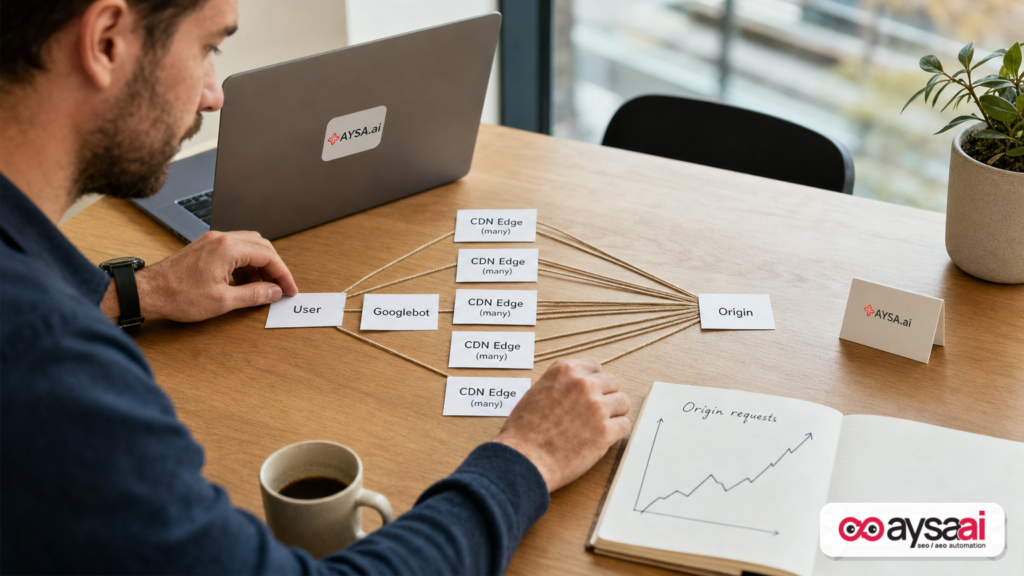
- CDN migrations can increase crawl pressure because many edge locations may “miss cache” and pull from your origin at the same time.
- Two big SEO failure modes are common: (1) origin overload (timeouts/5xx), and (2) overzealous bot/WAF protection that blocks Googlebot or makes it solve challenges.
- Fixes are operational, not mystical: configure correct Cache headers and cache keys, warm caches thoughtfully, rate-limit by behavior (not blanket blocks), and verify Googlebot properly.
- Monitoring matters more than slogans: watch origin errors, cache hit ratio, crawl stats, and log-level patterns in the first 72 hours.
- AYSA’s role: continuously monitor crawl/indexing signals, prepare safe change sets (headers, robots rules, canonical checks, redirects), ask for approval, and execute the accepted fixes—so performance improvements translate into durable search visibility.
Table of contents

- Why this matters now: CDNs, crawling, and modern SEO operations
- What changed (and why crawling can spike after a CDN move)
- The real culprit: edge cache misses that multiply origin traffic
- The two failure modes that hurt SEO: origin overload and “bot protection” blocks
- Googlebot basics that influence CDN setups
- A practical pre-migration checklist (SME-friendly, no jargon required)
- How to “train” your CDN: caching strategy that won’t scorch your origin
- Bot protection without collateral damage: allow Googlebot safely
- Headers and caching controls that make or break migrations
- Should you cache HTML? The SEO-safe decision framework
- A concrete SME scenario: ecommerce site migration done right
- The monitoring stack that matters: what to watch in the first 72 hours
- What agencies should rethink: deliverables, ownership, and incident prevention
- Where AYSA fits: approved execution for technical SEO and AEO/GEO readiness
- What to do next (action list)
- Sources and further reading
Why this matters now: CDNs, crawling, and modern SEO operations

For years, CDN decisions were seen as “pure performance engineering.” SEO teams cared about the resulting speed, but rarely owned the configuration. That separation doesn’t work anymore.
Modern websites have more moving parts:
- Multiple frameworks and runtime rendering paths
- Personalization and A/B testing at the edge
- Security layers (WAF, bot managers, rate limiters)
- Headless commerce and API-driven content
- Internationalization and multi-region deployments
When you add a CDN, you’re not just changing where assets are served—you’re changing how fetching happens, which affects crawling, indexing, and how reliably Google can retrieve your pages.
Google’s own documentation is clear that crawling and indexing depend on successful fetching and that you should use the official tooling and guidelines to control crawling responsibly (for example, through robots.txt and crawling/indexing fundamentals). But the tricky part is this: CDNs introduce behaviors that aren’t controlled by Robots.txt. A CDN can cause more origin requests even if your robots rules didn’t change, and security layers can block crawlers even if your robots rules are permissive.
That’s why this isn’t just a “web infrastructure” topic; it’s now a Technical SEO operations topic. And because AI-driven search experiences amplify the value of being consistently crawlable and indexable, stability is not optional.
If you want the performance win and search stability, you need to treat a CDN migration like a controlled release—planned, monitored, and reversible.
What changed (and why crawling can spike after a CDN move)
Many teams expect a CDN to reduce load on the origin. That’s often true after caches are warm and configuration is mature. But right after a CDN rollout—or after a cache purge—the opposite can happen.
Here’s the basic dynamic that surprises people:
- Before CDN: Googlebot requests a URL. Your origin serves it. One request in, one response out.
- After CDN: Googlebot requests a URL. That request hits an edge location. If the edge doesn’t have the object cached, it requests it from your origin (a cache miss). Now multiply that by many edges, many URLs, and multiple fetchers.
Even if Googlebot’s overall crawling doesn’t increase dramatically, the distribution of cache misses can. The result is a burst of origin traffic that looks like “everything crawling everywhere.”
Google Search Central highlights this exact class of issues in its post on moving to a CDN safely (see the official post here: Moving to a CDN without overwhelming your origin (or blocking Googlebot)).
From an operator’s perspective, this is the key change: you’re no longer serving one audience (users + crawlers) directly from origin. You’re serving them through a distributed layer that has its own caching behavior, eviction rules, and security posture. Crawling becomes a system effect.
The real culprit: edge cache misses that multiply origin traffic
If you only remember one technical point from this editorial, make it this: cache miss behavior is your origin’s new “crawl budget.”
CDNs are designed to cache and reuse responses at edge nodes. But caches are not magic. They miss when:
- The object was never cached (fresh rollout, new region, new edge)
- The object was evicted (limited cache size, low popularity)
- The object is not cacheable (headers, cookies, dynamic responses)
- The cache key is fragmented (query parameters, device variations, A/B tests)
- You purged or invalidated cache aggressively
- The TTL is too short for your crawl and user patterns
Now tie that to crawling: crawlers are systematic. They’ll touch lots of URLs, including older ones that haven’t been requested by users recently. Those URLs are more likely to be evicted or never warmed at the edge. So crawlers can “discover” cold paths that trigger cache misses—and your origin pays the bill.
This is why the phrase “Googlebot overwhelmed our origin after we added a CDN” isn’t paradoxical. It’s a predictable outcome of cold caches, cache fragmentation, or a configuration that prevents caching of HTML and other high-impact resources.
For business owners, translate it like this:
- A CDN is like opening more storefronts (edges) closer to customers.
- If each storefront has an empty shelf (cache miss), they all call the same warehouse (origin) at once.
- That warehouse can get crushed—even though you “opened storefronts to reduce warehouse load.”
The two failure modes that hurt SEO: origin overload and “bot protection” blocks
Most CDN-related SEO incidents fall into one of two buckets. Sometimes you get both at once, which is why these migrations feel chaotic.
Failure mode #1: origin overload (timeouts and 5xx)
Origin overload shows up as:
- Increased 5xx errors (or upstream timeouts) during crawl bursts
- Slow TTFB and long backend processing times
- Log spikes for the same paths across many regions
- CPU and DB saturation driven by repeated cache misses
Why SEO cares: if Googlebot can’t fetch reliably, it can slow down crawling or defer indexing updates. The effect might not be immediate rankings collapse, but it’s a real drag on freshness, coverage, and trust in fetch stability.
Failure mode #2: bot protection blocks (blanket rules, challenges, false positives)
Security teams often turn on CDN bot protection features to stop scraping, credential stuffing, or DDoS. Good idea—until it blocks legitimate crawlers or forces them into challenges they won’t complete.
Common missteps:
- Blocking by user-agent string alone (easy to spoof, causes false blocks)
- Requiring JavaScript challenges on key HTML endpoints
- Rate limiting that doesn’t distinguish between good bots and abusive bots
- IP allowlists that are outdated or incomplete
Google’s Search Central ecosystem includes foundational material on crawling and how things work, but the key operational point is: robots.txt is not a security control and security tools are not SEO controls. They intersect at the fetch layer, which means one team can break the other team’s objectives accidentally.
Helpful references for context include:
Googlebot basics that influence CDN setups
To configure a CDN safely for crawling, you don’t need to memorize every Googlebot nuance. You do need to internalize a few practical truths:
- Googlebot needs consistent fetch access to your canonical URLs. Anything that randomly blocks or challenges requests creates instability.
- Googlebot fetches more than HTML. It fetches assets needed to render pages in some cases and may fetch sitemaps, robots.txt, structured data resources, and more.
- Crawling is adaptive. Google adjusts crawling based on perceived site capacity and reliability. If your site errors, crawling can change.
Google provides a broad set of crawling and indexing documentation that becomes especially important during infrastructure changes, including:
You don’t need to use every feature in those docs to do a safe CDN move. But you should use them as your guardrails when you change how your content is delivered.
A practical pre-migration checklist (SME-friendly, no jargon required)
If you’re a founder or marketing lead and this migration is being driven by engineering (or your hosting provider), your job is to make sure there’s a plan that protects business outcomes: revenue, leads, and search visibility.
Here’s a pre-migration checklist written for non-specialists—but it’s technically meaningful.
1) Define what success means
- Which pages matter most (top revenue pages, top lead pages, top informational hubs)?
- What performance metric are you improving (TTFB, LCP, global latency)?
- What’s the acceptable error budget during rollout (ideally very low)?
2) Inventory “must-not-break” SEO fundamentals
- Canonical tags remain correct
- Robots rules are unchanged unless intentionally updated
- Status codes are correct (200/301/404—no weird 403 rate limiting)
- Redirect patterns remain stable
If you need a refresher for teams, point them to Google’s core references like the SEO Starter Guide and Search Essentials.
3) Decide what is cached and what is not
- Static assets (images, CSS, JS) are usually safe to cache aggressively.
- HTML may be cached, but requires a clear strategy (we’ll cover this).
- API responses used for rendering may be cacheable—but only if you understand variations.
4) Establish bot policy before launch
- What protections will be enabled at the CDN/WAF layer?
- How will you distinguish Googlebot from spoofed user agents?
- What’s your rollback path if false positives occur?
5) Create a rollback and incident plan
- Who has authority to roll back?
- What triggers rollback (error rate, blocked crawl, conversion drop)?
- How quickly can you revert caching rules or disable bot challenges?
Most “SEO problems” during migrations are really “operations problems without a runbook.” Fix that and you’ll outperform teams that rely on luck.
How to “train” your CDN: caching strategy that won’t scorch your origin
Google’s post frames this as training your CDN to avoid overwhelming origin. That’s the right mental model: your CDN isn’t a set-it-and-forget-it appliance. It’s a programmable delivery and security layer that must be tuned to your content and traffic patterns.
Here are the practical levers that matter most.
1) Avoid cold-start cache events
Cold caches create a stampede to origin. Cold-start events happen after:
- Initial cutover to a CDN
- Large cache purges
- Major deploys that change cache keys/headers
Mitigations include staged rollouts, controlled cache warming of key URLs (top pages first), and avoiding unnecessary purges. If your CDN supports it, you can prefill cache based on a list of URLs (often sourced from analytics or sitemaps). If you can’t do that, you can still run a controlled warmup process from a limited set of regions and at a safe rate.
2) Keep cache keys stable and intentional
Cache fragmentation is a silent killer. The same page can be cached many times if your cache key includes:
- Query parameters that don’t change content (e.g., tracking parameters)
- Device and geo variations that you don’t actually serve differently
- Cookies that shouldn’t affect the response
The business takeaway: if “/product/shoes” becomes 50 separate cache objects due to variations, you’ll get more misses, more origin load, and less consistency for crawlers.
3) Use TTLs that reflect crawl + user reality
If your TTL is too short, you’ll miss more often. If it’s too long, you risk staleness. There’s no universal perfect number. But you can separate concerns:
- Use longer TTLs for static assets with fingerprinted filenames.
- Use moderate TTLs for category pages and evergreen content.
- Use careful caching or revalidation for fast-changing pages (prices, inventory).
When in doubt, use revalidation patterns (serve cached content but check freshness efficiently) rather than frequent full cache misses. Your CDN and origin must agree on this via headers (next section).
4) Reduce edge-to-origin multiplicative effects
Some CDNs offer an “origin shield” concept (a centralized layer that reduces the number of edges hitting origin). If your provider supports it, it can reduce the “many edges, one origin” stampede effect.
I’m not naming vendor features here because implementations vary. But conceptually: you want fewer independent cache-miss sources pulling from the origin simultaneously.
5) Don’t bypass cache for crawlers by accident
Some configurations inadvertently treat bots differently (or treat all requests with certain headers differently). That can make Googlebot disproportionately expensive because it never benefits from edge caching. Ensure the same cacheability rules apply unless you have a strong reason otherwise.
Bot protection without collateral damage: allow Googlebot safely
This is where teams get emotional, because security teams have real threats to mitigate, and SEO teams have real revenue targets to protect.
The right approach is not “turn off security for bots.” The right approach is: identify and verify legitimate Google crawlers properly, and tune your rules to block abuse without creating false positives.
Key principles:
- Don’t rely on user-agent strings alone. They can be spoofed.
- Prefer verification mechanisms supported by your security stack (often based on IP ranges or reverse DNS verification). If your stack can’t do this safely, escalate before launch.
- Be careful with challenge pages (JS challenges, CAPTCHAs) on HTML endpoints that must be crawlable.
Google Search Central has multiple resources about crawling and site management. Start with the official Search Central hub (Google Search Central) and the crawling/indexing documentation (Documentation), then align your security configuration with those constraints.
Operationally: create a shared “crawler allow” policy with security + SEO + engineering. It should include:
- Which endpoints must always be accessible (home, categories, products/services, blog posts, robots.txt, sitemaps)
- What normal crawl behavior looks like for your site (rate, distribution)
- What the emergency exceptions are (temporary relaxation during rollout)
The nuance: you still want protection against abusive bots. But Googlebot should not be collateral damage.
Headers and caching controls that make or break migrations
In CDN work, headers are policy. They are how your origin tells the CDN—and the broader web—what may be cached, for how long, and under what conditions.
I’m going to avoid prescribing exact header sets, because they must match your platform, but here are the categories you should treat as non-negotiable in your rollout plan:
1) Cache-Control alignment (origin ↔ CDN)
Make sure your origin’s responses clearly express cache intent. If everything ships with “do not cache,” your CDN will behave like a passthrough under crawl pressure.
At minimum, your team should be able to answer:
- Which responses are cacheable?
- Which responses require revalidation?
- Which vary by cookie, device, geo, or auth state?
2) Vary and cookie discipline
If your responses include cookies for anonymous users, you may accidentally make content non-cacheable, or fragment caches heavily. In many stacks, simply setting a cookie can cause the CDN to treat responses as unique per user.
That’s fine for authenticated dashboards. It’s dangerous for public pages that Google needs to crawl consistently.
3) Canonical, redirects, and consistent 200s
A CDN should not rewrite canonicals unexpectedly, and redirects should remain stable. Keep a tight grip on:
- 301/302 behavior
- Trailing slash normalization
- HTTP→HTTPS enforcement
- www vs non-www resolution
Google’s docs on redirects and canonicalization are your baseline references here.
4) Robots and meta tags remain correct
CDNs sometimes introduce separate caching and rendering paths. Ensure your noindex tags don’t leak into public pages due to cache confusion, and ensure robots.txt remains reachable and correct. Reference: Meta tags and robots.txt.
Should you cache HTML? The SEO-safe decision framework
HTML caching is where performance and SEO teams either become allies or enemies. It’s also where “CDN migrations” go from simple static acceleration to full edge delivery.
There isn’t one right answer, but there is a right framework.
HTML caching is often a good idea when…
- Your pages are mostly public and not personalized per user
- Your content is relatively stable (or can tolerate short-lived staleness)
- Your origin is the bottleneck under traffic bursts
- You can control cache variation (query params, cookies)
HTML caching requires more caution when…
- Pricing/inventory changes frequently (ecommerce)
- Legal/compliance content must be instantly updated
- You heavily personalize content based on location or user state
- You run frequent experiments that alter HTML structure
The SEO risk isn’t “cached HTML”
The SEO risk is inconsistent or incorrect HTML being served to crawlers:
- Serving error pages with 200 status codes (soft errors)
- Serving geo-variant content without proper consistency or signals
- Serving blocked/challenged HTML intermittently
- Serving mixed versions of canonical tags due to fragmented caching
If your HTML caching policy is clear and your variation is controlled, caching HTML can reduce origin load and improve overall fetch stability—which can be good for crawling.
A concrete SME scenario: ecommerce site migration done right
Let’s make this real.
Scenario: A mid-sized ecommerce brand (say, a specialty footwear shop) has grown from 20k sessions/month to 500k+. They’re moving to a CDN because customers in Europe are complaining about slow product pages. Engineering wants to flip on “cache everything,” and security wants to enable aggressive bot protection to stop scrapers.
What can go wrong:
- Product pages vary by currency and inventory. If caching varies on unnecessary parameters, cache fragments.
- Googlebot starts exploring older category URLs. Many are cold at the edge, causing a wave of origin pulls.
- Security challenges some crawl requests, resulting in partial fetch failures.
- Origin returns 5xx intermittently. Googlebot adapts by slowing crawl, and indexing freshness drops for new products.
What “done right” looks like:
- Staged rollout: start with static assets, then selective HTML caching for categories, then product pages with short TTL + revalidation.
- Cache key discipline: strip tracking parameters; vary only on parameters that truly change content.
- Warm the cache: preload top categories and top product pages (based on analytics), then expand.
- Bot policy: configure protections to avoid challenges for verified Googlebot and keep essential endpoints accessible.
- Monitoring: track origin 5xx, cache hit ratio, and crawl stats. If 5xx spikes, roll back or relax rules immediately.
This is the difference between “we installed a CDN” and “we operationalized delivery.” The latter is what protects search performance.
The monitoring stack that matters: what to watch in the first 72 hours
The first 72 hours after a CDN migration are where good operators earn their keep. You don’t need perfect instrumentation, but you do need visibility into four layers:
1) Google crawl behavior
- Watch crawl trends in Search Console (especially if you see sudden drops or spikes).
- Use URL Inspection for spot checks on critical pages.
Google’s documentation and tools are your starting point. The Search Central documentation hub (Documentation) is the right place to align your checks with how Google sees your site.
2) Origin health
- 5xx error rate
- Timeouts
- Backend latency
- DB saturation if applicable
3) CDN cache performance
- Cache hit ratio (overall and for HTML specifically if applicable)
- Top cache-miss URLs
- Edge-to-origin request volume
- Regional patterns (are some edges colder than others?)
4) Security outcomes
- WAF block counts by rule
- Challenge rates
- False positives affecting known good bots
My point of view: teams often monitor “page speed” and “uptime,” but ignore “cache miss rate” and “origin request multiplication.” That’s why they’re surprised.
This is also where execution discipline matters. Monitoring without the ability to act quickly is just anxiety. You need a system that can propose fixes, get approval, and ship changes safely.
That’s the gap AYSA is built to close with approved execution: AYSA Monitoring.
What agencies should rethink: deliverables, ownership, and incident prevention
If you run an agency, CDN migrations are a perfect example of why “SEO recommendations” aren’t enough.
Clients don’t lose rankings because you didn’t write a ticket. They lose rankings because:
- The ticket wasn’t implemented correctly
- Implementation wasn’t validated in production-like conditions
- No one monitored crawling, caching, and security together
- Rollback authority was unclear
In 2026, SEO deliverables that stop at “advise engineering” are fragile. What wins is operational partnership: preflight checks, staged releases, automated monitoring, and controlled execution.
Agencies should evolve their CDN-related scope to include:
- Pre-migration SEO risk assessment (crawlability + canonical + redirect)
- Edge caching policy review (HTML caching decision, cache keys, TTL)
- Bot protection review (rules that affect crawl access)
- Monitoring plan and incident runbook
This isn’t about becoming a CDN vendor. It’s about recognizing that technical SEO is now inseparable from delivery infrastructure.
Where AYSA fits: approved execution for technical SEO and AEO/GEO readiness
At AYSA.ai, we think about SEO the way an operator thinks about uptime: monitor, detect, prepare a safe fix, ask for approval, then execute—and verify.
CDN migrations are a perfect fit for that model because the highest-value work is not the initial idea (“use a CDN”). The highest-value work is the controlled implementation and the fast correction of the unexpected.
Here’s how AYSA fits into a CDN + crawling stability workflow:
1) Continuous monitoring of search visibility signals
AYSA can help teams keep an eye on early indicators that your migration is affecting crawlability or indexing. Monitoring is foundational: AYSA Monitoring.
2) Technical change preparation (before you ship)
Before rollout, you want checks around:
- Robots directives and meta tags consistency
- Canonical tag integrity
- Redirect mapping and status code correctness
- JavaScript rendering risks (where applicable)
These are the places where crawl stability and indexing get quietly damaged. AYSA is built to prepare those change sets so they’re reviewable and safe—then executed only after approval.
3) AI search visibility depends on clean, stable fetching
Whether you call it AEO (answer engine optimization) or GEO (generative engine optimization), the prerequisite is the same: your content must be consistently accessible, renderable, and indexable.
If your CDN or WAF intermittently blocks crawlers, or serves inconsistent HTML, you undermine your visibility—both in classic results and in AI-driven surfaces.
For more on this broader visibility layer, see: AI Search Visibility.
4) Execution that’s controlled, not chaotic
Teams often know what to do but fail in execution: too many stakeholders, too many tools, not enough accountability. AYSA’s approved execution model is designed for exactly this reality.
If you want to explore how this gets operationalized, start here:
My opinion: in 2026, the competitive advantage isn’t knowing that CDNs can improve performance. Everyone knows that. The advantage is shipping infrastructure changes without breaking crawl stability—and correcting edge cases faster than your competitors.
What to do next (action list)
If you’re planning a CDN migration (or just did one), here’s a practical next-step plan you can run this week.
Step 1: Establish your “crawl-safe” non-negotiables
- robots.txt reachable and correct
- Critical HTML endpoints return consistent 200s
- No challenges for verified Googlebot on key pages
- Canonical and redirect logic unchanged (unless intentionally improved)
Step 2: Audit cache behavior on your top 50–200 URLs
- Are responses cacheable at the edge?
- Do cookies or query strings fragment the cache?
- Do you see unexpected cache misses?
Step 3: Reduce cache fragmentation
- Strip or ignore tracking query parameters in cache keys (where safe)
- Ensure public pages don’t set unnecessary cookies
- Align Vary behavior with real content variation
Step 4: Tune bot protection with SEO in the room
- Replace blanket blocks with behavior-based rules
- Confirm your method for verifying Googlebot is correct and maintained
- Document temporary exceptions for launch windows
Step 5: Monitor for 72 hours with an incident mindset
- Cache hit ratio and top cache-miss URLs
- Origin 5xx and latency
- Search Console crawl trends
- WAF blocks/challenges affecting crawl paths
Step 6: Operationalize with AYSA (optional, but how we’d do it)
- Set up monitoring: AYSA Monitoring
- Use AYSA to prepare and validate technical changes (robots, canonicals, redirects)
- Approve and execute changes with traceability, then verify outcomes
Sources and further reading
- Google Search Central Blog (primary): Moving to a CDN without overwhelming your origin (or blocking Googlebot)
- Google Search Central: Search Central home
- Search Central Documentation: Documentation
- Search Essentials: Search Essentials
- SEO Starter Guide: SEO Starter Guide
- How Google Search Works: How Search Works
- robots.txt (intro): robots.txt
- Sitemaps overview: Sitemaps
- Canonicalization: Canonicalization
- Redirects: Redirects
- JavaScript SEO basics: JavaScript SEO
- Meta tags: Meta tags
- Crawler management: Crawler management
Note: CDN-specific features (like origin shielding, bot managers, and cache prefill tools) vary by provider. If you need vendor-specific implementation guidance, use your CDN’s official docs and test changes in a staged rollout before broad deployment.
Continue the AI search topic inside AYSA.
Use these pages to connect the article with AI SEO tools, AI visibility monitoring, AI Overviews and approved website execution.
Turn this topic into a website action plan.
Use these AYSA hubs to move from reading to technical fixes, AI visibility monitoring, research, glossary context and approval-first SEO execution.