
Google’s DSA Sunset Is a Wake-Up Call: How to Migrate to AI Max Without Losing Control (or Leads)
Google is retiring Dynamic Search Ads (DSAs) and pushing advertisers toward AI Max. That shift changes targeting, creative generation, and landing page selection—often in ways that surprise SMEs. Here’s how to migrate safely, protect brand and lead quality, and build an approval-based execution workflow that keeps you in control.
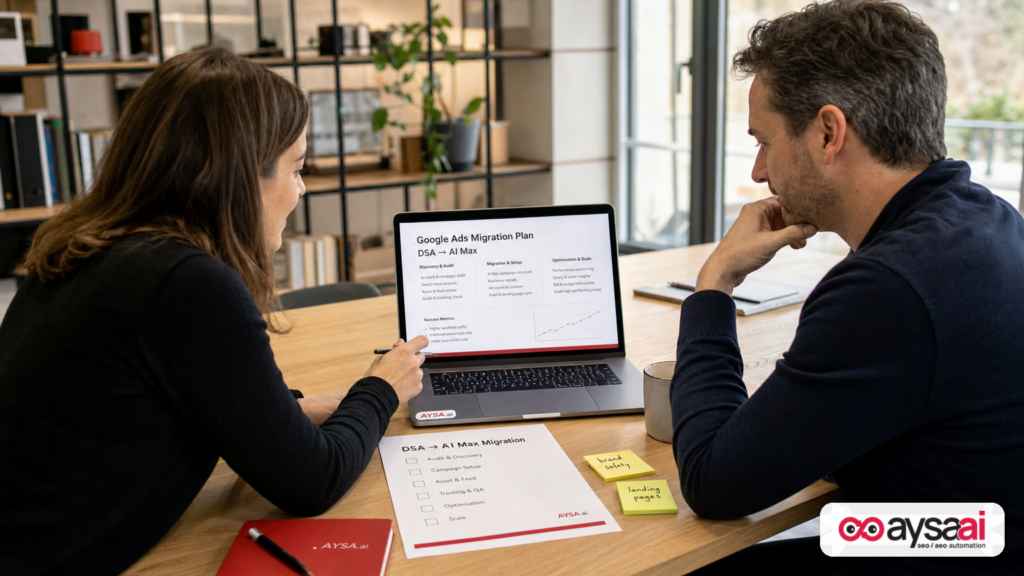
Google is retiring Dynamic Search Ads (DSAs) and steering advertisers toward AI Max—a shift that changes how Google targets searches, generates ad variations, and selects landing pages. That’s not just a feature update; it’s a control update. If you migrate casually, you can end up paying for traffic to the wrong pages, confusing prospects, and scaling “conversions” that don’t turn into revenue.
This editorial is a practical migration playbook written for SMEs and operators: what changed, why it matters, what can go wrong, and how to build a Monitoring + approvals system so you can benefit from automation without handing Google the keys to your brand.
Primary source: Search Engine Land’s coverage of the DSA sunset and what to monitor when moving to AI Max (external link).
Key takeaways (concise summary)
- DSA is going away. If DSAs are a meaningful part of your acquisition, you need a planned migration—especially for long-tail coverage and page-based targeting.
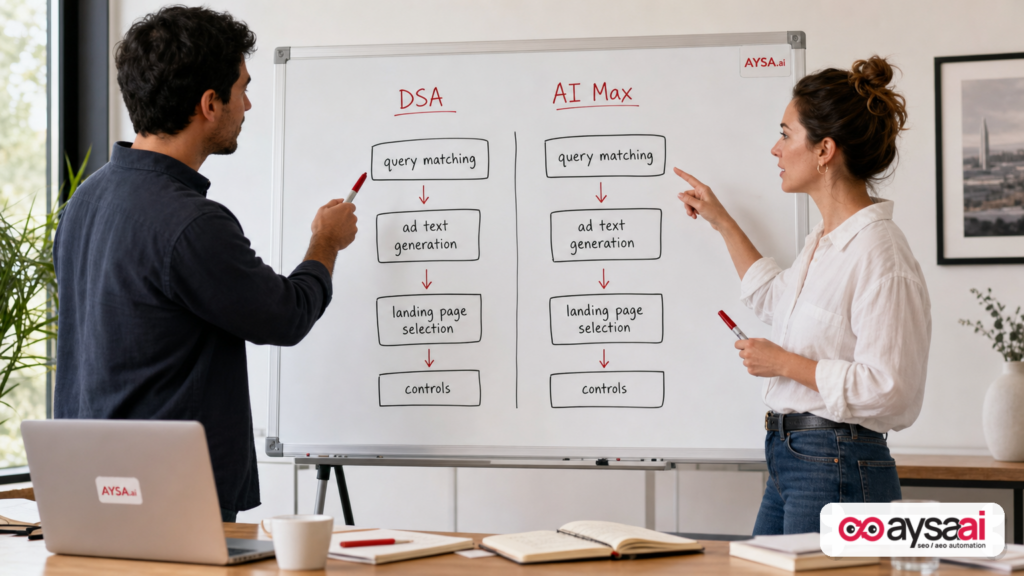
- AI Max expands the automation surface area. It can influence who you show up for (targeting), what you say (creative), and where you send traffic (landing pages). Each needs guardrails.
- Your website becomes part of the ad system. When platforms can choose landing pages dynamically, site structure, content clarity, Indexing, and compliance matter more.
- Lead quality monitoring is non-negotiable. “More conversions” is meaningless if it’s more spam, wrong-service leads, or low-intent calls.
- Execution is the bottleneck. Most teams can identify what to fix; fewer can implement changes safely and consistently. That’s where an approval-based execution system like AYSA helps.
Table of contents
- Context: DSAs were the ‘easy button’ for long-tail search
- What actually changed: from DSAs to AI Max (and why it’s not a simple rename)
- Why this matters to SMEs: budget efficiency, brand safety, and landing page risk
- The control surface: what you can (and must) monitor during the migration
- Measurement reality check: AI can optimize to the wrong “success”
- Your website is now your targeting set: how content and IA affect AI Max outcomes
- A step-by-step migration plan (DSA → AI Max) that avoids performance cliffs
- A practical SME scenario: the local clinic that accidentally advertised the wrong service
- What agencies should rethink: reporting, responsibility, and approvals
- Where AYSA fits: approved execution for search visibility (paid + organic)
- What to do next (action list)
- Sources and further reading
Context: DSAs were the ‘easy button’ for long-tail search
For years, DSAs helped businesses show up for searches they didn’t explicitly build Keyword lists for. If your site had a decent set of product or service pages, DSAs could match queries to relevant URLs and auto-generate ads using your site content.
That’s why DSAs became the “coverage layer” for a lot of accounts:
- Ecommerce stores used DSAs to catch long-tail product searches they hadn’t keyworded.
- Service businesses used DSAs to match niche “near me” or problem-based queries to deep service pages.
- Publishers and SaaS companies used DSAs to find demand pockets for features or topics not yet captured in keyword builds.
But DSAs also came with familiar tradeoffs: you could accidentally match into irrelevant queries, send people to awkward pages, and generate headlines that were technically accurate but not always brand-safe.
Now Google is sunsetting DSAs and encouraging migration to AI Max (as covered by Search Engine Land: How to prepare for Google’s DSA sunset and move to AI Max). The bigger story isn’t simply that one campaign type is being deprecated; it’s that the balance between automation and control is being redrawn.
What actually changed: from DSAs to AI Max (and why it’s not a simple rename)
When platforms retire a feature, most advertisers ask one question: “What’s the replacement?” That’s the right instinct—but incomplete. DSAs weren’t just a replacement for manual keywords; they were a specific model of how Google used your website as an input.
AI Max changes that model in three practical ways:
1) Targeting shifts from ‘your chosen keywords’ toward ‘Google’s inferred intent’
DSAs were already “intent inference,” but within a relatively bounded framework (page feeds, categories, DSA settings, plus your negatives). With AI Max, the system can broaden the set of searches you appear for based on signals that go beyond your explicit keyword lists.
Why it matters: you might get more volume, but you also increase the probability of:
- Wrong-intent queries that look close enough algorithmically.
- Competitor/brand-adjacent queries you didn’t want.
- “Research mode” traffic that doesn’t convert in lead gen.
2) Creative becomes more generative—and less predictable
With DSAs, Google would generate headlines dynamically based on the landing page and query. AI Max expands the system’s ability to create and test variations. In modern Google Ads, this trend has already been moving fast (e.g., responsive search ads, auto assets). AI Max continues the direction: more permutations, more machine-driven decisions.
Why it matters: your brand voice, compliance language, and offer clarity can drift if you don’t put guardrails in place and review outputs.
3) Landing page selection becomes a first-class optimization lever
This is the one that catches SMEs off guard. In DSA setups, landing pages were central—but often limited by your DSA targeting method. With AI Max, landing page selection can be increasingly dynamic, and it can change results dramatically:
- Best case: Google finds your best-converting page for certain intents, and you win.
- Worst case: Google sends paid Clicks to a page that is indexable but operationally wrong (out-of-date, wrong location, wrong service, wrong offer, not compliant).
That means the health and clarity of your Site architecture becomes part of your ads performance. This is where “paid search” stops being a pure ad account problem and becomes a Website Execution problem.
Why this matters to SMEs: budget efficiency, brand safety, and landing page risk
Enterprises can absorb inefficiency. SMEs can’t. When your monthly spend is constrained, every mismatch between query, ad, and page is expensive.
In practical business terms, the DSA → AI Max shift raises the stakes in three areas:
A) Budget efficiency: long-tail reach is good—until it isn’t
Automation often increases reach. Reach is not the same as demand. The trap SMEs fall into is celebrating traffic and then wondering why:
- form fills don’t turn into booked appointments,
- calls are low quality,
- sales teams complain,
- returns or cancellations increase.
If AI Max expands the top of funnel, your measurement needs to keep up (we’ll get into how).
B) Brand safety: you’re accountable even when the machine wrote it
Google can generate creative combinations faster than any human team. But the legal and reputational burden still sits with you—especially in regulated categories (health, finance), high-trust categories (home services), and businesses with strong brand positioning.
Automation can create subtle “brand damage” even when nothing is overtly wrong. Examples:
- Over-promising in headlines (“Best price guaranteed”) that your business doesn’t actually guarantee.
- Using aggressive language that undermines a premium positioning.
- Promoting services you’ve paused or can’t deliver in certain locations.
C) Landing page risk: the wrong page can break the sale before it starts
Most small businesses have at least one of these realities:
- Some pages are outdated but still live.
- Some pages are “SEO pages” and not great for conversion.
- Some pages are seasonal.
- Some pages exist for support, not acquisition.
- Some pages are for a different geography, phone number, or hours.
If your ad system can choose landing pages dynamically, those realities become paid media risks. The solution isn’t to fear AI Max. The solution is to make your site—and your controls—worthy inputs.
The control surface: what you can (and must) monitor during the migration
Automation doesn’t eliminate work; it changes the work. You spend less time building keyword lists and more time designing guardrails, monitoring behavior, and improving the website so the algorithm has better options.
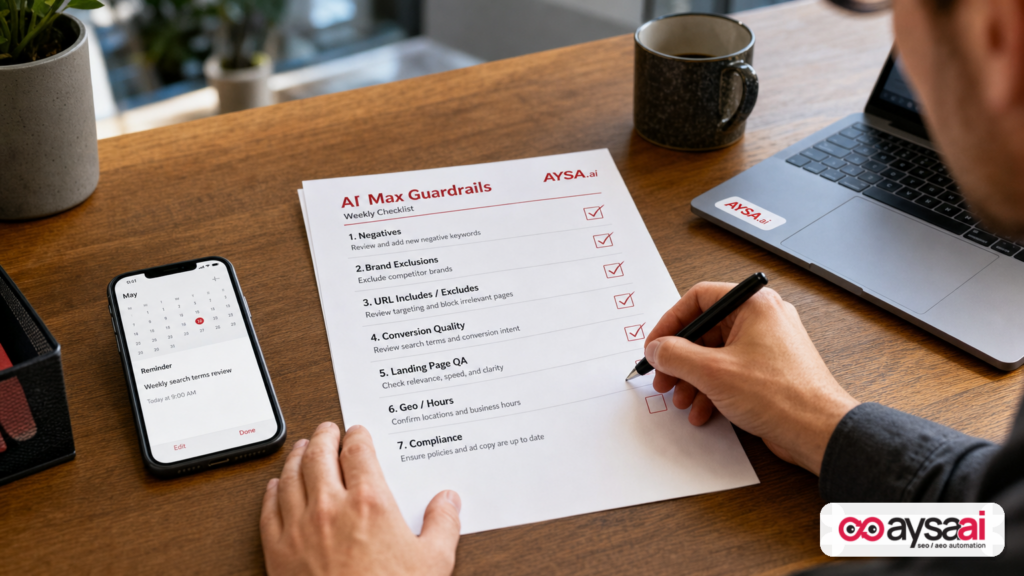
Here are the core monitoring and control areas I’d require during a DSA → AI Max migration. (This aligns with the “monitor and control” theme in Search Engine Land’s piece, but the list below is expanded into an operator-ready checklist.)
1) Search terms and intent drift
Regardless of how Google labels the mechanism, you must regularly inspect what you’re actually showing up for. Automation increases the chance of “intent drift,” where the system finds adjacent queries that increase volume but reduce conversion quality.
What to look for:
- Research queries vs. buying queries (e.g., “how to” vs. “buy/near me/cost”).
- Wrong service-line queries that share vocabulary (common in medical, legal, and B2B).
- Competitor brand queries you don’t want (or want, but only with strict messaging).
- Location mismatch queries (if you serve specific service areas).
Control action: negative keywords and exclusions. This is tedious, but it’s still one of the highest ROI activities in paid search.
2) Landing page destinations (the most overlooked report)
If the platform is choosing or rotating landing pages, you need a tight loop around destination URLs.
What to look for:
- High spend to pages with low engagement / low conversion.
- Traffic going to pages that are “informational only” when the query is transactional.
- Traffic going to pages that are operationally wrong (out of service area, wrong Product variant, out of stock, outdated offer).
- Inconsistent tracking tags across pages (leading to phantom performance).
Control action: define which URL paths are allowed and which are prohibited. If you cannot enforce that in-platform with enough precision, enforce it by improving the site (redirects, noindex where appropriate, or consolidating pages)—but do it carefully so you don’t break organic search.
3) Creative outputs and asset review cadence
As ad copy becomes more machine-assembled, the review cadence becomes a business process decision, not a “nice to have.”
What to look for:
- Policy-sensitive phrases (especially in health/finance).
- Brand voice drift (cheapening a premium service).
- Offer claims that aren’t universally true (pricing, guarantees, turnaround times).
- Unintended emphasis (e.g., focusing on “cheap” when you sell “reliable”).
Control action: lock down core messaging in pinned assets where appropriate, maintain a “do not say” list, and align your website language with what you’re willing to claim in ads—because the system will pull from your site, too.
4) Conversion quality, not just conversion quantity
Automated bidding systems are only as good as the conversion signals you feed them. If your primary conversion is “form submit” but 40% of form submits are junk, the machine can learn to optimize toward junk.
What to monitor:
- Call duration thresholds (to separate real calls from misdials/spam).
- Form validation and spam filtering outcomes.
- Down-funnel events (appointments booked, quotes accepted, purchases completed).
- Lead-to-sale rate by campaign type.
Control action: define “primary” conversions that reflect business value, and treat top-of-funnel micro-conversions carefully. If you can, import offline conversions back into Google Ads—but only if your data quality is strong. If you can’t verify a setup, don’t pretend it’s accurate.
5) Geo, schedule, and operational alignment
AI systems don’t know you’re short-staffed this week, that you only install HVAC in two counties, or that your clinic can’t accept new patients on Fridays. If you don’t encode constraints, the machine will spend as if constraints don’t exist.
Control action: align targeting and scheduling with operations, then revisit monthly. This is especially important for local services and appointment-driven businesses.
Measurement reality check: AI can optimize to the wrong “success”
In every automation transition, the measurement conversation separates mature advertisers from everyone else.
Here are the measurement failure modes I see most often when accounts lean harder into automation:
Failure mode 1: optimizing to proxy metrics
If your AI bidding strategy is optimizing to:
- page views,
- time on site,
- button clicks,
- “lead” events that include spam,
…then you’re training the machine to produce signals that look good in dashboards but don’t pay salaries.
Fix: tighten what counts as a conversion. Use higher-intent events. Consider separate conversion actions for “qualified” outcomes versus “any response.”
Failure mode 2: believing attribution is more precise than it is
As campaign types become more blended and behavior becomes more cross-channel, the “this click caused this sale” story gets shakier.
Fix: operate with a mix of:
- platform-level measurement (Google Ads conversions),
- site analytics (GA4),
- CRM outcomes (even if manual at first),
- business KPIs (bookings, revenue, margin).
If you’re not confident your measurement is correct, phrase conclusions as directional, not exact.
Failure mode 3: confusing expansion with incrementality
AI Max may broaden reach. That can raise conversions while lowering true incremental value (e.g., you pay for traffic you would have gotten through brand or organic).
Fix: run controlled tests where possible (geo splits, time splits, holdouts) and watch blended CAC/ROAS, not just campaign ROAS.
Note: I’m not citing specific test methodologies here as “best practice” because implementation depends heavily on your category, tracking maturity, and spend volume. But the principle holds: automation increases the need for disciplined experimentation.
Your website is now your targeting set: how content and IA affect AI Max outcomes
If you’ve treated your website like a brochure and your ad account like the “real marketing,” AI Max changes that equation.
When systems use your site to infer relevance and choose landing pages, your site becomes a living dataset. The structure and clarity of that dataset affects performance.
1) Information architecture: can a machine tell your pages apart?
Many SME sites have multiple pages that sound the same:
- “Services” pages that list everything but explain nothing.
- City pages with templated copy that doesn’t differentiate intent.
- Product category pages with thin descriptions and no unique attributes.
If pages are not distinct, the system can’t reliably map intent to the right destination. That leads to randomization and wasted spend.
What to do: make each revenue-driving page answer three questions clearly:
- What is this specifically?
- Who is it for (and not for)?
- What should the visitor do next?
2) Content clarity: remove ambiguity the algorithm can misread
AI-driven systems are strong at pattern matching. They’re also happy to be confidently wrong if your site language is ambiguous.
Examples of ambiguity that causes paid issues:
- A clinic page mentions “urgent care” historically, but the clinic no longer offers it.
- A contractor blog post mentions “free estimates,” but only for certain job sizes.
- An ecommerce site has old “sale” pages that still rank and still exist.
What to do: update or consolidate outdated pages, and ensure your highest-priority pages contain the approved, current language that you want your ads to reflect.
3) Technical hygiene: indexability, redirects, and tracking consistency
If the platform can land users on any indexable page, technical mistakes become ad spend leaks:
- duplicate pages that split signals,
- broken canonicals,
- slow pages,
- missing analytics tags on certain templates,
- redirect chains that degrade experience.
What to do: treat “landing page QA” as part of paid search operations, not a one-time dev project.
AYSA’s broader search visibility view (SEO + AEO/GEO) becomes relevant here: you can’t separate “what the machine learns from your site” from “how the machine chooses to spend your budget.” If you want a structured approach to visibility monitoring, start here: AI Search Visibility and AYSA Monitoring.
A step-by-step migration plan (DSA → AI Max) that avoids performance cliffs
If DSAs are meaningful in your account, don’t rip them out overnight. Migrate like you would any revenue-critical system: staged, measured, and reversible where possible.
Step 1: Inventory what DSAs are doing for you today
Before you replace anything, answer:
- Which campaigns/ad groups are using DSAs?
- What share of spend and conversions do they represent?
- Which landing pages receive the most DSA traffic?
- Which search terms are unique to DSAs (not covered elsewhere)?
This isn’t just an audit; it’s your baseline.
Step 2: Classify landing pages into “allowed,” “conditional,” and “never”
Most businesses already know, intuitively, that some pages should never receive paid traffic. Write it down.
- Allowed: core product/service pages, high-intent category pages, booking pages.
- Conditional: long-form guides (only for remarketing or specific intent), location pages (only if staffing supports it).
- Never: support articles, outdated promos, thin city templates, careers pages, policy pages.
This classification becomes your URL control plan.
Step 3: Clean the website inputs (the unsexy step that saves money)
If you don’t want AI Max to land users on certain pages, you have two levers:
- Platform controls (inclusions/exclusions, negatives, brand controls where applicable).
- Website reality (what exists, what is indexable, what is linked, what is updated).
SMEs often focus only on the platform because it feels faster. But a messy website will keep leaking value. Fix the inputs.
This is where AYSA is designed to operate as an execution system: it monitors your site, prepares changes, asks for approval, and then executes accepted updates. Explore: AI SEO Tools.
Step 4: Build AI Max campaigns in parallel (don’t immediately replace)
Run AI Max alongside DSAs long enough to compare:
- search term quality,
- landing page distribution,
- conversion quality,
- CPA/ROAS stability.
You’re not looking for perfection in week one. You’re looking for early warning signs of intent drift or destination chaos.
Step 5: Establish a “guardrails cadence” before you scale
The most common mistake is scaling before you have a monitoring rhythm. Create a cadence that fits your spend:
- Weekly: search terms review, destination URL review for top spend, creative/asset audit.
- Biweekly: conversion quality sampling (listen to calls, review form leads), landing page performance review.
- Monthly: budget reallocation, geo/schedule adjustment, site content updates to remove ambiguity.
Automation requires consistent operations. If you don’t have time for that, you shouldn’t expand the automation surface area yet.
Step 6: Sunset DSAs deliberately with a rollback plan
When you’re confident AI Max is covering the valuable intent that DSAs covered (without new waste), phase DSAs down. Keep documentation of:
- what changed,
- when it changed,
- what you expected to happen,
- what you’ll do if performance drops.
That last bullet is key. Businesses panic during volatility and make random changes. A rollback plan prevents that.
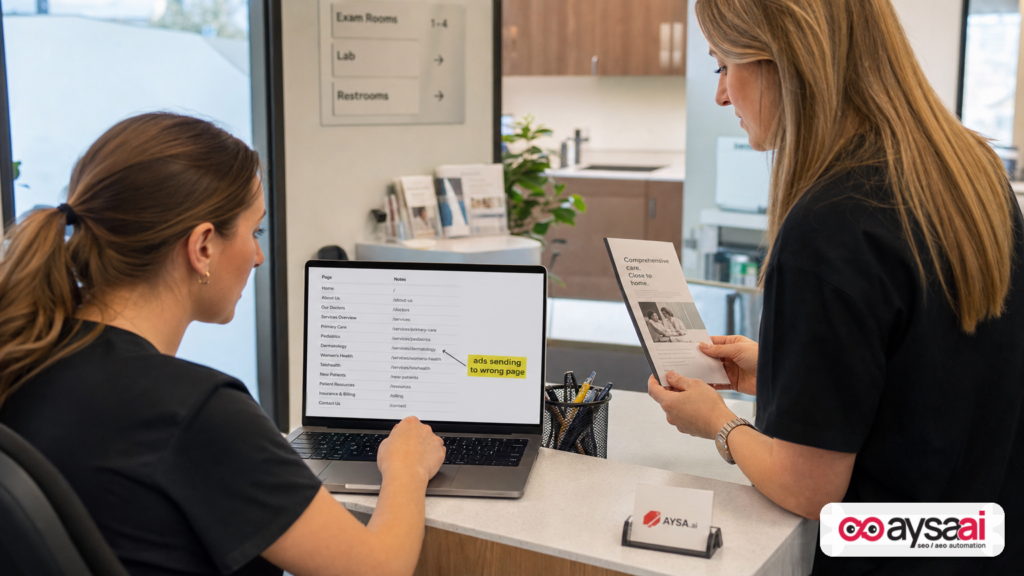
A practical SME scenario: the local clinic that accidentally advertised the wrong service
Let’s make this concrete with a scenario that mirrors what happens in real accounts.
Business: A local clinic with three revenue drivers:
- Primary care appointments (high volume, lower margin)
- Dermatology consults (lower volume, higher margin)
- Telehealth visits (good margin, but only for existing patients)
Before: The clinic ran DSAs mainly to catch long-tail symptom queries like “eczema specialist near me” and “rash appointment today.” Their DSA setup mostly sent traffic to dermatology pages. Not perfect, but manageable with negatives.
After migration to a more automated setup: The system begins matching more broadly on telehealth-related queries because the website mentions telehealth frequently across pages and the scheduling widget is present sitewide.
What goes wrong:
- Ads show for queries that imply telehealth is available for new patients.
- Clicks go to a general “Telehealth” page that doesn’t clearly state eligibility.
- Calls increase, but many are frustrated prospects who can’t book.
- The call center gets overwhelmed.
- Google sees “more calls” and tries to generate more of them.
The fix isn’t just “pause.” The fix is encoding reality into the system:
- Update the telehealth page to clearly define eligibility and route new patients to the correct booking path.
- Create (or improve) a dermatology-specific landing page that matches “eczema/rash” intent tightly.
- Add URL exclusions so acquisition campaigns don’t send traffic to telehealth pages unless explicitly desired.
- Adjust conversion definitions: count only qualified calls (duration threshold) or booked appointments as primary.
This is the core lesson: AI systems are powerful amplifiers. If your site and measurement contain ambiguity, the system amplifies ambiguity into spend.
What agencies should rethink: reporting, responsibility, and approvals
If you’re an agency (or an internal marketer acting like one), AI Max pushes you toward a new operating model.
1) The “ad account only” scope is less defensible
When landing pages are dynamically chosen and creative is generated from site content, the website is part of the media system. Clients will hold you accountable for outcomes that originate on-site—even if your SOW says “PPC only.”
That’s not a legal argument; it’s a reality argument. When the leads are bad, nobody cares whether the root cause is a site template or an ad setting.
2) Reporting must shift from ‘what we did’ to ‘what the machine did’
In manual PPC, reporting highlights optimizations: new keywords, new ads, bid changes. In automation-heavy PPC, the questions are different:
- Where did the machine expand?
- What intents did it discover?
- What did it deprioritize?
- Which landing pages did it favor?
- Did conversion quality improve or degrade?
That requires new dashboards, but more importantly, it requires new narratives. You’re no longer only an operator; you’re a risk manager.
3) Approvals become strategic, not bureaucratic
Automation often fails because teams avoid approvals to “move fast.” Then they move fast in the wrong direction.
The right approach is tiered approvals:
- Pre-approved zones: safe expansions (e.g., certain product categories, certain cities).
- Review-required zones: regulated services, sensitive messaging, high-margin offers.
- Never zones: pages, claims, or intents that create operational or compliance risk.
This is exactly the operational philosophy behind AYSA’s “approved execution” model: the system can do the work, but humans set boundaries and approve meaningful changes. See how we think about monitoring and controlled execution: AYSA Monitoring.
Where AYSA fits: approved execution for search visibility (paid + organic)
AI Max is a paid media change, but it exposes a broader truth: search visibility is converging. Paid systems increasingly use website content and structure as inputs, while organic search is increasingly influenced by AI-driven experiences (AEO/GEO). Either way, your site becomes your “model training data” in miniature.
AYSA is built for that environment:
- Monitors your site and search visibility signals continuously (monitoring).
- Prepares recommended changes based on what’s actually happening (content clarity, technical hygiene, internal linking, page focus).
- Asks for approval before implementing changes, so you maintain brand and compliance control.
- Executes accepted changes safely and consistently—reducing the “we know what to fix but can’t ship it” bottleneck.
In the DSA → AI Max world, that matters because many of the highest-impact paid search improvements are no longer confined to the ad account. They live on the site:
- Cleaning up outdated pages that automation might pick as landing pages
- Strengthening service/category page differentiation so intent mapping improves
- Aligning on-page language with what you’re willing to claim in ads
- Building clearer “money pages” so both humans and systems understand what to do next
If you want to see how AYSA positions these workflows in the broader AI search environment, start here: AI Search Visibility. If you want the practical toolset view, start here: AI SEO Tools. For cost considerations, see AYSA Pricing. For more operator-focused analysis, browse AYSA Blog.
What to do next (action list)
- 1) Pull a DSA baseline: spend, conversions, top search terms, top landing pages.
- 2) Write your URL policy: allowed / conditional / never. Treat it like a brand safety document.
- 3) Fix website ambiguity: update outdated pages, clarify eligibility/locations, separate overlapping services.
- 4) Define conversion quality: choose primary conversions that reflect business value, not noise.
- 5) Launch AI Max in parallel: compare intent, destinations, and lead quality before scaling.
- 6) Set a guardrails cadence: weekly search terms + destinations review; monthly strategic review.
- 7) Implement an approval-based execution workflow: don’t let automation changes ship without human sign-off where risk is high.
Sources and further reading
- Search Engine Land: How to prepare for Google’s DSA sunset and move to AI Max
- Google Ads Help Center (general reference hub): ads.google.com: Resources
- Google Analytics (GA4) Help Center: developers.google.com: Analytics
- AYSA.ai: AI SEO tools and execution system: AI SEO Tools
- AYSA.ai: Monitoring: AYSA Monitoring
- AYSA.ai: AI search visibility (AEO/GEO context): AI Search Visibility
- AYSA.ai: Pricing: AYSA Pricing
- AYSA.ai: Blog: AYSA Blog
Disclosure /
Continue the AI search topic inside AYSA.
Use these pages to connect the article with AI SEO tools, AI visibility monitoring, AI Overviews and approved website execution.
Turn this topic into a website action plan.
Use these AYSA hubs to move from reading to technical fixes, AI visibility monitoring, research, glossary context and approval-first SEO execution.

