
Google’s “Pageburst” Bot Ignoring robots.txt Is a Wake-Up Call: How to Audit Google’s Non-Search Crawlers (and Protect Your Ads, SEO, and Infrastructure)
Google quietly expanded its crawler documentation to include Pageburst—an Ads renderer that ignores robots.txt—plus 11 other existing Google clients that can show up in your logs without the word “Googlebot.” Here’s what changed, why it matters for SMEs and agencies, and the practical steps to verify, monitor, and control risk without breaking SEO or paid performance.

Google just did something that looks small on the surface, but it changes how responsible teams should think about crawl traffic, bot controls, and even paid media reliability: it updated its crawler documentation to explicitly list Pageburst—a Google Ads-related renderer that ignores Robots.txt—along with 11 other existing Google clients that commonly appear in server logs.
The breaking part isn’t that these systems exist (they already did). The breaking part is that many of these user agents:
- don’t contain the word “Googlebot”,
- look like normal browsers, and
- may be missed by simplistic filters, allowlists, and WAF rules that teams built over the years.
As the operator of an execution-focused SEO/AEO system (AYSA), my view is direct: this is an operational governance problem masquerading as an SEO footnote. If your organization still treats “SEO bots” as synonymous with “Googlebot,” you’re managing yesterday’s traffic—not today’s.
This editorial breaks down what changed, why it matters, and what to do next—specifically for SMEs and agencies who can’t afford random traffic drops, unexplained ad performance swings, or security teams blocking “unknown Chrome traffic” that is, in reality, a legitimate Google client.
Concise summary
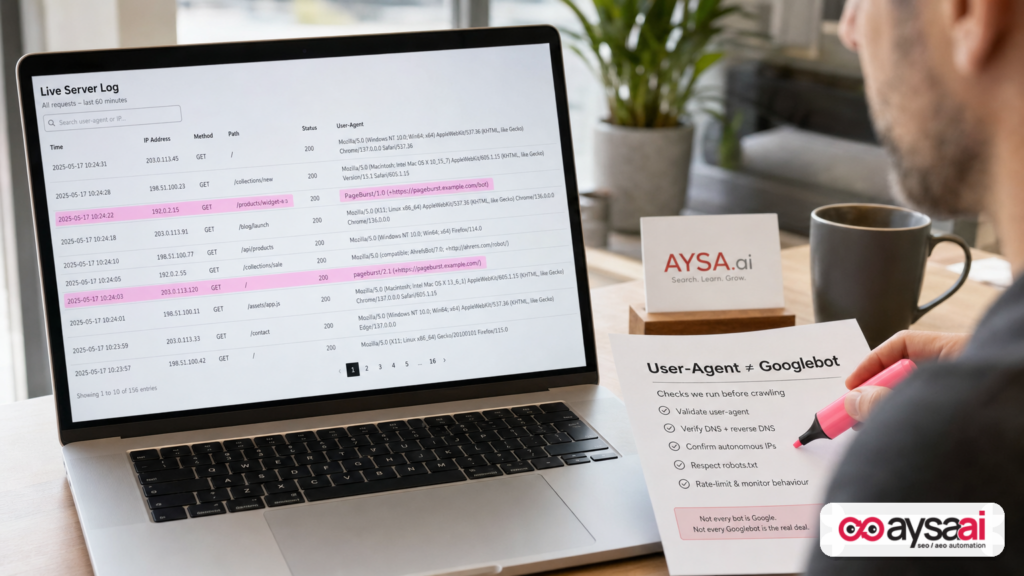
- Google documented Pageburst as an Ads renderer used for Google Ads quality, landing page safety, and page understanding, and states it is unaffected by Crawling preferences (i.e., it ignores robots.txt).
- Google also documented 11 other existing user agents (special-case crawlers and user-triggered fetchers) that may ignore robots.txt and can appear browser-like in logs.
- This matters because bot management based on “contains Googlebot” or “reverse DNS once” is no longer sufficient; you need verification, Monitoring, and governance.
- SMEs should: audit server logs, verify Google IP ranges per Google’s own guidance, review WAF/CDN rules, and monitor 403/challenge patterns that may degrade ads/SEO/user experiences.
- AYSA fits here by monitoring changes, preparing fixes (rules, Technical SEO updates, content changes), asking for approval, and then executing accepted changes—reducing the “someone changed a firewall rule” chaos that breaks growth.
Key takeaways (for busy operators)

- robots.txt is not security. It’s a crawling preference mechanism—and many Google clients are explicitly documented to ignore it.
- Not all Google traffic is Googlebot. Some of it is Ads, Gmail image proxying, Lighthouse-based checks, Sheets functions, platform tasks, etc.
- Browser-like user agents are a trap. If you block “random Chrome” aggressively, you may block Google’s tools that influence paid and product experiences.
- Verification matters. User agents can be faked; validate by IP ranges and Google’s published verification approach.
- Operational monitoring beats one-time configuration. Bot ecosystems evolve; your allowlists and WAF rules must be reviewed on a cadence.
Table of contents
- What Changed: Google Documented Pageburst (and 11 Other Existing Clients)
- Pageburst Explained in Plain English (and Why Ads Teams Should Care)
- robots.txt Isn’t a Security Tool—And Pageburst Proves It
- The Other 11 Google User Agents: A Practical Map for Operators
- APIs-Google Moved Lists: Why That’s Not Just Documentation Trivia
- The Practical Risks: Ads, SEO, Security, and Site Reliability
- How to Verify These Requests (Without Guessing)
- A Step-by-Step Audit: Logs, CDNs, WAFs, and Rules
- A Concrete SME Scenario: The Ecommerce Brand That “Lost ROAS” Overnight
- What Agencies Should Rethink: Reporting, Tech QA, and Accountability
- Where AYSA Fits: Monitoring + Approved Execution for Modern Search and Ads
- What to do next (Action list)
- Sources and further reading
What Changed: Google Documented Pageburst (and 11 Other Existing Clients)
The catalyst is a documentation update reported by Search Engine Journal: Google added Pageburst and 11 other existing user agents to its crawler docs, clarifying that these are not new systems—just high-volume clients that people kept asking about because they show up in logs and don’t look like “Googlebot.”
Google’s own explanation (as relayed in the coverage) is basically: these are common in logs; we’re documenting them. That alone should tell you something: if they’re “high volume,” they can create meaningful infrastructure load and meaningful measurement consequences.
From an operator’s standpoint, this is less about “what Google is doing” and more about what your org probably built:
- WAF rules that allow or block based on a substring like
Googlebot - CDN bot management tuned for search crawler behavior only
- Log parsing dashboards that classify anything not matching “Googlebot/Bingbot” as “Other”
- Security playbooks that treat browser-like traffic as suspicious by default
Those are the exact assumptions that get expensive now.
Primary source context: the update and the “ignores robots.txt” behavior are reported in Search Engine Journal’s coverage: Search Engine Journal – Google Documents Pageburst, An Ads Renderer That Ignores Robots.txt.
Pageburst Explained in Plain English (and Why Ads Teams Should Care)
Here’s the non-SEO translation: Pageburst is a Google user agent used to render your web pages in the context of Google Ads. Google describes it (per the coverage) as rendering for:
- Google Ads quality
- Landing-page safety
- Page understanding
If you run paid search—especially performance campaigns sending traffic to dedicated landing pages—this is relevant because rendering checks are often where:
- slow or broken pages get flagged,
- unexpected redirects or interstitials get detected,
- aggressive cookie walls / bot challenges break page load,
- content differs by user agent (intentionally or accidentally).
One of the most overlooked realities in growth teams: paid performance depends on technical reliability. If your landing page works for users but fails for an automated renderer, you can see downstream friction—policy checks, quality issues, measurement inconsistencies, or just less confidence in what’s happening.
The detail that should make you stop scrolling: Pageburst’s strings can look like Chrome on Linux (desktop) or Chrome on iOS/iPad (mobile), and do not include “Googlebot” (per the coverage). If your logging or security rules are keyed on that token, you won’t see what’s happening.
robots.txt Isn’t a Security Tool—And Pageburst Proves It
Let’s be blunt: too many businesses still treat robots.txt like a “keep out” sign. It’s not. It’s a preference file that cooperative crawlers may follow for Indexing and crawling behavior.
In the reported update, Google’s documentation for Pageburst says it is:
- unaffected by crawling preferences, and
- ignores robots.txt rules.
That should reset your mental model.
What robots.txt can do (in practical terms)
- Help manage crawl efficiency for cooperative crawlers.
- Signal where you’d rather crawlers not spend time (e.g., faceted navigation, internal search pages).
- Sometimes support workflow boundaries (e.g., keeping certain sections out of “normal crawling”).
What robots.txt cannot do (and never could)
- It cannot prevent access to content. If a URL is public, it’s accessible.
- It cannot enforce security boundaries.
- It cannot be relied upon as a universal “block Google” mechanism for non-search clients.
If you need access control, you use authentication, authorization, network rules, signed URLs, tokenized endpoints, or application-level gating—not a text file.
So what should a business do if it’s uncomfortable with Pageburst rendering pages? You don’t “hide” with robots.txt. You design your ad landing page strategy and security strategy coherently—and you monitor what’s actually happening in the logs.
The Other 11 Google User Agents: A Practical Map for Operators
Pageburst isn’t alone. Google documented 11 other user agents across two buckets, described in the coverage as:
- Special-case crawlers (used by specific Google products)
- User-triggered fetchers (requests initiated by users or their actions, which “generally ignore robots.txt rules”)
Rather than treat this like trivia, treat it like an inventory list for your operations team. Below is a practical interpretation based on the source summary and extracted text (not a copy of Google’s pages).
Special-case crawlers (non-Search Google products)
Per the coverage, newly documented special-case clients include items like:
- Google-analytics-postbacks: sends attribution postbacks from Google Analytics to ad networks when conversions happen (as described in the coverage).
- Google-Calendar-Importer: refreshes subscribed
.icsfeeds for Google Calendar users. - GoogleDocs: powers certain Google Sheets functions like
IMPORTHTML. - Google-Edu: used to verify domains for Google Workspace for Education submissions.
- PlayStore-Google: checks developer-submitted URLs in Google Play Store listings.
The key operational detail: the coverage states that each of these special-case entries says the user agent ignores robots.txt rules. So if your “control plan” was robots.txt, it may not apply.
User-triggered fetchers (often browser-like)
The coverage also mentions newly documented fetchers such as:
- AppEngine-Google: requests from code running in Google platform products.
- Google-Apps-Script: requests initiated by Apps Script executions.
- Google-Cloud-Tasks: requests from queued tasks.
- GoogleImageProxy: used to load images into email apps such as Gmail (per the coverage).
- Google Web Preview: fetches for preview contexts (strings may include Lighthouse/Chrome-like patterns per the coverage).
- PageSpeed Insights fetcher: strings ending in
Chrome-Lighthouseper the coverage.
These are the ones that will fool a lot of teams because they can appear as “Firefox on Windows XP” or “Chrome-like” strings, as noted in the reported analysis. If you have an analytics or security classification layer that’s too naive, you’ll mislabel them and potentially block them—then spend weeks debugging the wrong symptom.
APIs-Google Moved Lists: Why That’s Not Just Documentation Trivia
One subtle but meaningful detail in the reported update: Google moved APIs-Google from the special-case crawlers list to the user-triggered fetchers list, and corrected a formatting detail in its documented string (a missing semicolon, per the coverage).
Why should a business editor care about a semicolon? Because hardcoded string matching is common in legacy systems. Someone, somewhere, has a WAF rule, a log parser, or a webhook validator that:
- matches a user agent string exactly,
- assumes robots.txt is a control mechanism, or
- assumes a specific IP range classification.
And when Google clarifies “these push requests come from user-triggered fetcher IP ranges and ignore robots.txt rules” (as the coverage describes), that’s your signal to: review how your system decides what is allowed, challenged, rate-limited, or blocked.
In other words: documentation changes are often “late stage” confirmation of a reality you’ve already been living with. If you’re seeing webhook delivery issues, preview tool failures, or unexplained GET requests—this is the kind of nuance that can matter.
The Practical Risks: Ads, SEO, Security, and Site Reliability
If you’re an SME, you don’t need a taxonomy lesson—you need to know what can go wrong.
1) Paid search performance can degrade in non-obvious ways
Because Pageburst relates to ads quality and landing page safety (as reported), blocking or challenging it may lead to:
- more friction in landing page evaluation,
- slower diagnosis of “why did performance drop,”
- increased variance across devices if rendering differs.
I’m intentionally not claiming specific Google Ads outcomes (because the coverage itself notes Google doesn’t specify what happens if you block the check). But operationally, if a key evaluator can’t render your page, you should expect uncertainty at minimum.
2) SEO teams can misdiagnose crawl issues
If your log-based SEO monitoring only tracks “Googlebot,” you can miss:
- non-search Google clients being blocked (which may still affect your ecosystem),
- infrastructure rules accidentally catching legitimate requests,
- new patterns that correlate with outages or performance issues.
And because several of these user agents look like browsers, teams may blame “bad traffic” when it’s a product check, a preview fetch, or an image proxy.
3) Security posture can get sloppier—not tighter
It sounds counterintuitive, but it’s common: when teams can’t reliably classify traffic, they overcorrect:
- either by blocking too much (breaking business functions),
- or by allowing too much (creating a real security gap).
Google’s own documentation (as referenced in the coverage) notes user-agent strings can be faked. So “it says pageburst” is not proof. Verification is the point.
4) Site reliability and infrastructure costs can surprise you
If these are high-volume clients, they can consume bandwidth and compute—especially if your pages are heavy, dynamic, or require expensive server-side rendering.
On the flip side, if you rate-limit too aggressively (or trigger challenges), you can see spikes in:
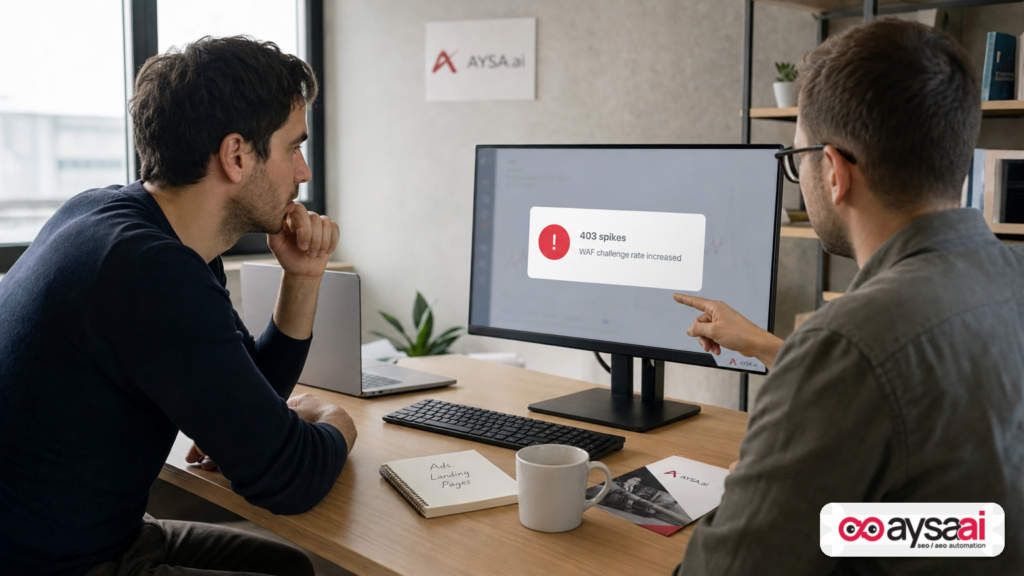
- 403 responses,
- challenge pages (CAPTCHA / JS challenges),
- timeouts,
- unexpected retries.
How to Verify These Requests (Without Guessing)
You should assume two truths simultaneously:
- Some of this traffic is legitimate Google infrastructure.
- Some malicious traffic may pretend to be it.
So verification needs to be part of the playbook.
In the SEJ coverage, Google’s docs are described as pointing to verification via Google IP ranges—including a file named special-crawlers.json for special-case crawlers, and a reverse DNS pattern resembling rate-limited-proxy-*-*-*-*.google.com for those IPs.
Because this article is based on the provided research context, I’m not going to pretend I pulled the live JSON file myself here. Instead, treat this as a policy: follow Google’s published verification procedures as referenced in the coverage, and confirm IP ranges and reverse DNS patterns in your own environment before changing allowlists.
Practical verification steps most teams can implement:
- Collect samples: export a small set of log lines with the suspicious user agent and source IP.
- Reverse DNS: check whether the IP resolves to a Google-owned domain pattern.
- Forward confirm: resolve that hostname back to IP and confirm it matches the original request IP (to prevent PTR spoofing patterns).
- Compare against published ranges: confirm IP is within Google’s documented ranges for that client category (as referenced by Google’s docs in the coverage).
If your team doesn’t do this today, your bot management is a combination of superstition and hope.
A Step-by-Step Audit: Logs, CDNs, WAFs, and Rules
This is the core: what should you actually do this week?
Step 1: Search your logs for the strings you’re not tracking
Start with the obvious: search for “pageburst” across server logs and CDN logs. Then expand the list to the other newly documented clients mentioned in the coverage (for example: GoogleImageProxy, PageSpeed Insights fetcher, Google Web Preview, Google-Apps-Script, Google-Cloud-Tasks, etc.).
What you’re looking for:
- status codes distribution (200/301/302/403/429/5xx)
- paths requested (landing pages? robots.txt? images? feeds?)
- volume patterns (steady vs spiky)
- geo patterns (unexpected regions can be normal with proxies, but still worth understanding)
Step 2: Identify where bot controls are enforced
Many businesses don’t have “one” bot rule. They have several layers:
- CDN bot management
- WAF rules (managed + custom)
- load balancer rules
- application middleware blocks
- rate limiting at edge and origin
Create a simple map: for each layer, answer:
- What does it block?
- How does it classify bots?
- Does it rely on “Googlebot” substring checks?
- Does it challenge “unknown browsers” that don’t execute JS?
Step 3: Compare outcomes for users vs renderers
Renderers often fail where users succeed, because users run full browsers with cookies, JS, and human interactions.
Check whether your landing pages depend on:
- JS-only rendering of critical content
- aggressive anti-bot challenges at first request
- geo-based redirection
- login walls (even for “public” content)
- consent popups that block the DOM
These aren’t “bad,” but they have tradeoffs. If Pageburst is rendering to evaluate safety/quality (as described), you want that render path to behave like a normal, safe user experience.
Step 4: Fix the classification problem first
Don’t jump straight to “allowlist everything Google.” That’s how security incidents happen.
Instead:
- Implement proper verification (IP ranges + DNS checks as referenced by Google docs in the coverage).
- Tag verified traffic in logs (e.g., “VERIFIED_GOOGLE_SPECIAL_CRAWLER”).
- Measure what happens when it is challenged or blocked.
Step 5: Establish a cadence (monthly is fine for SMEs)
Google’s own docs (as described in the coverage) say the lists aren’t exhaustive and include clients most likely to show up in logs.
That implies change. Create a recurring task:
- Monthly: review top user agents by volume and by 403/429 rates.
- Quarterly: review WAF/CDN rule changes that could affect verification behavior.
If you want this to be less manual, that’s exactly the kind of monitoring workflow AYSA is built to support—detect, propose, approve, execute.
A Concrete SME Scenario: The Ecommerce Brand That “Lost ROAS” Overnight
Let’s make it real with a plausible chain of events (no invented stats, no magic):
Business: a small-to-mid ecommerce brand running Google Ads to seasonal landing pages.
Change: the company migrates to a new CDN/WAF configuration. The security team enables a strict bot policy: “challenge any request that looks automated unless it matches an allowlist containing ‘Googlebot’.”
What happens next:
- Users still load pages fine (their browsers pass the challenge).
- But Pageburst—identifying as Chrome-like and not containing “Googlebot”—gets challenged or blocked.
- Now Google’s Ads-related rendering checks intermittently fail to load the page cleanly.
- The paid team sees a performance wobble. They start rewriting ads and blaming creative. The ecommerce team starts discounting products.
- Meanwhile the real issue is in the logs: a spike in 403s for a verified Google client.
The fix isn’t “turn off security.” The fix is:
- verify Google clients properly (not by user agent text alone),
- create nuanced rules (e.g., allow rendering fetches to reach landing pages without JS challenges),
- monitor status codes and challenge rates for those verified clients.
This is why I push a governance model: changes that affect access patterns should not be “someone flipped a switch.” They should be proposed, reviewed, approved, and then executed with monitoring. That’s the heart of AYSA’s approach.
What Agencies Should Rethink: Reporting, Tech QA, and Accountability
Agencies often sit in the middle of the blame triangle:
- clients want growth,
- platforms behave like black boxes,
- infrastructure teams make changes outside marketing’s visibility.
This Pageburst documentation update is your reminder to level up a few agency habits.
Stop pretending you don’t need log access
If your client runs meaningful spend or relies on organic visibility, you need at least one of:
- CDN/WAF logs,
- origin logs,
- or a monitored proxy that can surface status code patterns by user agent.
Not forever, not every day—but when diagnosing “mysterious” performance issues, log visibility is often the difference between a one-day fix and a one-month spiral.
Update operational KPIs: include “bot challenge rate” and “verified client failures”
Rankings, impressions, and ROAS are outcomes. Operators also need leading indicators:
- 403/429 rate for verified Google clients
- spikes in browser-like UAs hitting landing pages
- increases in timeouts for renderers and preview tools
Insist on change control for edge rules and bot policies
If an infrastructure change can tank an ad account’s performance, it deserves:
- a ticket,
- a rollback plan,
- and monitoring.
That’s not bureaucracy; that’s business continuity.
Where AYSA Fits: Monitoring + Approved Execution for Modern Search and Ads
The uncomfortable truth is that most businesses have the tools to detect problems, but not the operational system to execute fixes safely.
AYSA is designed as an execution engine for SEO/AEO/GEO work:
- It monitors site signals and operational anomalies (Monitoring).
- It prepares changes—technical fixes, content updates, structured improvements—based on what it detects.
- It asks for approval, so changes don’t ship silently.
- It executes accepted changes, closing the loop between insight and outcome.
In the context of Pageburst and Google’s newly documented clients, AYSA’s role is not “let’s block or allow bots.” AYSA’s role is to help teams:
- identify when an infrastructure rule change may have impacted crawl/fetch behavior,
- create a controlled, reviewable set of updates (including technical SEO cleanups that reduce heavy rendering burdens),
- prevent recurring incidents by making monitoring and approvals part of the routine.
If you’re exploring automation but you’re wary of “autopilot SEO,” you’re right to be cautious. Automation without governance is how production sites break. That’s why AYSA’s model is approved execution.
If you want to understand how this ties into broader AI-era visibility (not just classic SEO crawling), start here: AI Search Visibility and AI SEO Tools. For ongoing practical guidance, the AYSA blog is where we publish playbooks like this.
What to do next (Action list)
Use this checklist as an operational sprint. You do not need to do everything in one day—but you should do it intentionally.
- Pull 7–30 days of logs (origin + CDN/WAF if possible).
- Search for “pageburst” and record: volume, top URLs, status codes, and whether challenges occurred.
- Search for the other documented clients mentioned in the SEJ coverage (e.g., GoogleImageProxy, PageSpeed Insights fetcher, Google Web Preview, Google-Apps-Script, Google-Cloud-Tasks).
- Identify false blocks: any verified Google client getting 403/429/timeouts on important landing pages.
- Implement verification based on Google’s published guidance (as referenced in the coverage), not by user agent alone.
- Review WAF/CDN bot rules: remove simplistic “allow Googlebot, challenge everything else” patterns.
- Create monitoring alerts for spikes in 403/429 on verified Google clients.
- Document and schedule a monthly review of top user agents and anomalies.
- Operationalize execution: if you’re using AYSA, set up monitoring and approval workflows so fixes don’t depend on heroics. Explore Pricing if you need to align this with budget.
Sources and further reading
- Search Engine Journal: Google Documents Pageburst, An Ads Renderer That Ignores Robots.txt
- Search Engine Journal: Technical SEO coverage (context)
- Search Engine Journal: Paid media coverage (context)
- Search Engine Journal: SEO coverage (context)
Note on official documentation: The SEJ coverage references Google’s crawler documentation pages (special-case crawlers, user-triggered fetchers) and an IP range file for verification. If you are implementing policy changes, confirm details directly in Google’s official developer documentation and published verification procedures before you ship allowlist rules.
Author: Marius Dosinescu / AYSA.ai
If you want this kind of operational resilience without adding more dashboards, the path is consistent monitoring plus controlled execution. That’s the philosophy behind AYSA: monitor, prepare changes, request approval, and execute—so growth doesn’t get derailed by invisible edge-case traffic.
Continue the AI search topic inside AYSA.
Use these pages to connect the article with AI SEO tools, AI visibility monitoring, AI Overviews and approved website execution.
Turn this topic into a website action plan.
Use these AYSA hubs to move from reading to technical fixes, AI visibility monitoring, research, glossary context and approval-first SEO execution.