Inside Googlebot, in Plain English: Crawling Limits, Rendering Reality, and the Technical SEO Playbook SMEs Actually Need
Googlebot is not one bot, your pages aren’t read “like a human,” and bytes matter more than most teams realize. Here’s the practical, business-focused guide to crawling, fetching, rendering, and the real-world limits that shape whether your content gets discovered and indexed—plus an action plan you can execute with approved automation.

Search visibility is still built on a simple truth: if Google can’t reliably discover your URLs, fetch your content, and understand what the page is about, the rest of your marketing stack is fighting uphill.
That sounds obvious. Yet most small and mid-sized businesses treat Crawling like a black box. They publish a page, they wait, and they assume the “Google bot” will figure it out. Google’s own Search Central team recently pulled the curtain back on how Googlebot works—how it crawls, fetches, renders, and what it does with the bytes it processes. That’s the technical reality behind whether your pages show up at all.
This editorial is my practical, business-first interpretation of what that reality means for SMEs, ecommerce teams, local businesses, publishers, and agencies. It’s not a rewrite of Google’s post; it’s an execution guide that explains the mechanisms, the failure modes, and the decisions you can make today—plus how we think about operationalizing this with AYSA as an “Approved Execution” system that monitors, prepares, requests approval, and then implements accepted changes.
Concise summary

- Googlebot isn’t one bot. Crawling is a distributed system with multiple components and constraints; treating it like a single visitor leads to the wrong fixes.
- Bytes matter. What Google fetches and processes is limited; heavy pages and bloated templates can reduce what gets understood and indexed.
- Rendering is not guaranteed. If your critical content depends on JavaScript rendering, you’re adding risk—especially at scale or during crawl spikes.
- Indexing problems are often self-inflicted. Duplicate URLs, parameter explosions, weak Internal linking, redirect chains, and poor caching waste crawl effort.
- The winning move is operational. Monitoring, triage, and shipping fixes consistently beats one-time audits. This is where approved automation can change outcomes.
Key takeaways (what most businesses should do next)
- Audit your “crawl surface area.” Know how many URLs you’re exposing via navigation, filters, internal search, and sitemaps.
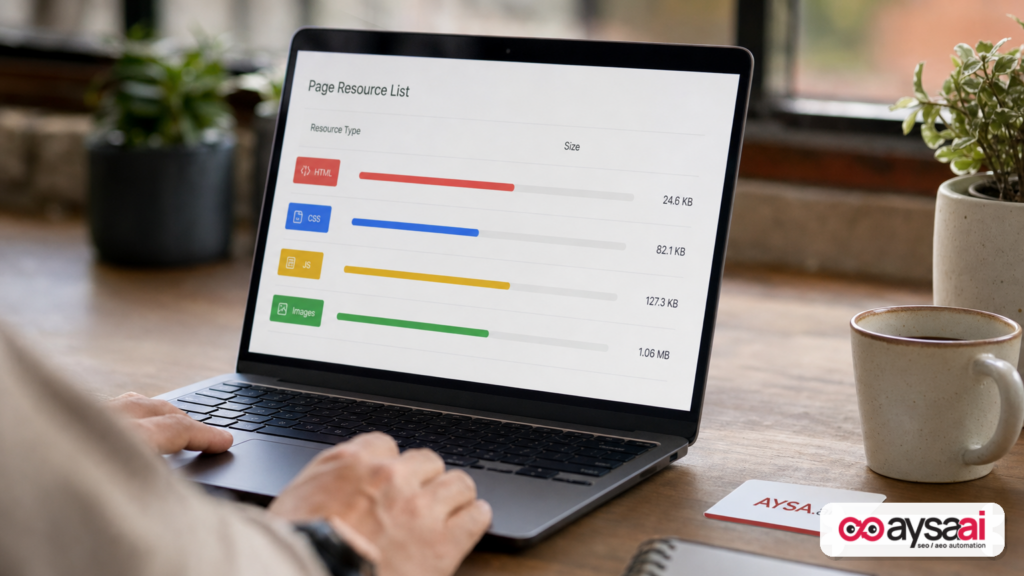
- Shrink and simplify templates. Reduce HTML bloat, remove unused scripts, and make above-the-fold content available in the initial response where possible.
- Make your internal linking intentional. Use category hubs, collections, and editorial links so Googlebot finds what matters fast.
- Fix crawl traps. Block or Noindex internal search and infinite combinations; consolidate duplicates with canonicals and redirects.
- Use Search Console like an operations dashboard, not a report card. Monitor crawl stats, indexing signals, and URL inspection patterns (and act).
Table of contents

- Why Googlebot details suddenly matter more (even if you don’t “do SEO”)
- The modern reality: Googlebot isn’t a single program (and that’s not trivia)
- Crawling vs. fetching vs. rendering vs. indexing: the pipeline that decides your fate
- The bytes budget: why the “2MB” conversation matters more than most teams admit
- Rendering: the step everyone hopes Google will “just handle”
- Best practices for your bytes (template-level decisions with SEO consequences)
- Common failure modes that waste crawl and kill indexability
- A concrete SME scenario: the ecommerce site that “published 10,000 pages” but Google saw 2,000
- What you should monitor (and why most teams monitor the wrong things)
- Agency and in-house teams: what needs to change in your technical SEO workflow
- Where AYSA fits: approved execution for crawl, rendering, and indexability
- A practical action plan (what to change this week, this month, and this quarter)
- What to do next
- Sources and further reading
Why Googlebot details suddenly matter more (even if you don’t “do SEO”)
If you run an SME, you’re already making SEO decisions—whether you call them that or not. Every choice that changes what your server returns (templates, scripts, caching, parameterized URLs, redirects, CMS plugins) changes how crawlable and indexable your site is.
The reason this matters now is that search is moving in two directions at once:
- More complexity in the search results. Traditional blue links still exist, but surfaces like rich results, product modules, and generative experiences raise the bar for consistent indexing and structured understanding.
- More complexity in websites. Modern stacks ship more JavaScript, more third-party tags, more personalization, and more infinite URL combinations than the web of a decade ago.
In that environment, “Google will find it” is not a strategy. Crawling and rendering are resource-constrained engineering processes. Google has been explicit for years that crawling is not unlimited and that there are practical limits to what is fetched and processed. The Search Central blog post that inspired this editorial digs into those mechanics and how bytes are handled. Read it directly here: Inside Googlebot: demystifying crawling, fetching, and the bytes we process.
My perspective: the biggest SEO performance gap in 2026 isn’t “keyword research.” It’s operational excellence—shipping technical changes that reduce crawl waste and make content reliably parsable before you scale content or run campaigns.
The modern reality: Googlebot isn’t a single program (and that’s not trivia)
When people say “Googlebot,” they imagine one robot visiting pages like a browser. But Google’s own explanation emphasizes that Googlebot is not a single program. It’s a system.
Why that matters in practice:
- Different stages behave differently. The system that discovers URLs, the system that fetches bytes, and the system that renders content are not identical steps with identical constraints.
- Your server sees different patterns. Fetching patterns can look “bursty,” vary by host, and vary by content type.
- Debugging needs specificity. “Googlebot couldn’t see my content” could mean robots rules, HTTP errors, slow responses, blocked resources, JavaScript rendering issues, canonicalization confusion, or simply low internal importance.
For business owners, the actionable takeaway is simple: treat crawl and indexability as a pipeline with multiple failure points. If you only look at rankings, you’ll diagnose too late. If you only look at traffic, you’ll misattribute the cause.
If you want foundational context from Google, start with their documentation hub: Google Search Central and the Search documentation.
Crawling vs. fetching vs. rendering vs. indexing: the pipeline that decides your fate
Most SEO disagreements are really disagreements about which step failed.
1) Crawling: discovery and scheduling
Crawling is how Google discovers URLs and decides which ones to visit and how often. Inputs include:
- Internal links (navigation, breadcrumbs, related items, editorial links)
- Sitemaps (what you say exists)
- External links (what the web points to)
- Past crawl signals (how your site responds, speed, stability)
Google’s sitemap documentation is the official starting point: Sitemaps overview.
2) Fetching: bytes over the wire
Fetching is the retrieval of a URL—HTTP response, headers, body, resources. Fetching failures are often mundane:
- Time-outs and server errors
- Soft 404s
- Blocked by robots.txt or authentication
- Redirect loops or long redirect chains
Robots rules matter, but so does how you use them. Google’s robots introduction: robots.txt.
3) Rendering: turning code into content
Rendering is where Google processes HTML, CSS, and JavaScript to produce something closer to what a user sees. Rendering is expensive. It’s also where many modern sites “hide” their actual content until JavaScript runs.
Google’s JavaScript SEO basics are worth bookmarking: JavaScript SEO basics.
4) Indexing: deciding what is stored and eligible to rank
Indexing is not guaranteed. A page can be crawled and fetched and still not be indexed (or not indexed the way you expect) due to duplication, canonicalization, quality signals, thin content, or conflicting directives.
Canonicalization is a repeat offender in ecommerce and faceted navigation. Google’s guide: Canonicalization.
The bigger picture is covered in Google’s How Google Search Works documentation. If your leadership team only reads one technical reference, make it that.
The bytes budget: why the “2MB” conversation matters more than most teams admit
Here’s the hard business truth: at scale, technical SEO is the art of not wasting Google’s time. Bytes are time. Time is capacity. Capacity is coverage.
Google has discussed practical processing limits before (many SEOs remember older conversations about size thresholds). In the newer explanation that inspired this piece, Google again focuses attention on bytes and what happens to them during processing.
I’m intentionally not turning this into a “panic about a specific number” article, because teams misuse numbers. The right takeaway is more durable:
- Make the first response count. Your initial HTML should contain the essential meaning of the page: primary content, core headings, key links, and structured metadata.
- Stop shipping unused code. Every tag manager container, chat widget, experiment script, and tracking pixel competes with content for bytes and processing.
- Heavy templates create invisible SEO debt. You can write “great content” and still lose because your template makes it costly to fetch and parse.
For SMEs, this often shows up as: “We published 200 new service pages and only 30 show up.” The root cause is rarely the writing. It’s typically discovery and crawl efficiency: internal linking, duplicate URLs, and bloated templates.
Bytes are a product decision, not just an engineering detail
If you operate a business site, your page weight and template complexity are part of your product. They affect:
- Customer experience (speed, stability)
- Ad efficiency (landing page performance affects conversion rates even outside SEO)
- Search coverage (crawl and render efficiency)
Leadership should treat “reducing bloat” like reducing churn: it’s not glamorous, but it compounds.
Rendering: the step everyone hopes Google will “just handle”
Modern sites often behave like this:
- The server returns a thin HTML shell.
- JavaScript loads, calls APIs, and then injects the real content.
- The user sees a rich page.
Humans can wait for that. Crawlers operate under constraints and must prioritize. That’s why rendering is a risk multiplier.
Why this creates SEO risk
- Dependency risk: if an API call fails, the content never exists.
- Resource blocking: blocked scripts/styles can break rendering or hide content.
- Time and queueing: rendering is heavier than parsing HTML, and at scale it can delay what gets fully processed.
A principle I push for SMEs: “Meaningful HTML first”
Without prescribing a specific framework, the goal is: your initial HTML response should include the critical content and links that define the page. JavaScript can enhance. It shouldn’t be required for the page to exist.
If your team needs a starting point, Google’s JavaScript SEO basics doc is the safest reference in the provided source context.
Best practices for your bytes (template-level decisions with SEO consequences)
This is the “unsexy” section that drives results. Most crawl and indexing failures are repeatable template mistakes.
1) Put the primary content early and clearly
- One clear H1 that matches the page purpose.
- Primary content visible in the HTML without needing user interaction.
- Clean internal links to parent categories and related entities.
If you’re unsure what Google considers baseline best practice, Google’s Search Essentials is the right non-technical starting point.
2) Practice “head discipline”
The <head> can become a junk drawer. Keep it intentional:
- Accurate titles and meta descriptions (not for ranking directly, but for clarity and click performance)
- Canonical tags that reflect your true preferred URL
- Robots directives only when you mean them
Google’s docs on special tags: Meta tags and other tags.
3) Keep redirects clean and purposeful
Redirects are necessary. Redirect chains are not. Every hop wastes crawl and slows discovery of the final URL. If you’ve done migrations, seasonal URL changes, or CMS replatforming, this is often a hidden crawl sink.
Google’s redirects guidance: 301 redirects.
4) Images are content and bytes
Images support conversion—and they can quietly dominate page weight. The right strategy is not “remove images.” It’s “serve images intelligently”: correct dimensions, modern formats where supported, and descriptive alt text where it helps users.
Google’s image guidance is extensive: Images.
5) Don’t ignore titles and snippets
Even in an era of AI features, the title link and snippet still shape click behavior and user trust. When crawling and indexing are working, these become leverage points.
Google’s references: Title links and Snippets.
Common failure modes that waste crawl and kill indexability
Let’s get blunt. Most “Google doesn’t index my site” stories are caused by a handful of patterns.
1) Duplicate URLs and canonical confusion
Ecommerce and CMS-driven sites love creating multiple URLs for the same content:
- Tracking parameters
- Sorting and filtering parameters
- Multiple category paths to the same product
- Printable versions
If Google has to choose which URL is canonical, you’re surrendering control. Use canonicals intentionally and consolidate duplicates where possible.
Official reference again: Canonicalization.
2) Infinite crawl spaces (facets, internal search, calendars)
Infinite spaces create “crawl traps.” Examples:
- Facet combos: color=red & size=10 & brand=x & price=…
- Internal site search pages that generate endless query URLs
- Calendar navigation that creates infinite future pages
This isn’t only an SEO problem; it’s an infrastructure cost problem. You’re inviting machines to generate load with low business value.
Use robots rules carefully, and consider noindexing internal search results pages. For crawl management concepts, see: Crawler management.
3) “Thin HTML shell” pages
If your server response contains:
- Minimal text
- No meaningful internal links
- Content injected after multiple JS steps
…you’re betting on rendering. Sometimes that bet works. Sometimes it doesn’t. The risk grows as your site grows.
4) Soft 404 and low-signal pages
SMEs often build pages for every minor variation: a service page for every neighborhood, a product page for out-of-stock variants, a location page for places they don’t serve.
If those pages don’t provide unique value, they can be treated as low-signal and may not be indexed or may not perform. This is where content strategy and technical hygiene meet.
5) Blocked resources that break understanding
Teams sometimes block CSS/JS paths in robots.txt to “save crawl budget.” That’s a classic self-own. If blocked resources prevent Google from rendering or understanding layout and content, you’ve made the page harder to process, not easier.
Use robots.txt for controlling access to non-value URLs, not for hiding essential resources. Reference: robots.txt.
6) Misusing removals and directives
When people panic, they reach for “remove it from Google.” But removal tools and noindex are scalpels, not hammers. Misuse can cause accidental deindexing of revenue pages.
Google’s removals overview: Removals.
A concrete SME scenario: the ecommerce site that “published 10,000 pages” but Google saw 2,000
Let’s make this tangible.
Scenario: A mid-sized ecommerce brand in home goods expands inventory and launches thousands of new product URLs, plus “collection” pages for every style, color, and room. The CEO expects organic traffic to climb because “we added more products.” Three months later, growth is flat. Search Console shows far fewer indexed pages than expected.
What’s often happening under the hood:
- Discovery bottleneck: Products are only accessible via infinite-scroll category pages with minimal internal linking to deeper pages.
- Duplicate URLs: Sorting and filtering create many parameterized URLs that look unique to crawlers but represent near-duplicates.
- Rendering risk: The product description and specs are injected via JavaScript after API calls. The raw HTML is mostly placeholders.
- Byte bloat: Each page loads multiple third-party scripts, personalization tags, and large images—making fetch and processing heavier.
What the business should do (in business language):
- Make key collections and best-selling products reachable via static, paginated links.
- Choose canonical URLs for each product and collection; constrain low-value filter URLs.
- Ensure the core product content exists in the initial HTML response where possible.
- Reduce template bloat so each crawl yields more usable understanding.
This is not “SEO magic.” It’s reducing friction in the discovery-to-index pipeline.
What you should monitor (and why most teams monitor the wrong things)
Most SMEs monitor rankings and traffic. Those are lagging indicators. If you want to prevent losses and accelerate wins, monitor leading indicators:
1) Google Search Console signals
- Indexing patterns: Are important templates getting indexed consistently?
- URL inspection sampling: Are canonical selections stable? Is Google seeing the rendered content?
- Crawl stats trends: Do fetch requests spike with errors? Do response times rise?
If your organization doesn’t treat Search Console as operational infrastructure, fix that. (If you’re new to SEO, Google’s SEO Starter Guide is still a good baseline.)
2) Server log signals (when you can get them)
I can’t claim specifics beyond the provided sources, but operationally: server logs can reveal what Googlebot actually requests, where it spends time, and which URL patterns are wasting resources. If you can’t access logs, you can still infer patterns via internal crawling tools and Search Console crawl stats.
3) Release-based monitoring
Every site change—new CMS plugin, new tag manager container, new faceted navigation, new design system—can change crawling and rendering. Treat releases as hypotheses and monitor their effects.
This is one reason I’m bullish on continuous monitoring systems over “quarterly audits.” Audits are snapshots. Crawling is continuous.
Agency and in-house teams: what needs to change in your technical SEO workflow
If you’re an agency or a lean in-house team, the biggest challenge isn’t knowing what to do—it’s getting it done without breaking things.
Here’s what I see repeatedly in the market:
- Recommendations without execution. PDFs and ticket lists don’t ship themselves.
- No shared definition of “indexable.” Content teams assume publish = index. Dev teams assume index = content problem. Nobody owns the pipeline.
- Change fear. Teams avoid touching templates because it could affect conversions, tracking, or design.
My editorial POV: technical SEO needs a product mindset. You define constraints (what URLs should exist), you define quality (what content must be in HTML), and you define SLAs (how quickly critical pages must become indexable). Then you operationalize it.
Where AYSA fits: approved execution for crawl, rendering, and indexability
At AYSA.ai, we treat SEO as an execution system, not a one-time consulting engagement. The crawl/fetch/render/index pipeline is a perfect example of why.
What typically fails in SMEs: They get good advice—then it dies in Slack, in Jira, or in “we’ll do it next sprint.” Meanwhile, templates change, plugins update, and crawl waste grows.
How an approved execution model helps:
- Monitor: detect changes in indexability signals, crawl anomalies, and template bloat patterns over time. See: AYSA Monitoring.
- Prepare changes: translate issues into specific, testable site edits (canonical rules, internal linking improvements, robots directives where appropriate, redirect cleanup, metadata fixes).
- Ask for approval: keep humans in control—especially for sensitive directives like noindex, robots rules, and redirect updates.
- Execute accepted changes: ship improvements reliably, then watch outcomes.
That’s why we position AYSA as both SEO and AEO/GEO execution. Modern search experiences still rely on accessible, structured, crawlable content. You can’t optimize for any “AI search layer” if the base layer—crawl and index—breaks.
If you want the broader framing, explore: AI search visibility and AI SEO tools. For pricing and scope, see AYSA pricing. More editorials live at AYSA Blog.
A practical action plan (what to change this week, this month, and this quarter)
This is the operational part. Don’t try to do everything at once. Do the highest-leverage items that reduce crawl waste and rendering risk first.
This week (fast wins)
- Find and list your top revenue templates (homepage, category/collection, product/service, location, blog/article, help docs). You’ll prioritize these first.
- Check robots.txt and meta robots for accidental blocking/noindex. Use Google’s robots documentation to validate intent: robots.txt and meta tags.
- Sample 20 important URLs in Search Console’s URL inspection. Look for obvious canonical mismatches and rendering issues (what Google sees vs what users see).
- Kill redirect chains for your top pages. Use direct 301s where appropriate. Reference: 301 redirects.
- Make sitemaps reflect reality. Include canonical, indexable URLs—not parameter junk. Reference: Sitemaps.
This month (structural fixes)
- Constrain crawl traps. Identify internal search URL patterns and infinite facets; decide what should be crawlable, indexable, both, or neither.
- Canonicalize intentionally. For products and collections, set canonical rules that match your business intent. Reference: Canonicalization.
- Make key content HTML-first where feasible. Especially for product/service descriptions, pricing context, availability, FAQs, and primary navigation links.
- Reduce template bloat. Remove unused scripts, delay non-essential tags, compress and optimize images. Reference for images: Images.
- Improve internal linking depth. Build hub pages and link to key inventory and high-margin services from within indexable pages.
This quarter (systems and governance)
- Define an “indexability SLA.” Example: “New product pages must be discoverable via internal links and included in sitemaps within 24 hours.”
- Create a release checklist for crawl/render risk. Any navigation change, JS framework update, or tag addition triggers a crawl/render review.
- Operationalize monitoring. Don’t rely on one person checking Search Console once a month. Use a system that flags anomalies and prepares fixes for approval (this is where AYSA is designed to fit via monitoring and controlled execution).
- Align content strategy with crawl reality. If you publish thousands of pages, ensure they’re actually discoverable and not duplicates. Otherwise you’re building inventory Google never “stocks.”
What to do next
- Read the primary source to ground your team in how Google frames crawling and byte processing: Inside Googlebot: demystifying crawling, fetching, and the bytes we process.
- Pick one template (your highest revenue page type) and make it “meaningful HTML first.”
- Pick one crawl trap (internal search or facets) and constrain it using canonicalization, robots rules, and better internal linking.
- Set up continuous monitoring so you catch regressions after releases: AYSA Monitoring.
- Operationalize execution with an approval step so fixes ship safely—especially directives like noindex, robots, and redirects.
Sources and further reading
- Google Search Central Blog: Inside Googlebot: demystifying crawling, fetching, and the bytes we process
- Google: How Google Search Works
- Google: Search Essentials
- Google: SEO Starter Guide
- Google: Sitemaps
- Google: robots.txt
- Google: Canonicalization
- Google: Redirects
- Google: JavaScript SEO basics
- Google: Images in Search
Continue the AI search topic inside AYSA.
Use these pages to connect the article with AI SEO tools, AI visibility monitoring, AI Overviews and approved website execution.
Turn this topic into a website action plan.
Use these AYSA hubs to move from reading to technical fixes, AI visibility monitoring, research, glossary context and approval-first SEO execution.