
Safari’s MCP Server: The Practical SEO & Core Web Vitals Breakthrough (And What Businesses Should Do Next)
Apple’s WebKit introduced a new MCP server for Safari that lets AI agents inspect real browser state—DOM, network requests, and more—to debug performance and SEO issues. Here’s what changed, why it matters (especially in the U.S.), what can go wrong, and a step-by-step plan for SMEs and agencies using an approved-execution workflow like AYSA.
Apple’s WebKit team announced a new MCP server for Safari that lets AI agents connect to a live Safari browser window and inspect what’s really happening: the DOM, network requests, and other browser state used for debugging performance, compatibility, accessibility, and SEO issues.
That might sound like another “AI feature.” It’s not. This is a workflow shift: instead of humans describing problems to an AI in fragile prompts, the AI can observe the state directly—and that’s exactly what Technical SEO and Core Web Vitals work has been missing.
In this editorial, I’ll break down what changed, why Safari is a strategic battleground for many U.S. businesses, what you should do with this new capability, and how an approved-execution system like AYSA fits into a safer “monitor → prepare → approve → execute” model.
Concise summary
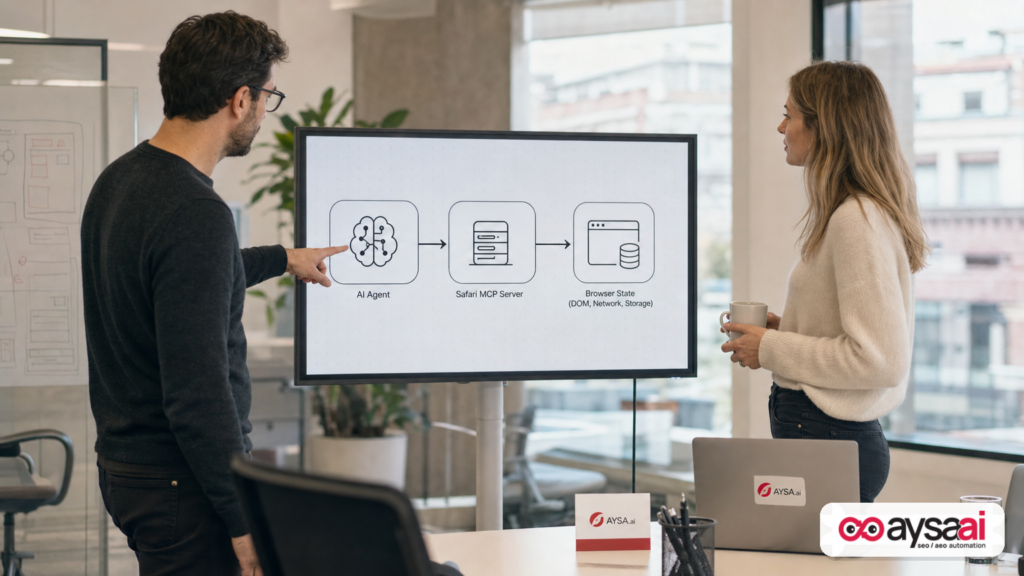
- What changed: WebKit introduced a Safari MCP server that enables AI-based debugging by giving agents direct access to browser signals (like network and DOM) rather than relying on descriptive prompts.
- Why it matters: Safari is a major browser (especially in the U.S.), and Safari-specific issues often hit real customers—slow pages, broken checkout flows, misfiring analytics, or “works in Chrome” compatibility problems.
- What to do: Treat it as an opportunity to operationalize technical SEO: standardize CWV triage, test Safari compatibility, reduce third-party bloat, and build an approval-based change pipeline.
- Where AYSA fits: AYSA is designed to monitor, prepare, ask for approval, and execute accepted website changes—exactly the governance you want when AI starts recommending (or eventually implementing) technical fixes.
Key takeaways (for busy operators)

- Safari debugging is not optional if you sell to U.S. consumers, run local lead-gen, or depend on mobile conversions.
- AI gets more useful when it can see the truth (network calls, render timing, DOM mutations), not just your description of a “slow page.”
- Core Web Vitals work fails in execution more than it fails in diagnosis—because fixes touch code, tags, images, experimentation, personalization, and compliance banners.
- Governance matters: AI proposals should flow through approval, staging, measurement, and rollback—especially for revenue-critical pages.
- SMEs can win because the playbook is repeatable: reduce third-party drag, ship fewer bytes, simplify the critical path, and validate on Safari.
Table of contents
- What changed: Safari becomes “AI-inspectable” via MCP
- MCP in plain English: why this protocol matters
- Why Safari matters (and why “Chrome-only QA” quietly costs you money)
- Why this matters to SEO: CWV is still the fastest way to waste (or win) demand
- What Safari MCP can help you debug (practical use cases)
- What can go wrong: AI debugging isn’t AI fixing
- The SME scenario: a local clinic that “looks fine” but loses patients on iPhone
- Agency impact: from audits to operational performance engineering
- The real gap: diagnosis vs. implementation
- A practical action plan (30/60/90 days)
- Where AYSA fits: approved execution for technical SEO and AI search
- What to do next (checklist)
- Sources and further reading
What changed: Safari becomes “AI-inspectable” via MCP
The announcement, covered by Search Engine Journal, is straightforward but the implications are big: Safari now has an MCP server that lets an AI agent connect to the active Safari window and collect debugging signals—including network requests and the DOM—so the agent can help troubleshoot issues tied to Core Web Vitals (CWV), Safari compatibility, and other web development problems.
Here’s the key line that should change your mental model: you no longer need to write the “perfect prompt” describing what you’re seeing. The agent can find out for itself.
That matters because debugging is usually not a knowledge problem—it’s an observability problem. In technical SEO, the painful moments are rarely “What is LCP?” The painful moments are:
- Why is LCP fine in one environment but bad for real iPhone users?
- Which third-party script is blocking the main thread on Safari?
- Why does the page flicker (CLS) only after consent is accepted?
- Why does the DOM change after load due to personalization, and how does that impact rendering?
If you can give an AI agent access to what a good developer would inspect anyway (network waterfall, DOM state, resource timing), you get a tool that can assist in a way that’s closer to a junior engineer sitting next to you—rather than a chatbot guessing from a paragraph of context.
Source context: Search Engine Journal’s coverage of the Safari MCP server announcement is here: Safari’s New MCP Server Enables AI Debugging For SEO And CWV.
The SEJ piece also points readers to the official WebKit announcement (primary source). If you’re making decisions based on this capability—especially for regulated environments—read the WebKit post directly: WebKit.org (navigate to the relevant announcement).
MCP in plain English: why this protocol matters
MCP stands for Model Context Protocol, an open protocol introduced by Anthropic (as noted in the SEJ coverage) to standardize how AI models connect to external tools and data sources. The practical point isn’t the acronym—it’s the shift from “AI that chats” to “AI that can use tools.”
Most businesses are already living this reality in smaller ways:
- Your analytics tools collect data (GA4, server logs, tag managers).
- Your SEO tools crawl and report.
- Your dev tools show what the browser is doing.
Historically, an AI assistant sat outside that ecosystem. You could paste in snippets, export CSVs, or describe symptoms. MCP is part of a broader move toward AI systems that can safely and consistently “plug in” to:
- Browsers (like Safari, now via an MCP server)
- SEO tools (SEJ mentions common tool support in the ecosystem)
- Platform dashboards (CMS, ecommerce platforms, performance tooling)
For technical SEO, MCP’s real value is repeatability. The best technical teams don’t rely on hero debugging. They rely on procedures:
- Reproduce → Observe → Isolate → Propose fix → Validate → Roll out
If MCP makes the “Observe” step faster and more complete, the whole loop compresses. That’s how you get compounding improvements rather than quarterly fire drills.
Why Safari matters (and why “Chrome-only QA” quietly costs you money)
Many teams still ship websites with an unspoken assumption: “If it works on Chrome, it’s fine.” That assumption is expensive.
Safari’s market position matters for a few reasons that show up directly in revenue:
- iPhone-driven commerce: Many consumer segments over-index on iOS. If you sell direct-to-consumer, you are likely selling to Safari users.
- Local services and clinics: Calls and bookings often come from mobile. A slow or broken booking flow on Safari is lost demand.
- Affluent audiences: Depending on your vertical, iOS usage can correlate with higher average order value or premium service demand (this is not universal—treat it as a segment hypothesis to validate with your own analytics).
The SEJ article emphasizes Safari’s significance in the U.S. and globally. Even without leaning on specific share numbers, you don’t need a statistic to know this: Safari is a “can’t ignore” browser for most businesses that care about customers in the U.S.
Safari also has its own quirks:
- Differences in how certain APIs behave
- Timing and rendering differences that affect layout stability
- Edge cases in storage, cookies, and cross-site behavior
- Performance differences from device constraints (older iPhones in the wild)
You don’t need to be a developer to care about any of this. You just need to care about Conversion rate, lead quality, and brand trust. “The page feels janky” is a trust-killer.
Why this matters to SEO: CWV is still the fastest way to waste (or win) demand
There’s a weird pattern in SEO discussions:
- We talk endlessly about content strategy.
- We talk endlessly about AI answers and citations.
- Then we ship pages that load slowly, shift around, or break on the device the customer actually uses.
Core Web Vitals aren’t the only thing that matters in SEO. But CWV improvements often do something content can’t: they improve the experience of already-earned demand.
If someone is already on your page—because of brand, because of referrals, because you ranked, because you got cited—then:
- Speed impacts engagement.
- Stability impacts trust.
- Responsiveness impacts conversion.
That’s why I treat performance work as a growth lever, not a compliance chore. It’s frequently the simplest way to stop leaking revenue.
For teams thinking about AI Search (AEO/GEO), the logic gets even stronger: AI systems may send fewer clicks for some queries, but the clicks you do get are higher intent. If those users hit friction, you can’t afford it.
If you want a structured way to think about AI-era visibility (beyond traditional rankings), start here: AYSA AI Search Visibility.
What Safari MCP can help you debug (practical use cases)
WebKit’s announcement (as summarized in the SEJ coverage) lists several practical use cases for Safari MCP integration:
- Accessibility testing
- Safari compatibility testing
- Verifying user state
- Web development in Safari
- Web performance analysis
Let’s translate that into concrete “what would I actually do with this?” scenarios.
1) Web performance analysis that starts with evidence, not opinions
Most CWV projects begin with a debate: “It’s the images.” “No, it’s the fonts.” “No, it’s the A/B testing script.” The right answer is: look at the waterfall and the runtime behavior.
If the MCP server allows an agent to access network requests and DOM, an AI assistant could help you:
- Identify the most expensive resources in the critical path
- Spot render-blocking patterns
- Detect late-loading elements that cause layout shift
- Find pages where third-party scripts dominate load behavior
This doesn’t replace developer judgment. It reduces the time to isolate likely culprits.
2) Safari compatibility testing that doesn’t require guesswork
Compatibility bugs are notoriously hard to debug because they’re often conditional:
- Only on certain iOS versions
- Only after accepting consent
- Only when logged in
- Only when a personalization script runs
If an agent can verify user state and observe DOM changes, you can compress the “reproduce the bug” phase—often the most expensive part of fixing anything.
3) Accessibility testing that becomes part of SEO QA
Accessibility is not just a legal or ethical concern; it’s also an operational signal that your site is structurally sound. Clear semantics, stable layouts, and predictable interactions tend to align with better user experience overall.
An AI agent that can inspect page structure and state can assist with accessibility checks as part of release QA—especially useful for teams without dedicated accessibility engineers.
4) “Verify any user state” is a bigger deal than it sounds
SEO and growth teams increasingly ship conditional experiences:
- Logged-in vs. logged-out UI
- Region-based content
- Consent-based tags
- Paywall states
- Dynamic pricing
Many performance issues only exist in one state, so debugging that state is critical. This is also where analytics and attribution break: if tags fail in one state, your reporting lies.
5) SEO debugging beyond CWV
Even though the headline is CWV, “agent can inspect DOM + network” naturally extends to many technical SEO checks, such as:
- Whether critical content is present in the DOM at the right time
- Whether internal navigation is functioning as intended
- Whether redirects or canonicalization behave correctly in the browser
I’m intentionally not over-claiming here: how far this goes depends on the MCP server capabilities and the tools that integrate with it. But the direction is clear: browser-aware SEO debugging.
What can go wrong: AI debugging isn’t AI fixing
When a new AI integration ships, the market tends to split into two camps:
- Camp A: “This changes everything, we can automate the whole stack.”
- Camp B: “This is hype, nothing changes.”
The truth is usually operational: it changes what’s cheap, what’s fast, and what’s reliable. But it doesn’t eliminate the need for ownership.
Here are the failure modes I expect businesses to hit if they treat AI debugging as a magic wand.
Risk #1: Fast diagnosis still needs domain judgment
An AI agent might correctly identify “a large script” but miss the business context:
- That script might be your fraud prevention.
- That script might be required for checkout.
- That script might be required for compliance.
Technical SEO is never purely technical. It’s always a trade-off between performance, measurement, compliance, and UX.
Risk #2: Performance fixes can break analytics (or vice versa)
Many teams optimize CWV and accidentally break tracking. Or they add tracking and accidentally destroy CWV.
In an AI-assisted workflow, you want changes to be:
- Proposed with rationale
- Approved by an owner who understands impact
- Validated in a staging environment (when possible)
- Measured post-release with agreed KPIs
This is exactly why I’m bullish on “approved execution” as the sane model for AI + SEO automation.
Risk #3: Tool access and privacy need governance
If an AI agent can connect to browser state, teams need to think about:
- What data can be exposed in the debugging session?
- How are credentials handled?
- What environments are allowed (prod vs. staging)?
- Who can run agents, and how is it logged?
I’m not asserting any specific security model for Safari’s MCP server beyond what WebKit documents. The point is: treat tool-connected AI like you’d treat any powerful developer integration—because it is one.
The SME scenario: a local clinic that “looks fine” but loses patients on iPhone
Let’s make this real.
Imagine a local clinic (dental, dermatology, physical therapy—pick your vertical). They’re not trying to “win SEO.” They’re trying to keep appointment slots full.
The clinic runs:
- A WordPress or headless site
- An embedded booking widget
- A call tracking script
- A consent banner
- Some remarketing tags
On a modern desktop, it feels fine. On Chrome mobile, it’s okay. On Safari (iPhone), it’s slow and sometimes the booking widget fails to initialize after consent.
Here’s what happens operationally:
- The owner blames “SEO.”
- The marketer blames “the developer.”
- The developer says “works on my machine.”
Meanwhile, the business bleeds demand—especially for high-intent branded searches where users are ready to book right now.
Safari MCP is relevant because it suggests a near-future workflow where an agent can:
- Open the booking page in Safari
- Observe the network and DOM changes through the consent flow
- Identify which script fails, when, and under what state
- Propose a fix (defer loading, change initialization sequence, adjust consent gating)
Again: not “AI fixes everything,” but “AI shortens time-to-clarity.” For an SME, time-to-clarity is often the difference between fixing an issue this week vs. never fixing it.
Agency impact: from audits to operational performance engineering
Agencies have lived through several waves:
- SEO audits becoming commoditized
- Content production scaling with AI
- Reporting shifting from “rankings” to “visibility across surfaces”
Safari MCP accelerates another shift: debugging and QA become partially automatable, which means:
- Simple audits become cheaper and faster.
- Client expectations go up (because “AI should be able to figure it out”).
- The value moves from finding issues to shipping fixes safely and repeatedly.
If you’re an agency, the product you sell can’t be “a list of issues.” The product has to be “performance outcomes with governance.”
This is where the agency model often breaks: agencies can diagnose, but implementation is blocked by client dev cycles, unclear ownership, or fear of breaking revenue pages.
That’s why I believe the winners will package:
- Monitoring
- Prioritization
- Change preparation
- Approval workflows
- Safe execution and rollback
AYSA’s approach is built around that operational reality. If you want to understand how we think about monitoring as the foundation, start here: AYSA Monitoring.
The real gap: diagnosis vs. implementation
In technical SEO, the “hard part” is rarely knowing what to do. The hard part is getting it done without collateral damage.
Here’s why implementation is difficult in real businesses:
- Too many stakeholders: marketing wants speed, product wants features, legal wants compliance, analytics wants tracking, finance wants risk minimized.
- Third-party dependency: chat widgets, scheduling tools, reviews, personalization, experimentation, tag managers.
- Platform complexity: modern stacks are a mix of CMS, ecommerce, CDNs, JS frameworks, and plugins.
- Release fear: changes to performance-critical resources can break the funnel.
This is why I’m not interested in “AI that writes a recommendation.” Recommendations are cheap. Execution is the bottleneck.
In 2026, the competitive advantage is an execution system—a pipeline that consistently turns insights into safe changes.
If you’re exploring AI-assisted SEO tooling, browse the ecosystem view here: AYSA AI SEO Tools.
A practical action plan (30/60/90 days)
If you’re an SME, marketing lead, or agency operator, you don’t need to wait for a perfect Safari MCP integration in your stack to benefit from this trend. Use it as a forcing function to tighten your technical SEO operations.
Days 1–30: Establish a Safari-first performance baseline
- Pick your money pages: homepage, category/service pages, top landing pages, checkout/booking, and 2–3 high-traffic articles.
- Test on real iPhone Safari: not just desktop emulation. (If you can’t do device testing, note that limitation explicitly.)
- Document friction: slow loads, layout shifts, interaction delays, broken widgets, consent-related failures.
- Inventory third parties: identify which scripts load on these pages and why they exist.
Outcome: a short list of pages and problems that matter financially.
Days 31–60: Create a repeatable CWV triage workflow
- Define “what good looks like” for your business: speed thresholds, stability expectations, and conversion KPIs.
- Prioritize fixes by funnel impact: booking/checkout first, then lead-gen pages, then content.
- Bundle fixes: tackle the big repeatable levers (images, fonts, scripts, caching) rather than chasing edge cases.
- Set up an approval queue: nothing touches production without a named owner approving the change set.
Outcome: you stop treating performance as ad hoc, and start treating it as operations.
Days 61–90: Implement, validate, and keep it from regressing
- Ship the top 3–5 changes that reduce critical path weight or script contention.
- Validate in Safari and confirm nothing broke (booking, checkout, tracking, consent flows).
- Monitor for regression as new tags, plugins, or campaigns get added.
- Institutionalize: make CWV and compatibility part of launch QA, not a quarterly project.
Outcome: sustained performance improvements rather than temporary wins.
Where AYSA fits: approved execution for technical SEO and AI search
Safari’s MCP server points to a world where AI agents can diagnose issues with much more fidelity. That’s great—but diagnosis is only half the job.
AYSA is designed around the missing half: turning insights into changes safely.
Here’s the model we believe businesses should adopt as AI becomes more tool-connected:
- Monitor: continuously watch the site for SEO and experience issues, including changes that create performance regressions. See: AYSA Monitoring
- Prepare: generate proposed fixes as clear, reviewable change sets (not vague advice).
- Ask for approval: ensure an accountable human signs off—especially when changes touch revenue, tracking, or UX.
- Execute accepted changes: implement what’s approved, then validate and measure impact.
This is the difference between “AI recommendations” and SEO automation with governance. It’s also how SMEs compete with bigger teams: they don’t out-headcount enterprises, they out-execute them.
If you want to explore what this looks like in a system (including how we think about visibility across AI answers, not just rankings), start here:
What to do next (checklist)
- Stop treating Safari as “secondary.” If you’re U.S.-focused, it’s a primary revenue surface.
- Pick 10 pages that matter and test them on iPhone Safari this week.
- Identify your third-party script “tax” on those pages and make sure each script has an owner and a reason to exist.
- Create an approval workflow for performance changes (even if it’s just a shared doc + sign-off).
- Operationalize monitoring so performance doesn’t regress after every marketing launch.
- Plan for AI-connected debugging: as MCP-based tooling matures, make it part of your QA and release process.
Sources and further reading
- Search Engine Journal: Safari’s New MCP Server Enables AI Debugging For SEO And CWV
- WebKit.org (official WebKit announcements)
- Search Engine Journal: Latest news
- Search Engine Journal: SEO section
- AYSA: Monitoring
- AYSA: AI search visibility
- AYSA: AI SEO tools
- AYSA: Pricing
- AYSA: Blog
Continue the AI search topic inside AYSA.
Use these pages to connect the article with AI SEO tools, AI visibility monitoring, AI Overviews and approved website execution.
Turn this topic into a website action plan.
Use these AYSA hubs to move from reading to technical fixes, AI visibility monitoring, research, glossary context and approval-first SEO execution.

