Agentic Readiness Is the New Technical SEO: How to Use Lighthouse, Fix Your Accessibility Tree, and Prepare Your Site for AI Agents
Google’s new Lighthouse “Agentic Browsing” report is a wake-up call: it tests whether AI agents can actually use your site—not just crawl it. Here’s what changed, why it matters for SMEs, and a practical action plan to improve discoverability, accessibility-tree usability, WebMCP readiness, and LLMs.txt governance.
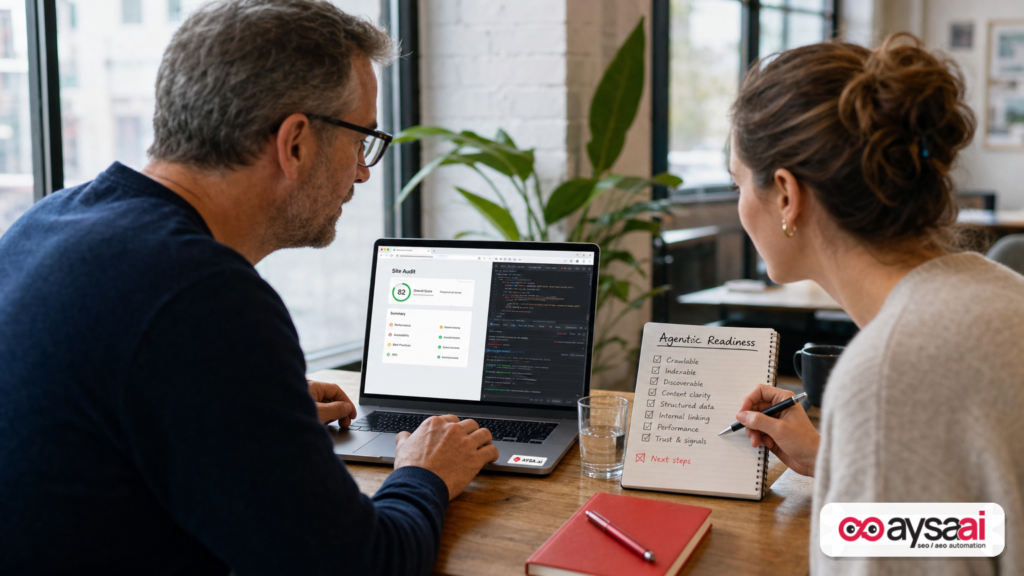
AI agents are moving from novelty to workflow. Customers are already asking assistants to do things like “book me the earliest appointment,” “reorder my last purchase,” “find the best room for a family of four,” or “compare pricing and start checkout.”
That changes the bar for what a “good website” is.
For 20+ years, Technical SEO was largely about making pages crawlable and indexable for search engines. But agents don’t just read pages—they attempt to use them. They click buttons, navigate flows, fill forms, and need reliable structure to complete tasks.
That’s why Google introducing an “Agentic Browsing” report in Lighthouse matters. It’s an early signal of where the web is heading: a world where your site isn’t only evaluated as content, but as a set of actions and affordances that machines must be able to understand and operate.
This editorial is a practical field guide for small and mid-sized businesses (SMEs), in-house marketers, and agencies who want to get ahead of the next technical shift—without chasing hype or implementing speculative files that don’t pay off.
Primary source: Search Engine Journal’s coverage of the new Lighthouse report: How To Use Lighthouse To Test Your Website For Agentic Readiness.
Concise summary
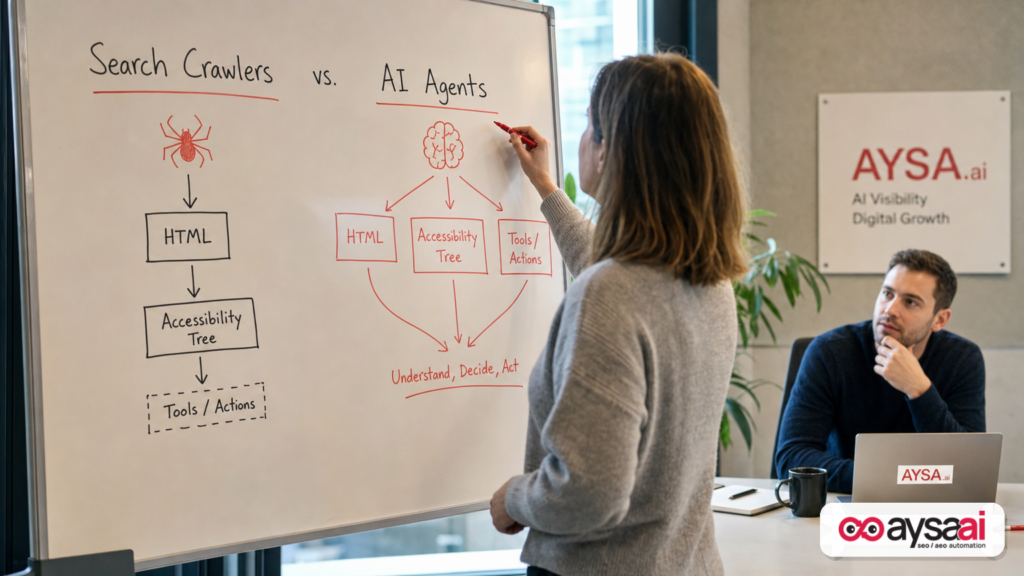
Google’s new Lighthouse “Agentic Browsing” checks (available in Chrome Canary) focus on whether AI agents can discover and operate your site. The big ideas are: (1) the accessibility tree becomes critical because it’s how agents identify real controls and meaning, (2) emerging standards like WebMCP aim to expose “tools” on your site to agents, and (3) LLMs.txt is being discussed as a way to provide agent-focused instructions—separate from search ranking guidance.
For most businesses, the immediate wins are not exotic: fix semantic HTML, labels, roles, and predictable navigation; reduce fragile, script-only interactions; and build governance for what agents should and should not be allowed to do. The businesses that execute this well won’t just “rank”—they’ll convert better when agents become a mainstream interface.
Key takeaways (for founders and operators)
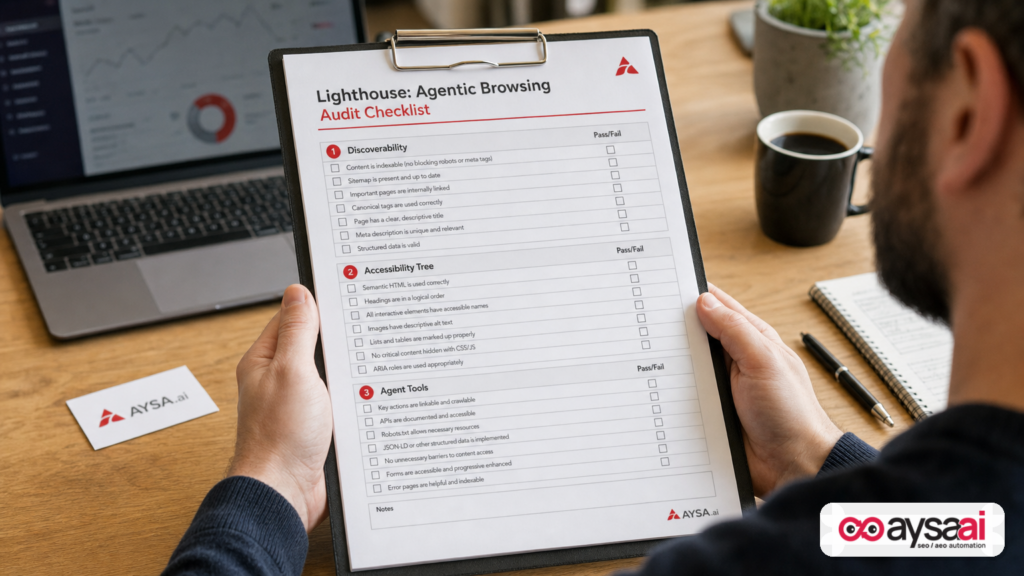
- Agentic readiness is usability for machines. It sits at the intersection of technical SEO, accessibility, and conversion optimization.
- Lighthouse is becoming an early warning system. If Lighthouse says agents may struggle, don’t assume “Google will figure it out.” Customers will just get routed elsewhere.
- The accessibility tree is now revenue infrastructure. The same semantics that help screen readers help agents identify buttons, forms, and intent.
- WebMCP and LLMs.txt are emerging concepts. Don’t rush implementation blindly—build readiness, track the ecosystem, and implement when your use cases justify it.
- Execution is the moat. The businesses that can monitor, propose, approve, and ship fixes reliably will outperform those stuck in audits and slide decks.
Table of contents
- What changed: from crawlability to agent usability
- What Lighthouse’s Agentic Browsing report is actually testing (in plain English)
- How to run Lighthouse Agentic Browsing (Chrome Canary)
- The first pillar: discoverability for agents (not just bots)
- 1) Accessibility tree: the “agent UI” you didn’t know you had
- 2) WebMCP: exposing site capabilities as agent tools (what to know now)
- 3) LLMs.txt: governance and instructions for agents (and why it’s not the same as SEO)
- What can go wrong: risk, abuse, and brand damage
- A concrete SME scenario: a local clinic that wants agents to book appointments correctly
- What agencies and in-house teams need to rethink
- A practical 30–60 day action plan (prioritized)
- Where AYSA fits: monitoring + approved execution for agentic readiness
- What to do next
- Sources and further reading
What changed: from crawlability to agent usability
Traditional SEO taught businesses to optimize for systems that largely behave like this:
- Fetch HTML.
- Render (sometimes).
- Extract links and text.
- Index content.
- Rank results.
Agentic browsing introduces a new behavior pattern:
- Interpret the page like a user would.
- Identify interactive elements that represent actions (buttons, menus, toggles, inputs).
- Decide which action to take to complete a task.
- Execute multi-step workflows (search → filter → select → checkout → confirmation).
- Recover from errors and ambiguities.
That last part—recovering from errors and ambiguity—is where many modern websites fail. Not because the content is “bad,” but because the interface is built in ways that are hard for non-human actors to understand reliably.
And that’s why Lighthouse’s shift is important: it’s not telling you “write more content.” It’s forcing the uncomfortable question: Can something that’s not human actually operate your site?
In my view, this is the next layer of technical SEO. Not a replacement for the fundamentals, but an extension: machines that act like users will reward sites that behave predictably and punish sites that are clever but brittle.
What Lighthouse’s Agentic Browsing report is actually testing (in plain English)
The Search Engine Journal write-up explains that Google’s new Lighthouse report checks three broad areas: discoverability for agents, WebMCP integration, and an evaluation related to LLMs.txt (source).
Let’s translate that into business terms:
- Discoverability: Can an agent find and interpret the critical parts of your pages without guessing? Not just “is the page indexed,” but “is the UI understandable?”
- Tools/Actions (WebMCP concept): Do you expose structured ways for agents to use your site features (like booking, ordering, requesting a quote) rather than forcing them to reverse-engineer your front-end?
- Instructions/Governance (LLMs.txt concept): Do you provide clear, machine-readable guidance about what agents are allowed to do, where key information lives, and how to interact safely?
Important nuance: this is not primarily a “rankings” report. It’s about how agents interact with your site. Search Engine Journal’s article explicitly notes that LLMs.txt is framed around agents using your site—not as a requirement for appearing in Google’s AI Search features (source).
How to run Lighthouse Agentic Browsing (Chrome Canary)
Per the source article, you may not see the agentic report in stable Chrome yet. The path described is:
- Install Chrome Canary (the beta/preview channel).
- Open a page on your site.
- Right-click → Inspect (Developer Tools).
- Go to the Lighthouse tab.
- Look for the new category: Agentic Browsing.
I’m intentionally keeping this “how-to” high level because Lighthouse UI and release channels change quickly. The point is not the exact Clicks; the point is that the tool is now accessible to anyone who can open DevTools—meaning agent readiness is moving from research labs into everyday SEO workflows.
If your organization isn’t comfortable running Canary on production machines, run it on a dedicated testing profile or a separate workstation. Treat it like a diagnostic tool.
The first pillar: discoverability for agents (not just bots)
When SEOs hear “discoverability,” they think: Robots.txt, sitemaps, Internal linking, Canonicalization, status codes.
Those still matter. But agent discoverability has an extra layer: UI discoverability.
Example: You might have a “Book now” action that is visually obvious to humans—but implemented as a non-semantic <div> with a JavaScript click handler, no proper role, and no accessible name. A human sees a button. An agent may see a generic container with no clear action affordance.
Another example: your product filters may be gorgeous but depend on custom components that don’t expose state properly. Humans can trial-and-error. Agents need consistent, labeled states: checked/unchecked, expanded/collapsed, enabled/disabled.
From a business standpoint, this becomes a funnel issue:
- If an agent can’t reliably find “pricing,” “availability,” “returns,” or “contact,” it may choose not to recommend you.
- If an agent can’t complete a task, it may route the user to a competitor with a simpler flow.
Traditional SEO rewarded content that was easy to parse. Agentic SEO will reward experiences that are easy to operate.
1) Accessibility tree: the “agent UI” you didn’t know you had
This is the part most teams underestimate.
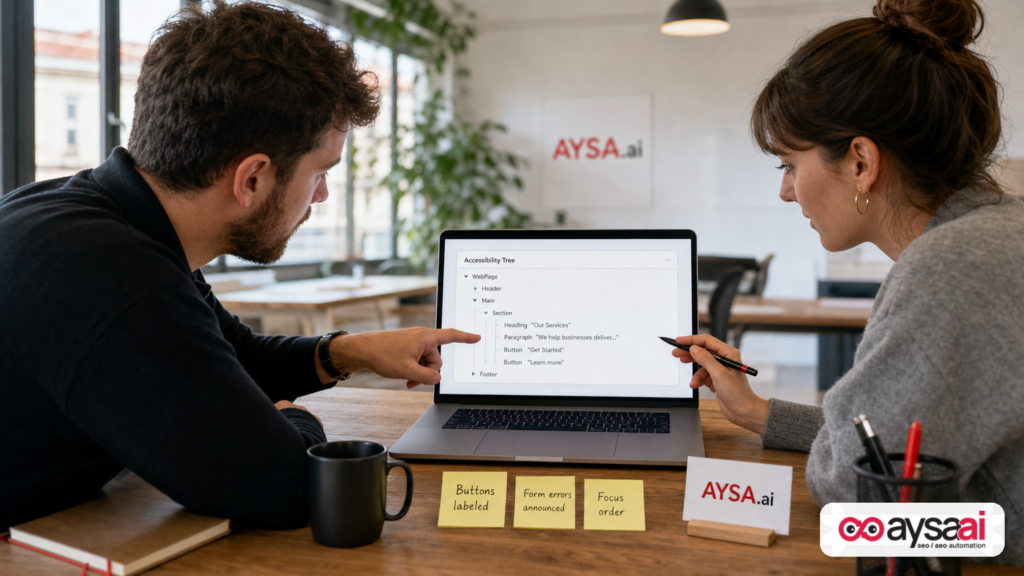
Search Engine Journal’s summary highlights that agents can interpret a page through three lenses: visual rendering (screenshots), HTML, and the accessibility tree—the structure originally designed for assistive technologies like screen readers (source).
Why does that matter? Because the accessibility tree often provides the most reliable “map” of what the user can do: where the buttons are, what inputs mean, how menus are structured, what labels belong to which controls.
Here’s the business translation:
- Semantic HTML reduces ambiguity. A real
<button>with an accessible name beats a clickable<div>every time. - Accessible names are action descriptors. “Submit” is weaker than “Request a quote” or “Book appointment.”
- Error handling must be machine-parseable. If a form fails, the error needs to be programmatically associated with the field.
- Focus order is workflow order. Agents (and keyboard users) depend on a predictable sequence.
What to fix first (high ROI)
If you only have bandwidth for a handful of improvements, start with:
- Buttons and links: Ensure all interactive elements are real interactive elements (button, link, input) with clear labels.
- Forms: Labels tied to inputs, required fields indicated, validation errors announced clearly.
- Menus and dialogs: Proper roles, aria-expanded states, close buttons that are reachable and labeled.
- Critical tasks: Booking, checkout, quote request, contact, “find a location,” “check availability.”
Notice what’s missing: “Write 50 blog posts.” This is infrastructure work. It’s not glamorous, but it’s the difference between agents being able to act and agents giving up.
How this connects to SEO and conversions
Even if agentic browsing takes time to become mainstream, accessibility-tree improvements often pay off immediately:
- Better mobile usability and fewer rage clicks (because UI elements behave more predictably).
- Cleaner analytics (events tied to real elements instead of fragile selectors).
- Higher form completion rates (clearer validation and guidance).
It’s one of the rare technical investments that helps humans and machines at the same time.
2) WebMCP: exposing site capabilities as agent tools (what to know now)
The SEJ piece references WebMCP as a proposed web standard for exposing structured tools for AI agents (source). It describes two types—declarative and imperative—with the idea that this can help agents understand and use your site functionality.
Let’s be careful here: “proposed standard” is the key phrase. Not every proposal becomes a widely adopted reality, and timelines are uncertain. But proposals are still useful because they indicate direction.
The direction is clear: sites will increasingly be expected to provide machine-consumable ways to do tasks.
What WebMCP is trying to solve
Most websites today expose actions indirectly:
- A booking action is embedded in a JavaScript app.
- A checkout action involves multiple stateful steps.
- A “filter products” action changes URL parameters or client-side state.
Humans can infer intent. Agents need explicitness.
WebMCP (as described in the source) is essentially an attempt to standardize “tool exposure” so an agent can see: Here is a form. Here is what it does. Here are the allowed inputs. Here is how to confirm success.
What you should do now (even before WebMCP is mainstream)
You can prepare without implementing any new standard:
- Stabilize your critical flows. Reduce unnecessary steps; remove confusing modal chains; ensure each step has a real URL when possible.
- Expose meaningful URLs. If filters and states can be represented via clean query parameters, agents have a better chance.
- Document your “tasks.” Internally, list your top 10 user tasks and the exact steps required to complete them.
- Create test scripts. If a human QA tester can’t reliably complete a task, an agent won’t either.
Think of this as “agent QA,” similar to how mobile-first forced teams to test on small screens. Agent-first will force teams to test for machine-operability.
3) LLMs.txt: governance and instructions for agents (and why it’s not the same as SEO)
The SEJ article highlights a tension that many marketers are feeling: Google has published guidance in other contexts suggesting you don’t need LLMs.txt for ranking in certain AI search features, yet Lighthouse is now evaluating LLMs.txt in the context of agents using your site (source).
Here’s the important framing:
- Search features are about being surfaced.
- Agentic browsing is about being usable.
LLMs.txt, as described, is more like a “human-readable, machine-usable guide” in markdown form. Think: a map of your site and policies for agents at inference time—similar in spirit to robots.txt, but focused on task interaction and interpretation rather than crawl permissions.
When LLMs.txt might make sense
Based on the source’s cautious guidance, many sites won’t need this immediately (source). Still, it could be valuable if you have:
- Complex site sections that agents routinely misunderstand (pricing tiers, eligibility, regulated products).
- Critical policies that must be followed (returns, cancellations, medical disclaimers, age verification).
- High-stakes tasks (financial actions, account changes, bookings with penalties).
When LLMs.txt might be a distraction
If your site currently has basic issues—unlabeled controls, broken forms, confusing navigation—LLMs.txt won’t save you. Agents still have to operate the front-end and backend.
Governance files are not substitutes for accessible, stable UX.
Governance: decide what you want agents to do
The deeper business question is: what tasks should agents be allowed to complete?
- Should agents be able to place orders? Or only prepare carts?
- Should agents be able to book appointments? Or only request availability?
- Should agents be able to access account areas? Under what authentication model?
Even if you never publish LLMs.txt, you need internal answers. Because the second agents become mainstream, you’ll be forced to formalize these policies quickly—often under pressure.
What can go wrong: risk, abuse, and brand damage
Every time the web gets a new interface layer, abuse follows.
Agentic browsing introduces risks that many SMEs haven’t considered yet:
1) Unintended actions
If your site has destructive actions (cancel order, delete account, change subscription), you must ensure strong confirmation patterns and clear states. A poorly labeled button or ambiguous UI could lead to costly mistakes.
2) Fraud and exploitation
If agents can interact with forms and checkout flows, attackers may use agent-like automation to probe weaknesses. That’s not new—bots exist—but “agentic” tooling could make sophisticated automation more accessible.
3) Brand misrepresentation
If agents don’t understand your policies, they may confidently tell users the wrong information (e.g., “returns are free” when they’re not). That can lead to churn, refunds, and support burden.
4) Support cost blow-ups
When agents fail, customers don’t blame the agent—they blame your brand. Expect: “Your site is broken” even when the site is fine for humans.
This is why agentic readiness is not a “future SEO nice-to-have.” It’s risk management.
A concrete SME scenario: a local clinic that wants agents to book appointments correctly
Let’s make this real.
Imagine a multi-provider clinic (dental, dermatology, physical therapy—pick your vertical). They rely on online booking. They also rely on phone calls, but margins are tight and staff time is limited.
A customer asks an assistant: “Find me a dermatologist near me with availability next Tuesday after 3pm and book it.”
Now the assistant (or agent) attempts to use your site.
Where clinics often fail agentic readiness
- Provider selection is a custom dropdown with no accessible label, so the agent can’t choose “Dermatology.”
- Date picker is fully visual and not keyboard-friendly, so the agent can’t select Tuesday.
- Time slots load dynamically without announcing state changes, so the agent doesn’t know which slots are available.
- Form errors are not tied to fields, so the agent can’t correct “Phone number required.”
What “agent-ready” looks like (without magic)
- Specialty and provider dropdowns have explicit labels and accessible names.
- Date and time can be chosen via standard form controls (or accessible date picker patterns).
- Availability is exposed as text, not just color on a calendar.
- Validation errors are announced and associated to the correct input.
Notice: these are not “AI features.” They’re high-quality web fundamentals. The same improvements help screen readers, keyboard users, and mobile users.
And in a world where agents influence decisions, clinics that make booking easy for agents will likely see more completed bookings—while clinics with fragile UI will see drop-off and more calls (higher cost per appointment).
What agencies and in-house teams need to rethink
Agentic readiness will expose the difference between teams that:
- Produce audits, and
- Ship improvements.
Historically, many SEO retainers delivered value through recommendations. But agentic readiness is not a “meta description optimization” problem. It’s cross-functional:
- Front-end engineering (semantics, components, focus management)
- UX (flow simplification, clear actions)
- Compliance (what agents may do)
- Analytics (measure task success)
- SEO (discoverability, structured content, internal linking)
The uncomfortable truth
If you can’t get changes implemented, you don’t have a strategy problem—you have an execution system problem.
That’s why we built AYSA as an execution engine for SEO/AEO/GEO: monitor, prepare, ask for approval, then execute accepted changes. Because modern search (and now agentic behavior) moves too fast for quarterly roadmaps and ticket backlogs.
If you’re an agency, this shift is also an opportunity: you can move upstream into technical governance and experience optimization, not just content and links.
A practical 30–60 day action plan (prioritized)
Here’s the playbook I’d use for a typical SME site (ecommerce, local services, SaaS) that wants to prepare without overbuilding.
Phase 1 (Week 1–2): establish baselines and task priorities
- List your top 5–10 revenue tasks. Examples: “book,” “request quote,” “checkout,” “find a location,” “schedule demo.”
- Run Lighthouse Agentic Browsing on the key pages that power those tasks (homepage, category page, product page, booking page, cart/checkout, contact).
- Document agent blockers as plain-language issues, not dev jargon. “Agent can’t find submit button” is better than “aria-label missing.”
- Set up monitoring. If you don’t continuously watch key pages, you won’t know when a redesign breaks agent usability.
AYSA note: this is where AYSA Monitoring should be in place, because agent readiness isn’t a one-time project. Sites change weekly.
Phase 2 (Week 2–4): fix accessibility-tree fundamentals on money pages
- Convert fake buttons into real buttons. Ensure interactive elements are represented correctly in the DOM.
- Ensure every control has a clear accessible name. Especially primary CTAs.
- Fix form labeling and validation. Tie errors to fields; don’t rely on color alone.
- Stabilize navigation elements. Menus, accordions, tabs must expose state.
- Reduce modal complexity. Too many popups create dead ends for agents and humans alike.
AYSA note: an execution system matters because many of these fixes are small but numerous. AYSA is built to prepare changes and request approval before implementation—see AYSA AI SEO tools and how we approach operational SEO.
Phase 3 (Week 4–6): make tasks predictable and measurable
- Create “task success” metrics. Not vanity metrics. Example: booking completion rate, checkout completion rate, demo request completion rate.
- Instrument key steps. Even simple events can help detect “agents (and users) can’t proceed past step 2.”
- Ensure states have text equivalents. “Out of stock,” “Fully booked,” “Discount applied” should be readable in the DOM.
- Write internal agent policies. Decide what you want agents to do. This precedes any LLMs.txt publishing.
Phase 4 (Week 6–8): evaluate emerging standards strategically
Only after you’ve fixed fundamentals should you evaluate:
- Whether you have a real WebMCP use case (site-as-a-tool).
- Whether an LLMs.txt file would reduce confusion or risk for your customers.
Remember: proposals evolve. Stay informed, but don’t confuse “being early” with “being effective.”
Where AYSA fits: monitoring + approved execution for agentic readiness
At AYSA, we think the next era of SEO is less about producing recommendations and more about operating a system:
- Monitor what matters across search and site experience.
- Prepare changes that improve outcomes.
- Ask for approval so humans keep control of brand, compliance, and risk.
- Execute accepted changes quickly and consistently.
That’s especially relevant for agentic readiness, because fixes tend to be:
- Cross-functional (SEO + UX + dev + compliance)
- High volume (many small semantic improvements)
- High leverage (a broken primary CTA can erase conversions)
Here’s how AYSA fits into the workflow:
- Visibility strategy: Align agentic readiness with AI search discovery, citations, and conversion flows via AYSA AI search visibility.
- Monitoring: Keep watch on key pages and templates using AYSA Monitoring so you catch regressions early.
- Execution system: Use AYSA’s approach to propose changes, obtain approval, and execute—so improvements actually ship.
- Operational learning: Keep up with evolving AI and search changes via the AYSA blog.
- Planning and fit: Evaluate the right plan for your organization at AYSA pricing.
One more point of view: agentic readiness will create a new kind of technical debt. Teams that can’t ship small fixes quickly will fall behind—not because they don’t know what to do, but because they can’t operationalize doing it.
What to do next
- Run the Lighthouse Agentic Browsing report on your top 5 money pages.
- Pick 10 fixes that improve semantic controls and form clarity (labels, roles, error handling).
- Simplify one critical flow (booking, checkout, quote) to reduce modal chains and ambiguous steps.
- Define your agent policy: what should an agent be able to do on your site, and what must require explicit user confirmation?
- Set up continuous monitoring so future releases don’t undo the work.
- Only then evaluate WebMCP/LLMs.txt based on your actual customer tasks and risk profile.
Sources and further reading
- Search Engine Journal: How To Use Lighthouse To Test Your Website For Agentic Readiness
- Search Engine Journal: SEO section (context and related coverage)
- Search Engine Journal: Latest news (to track ongoing changes)
Note on official documentation: The supplied research context references Google guidance and proposals (WebMCP, LLMs.txt). However, the official primary documentation URLs were not included in the provided context. Rather than risk mislinking or inventing sources, I’m intentionally limiting external citations to the source article and its site sections. If you want, we can update this piece with official links once they’re provided or added to your editorial research pack.
Continue the AI search topic inside AYSA.
Use these pages to connect the article with AI SEO tools, AI visibility monitoring, AI Overviews and approved website execution.
Turn this topic into a website action plan.
Use these AYSA hubs to move from reading to technical fixes, AI visibility monitoring, research, glossary context and approval-first SEO execution.