
GA4 Is Undercounting Your AI Referrals: Fix Your Channel Grouping Before You Make the Wrong SEO Calls
GA4’s native “AI Assistant” channel is a helpful start—but it can quietly fragment AI referrals (like ChatGPT) across multiple channels, leading to underreporting and bad decisions. This is the durable, business-grade way to measure identifiable AI referrals, explain the blind spots GA4 can’t solve, and turn the data into approved execution with AYSA.

GA4 finally put “AI Assistant” on the dashboard. That’s progress.
But if you’re a founder, a marketing lead, or an agency responsible for reporting—and you’re using that single channel as your “AI traffic” number—there’s a strong chance you’re undercounting. Not by a rounding error, either. In many accounts, one AI referrer (like ChatGPT) shows up in three different channels at the same time. That fragmentation can quietly distort your decisions about SEO, content, CRO, and even paid media budgets.
This editorial is a practical, business-first guide to what changed, why it matters, what can go wrong in GA4, and how to build a durable AI referrals view that doesn’t collapse the moment platforms, domains, or GA4 defaults change. It also explains what analytics still cannot measure (and what you should track instead), plus how AYSA.ai helps teams move from “interesting data” to Approved Execution on the site.
Research inspiration and context: Search Engine Journal.
Key takeaways (read this before you touch GA4)
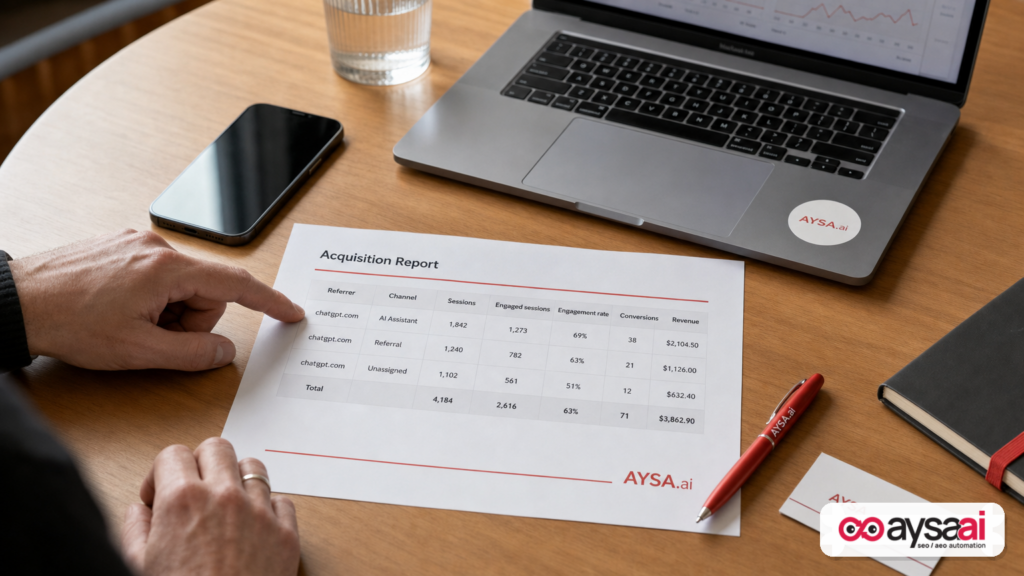
- GA4’s AI Assistant channel is a starting point, not a total AI number. It can fragment one source across AI Assistant, Referral, and Unassigned depending on how GA4 receives source and medium.
- Channels are rule logic—not truth. GA4 assigns channels using combinations like “source + medium,” so inconsistent tagging creates inconsistent channels.
- The most durable fix is a custom channel group that matches on session source (not medium). This collapses the fragments into one defensible AI referrals bucket.
- Even perfect channel rules can’t capture “dark AI.” If referrers are stripped and the session becomes Direct, you can’t regex your way back to certainty.
- Don’t confuse AI referrals with AI influence. Some of the biggest AI impact is citation/mention without a click; that needs a separate measurement posture and operational plan.
- AYSA’s role: Monitoring + approved execution. Once you’ve got a clean view, the advantage comes from shipping improvements—continuously and safely—so assistants cite you and visitors convert.
Table of contents
- What changed in GA4—and why it matters now
- What “AI traffic” actually means (and why teams talk past each other)
- The quiet problem: one AI source, three GA4 channels
- Why GA4 classifies channels this way (and why AI makes it messy)
- Why this matters for SMEs: budget, priorities, and revenue attribution
- The obvious fixes that don’t work (and why they fail)
- The durable fix: build one AI channel that matches on source (not medium)
- Regex and governance: how not to sabotage your own reporting
- The unavoidable blind spots: what GA4 still can’t measure
- A concrete SME scenario: the ecommerce brand that almost cut SEO
- Agency implications: reporting templates, retainer scope, and accountability
- AI-era KPIs that are harder to game (and more useful in a meeting)
- Where AYSA fits: from measurement to approved execution
- What to do next: a practical checklist you can run this week
- Sources and further reading
What changed in GA4—and why it matters now

GA4 introduced a native “AI Assistant” channel in its Default Channel Group. The intent is simple: if GA4 recognizes a referrer as an AI assistant, it labels the session and drops it into a dedicated bucket—without you building custom channel rules.
That’s not a cosmetic change. It’s Google acknowledging that AI assistants are now a real discovery layer. When the measurement stack finally creates a category, budgets and priorities follow. That’s exactly why accuracy matters.
But there are two practical problems hiding behind a well-meaning default:
- Recognition is not stable. The list of AI assistants GA4 “recognizes” can change over time (the SEJ research calls this out explicitly). That means today’s “AI Assistant” number may not be comparable to last quarter’s—even if your business didn’t change at all.
- Recognition is not consistent. Even within one assistant, different apps, in-app browsers, and privacy behaviors can yield different Attribution inputs to GA4. When those inputs differ, GA4’s channel rules classify the sessions differently.
Put bluntly: GA4 gave you a new label. It did not give you a full measurement model for AI-driven discovery.
What “AI traffic” actually means (and why teams talk past each other)
Before you fix anything in GA4, you need internal clarity. Most teams mix these three ideas and call them all “AI traffic”:
- AI referrals: A user clicked a link inside an AI assistant and landed on your site with an identifiable referrer (e.g., an assistant domain appears as session source).
- AI-mediated search: A user used an AI layer inside a traditional search engine experience, then clicked a result. In analytics, this may look like ordinary organic search.
- AI influence without a click: The assistant recommended you, summarized you, or compared you, and the user later navigated via brand search, direct typing, a bookmark, or a separate channel.
This editorial focuses on the first category—identifiable AI referrals in GA4—because that’s where the undercounting problem is immediate and solvable. But you should treat the other two categories as real business impact that requires different signals and different operational habits.
If you’re presenting to leadership, label your metric honestly: “Identifiable AI assistant referrals.” Don’t label it “Total AI impact.” You will lose credibility the first time someone asks, “What about the people who didn’t click?”
The quiet problem: one AI source, three GA4 channels
The SEJ research highlights a situation that I’ve now seen repeatedly in the wild: the same source (for example, chatgpt.com) appears in multiple GA4 channels at the same time. Not multiple sources—one source fractured across channels.
In practice, this often looks like:
- AI Assistant: Sessions with a source/medium combination GA4 recognizes and tags into its AI Assistant rules.
- Referral: Sessions from the same assistant domain that arrive as ordinary “referral” traffic (including older traffic before the AI Assistant channel rolled out on your property, and traffic GA4 didn’t tag as ai-assistant).
- Unassigned: Sessions where GA4 has a source but the medium is “(not set),” so the session doesn’t match channel rules and falls into Unassigned—the bucket almost nobody monitors.
Why is this so dangerous for business decisions?
- If you report only the AI Assistant channel, you are almost certainly undercounting.
- If AI referrals convert well (often the case for high-intent recommendations), undercounting can cause you to de-prioritize the exact content and pages that are pulling incremental revenue.
- If Unassigned is quietly growing, it can disguise attribution problems that will later show up as “Direct is up” with no explanation.
This is not a “GA4 nerd” issue. This is a budget governance issue. Your reporting shapes your strategy—and your strategy shapes your backlog.
Why GA4 classifies channels this way (and why AI makes it messy)
GA4 channels aren’t a natural law. They’re rule sets that map dimensions to buckets. A channel is basically an “if-this-then-that” layer that assigns a human-friendly name to a session based on values like:
- Session source
- Session medium
- Campaign parameters
- Other attribution dimensions
That approach works well when the underlying data is stable. Traditional channels have stable patterns:
- Organic search commonly appears as a known search engine source with medium “organic.”
- Paid social commonly appears with known source/medium conventions or UTM parameters.
- Email traffic typically uses tagged UTMs.
AI assistants introduce instability because the journey is mediated by:
- Mobile apps and embedded browsers (which can handle referrers differently than standard browsers)
- Privacy controls that may restrict referral information
- Rapidly changing assistant ecosystems (domains, routes, redirectors, and new entrants)
So GA4 may see:
- source = assistant domain, medium = ai-assistant
- source = assistant domain, medium = referral
- source = assistant domain, medium = (not set)
- or no usable referrer at all (which becomes Direct/none)
From GA4’s perspective, it’s doing what it’s designed to do: apply channel rules to whatever it receives. From your perspective, the business risk is that the same customer intent is split across multiple labels.
Why this matters for SMEs: budget, priorities, and revenue attribution
SMEs don’t have infinite analytics patience. You have a finite number of “data projects” you can justify before the team checks out. So why spend time here?
Because AI referrals, even at low volume, often represent high-intent discovery. Users aren’t casually scrolling; they’re asking for a decision. When that decision lands on your site, you want to:
- measure it accurately
- understand which pages it lands on
- improve those pages so the traffic converts
Here’s how misclassification becomes a real business failure:
Failure mode #1: You cut the wrong work
Leadership sees “AI Assistant” as tiny and concludes AI isn’t relevant. Content updates get delayed. Technical cleanup gets postponed. The competitor who invests now becomes the assistant’s default citation later.
Failure mode #2: You over-credit paid media
If AI traffic is leaking into Referral, Unassigned, or Direct, you can accidentally attribute incremental performance to the channels you do trust—often paid. That can lead to budget reallocation that looks rational in the spreadsheet but wrong in reality.
Failure mode #3: You optimize the wrong pages
AI referrals often land deeper than traditional top-of-funnel traffic. If your analytics view undercounts or mislabels them, you may optimize blog posts for “traffic” while ignoring the service pages, category pages, or product pages that AI users actually land on.
Failure mode #4: You report a fake trend
If the AI Assistant channel rolled out mid-period (or was updated), month-over-month comparisons can reflect labeling changes rather than real behavioral change. You celebrate “AI growth” that is actually “GA4 classification growth.” Then you set expectations you can’t meet next month.
The obvious fixes that don’t work (and why they fail)
When teams notice the AI Assistant channel is smaller than expected, they typically try one of three shortcuts. Each one has a hidden trap.
Shortcut #1: “Just use the AI Assistant channel”
This is the most common error because it feels official. The channel exists, so it must be the truth.
But a default channel is only as good as the rules and the inputs. If assistant sessions are also showing up as Referral and Unassigned, then the AI Assistant channel is not the total. It’s a subset.
Also, assistants not included in GA4’s recognized list won’t be captured there. The SEJ research notes that some major assistants may not be included at any given time, meaning your “AI Assistant” number can miss meaningful sources.
Shortcut #2: “We’ll compare this month to last month and see if AI is growing”
If labeling changed during the period (rollout timing, recognition updates, definition changes), you’re comparing two different measurement regimes. That’s not trend analysis; it’s comparing apples to a new apple label.
Trend analysis is only valid when the underlying classification is consistent over time. If it isn’t, fix classification first.
Shortcut #3: “Rank tracking will tell us if AI is working”
Rankings are not referrals. AI discovery isn’t only “where you rank”; it’s whether you’re cited, recommended, summarized, and clicked.
Even if rankings correlate with citations in some situations, you still need a click-based view for on-site outcomes. Otherwise, you can’t answer the only question a business actually cares about: “Did it produce revenue or leads?”
The durable fix: build one AI channel that matches on source (not medium)
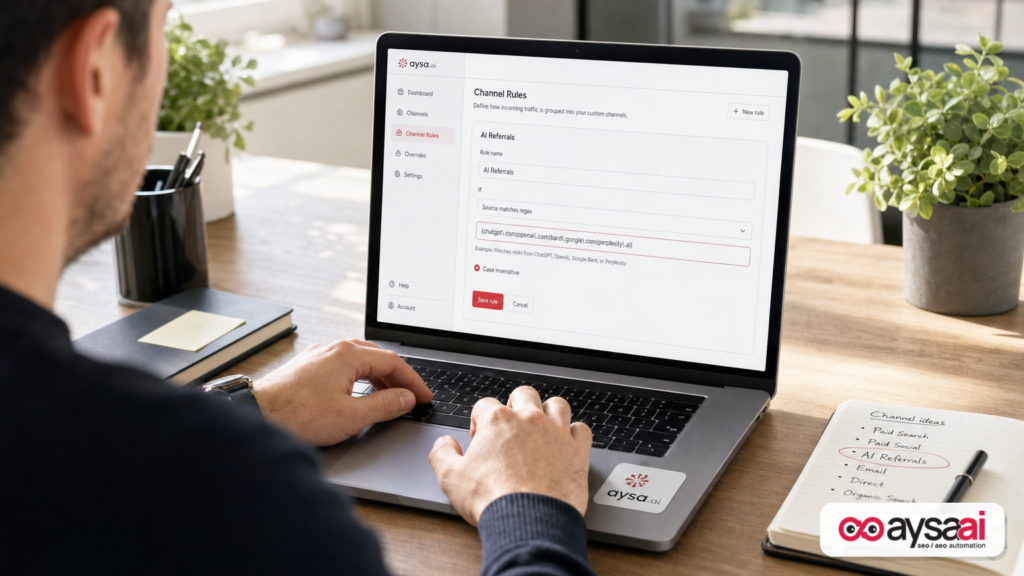
If your goal is a defensible, repeatable AI referrals number inside GA4, the cleanest solution is to build a custom channel group that matches AI traffic based on session source and ignores medium.
This is the core tactic highlighted in the Search Engine Journal research, and it’s the approach I’d use for any business that needs decision-grade reporting.
What you’re actually building (in plain English)
You’re building a channel that says:
“If the session source matches known AI assistant domains, label it AI Referrals—no matter what GA4 decided the medium was.”
That collapses these fragments into one:
- assistant / ai-assistant
- assistant / referral
- assistant / (not set)
When you do this right, you’re not “fighting GA4.” You’re creating a business reporting view that reflects how you actually want to manage the channel: by referrer identity, not GA4’s shifting medium logic.
High-level steps (operator-friendly)
- Create a new Channel Group (leave the default untouched as your baseline).
- Add a channel named “AI Referrals” (or just “AI”).
- Set a rule: Session source matches regex (a pattern that lists AI assistant domains).
- Prioritize the rule: Move AI Referrals above Referral and other catch-alls so AI traffic is claimed first.
- Use your custom channel group as the primary dimension in acquisition reports and dashboards.
Why this is more durable than the default channel
- You control the definition. GA4 defaults can change; your channel group is yours.
- You can include assistants GA4 doesn’t recognize. If an assistant is sending you meaningful traffic, you can capture it by domain pattern.
- You can clean up history. When defaults roll out midstream, earlier sessions may live in Referral; source-based matching helps unify reporting across ranges.
Regex and governance: how not to sabotage your own reporting
This is where smart teams accidentally create bad data.
A sloppy regex can pull unrelated sources into your AI bucket. Then your “AI performance” becomes inflated, and sooner or later someone notices that your AI channel includes random tools, affiliate networks, or internal systems. That’s the moment your reporting loses trust.
Two principles that keep you safe
- Use domain-level signals, not generic words. Don’t match on “gpt” or “ai” as stand-alone tokens. Those strings can appear anywhere.
- Avoid over-broad parent domains. If you add “google” to catch Gemini, you will swallow your organic search channel. Use specific hostnames when possible.
A note on example patterns
The SEJ research includes a boundary-aware pattern covering multiple AI sources. Treat any prebuilt regex as perishable. Assistant ecosystems evolve, domains change, and what counts as “AI referrals” for one business might not match another business’s reality.
Your job is not to build the “perfect global list.” Your job is to build a definition you can defend for your property.
A governance workflow that prevents embarrassment
If you’re an SME, this can be a simple recurring calendar item. If you’re an agency, treat it like code:
- Baseline export: Export top session sources for the last 30–90 days.
- Candidate list: Identify which sources are truly AI assistants.
- Regex test: Test your regex against the export and look for false positives.
- Version control: Record the regex, who changed it, and when (a dated doc is enough; a repo is better).
- Quarterly review: Re-check the list; assistants and domains will change.
Most importantly, document what your channel does not measure: “This channel measures identifiable assistant referrals by referrer. It does not measure AI influence without a click.” That sentence saves you from overpromising.
The unavoidable blind spots: what GA4 still can’t measure
Even if your channel group is flawless, analytics can’t capture what never arrives as a measurable referrer. There are three blind spots you need to acknowledge to keep your reporting honest.
Blind spot #1: AI sessions that become “Direct”
If an AI app opens a link in a way that strips referrer data, GA4 may record that visit as Direct/none. At that point, there is no reliable source string to match. Your regex can’t fix missing inputs.
What you can do instead:
- Watch Direct landing pages for correlated lifts on pages that also attract AI referrals.
- Train humans to ask and log “How did you find us?” with a structured “AI assistant” option (especially in sales-led funnels).
- Use landing-page-level inference carefully: it’s directional, not definitive.
Blind spot #2: AI influence without a click
AI assistants can influence decisions without sending a visit. Users often:
- ask an assistant for recommendations
- then search the brand name later
- or go directly to the site
That influence might show up as brand search growth or improved conversion rates on returning users, not as a neat “AI referrals” line in GA4.
Operationally, this means you should separate two workstreams:
- Referral optimization (measurable): improve the pages AI users land on, measure conversion, iterate.
- Visibility optimization (partially measurable): increase citations/mentions and brand preference, accept that click attribution won’t capture everything.
Blind spot #3: AI layers inside traditional search engines
The SEJ research warns that some AI-driven search experiences can be counted as traditional organic search in GA4. That’s a real limitation. Trying to reclassify “google / organic” into “AI” is risky because you can accidentally corrupt your organic reporting.
My approach: don’t jam everything into one “AI” bucket just because it feels modern. Keep “AI referrals” separate and honest, and handle AI-mediated organic search as its own analysis topic with careful methodology.
A concrete SME scenario: the ecommerce brand that almost cut SEO
Let’s make this real with a scenario I see constantly.
Business: a mid-sized ecommerce brand selling specialty home goods (DTC).
Team: founder, one marketer, one contractor developer.
Problem: paid acquisition costs rise; leadership looks for cuts.
The marketer pulls GA4 and sees:
- AI Assistant channel: “tiny”
- Referral channel: normal
- Direct channel: creeping upward
The founder’s conclusion is predictable: “AI isn’t sending traffic; let’s stop spending on content and put the money into ads.”
Now the fix: the marketer adds Session source/medium and searches for common AI referrers. They find the same source split across:
- AI Assistant (tagged)
- Referral (not tagged)
- Unassigned (medium not set)
They build a custom “AI Referrals” channel group based on session source. Suddenly, the AI referral number is still not massive—but it’s material, and it’s high-intent.
Then they look at landing pages from AI referrals and notice a pattern:
- AI users land directly on category pages and high-consideration product pages.
- Those pages have thin comparison guidance, unclear shipping policies, and weak “which one should I buy” decision support.
Instead of cutting SEO, they shift from “publish more blog posts” to “make money pages clearer.” Their next 30 days look like:
- Update top category pages with short comparison blocks (“Best for small apartments,” “Best for allergies,” etc.).
- Add an FAQ section addressing the exact constraints AI users ask about (size, returns, materials, care).
- Improve Internal linking from evergreen guides to the categories/products that actually convert.
- Monitor conversion and bounce/engagement changes specifically for AI referral landing pages.
That’s the entire reason to fix GA4: not to win an analytics argument, but to prevent the wrong strategic cut and to focus improvements where the intent is highest.
Agency implications: reporting templates, retainer scope, and accountability
If you’re an agency, GA4’s AI Assistant channel creates a new kind of client risk: clients will demand “AI performance” reporting, and many agencies will respond by pasting the default channel metric into a deck.
That is how you get burned.
The hidden agency risk
- Clients will compare across agencies and tools. If your AI number is only the AI Assistant channel, another vendor might show a higher number by consolidating source-based referrals.
- Clients will ask for trends. If your trend is a labeling artifact, your credibility takes the hit—not GA4’s.
- Clients will ask for ROI. If your AI bucket is incomplete or inflated by false positives, ROI claims become fragile.
How agencies should adapt (practically)
- Standardize a custom AI referrals channel group as part of onboarding.
- Include an “AI measurement notes” slide in every monthly report: what’s included, what isn’t, and why.
- Report AI by landing page and conversions, not just sessions. High-intent channels should be judged by outcomes.
- Separate AI referrals from AI visibility work (citations/mentions). Treat them as related but not identical workstreams.
And yes—this also changes retainer scope. If you’re going to be judged on AI outcomes, you need the ability to ship on-site improvements continuously. Strategy without execution will not hold up in AI-driven discovery, because assistants reward clarity, consistency, and freshness.
AI-era KPIs that are harder to game (and more useful in a meeting)
“AI sessions” is a tempting KPI because it’s a single number you can put in a box. But it’s not enough to run a business.
Here’s a KPI set that holds up better—and stays honest about measurement limits.
1) Identifiable AI referrals (custom channel group)
- Sessions
- Engaged sessions
- Conversion rate (your primary Conversion event)
- Revenue/lead value (only if your tracking is reliable)
Why it matters: It’s the clearest “AI sent us a visitor” signal available in GA4.
2) AI referral landing pages (top 10) + conversion outcomes
- Landing page
- Sessions from AI referrals
- Conversion rate
- Drop-off signals (engagement, key funnel steps)
Why it matters: It turns “AI traffic” into a prioritized on-site backlog.
3) Content clarity improvements shipped (count and scope)
- Number of high-intent pages updated
- Number of FAQs/comparison blocks added
- Internal linking improvements implemented
Why it matters: In AI discovery, execution cadence is a competitive advantage.
4) Directional “AI influence” proxies (clearly labeled as proxies)
- Brand search demand trend (directional)
- Direct landings on decision pages (directional)
- Sales/support “How did you hear about us?” logs mentioning assistants (qualitative)
Why it matters: It acknowledges the channel’s real-world impact without claiming false precision.
Where AYSA fits: from measurement to approved execution
Fixing GA4 is necessary—but it’s not sufficient. The businesses that win in AI discovery won’t be the ones with the prettiest dashboards. They’ll be the ones that ship improvements faster than their competitors while keeping quality high.
That’s the gap AYSA is built to close.
The operational problem most teams can’t solve
Once you identify that AI users land on certain pages, you need to improve those pages. That sounds simple until you hit the real-world blockers:
- Backlogs are full.
- Developers are busy.
- Content updates take weeks to publish.
- No one owns ongoing internal linking hygiene.
- Teams are afraid of breaking the site (rightfully).
So the “AI strategy” becomes a slide deck. And slide decks don’t get cited.
AYSA’s loop: monitor → prepare → approve → execute
AYSA is an execution system designed for SEO/AEO/GEO operations. It monitors performance and pages, prepares recommended changes, asks for approval, and executes accepted updates—so improvements actually ship.
In the context of AI referrals tracking, that means:
- Monitoring: detect changes in AI referral landings, behavior, and conversion performance. Start here: AYSA Monitoring
- Visibility goals: align page updates with AI discovery and citation patterns (AEO/GEO), not just “traffic.” Learn more: AI Search Visibility
- Tools + execution: use an AI-assisted workflow that results in real on-site change, not just recommendations. Overview: AI SEO Tools
- Fit and resourcing: decide if it makes sense for your team or your clients: AYSA Pricing
- Ongoing playbooks: keep current as AI + search behavior shifts: AYSA Blog
What AYSA does once AI referrals are measured correctly
Once you have a credible “AI Referrals” channel, you can build an execution backlog that’s tied to revenue. Typical high-impact work often includes:
- Improving product/service page clarity so assistants and humans understand the differentiators
- Adding comparison and constraint-driven sections (“best for,” “works if,” “avoid if”)
- Strengthening internal linking so the site communicates topical authority and navigation paths
- Reducing friction for high-intent visitors (shipping/returns clarity, booking steps, trust signals)
The key is governance: AYSA prepares changes, asks for approval, then executes the accepted updates. That’s how you scale without losing control.
What to do next: a practical checklist you can run this week
This is the action plan I’d put in front of a founder, marketing manager, or agency lead who needs this fixed fast—without turning it into a multi-week analytics project.
Step 1: Confirm fragmentation in your own property (15 minutes)
- Open a GA4 acquisition report.
- Add the dimension Session source/medium (or equivalent).
- Search for AI assistant domains you expect to see.
- Look for the same source appearing with multiple mediums and multiple channels.
- Check Unassigned. Most teams never do.
Output: a short list of AI-related source/medium rows you want unified.
Step 2: Build a custom “AI Referrals” channel group (30–60 minutes)
- Create a new channel group (keep default intact).
- Add channel: “AI Referrals.”
- Rule: Session source matches regex (domain-based pattern).
- Move the AI Referrals channel above Referral and other catch-alls.
Output: one unified AI Referrals line item you can use in reporting.
Step 3: QA the rule like you’d QA billing (30 minutes)
- Export top sources for the same date range.
- Confirm no unrelated domains match your AI regex.
- Document your regex and the date it changed.
- Set a quarterly reminder to review and update.
Output: a definition you can defend in a meeting.
Step 4: Update your language in reports (10 minutes)
Rename the KPI to Identifiable AI assistant referrals and add one sentence:
“This metric includes sessions from known AI assistant referrers. It does not measure AI influence without a click or sessions where referrer data is unavailable.”
Output: honest reporting that preserves trust.
Step 5: Turn the report into a backlog (60 minutes)
- List top AI referral landing pages.
- For each page, define one conversion goal (buy, book, call, demo).
- Identify 1–3 changes that increase clarity and reduce friction.
- Ship the changes in weekly batches, not quarterly rewrites.
Output: AI traffic becomes a growth loop, not a curiosity metric.
Step 6: Add AYSA to make execution continuous (optional—but decisive)
- Use AYSA Monitoring to keep the signal clean and spot shifts early.
- Use AYSA AI SEO Tools to prepare and propose changes.
- Run changes through approval and execute accepted updates—so improvements ship safely.
- Align your work to AI discovery outcomes via AI Search Visibility.
Output: a compounding execution advantage in an AI-mediated discovery world.
Sources and further reading
- Search Engine Journal: GA4’s AI Assistant Channel Undercounts Your AI Traffic: How To Build One That Doesn’t
- Search Engine Journal: Latest (useful for tracking ongoing platform and measurement changes)
- Search Engine Journal: SEO (broader context on search behavior shifts)
- SEJ Webinars (operator-level learning, varies by topic)
- SEJ: For Agencies (reporting and delivery implications)
Editorial note on verification: The SEJ research excerpt references GA4 channel definitions and recognized assistant lists that may change over time. This article does not claim to have validated Google’s live documentation beyond the supplied research context. If you publish client-facing definitions, confirm GA4’s current channel rules and recognized referrers on the day you publish.
Closing perspective: dashboards don’t win—execution does
GA4 adding an AI Assistant channel is a real step forward. But default channels are not a strategy, and they’re not a measurement standard you can outsource your thinking to.
Fix the fragmentation so your AI referrals number is defensible. Be explicit about what you can’t measure. Then do the work that actually compounds: improve the pages AI visitors land on, increase clarity, reduce friction, and ship updates consistently.
That’s where teams separate. And that’s what AYSA is built for: monitoring what matters, preparing changes, getting approval, and executing safely—so AI-driven discovery becomes revenue, not just a reporting debate.
Continue the AI search topic inside AYSA.
Use these pages to connect the article with AI SEO tools, AI visibility monitoring, AI Overviews and approved website execution.
Turn this topic into a website action plan.
Use these AYSA hubs to move from reading to technical fixes, AI visibility monitoring, research, glossary context and approval-first SEO execution.

