
Disallow Is Not Noindex: The AI Share-Link Indexing Wake‑Up Call (And the Practical Fix)
Shared AI chats showing up in Google is a reminder that robots.txt controls crawling—not indexing. Here’s what actually prevents indexing, what businesses should audit right now, and how AYSA helps monitor and execute technical fixes with approval.
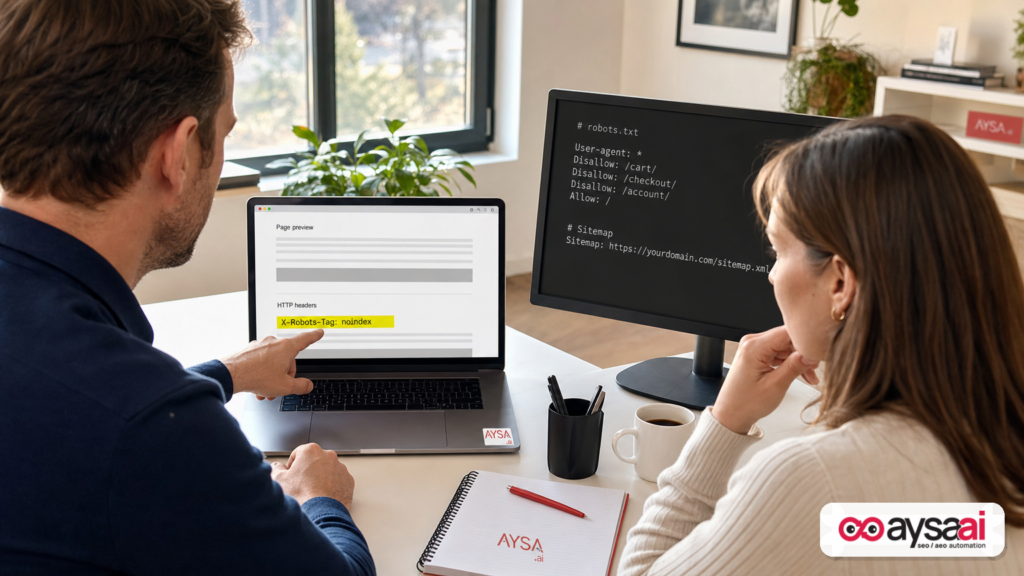
Over the last few years, “sharing” has quietly changed meaning on the internet. It used to mean you sent a file to a colleague. Now it often means you published a URL—one that behaves like any other webpage, complete with the possibility of being discovered, linked to, cached, and indexed.
That shift became very real when shared AI chats started appearing in Google results. Search Engine Journal documented one case involving Claude share pages and a technical mismatch that SEO veterans have warned about for decades: blocking a URL with Robots.txt is not the same as preventing it from being indexed, especially if the URL can be discovered via links elsewhere. In SEJ’s investigation, a Noindex-equivalent directive existed (via an X-Robots-Tag header), but it sat behind a robots.txt block—making it hard or impossible for Googlebot to fetch the page and read that directive. (Source: Search Engine Journal.)
I’m writing this as a practical editorial for founders, SMEs, and agencies—not to pile on any one vendor, but to force a long-overdue operational reset: treat every share link as a public webpage from the moment it exists, and make crawl/index controls boringly correct. Because the messy middle—where links exist, but controls conflict—creates exactly the kind of exposure that brands can’t afford in 2026.
Concise summary
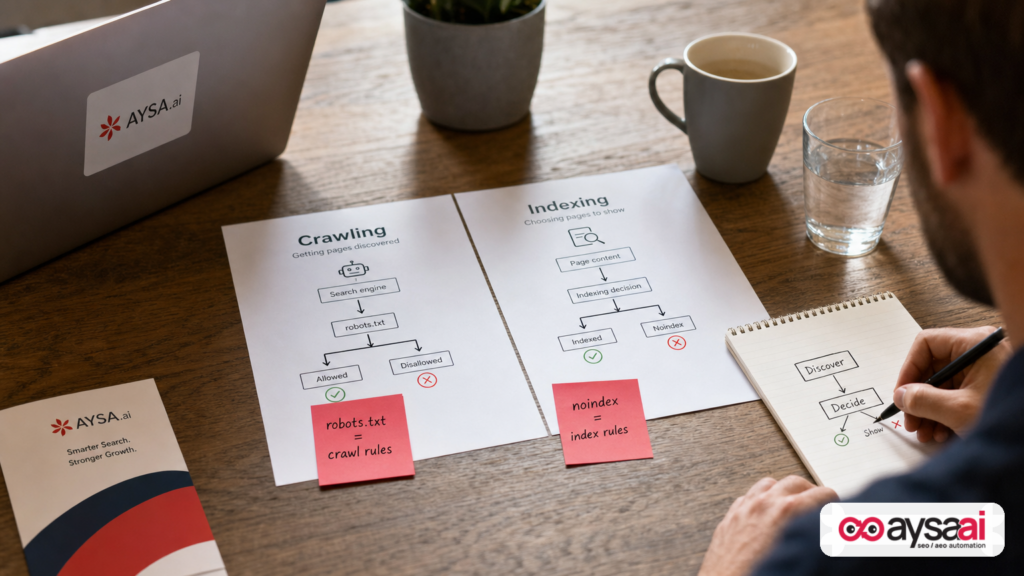
- Robots.txt controls Crawling, not Indexing. A blocked URL can still appear in Google if it’s discovered via links.
- Noindex only works when crawlers can read it. If you disallow crawling, Google may not fetch the page and won’t see the
noindex. - AI share links are publish events. A “shared chat” is effectively a public URL that can travel further than expected.
- Fixing the page isn’t the same as removing it from search. Prevention, cleanup, and Monitoring are separate workstreams.
- AYSA’s role: continuously monitor crawl/index conflicts, prepare recommended changes, request approval, and execute accepted fixes reliably across environments.
Key takeaways (print these for your team)
- Don’t use
Disallowas your “privacy” tool. Use authentication, expiring links, and truly non-public storage for sensitive content. - If you need content removed from search, don’t block crawling. Allow Google to fetch the page so it can see
noindex(or remove the content / return an appropriate status). - Don’t create conflicting directives. Mixing
Disallowandnoindexon the same URL is a classic footgun. - Assume share links can leak. They can be reposted, scraped, or included in public pages without your knowledge.
- Build an “accidental public pages” audit into operations. Make it routine, not reactive.
Table of contents
- What changed: why AI chats appearing in Google isn’t a freak incident
- The core lesson: crawling controls and indexing controls are different
- Why conflicting directives happen (and why they persist)
- The “share link” problem: AI products turned URLs into publish buttons
- What can go wrong for SMEs (beyond embarrassment)
- How Google can show a URL without crawling it
- A practical audit: how to find “accidental public pages” before Google does
- Fix patterns that actually work (and when to use each)
- Removal vs prevention: two different playbooks
- Concrete SME scenario: the clinic, the share link, and the compliance scramble
- What agencies should rethink: deliverables, liability, and technical governance
- Where AYSA fits: monitoring + approved execution (the missing link)
- What to do next (action list)
- Sources and further reading
What changed: why AI chats appearing in Google isn’t a freak incident
SEJ reported that shared Claude chats showed up in Google and that the pages appeared to carry a noindex-equivalent directive via an X-Robots-Tag header—yet the share path was blocked in robots.txt, creating a conflict where Google could discover the URL without being able to fetch it and read the directive. (Source: Search Engine Journal.)
Let’s zoom out. This isn’t just “an AI company had a bug.” It’s a collision between:
- Consumer-grade sharing UX (copy link, paste link, done), and
- Enterprise-grade discovery systems (search crawlers, link graphs, scrapers, embeds, and indexers).
When those collide, your intent—“I only shared this with a couple people”—doesn’t matter. What matters is: does a public URL exist, and can a crawler discover it?
SEJ’s piece also noted this pattern is not unique: public chat/share URLs have surfaced before across the industry. That’s the real headline for businesses: if you’re building products, running marketing, or operating a site with any type of share feature, you’re now in the publishing business. Act like it.
The core lesson: crawling controls and indexing controls are different
Here’s the simplest mental model I use with SMEs:
- Crawling is whether a bot is allowed to fetch a URL and read what’s on it.
- Indexing is whether a search engine is allowed to store and show that URL (or its content) in results.
robots.txt is primarily about crawling. It’s a request: “don’t fetch these URLs.” It is not a lock, and it is not an indexing guarantee.
noindex (whether via meta robots or the X-Robots-Tag header) is about indexing: “do not include this page in search results.” But there’s a catch: the bot typically needs to fetch the page (or at least the headers) to see that instruction.
SEJ highlighted exactly the failure mode: if you block crawling to the page, Google may still learn the URL exists (from links), and then it may show the URL in search results without ever seeing the noindex. That’s why “Disallow is not noindex.”
Why this matters to non-SEO business owners
If you’re thinking, “Okay, but I’m not an SEO,” this is still your problem because:
- You have internal docs, pricing rules, supplier lists, and customer details living somewhere.
- Your team uses SaaS tools that generate public links by default.
- Your website almost certainly has at least one area someone once tried to “hide” with robots.txt.
That’s why we treat this as operational risk, not just a Technical SEO curiosity.
Why conflicting directives happen (and why they persist)
Teams create robots/noindex conflicts for understandable reasons:
- They’re trying to reduce crawl load (block faceted navigation, search results pages, parameter URLs).
- They’re trying to hide something quickly (a staging environment, a partner portal, a temporary campaign page).
- They inherited legacy rules from old agencies, plugins, or platform defaults.
- They confuse privacy with index control (a common and dangerous mix-up).
Then the conflict persists because it often “works” until it doesn’t. You might not notice a problem until:
- A URL gets linked in a public forum, PR story, or GitHub issue.
- A partner pastes the link into a public doc that gets crawled.
- An AI tool or browser extension republishes a link automatically.
- A competitor finds it via simple search operators and starts asking questions.
At that point, you’re not just doing SEO. You’re doing incident response.
The “share link” problem: AI products turned URLs into publish buttons
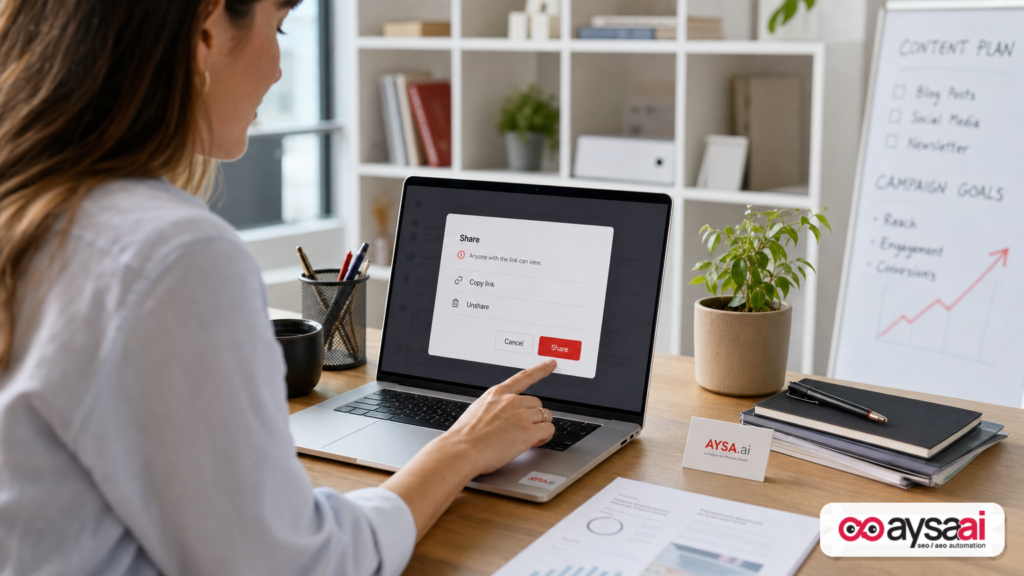
AI chat tools, doc tools, and collaboration suites are converging on the same pattern: a “Share” button that generates a stable URL.
From a user’s perspective, it feels like sending a message. From the web’s perspective, it’s publishing a page.
SEJ noted that unsharing a shared chat disables the direct link, and that users should review their shared chats list. That’s an important mitigation step, but it’s also a reminder: your content governance can’t stop at “we told people not to share sensitive stuff.” You need:
- Product-level controls (expiration, auth, robots alignment).
- Website-level controls (correct directives, consistent handling).
- Process controls (training, checklists, approvals).
And if you’re an SME using these tools—not building them—you still need internal policy: what can and can’t be shared, and how to verify links are disabled when a project ends.
What can go wrong for SMEs (beyond embarrassment)
Most founders underestimate the blast radius of “accidental indexing.” Here are the practical failure modes I see repeatedly:
1) Reputational damage and trust erosion
Even if the content is not strictly confidential, seeing “private-ish” conversations in search results signals sloppy operations. Trust is fragile—especially in healthcare, finance, education, and B2B services.
2) Competitive intelligence leaks
Share links can expose vendor pricing, margin notes, roadmap ideas, sales scripts, or internal positioning. For an ecommerce brand, that can mean supplier terms or product launch details. For a SaaS, it can mean feature plans and churn reasons.
3) Compliance and legal exposure
I’m not a lawyer, but you don’t need legal jargon to understand the risk: if personally identifiable information (PII) or customer data becomes publicly accessible, you may have contractual obligations, notification requirements, or regulatory exposure depending on your industry and jurisdiction.
4) SEO side effects: crawl waste and index pollution
Even when content isn’t sensitive, accidental public pages can damage organic performance by:
- Generating large volumes of low-quality indexed URLs.
- Splitting link equity across junk pages.
- Causing duplication and canonical confusion.
- Distracting bots from your money pages.
5) AI search visibility distortions
In AI-powered discovery (AEO/GEO), visibility is increasingly tied to what systems can access and cite. If accidental pages become crawlable and indexable, they can surface in ways you didn’t intend—sometimes outranking your polished pages because they contain raw phrasing or long-tail detail.
This is why the “share link” issue is both a privacy risk and a search strategy risk.
How Google can show a URL without crawling it
SEJ summarized a key point that Google has been consistent about for years: if Google finds a URL via links, it may index the URL (or list it) even if it can’t crawl the page because robots.txt blocks access. That’s the heart of the “Disallow is not noindex” concept.
In plain English:
- You block Google from entering a room.
- Google still hears the room exists because people keep telling it about the door.
- Google may still list “Door to Room 12” in its directory, even if it can’t see what’s inside.
That’s why you don’t use robots.txt as a confidentiality tool. You use authentication and true access control.
And that’s why, if your goal is de-indexing, you typically need Google to be able to fetch a page (or at least receive an unblocked response) that clearly says “noindex” or returns a status that removes the content.
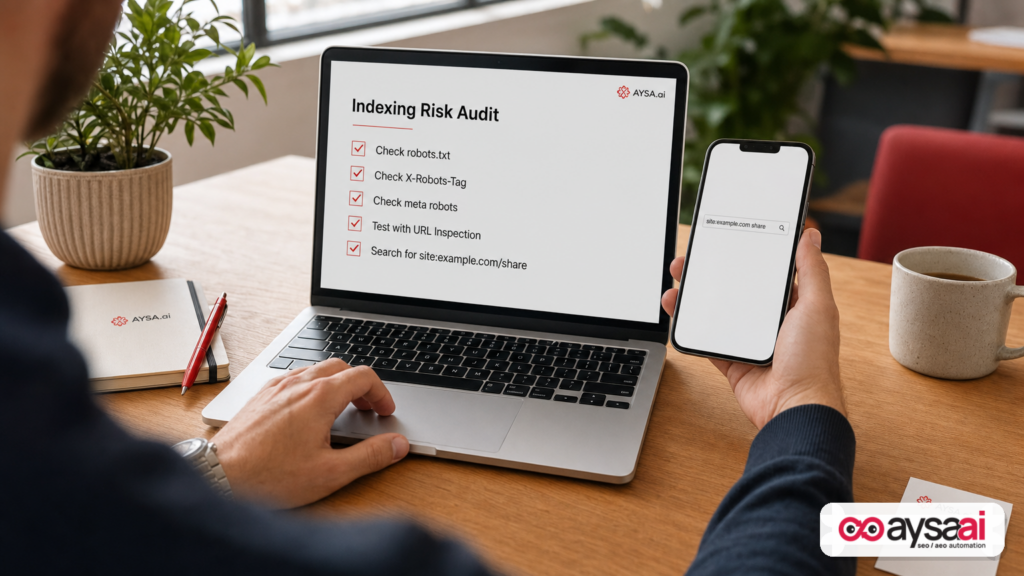
A practical audit: how to find “accidental public pages” before Google does
If you operate a website (or multiple sites), you need a repeatable audit. Here’s a pragmatic approach that doesn’t require you to be an SEO specialist—just disciplined.
Step 1: Inventory “shareable” systems your team uses
Make a simple list:
- AI chat tools and “share conversation” features
- Docs and slides with public links
- File storage share links
- Support tools that create public ticket views
- Proposal tools, invoice portals, scheduling pages
Your goal is not paranoia. It’s knowing where public URLs can be generated.
Step 2: Search your brand footprint for likely public URL patterns
SEJ referenced using search operators (like site:) to find exposed share pages. You can do a basic version of this for your own domain(s) by searching for common path patterns you may have, for example:
site:yourdomain.com sharesite:yourdomain.com publicsite:yourdomain.com artifactssite:yourdomain.com staging
Don’t overinterpret results—use them as leads for investigation.
Step 3: Review robots.txt for “privacy-by-disallow” behavior
Look for rules that are clearly trying to hide something sensitive, such as:
Disallow: /private/Disallow: /members/Disallow: /invoices/Disallow: /share/
Blocking these may reduce crawling, but it does not secure the content and may not prevent indexing. If the content is truly private, it should require authentication and never be publicly accessible.
Step 4: Check the actual indexing directives on representative URLs
For a sample of URLs from those areas, verify whether they return:
- A
meta name="robots" content="noindex"directive, and/or - An
X-Robots-Tagresponse header (e.g.,noindex), and - A consistent HTTP status code (200, 401/403, 404, 410, etc.).
SEJ reported seeing X-Robots-Tag: none on share pages, which Google treats as equivalent to noindex, nofollow under its robots meta guidance, but the key issue was that the page was blocked from crawling via robots.txt. (Source: Search Engine Journal.)
If your goal is “keep out of search,” do not hide the directive behind a crawl block.
Step 5: Confirm what Google is doing (not what you hope it’s doing)
If you have access to Google Search Console, use it to validate whether specific URLs are indexed and how Google sees them. Many teams skip this and rely on assumptions.
If you don’t have GSC set up, that’s an operational gap. (AYSA can help you structure ongoing monitoring; see AYSA Monitoring.)
Step 6: Turn it into a recurring monthly or quarterly process
Most exposure incidents are not one-time mistakes; they’re symptoms of an organization that doesn’t routinely test its publishing surfaces.
Fix patterns that actually work (and when to use each)
There is no single “best” fix. The correct approach depends on whether the content should be:
- Public and indexable
- Public but not indexable
- Not public at all
- Temporarily public
Here are the patterns that hold up in the real world.
Pattern A: Make it not public (authentication and authorization)
If content is sensitive (customer info, internal docs, minor data, medical info, invoices), do not rely on robots.txt or noindex. Use proper access control:
- Require login (401/403 for unauthenticated users)
- Use expiring links and tokenized access if sharing is necessary
- Avoid stable public URLs for sensitive content
This is security and product design—not SEO. But it prevents SEO incidents.
Pattern B: Keep it public but out of search (noindex without disallow)
If content can be publicly accessible but should not appear in search (some campaign landing pages, some share previews, some internal utilities), then:
- Allow crawling so bots can see the directive
- Return a clear
noindex(meta robots orX-Robots-Tag) - Keep it consistent across variants (HTTP/HTTPS, trailing slashes, parameters)
The important piece: don’t block the bot from seeing the noindex.
Pattern C: Remove the content (404/410) and stop generating the URL
If something should never have existed publicly:
- Disable the share link (so it no longer renders content)
- Return
404(not found) or410(gone) where appropriate - Ensure the content is actually deleted or inaccessible server-side
Unsharing is good; decommissioning the URL behavior is better.
Pattern D: Consolidate duplicates (canonicalization) but don’t use it as a privacy tool
Canonicals are not a “hide this” button. They’re hints for consolidating signals among similar pages. If content is sensitive, canonicals are irrelevant—use auth/removal.
Pattern E: Use robots.txt for crawl management only
Robots.txt shines when you’re managing crawler resources and keeping bots away from infinite spaces (facets, internal search, cart parameters). Use it intentionally, and don’t pair it with noindex on the same URLs unless you’re absolutely sure of the implications.
SEJ referenced Google representatives advising against combining the two. That aligns with what we’ve seen in practice: mixing directives creates ambiguous behavior and surprises.
Removal vs prevention: two different playbooks
One of the biggest points of confusion for SMEs is thinking that changing a setting today automatically cleans up what happened yesterday.
Prevention is about future behavior
Examples:
- Stop generating public share URLs by default
- Add expiration to share links
- Make indexing directives consistent and accessible
Removal is about undoing what’s already discoverable
Examples:
- Return appropriate status codes (404/410) for content that must disappear
- Ensure Google can crawl and see
noindexwhere that’s the chosen route - Use platform-level removals where you have access (for your own sites)
SEJ pointed out a key limitation for end users of a third-party platform: you may be able to unshare content, but you can’t necessarily control what the platform serves to Googlebot or submit removals yourself. That’s exactly why businesses should treat third-party share links as public and time-bound—and why vendors must implement sane defaults.
Concrete SME scenario: the clinic, the share link, and the compliance scramble
Let’s make this real with a scenario that I’ve seen variations of across SMEs.
The setup
- A mid-sized clinic has a marketing manager and an operations lead.
- They use an AI assistant to draft patient FAQs, intake scripts, and internal training notes.
- A staff member clicks “Share” on a chat to send a draft script to a contractor.
- The contractor pastes the link into a project board that is publicly accessible (or later becomes accessible).
What goes wrong
- The share URL is now discoverable by crawlers.
- The clinic assumes “it’s not indexed because it’s blocked,” but the platform’s directives conflict (or the content is public without a reliable noindex).
- A few weeks later, someone searches the clinic name and sees a strange URL in results that looks like a share page.
The scramble
- They unshare the chat (good), but the URL may remain visible in search for some time depending on crawl/index behavior.
- They realize they don’t have a clear inventory of who has shared what, and where those links were posted.
- They ask their web team to “block it in robots.txt,” which can actually make removal harder if the chosen method is noindex and the crawler can’t see it.
The right operational fix
- Policy: never share chats containing any patient details; treat share links as public webpages.
- Process: a monthly review of shared links across tools; immediate unshare upon project completion.
- Technical posture (for owned web properties): do not rely on robots.txt for removal; implement correct noindex or remove content at the server level.
- Monitoring: alerts for unexpected indexed URLs and “thin/unknown” paths, so issues are found early.
This is not about fear. It’s about making “publishing hygiene” normal—because the web will treat your links like publications whether you intended it or not.
What agencies should rethink: deliverables, liability, and technical governance
If you run an agency, this incident category should change how you scope and govern technical SEO work.
1) Stop selling SEO as “rankings” and start selling it as “index governance”
Rankings are downstream of: what exists, what’s accessible, what’s indexable, what’s canonical, and what’s trusted. If you don’t control the upstream, you’re gambling.
2) Add “accidental public pages” to every audit
Every client has them. Every platform creates them. The only question is whether you find them before Google (or a journalist) does.
3) Formalize change management
Most technical SEO mistakes happen during “quick fixes.” Someone changes robots.txt on a Friday night. Someone adds a global noindex header by accident. Someone blocks a path that contained the only noindex directive.
This is exactly why we believe in approved execution: proposed changes should be prepared, reviewed, approved, and then deployed with an audit trail.
4) Update your AI usage policy
Agencies use AI constantly for drafting and analysis. If your team is sharing chats or artifacts with clients, you need a policy that treats share URLs as public by default and defines what can be shared, for how long, and how it is retired.
Where AYSA fits: monitoring + approved execution (the missing link)
Here’s my point of view: most SEO tools tell you what’s wrong. Very few systems reliably help you fix what’s wrong without turning your site into a science experiment.
AYSA is built to close that gap as an execution system for SEO/AEO/GEO:
- Monitor: detect crawl/index conflicts, unexpected indexation, and risky changes over time (aysa.ai/monitoring).
- Prepare: generate clear, actionable recommendations (what to change, where, and why), mapped to business outcomes.
- Ask for approval: you stay in control—nothing “auto-breaks” your site.
- Execute accepted changes: implement fixes consistently across templates and environments, with traceability.
That workflow matters for issues like “Disallow vs noindex” because the fix is often simple, but the consequences of getting it wrong can be serious. You need consistency and governance, not heroics.
How this connects to AI Search visibility (AEO/GEO)
As AI search experiences expand, visibility isn’t only about blue links. It’s also about:
- What content systems can fetch and cite
- Whether your canonical sources are clearly accessible
- Whether “junk” pages compete with your main pages in discovery systems
AYSA’s focus on technical correctness and execution supports that broader goal. If your index is polluted or your directives conflict, you’re building on sand. For more on how we think about AI-era visibility, see aysa.ai/ai-search-visibility and our tools overview at aysa.ai/ai-seo-tools.
Operationally, what AYSA would flag in a situation like the SEJ case
Without claiming access to any third-party system, here’s the general class of issues AYSA is designed to catch on sites you manage:
- Paths blocked in robots.txt that are also configured with noindex directives (conflict risk).
- Public URL patterns that suddenly start generating indexable pages.
- Header-level robots directives (X-Robots-Tag) changing unexpectedly.
- New “public” directories or routes introduced by a product release.
Then: prepare a fix, ask for approval, and execute. That’s the difference between “we saw it” and “it won’t happen again.”
If you want to understand how this is packaged for SMEs and agencies, start with aysa.ai/pricing, or browse more operational SEO editorials at aysa.ai/blog.
What to do next (action list)
This is the practical checklist I’d give a business owner on a Monday morning.
Within 24 hours
- List your share surfaces: AI chats, docs, files, support portals, proposals, invoices.
- Audit what’s currently shared: review active shared links and revoke anything you wouldn’t post on your homepage.
- Run basic discovery searches: use
site:queries for obvious patterns on your domain(s).
Within 7 days
- Review robots.txt with intent: identify any areas where robots rules are being used as “privacy.” Replace with auth.
- Check for directive conflicts: any URL that is disallowed but also “noindex” is a candidate for surprise behavior.
- Set up monitoring and alerts: unexpected indexed URLs, new directories, robots changes, header directive changes.
Within 30 days
- Adopt a share-link policy: what can be shared, who can share, when links expire, how links are retired.
- Implement governance: change approvals for robots rules, global headers, and template-level meta robots.
- Document a removal playbook: who does what when something is indexed that shouldn’t be.
Sources and further reading
- Search Engine Journal — Indexed Claude Chats Show Why Disallow Is Not Noindex
- Search Engine Journal — Latest news (research lead)
- Search Engine Journal — SEO category (research lead)
- Search Engine Journal — On-page SEO (research lead)
Note on citations: The supplied research context references Google guidance and comments attributed to Google Search team members, but it does not include the direct official URLs. Where an official Google source would typically be cited (robots meta, robots.txt behavior, URL removal guidance), I’ve intentionally avoided inventing links. If you want, we can add primary-source links in a later update once they’re provided in the research pack.
Final word: stop treating “share” as “send”
The most important mindset change is cultural, not technical: if your tools generate a URL, you didn’t “send” content—you published it. From that moment, you’re operating in the same universe as Google, scrapers, link graphs, and AI discovery systems.
Technical SEO has always been about aligning intent with machine-readable reality. In 2026, that includes every share surface your company touches. Get your crawl rules right, get your indexing directives right, and put monitoring + approved execution in place so you’re not relying on luck.
If you want help operationalizing this across your site(s), start with AI Search Visibility, explore the toolset at AYSA AI SEO Tools, and set up ongoing monitoring so you catch conflicts before they become headlines.
Continue the AI search topic inside AYSA.
Use these pages to connect the article with AI SEO tools, AI visibility monitoring, AI Overviews and approved website execution.
Turn this topic into a website action plan.
Use these AYSA hubs to move from reading to technical fixes, AI visibility monitoring, research, glossary context and approval-first SEO execution.

