
Google Search Partners: The Hidden Budget Leak in Google Ads (and How to Audit, Fix, and Scale Safely)
Search Partners can quietly soak up budget with low-quality clicks while muddying your reporting. Here’s how to audit Search Partners, spot junk traffic signals, protect conversions, and decide when (and if) you should ever test them again.

Google Ads has a quiet setting that can drain budget while making your performance look “fine” on the surface: Google Search Partners. It’s often enabled by default, it promises extra reach, and it frequently delivers exactly what you didn’t ask for—low-intent Clicks, messy reporting, and optimization data that nudges your bidding in the wrong direction.
This editorial is a practical field guide for business owners, in-house marketers, and agencies: what Search Partners are, why they so often underperform, how to audit them properly, and how to decide whether to opt out, limit exposure, or test safely. The core research trigger for this article is Search Engine Land’s perspective on why most advertisers should opt out of Search Partners, plus how to see whether you’re paying for those placements (Search Engine Land).
Concise summary

Search Partners extend Search ads beyond Google’s main search results to third-party properties with Google-powered search results. The promise: more volume at cheaper CPCs. The common reality: cheaper clicks that don’t convert, plus reporting that masks where budget is going. The correct move for most SMEs is to opt out for Search and Shopping campaigns, keep measurement tight, and only test Search Partners when your core Google Search performance is already stable and you have clean conversion signals.
Key takeaways
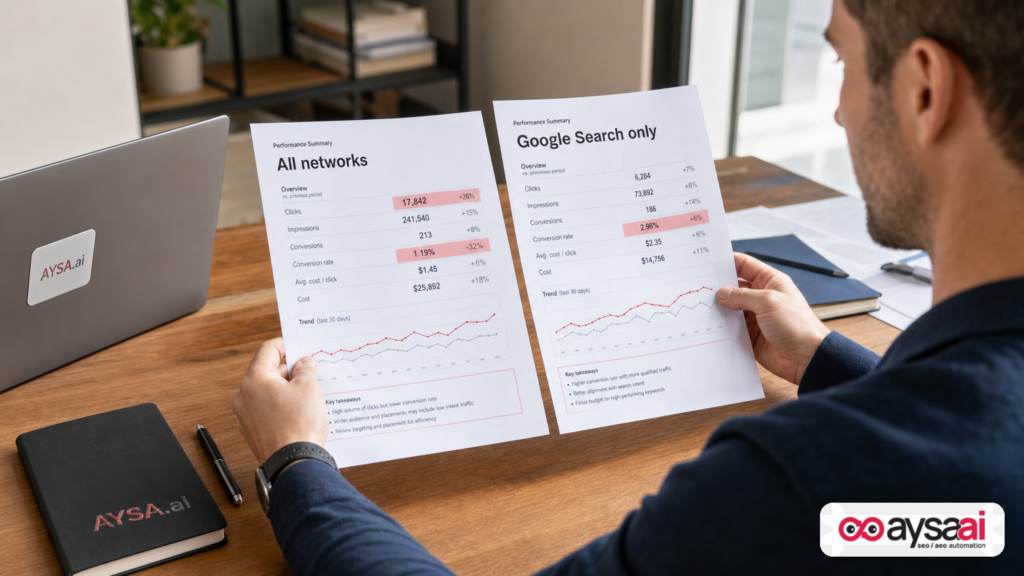
- Search Partners are not “Google Search.” They’re external properties where user intent, UX, and fraud risk can be meaningfully different.
- Lower CPC is not a win if conversion quality drops or if you’re optimizing to shallow conversion events.
- Mixing partner traffic into one blended CPA/ROAS can mislead owners and lead to the wrong decisions (increase budgets, expand keywords, loosen match types) based on noisy data.
- Audit first, then decide. Segment by network, check conversion integrity, and review placement transparency reporting where available.
- PMax is different. Performance Max includes Search Partners as part of its network mix; you can’t toggle it off the same way you can in Search campaigns (so you need different controls).
- AYSA fits after the strategy call. The hard part isn’t the advice—it’s executing and maintaining the guardrails (measurement hygiene, Monitoring, approvals, and ongoing fixes). That’s the workflow we built for.
Table of contents

- What changed in paid search—and why this setting matters more now
- What Google Search Partners are (in plain English)
- Why Search Partners often produce junk traffic
- The real risk: partner traffic doesn’t just waste money—it poisons your decision-making
- How to audit Search Partners in Google Ads (step-by-step)
- Conversion tracking hygiene: the #1 prerequisite before you test anything
- Smart Bidding and Search Partners: when algorithms help—and when they can’t
- Performance Max: why you can’t “opt out,” and what to do instead
- When a Search Partners test can be rational (and how to structure it)
- A concrete SME scenario: how a “successful” campaign can still be unprofitable
- Agency and in-house implications: what to change in reporting and governance
- Where AYSA.ai fits: monitoring + approved execution (not just recommendations)
- What to do next: a practical action list
- Sources and further reading
What changed in paid search—and why this setting matters more now
Search Partners has existed for years. So why is it still worth a long editorial in 2026?
Because the way businesses run Google Ads has changed:
- Automation is deeper. More accounts rely on Smart Bidding, broader match behavior, automated creatives, and “black box” campaign types that optimize across networks.
- Measurement is more fragile. Between consent changes, tagging changes, server-side setups, and Attribution modeling, it’s easier than ever for an account to accidentally treat a low-quality signal as a “conversion.”
- AI-driven search experiences are reshaping intent. When the SERP itself changes (and user behavior changes), advertisers chase volume. “More reach” becomes tempting—exactly the pitch Search Partners makes.
In that environment, Search Partners becomes a multiplier: if you have solid conversion signals and tight governance, it might be harmless or even marginally helpful. But if you have measurement gaps, weak lead validation, or you’re reporting blended performance to executives, Search Partners can become a hidden budget leak and an optimization trap.
What Google Search Partners are (in plain English)
Google Search Partners are third-party sites or experiences that show search results powered by Google. Ads can show there when you’re running eligible campaign types (commonly Search and Shopping; Search Engine Land notes Search Partners can also include YouTube and a wide range of other sites and domains) (Search Engine Land).
Here’s the simplest mental model:
- Google Search = someone searches on Google.com (or core Google search properties). Your ad appears alongside the main SERP experience you’re used to.
- Search Partners = someone searches somewhere else, but that “somewhere else” uses Google-powered search results. Your ad can appear there, too.
People commonly confuse Search Partners with the Google Display Network (GDN). They are not the same thing. Search Engine Land frames it this way: Display is content browsing across sites/apps using AdSense; Search Partners are search-intent placements and are compatible with Search, Shopping, and Performance Max campaigns (Search Engine Land).
That distinction matters because it affects how you think about the click. Display clicks often come from passive attention. Search clicks are supposed to come from active intent. Search Partners sits in between: it has a “Search query,” but the surrounding experience, user intent, and quality controls can differ from core Google Search.
Why Search Partners often produce junk traffic
I’m going to be blunt, because this is where real money gets wasted: most SMEs do not need extra reach on questionable partner inventory. They need tighter targeting, better landing pages, cleaner Conversion tracking, and more budget discipline on the placements already working.
Search Partners frequently underperform for a few structural reasons:
1) “Search” doesn’t always mean the same intent
On Google.com, a search is usually a deliberate act: you open Google, you type a query, you evaluate results. On partner sites, “search” can be embedded into directories, toolbars, parked domains, internal site searches, or UX flows where users aren’t in the same evaluation mindset.
If the user’s primary goal is “navigate this directory” rather than “choose a vendor,” your ad is less likely to convert—even if the query looks similar.
2) Quality controls and UX can be weaker or simply different
The main Google SERP has an ecosystem of expectations: ad labeling, familiar layout, well-understood user behaviors, and a mature set of spam/fraud defenses. Partner properties vary widely, and that variance is the problem. You might get:
- Accidental clicks from poor mobile layouts
- Low-information environments where users bounce quickly
- Traffic that looks “cheap” because it isn’t competitive for a reason
3) The cheap-click trap (CPC falls, business value falls faster)
Search Engine Land points out a common pattern: Search Partners often drive more clicks at lower CPC, but meaningful business value is rare (Search Engine Land). That’s not a moral judgment; it’s economics.
If your goal is revenue or qualified leads, lower CPC only matters if:
- Conversion rate holds, and
- Lead quality holds, and
- Down-funnel metrics hold (close rate, margin, retention)
For many SMEs, Search Partners fails on at least one of these—and often on all three.
4) “Conversions” can be faked by shallow goals
This is the silent killer: if your conversion is “page view,” “time on site,” “button click,” or an easily-triggered form submit with no validation, low-quality traffic can look like it’s working.
Search Engine Land warns that conversions may appear only if you’re tracking something shallow or bot-susceptible (Search Engine Land). That lines up with what I see across SMEs: the more “optimistic” the conversion definition, the more Search Partners can slip through as “successful.”
5) Limited transparency makes it easy to ignore
When performance is blended, Search Partners can hide inside “Search” numbers. Many owners don’t realize they’re paying for it until the budget is gone. The fix starts with segmentation and placement review.
The real risk: partner traffic doesn’t just waste money—it poisons your decision-making
Wasting $500–$5,000/month is painful. But the bigger cost is what happens next: bad traffic rewires your strategy.
Here’s the chain reaction I’ve watched happen in real businesses:
- You turn on (or leave on) Search Partners.
- You see more clicks and a lower CPC.
- Your blended CPA looks “okay” because your conversion tracking is too broad (or attribution is messy).
- You assume campaigns are scalable, so you raise budgets or broaden keywords.
- Smart Bidding learns from the wrong signals, and your account starts prioritizing the easiest-to-get “conversions,” not the most valuable ones.
- Sales complains about lead quality or ecommerce sees a revenue gap.
- You start questioning the channel (“Google Ads doesn’t work”), when the real issue is governance and measurement.
This is why I treat Search Partners as a controls problem, not just a placement choice. If the network mix makes your reporting less trustworthy, you’ll make worse decisions—about creative, landing pages, pricing, staffing, and inventory.
How to audit Search Partners in Google Ads (step-by-step)
Don’t argue about this setting on principle. Audit it like a CFO would: isolate it, measure it, decide.
Audit for Search or Shopping campaigns: segment by network
Search Engine Land’s recommended approach is straightforward: in your campaign view, use Segment and choose Network (with search partners) to split results into “Google Search” and “Search Partners” (Search Engine Land).
When you do this, look at:
- Spend share: What percent of spend is going to partners?
- Conversion rate and CPA/ROAS by network (not blended)
- Engagement sanity checks (Bounce Rate / engaged sessions, time on site) if you’re integrating analytics—carefully, because these metrics can be noisy
- Lead quality indicators: spam submissions, invalid phone numbers, duplicates, “I didn’t request this” feedback
Audit for Performance Max: use channel performance views
Performance Max is structurally different. As Search Engine Land notes, Search Partners are required for PMax; you can’t opt out, but you can monitor activity via channel performance reporting (Search Engine Land).
In PMax, your job isn’t to flip a switch. It’s to:
- Validate conversion quality
- Prevent “easy conversions” from becoming the optimization target
- Watch for unexpected spend shifts that indicate measurement issues
Use placement transparency reporting where available
Search Engine Land references the Content suitability reporting as a way to view where ads appeared on the Search Partner network (under Insights and reports) (Search Engine Land).
Two important notes from an operator’s perspective:
- This list can be eye-opening. If you see a long tail of questionable sites, that’s not “paranoia”—it’s a placement reality check.
- Don’t rely on one-time reviews. Treat it like ongoing vendor risk management. Inventory changes.
Establish a baseline: “Google Search only” performance
Before you decide anything, get a clean baseline for:
- Your best-performing campaigns on Google Search
- Your best-performing brand vs non-brand segments (if applicable)
- Your best-performing landing pages
If the baseline is weak, Search Partners won’t fix it. It’ll just add noise.
Conversion tracking hygiene: the #1 prerequisite before you test anything
If you remember one thing: Search Partners punishes sloppy conversion definitions.
A healthy conversion setup for SMEs typically includes:
- Primary conversions that reflect business value (purchase, qualified lead, booked appointment)
- Secondary conversions for diagnostics (newsletter signup, engaged session, add-to-cart), but not used to drive bidding unless you have a deliberate reason
- Spam protection for forms (rate limits, validation, CAPTCHA where appropriate)
- Offline lead quality feedback when possible (even simple “qualified/unqualified” tags pushed back later is better than nothing)
Why this matters: if you allow low-friction signals to count as success, you’re telling Google’s optimizer that your business values those actions—even if your sales team hates them.
If you’re not sure whether your conversion setup is safe, pause the Search Partners debate and fix measurement first. It’s the foundation.
Smart Bidding and Search Partners: when algorithms help—and when they can’t
Search Engine Land makes a point that matches what many advertisers observe: if you’re using conversion-focused Smart Bidding, Search Partners spend may naturally drop over time because the system learns it doesn’t convert and stops allocating budget there (Search Engine Land).
That’s true—when your conversion signals are good.
But here’s the operational catch: the system can only optimize toward what you measure.
When Smart Bidding can protect you
- Your primary conversions are closely tied to revenue or qualified leads.
- You have enough conversion volume for stable learning.
- Your tracking isn’t inflated by bots or accidental events.
In that world, Search Partners may “self-throttle.” You’ll still want to monitor, but the algorithm might do the obvious thing.
When Smart Bidding can’t protect you (and may amplify the issue)
- Your primary conversion is too easy (page view, click-to-call without validation, “lead” without qualification).
- You have low conversion volume, so learning is unstable.
- Attribution is messy and assigns conversions to partner clicks that didn’t actually drive outcomes.
In that world, Search Partners can become the place your budget goes to “hit the numbers.” Not because it’s profitable—because it’s measurable.
That’s not Google being evil. That’s the optimizer doing what you asked.
Performance Max: why you can’t “opt out,” and what to do instead
If you run Performance Max, you don’t get the same simple toggle. Search Engine Land explicitly notes Search Partners are required in PMax (Search Engine Land).
So the question becomes: how do you prevent low-quality inventory from dominating your results?
Controls that actually matter in PMax
- Conversion goal discipline: make sure only true business outcomes are “primary” for bidding.
- Asset and landing page relevance: reduce mismatch that causes bounces and low-quality traffic loops.
- Audience signals (where used): give the system better starting points, especially for SMEs with limited data.
- Regular channel mix review: if spend shifts toward placements that don’t drive profit, treat that as a measurement or strategy alarm.
If you see unusually high Search Partners activity inside PMax, Search Engine Land suggests it may indicate issues with conversion tracking or bid strategy settings (Search Engine Land). From an operator perspective, that’s your cue to run a measurement and lead-quality investigation—not to “wait and hope.”
When a Search Partners test can be rational (and how to structure it)
Despite the strong stance in the source, I don’t think the right professional posture is “never.” It’s: default no, test later with guardrails.
Search Engine Land recommends leaving it unchecked for new Search/Shopping campaigns and only testing after campaigns perform well with solid conversion data (Search Engine Land). That’s the right sequencing.
If you choose to test, do it like an experiment, not a preference.
Prerequisites
- Google Search-only performance is stable for at least a few weeks.
- You can clearly define success (profit, qualified leads, booked appointments—not “traffic”).
- Conversion tracking is clean and aligned with revenue/qualification.
Test design that doesn’t wreck your account
- Isolate the variable: run an A/B split by campaign (one with partners on, one off) where feasible, keeping other settings aligned.
- Cap risk: keep the test budget limited and time-boxed.
- Judge on down-funnel outcomes: for lead gen, review call recordings, appointment show rates, or qualified lead rates.
- Segment reporting: never evaluate results blended.
Exit criteria (when to stop the test)
- Partner traffic increases spam or low-quality leads.
- CPA worsens materially vs Google Search-only, with no compensating lift in volume that’s actually profitable.
- Your team can’t reliably validate lead quality (in which case the test is not measurable).
If you can’t define or measure “better,” you’re not running a test—you’re gambling.
A concrete SME scenario: how a “successful” campaign can still be unprofitable
Let’s make this real with a scenario I’ve seen variations of across ecommerce and local services.
Scenario: a regional ecommerce brand selling specialty home goods
- Monthly ad budget: modest (SME constraints)
- Goal: profitable purchases (not just add-to-cart)
- Setup: Search campaign + Shopping campaign
- Problem: performance looks “fine” in Google Ads, but the bank account doesn’t agree
Their report shows:
- Clicks rising
- CPC decreasing
- “Conversions” steady
Then the owner checks:
- Actual orders didn’t rise proportionally
- Support tickets increased (“I didn’t mean to…”) and form spam rose
- Return rate ticked up on a subset of orders
The fix was not “fire Google Ads.” The fix was governance:
- Segment performance by network and discover a chunk of spend on Search Partners with weak purchase behavior.
- Tighten conversion actions to prioritize purchases (and treat softer events as secondary).
- Opt out of Search Partners for Search/Shopping while the account re-stabilizes.
- Improve landing page alignment for high-intent queries on Google Search.
What changed wasn’t the business. It was the accuracy of what the business was optimizing for.
Agency and in-house implications: what to change in reporting and governance
If you manage accounts for clients—or you’re the in-house lead reporting to a founder/CFO—Search Partners is less a media question and more a trust and governance question.
1) Always show “Google Search” vs “Search Partners” separately
If you present blended Search performance, you’re asking for future conflict. Make the split a standard view. It reduces surprises and makes optimization conversations faster.
2) Tie reporting to business outcomes, not platform outcomes
Owners don’t ultimately care about CTR. They care about:
- Qualified leads
- Booked jobs
- Revenue and margin
If Search Partners inflates “platform conversions” but not revenue, your report should expose that gap.
3) Establish a default policy: partners off unless justified
For most SMEs, the default should be:
- Search campaigns: Search Partners off
- Shopping campaigns: Search Partners off (test later only if needed)
- PMax: accept that it’s included, but tighten measurement and monitor channel mix
This matches the overall recommendation from Search Engine Land: leave Search Partners unchecked in new Search/Shopping campaigns and consider testing only after strong baseline performance exists (Search Engine Land).
4) Build operational controls (so you don’t reintroduce the problem later)
What happens in the real world is simple: someone duplicates a campaign, or imports settings, or launches a new region—and the default checkbox comes back.
So you need controls like:
- A launch checklist
- Monthly audits
- Network segmentation baked into dashboards
- Change logs and approvals (especially in multi-user accounts)
This is exactly the type of “small setting, big impact” work that gets missed when teams are busy.
Where AYSA.ai fits: monitoring + approved execution (not just recommendations)
Most content on Search Partners ends with “opt out” or “check the box.” That’s necessary, but it’s not sufficient in a business that moves fast.
AYSA is built for the part that actually breaks in real companies: ongoing execution with governance.
Here’s how we think about it:
1) Monitor the signals that indicate network-quality problems
Partner traffic issues often show up as patterns: spend drift, conversion-rate anomalies, landing page mismatch, or quality regressions. AYSA’s monitoring philosophy is: detect changes early, before “monthly reporting” finds them too late.
Relevant AYSA hub: AYSA Monitoring
2) Tie paid outcomes back to search visibility reality
Paid search doesn’t operate in isolation. If your organic visibility shifts, you may lean harder on paid—and then “more reach” settings become tempting. AYSA helps teams stay grounded in visibility signals and how customers actually find you across modern search experiences.
Relevant AYSA hub: AI Search Visibility
3) Prepare changes, ask for approval, execute what’s accepted
In practice, the “fix” for Search Partners usually touches multiple moving parts:
- Campaign settings (partners on/off where possible)
- Conversion action definitions (primary vs secondary)
- Landing page alignment (so your best traffic converts)
- Site changes that improve lead quality (validation, UX, clarity)
AYSA’s model—monitor, propose, request approval, execute—reduces the typical failure mode where everyone agrees in a meeting, and nothing is implemented consistently.
4) Make it a system, not a one-time cleanup
If your team needs a scalable way to operationalize SEO/AEO/GEO improvements alongside the website changes that protect conversion quality, start here:
Important clarification: AYSA is not “set it and forget it.” It’s “make execution reliable.” The goal is to keep the account and the website aligned with how the business actually makes money.
What to do next: a practical action list
Use this as a checklist you can run this week.
This week (60–120 minutes)
- Find the setting. In each Search/Shopping campaign, check whether Search Partners is enabled.
- Segment reporting. Split performance by “Google Search” vs “Search Partners” (Search Engine Land’s segmentation method) (Search Engine Land).
- Check conversion definitions. Identify what the account calls a “conversion.” If it’s shallow, fix that before judging partner performance.
- Decide default policy. For most SMEs: partners off unless a documented test plan exists.
In the next 2–4 weeks
- Clean measurement. Make purchases/qualified leads primary; demote soft signals to secondary.
- Align landing pages. Improve pages for your top converting queries so Google Search performance is strong without needing “extra reach.”
- Build governance. Add a launch checklist and monthly audit routine so the setting doesn’t creep back in.
Later (only if needed): run a guarded test
- Time-box the test and cap spend.
- Evaluate down-funnel quality, not just CPA.
- Stop quickly if lead quality declines or if blended reporting becomes confusing for stakeholders.
My perspective as an operator: “More reach” is rarely the bottleneck
Most SMEs I talk to don’t have a reach problem. They have a clarity problem:
- They can’t clearly connect ad spend to profit.
- They don’t know which conversions are real.
- They don’t have consistent execution to keep settings and tracking correct over time.
Search Partners preys on that fog. Not intentionally—structurally. It adds inventory complexity to accounts that are already dealing with measurement and AI-driven automation.
So the playbook is simple: earn the right to expand. Nail Google Search first. Tighten measurement. Make decisions on segmented data. Then—if you truly need additional volume—test with guardrails.
Sources and further reading
- Search Engine Land: Why you should opt out of Google Search Partners
- Search Engine Land: Why search ROAS depends on paid social more than you think
- Search Engine Land: Performance Max (PMax) Google Ads campaigns explained (linked as a relevant lead from the source page context; verify availability in your region/publication access)
- AYSA: AI SEO tools
- AYSA: AI search visibility
- AYSA: Monitoring
- AYSA: Pricing
- AYSA: Blog
Note on sourcing: This article uses Search Engine Land as the core research input and cites it directly. The source page context includes additional related Search Engine Land links; when you expand this piece in WordPress, consider adding primary Google documentation links as well (e.g., official Google Ads Help pages) to strengthen policy and feature claims. I’m not including specific Google Help URLs here because they were not provided in the supplied research context.
Continue the AI search topic inside AYSA.
Use these pages to connect the article with AI SEO tools, AI visibility monitoring, AI Overviews and approved website execution.
Turn this topic into a website action plan.
Use these AYSA hubs to move from reading to technical fixes, AI visibility monitoring, research, glossary context and approval-first SEO execution.

