
Robots.txt Isn’t a Noindex: The Quiet SEO Failure That’s Letting Spam Pages Get Indexed (And How To Fix It)
A small robots.txt “quirk” can make Googlebot ignore the rules you thought protected you—especially during search box spam attacks. Here’s what changed, why it matters, and a practical playbook for SMEs, ecommerce teams, and agencies to prevent unwanted indexing and protect organic visibility.

Robots.txt is one of those SEO tools that feels simple—until it quietly fails. And when it fails, it often fails in public: strange URLs show up in Google, brand searches surface spammy pages, and your real product or service pages compete with garbage for Crawl budget and attention.
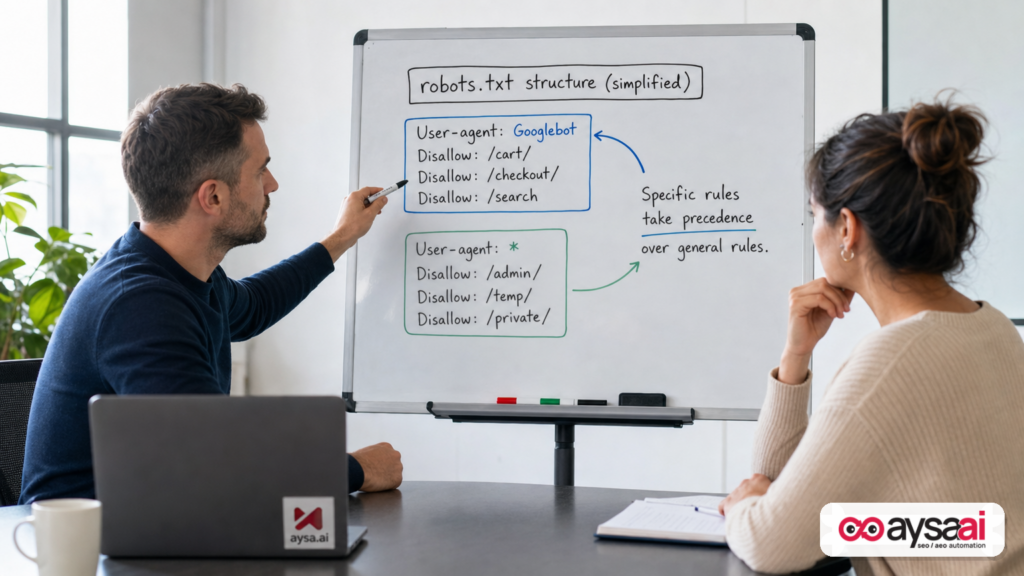
Google’s John Mueller recently explained a mistake that can cause Googlebot to ignore the rules you thought you set in robots.txt: when you create a Googlebot-specific group and also keep a broader User-agent: * group, Google may only follow the Googlebot section—ignoring the “global” rules you expected to apply. The end result can be ugly, especially during search box spam attacks where thousands of junk URLs get generated and discovered.
This editorial is my take—practical, SME-first, and execution-oriented—on what changed, why it matters, and what businesses should do right now to protect their search presence. I’ll also show how AYSA fits: Monitoring what’s happening, preparing fixes, asking for approval, and executing only what you accept—so you’re not stuck with a technical to-do list that never gets shipped.
Concise summary
- Robots.txt does not “prevent Indexing.” It primarily controls Crawling. If you need something out of Google’s index, use Noindex, correct status codes, canonicalization, and cleanup—then request removal where appropriate.
- If you define a
User-agent: Googlebotgroup, Google will use it—and may ignore yourUser-agent: *group rules you assumed applied to everyone. - Search box spam and parameter spam create index bloat, quality signals issues, and brand risk. Redirecting junk URLs to “real” pages can backfire by consolidating noise into important collections.
- SMEs need an operating system, not a one-time fix: monitor indexing anomalies, ship the right control (noindex/canonical/status), and verify in Google Search Console.
Table of contents

- What changed: Google clarifies why robots.txt may be “ignored”
- The “robots.txt quirk” (and why it’s not really a quirk)
- Search box spam: why this problem keeps coming back
- Robots.txt vs. noindex vs. redirects vs. 404/410: what each tool does
- How teams accidentally create indexable junk (common failure modes)
- Shopify: what to do when /search URLs get indexed
- WordPress: what to do when internal search and spam queries appear
- How to diagnose and confirm the issue in Google Search Console
- The practical fix: a step-by-step playbook for SMEs
- What agencies should rethink: fewer audits, more execution
- Where AYSA fits: monitoring + approved execution for technical SEO
- What to do next
- Sources and further reading
What changed: Google clarifies why robots.txt may be “ignored”

The catalyst here is a scenario that’s increasingly common: a site is hit with search box spam, spammy search-result URLs get discovered, and the business tries to stop it with robots.txt. Then they notice those URLs are still indexed, and they conclude “Google is ignoring robots.txt.”
Google’s explanation is less dramatic and more operational: the robots.txt file can be interpreted exactly as written, but not as you intended. If you have one set of rules for User-agent: Googlebot and another set for User-agent: *, Google will follow the rules most specific to Googlebot. That can make it look like Google ignored your disallow lines—when in reality Google followed the wrong block (from your perspective) because of how the file is structured.
The original reporting (and the specific Mueller guidance) was covered by Search Engine Journal. You should read it as background, but don’t treat it as a “news story” to skim—treat it as a reminder that technical SEO problems are often process problems: multiple people touching the same file, platform defaults, app integrations, and rules that get added over time without a single owner accountable for the final behavior.
Source: Search Engine Journal coverage of Mueller’s explanation
The “Robots.txt quirk” Google highlighted (and why it’s not really a quirk)
Here’s the key operational rule to understand in plain English:
- Robots.txt is grouped by user-agent. Each group starts with a
User-agentline and includes rules likeDisallowandAllow. - Crawlers choose the most specific matching group. If there’s a group that matches
Googlebot, Googlebot will use that group. - If you expected Googlebot to also follow your
User-agent: *rules, that expectation may be wrong. Your global rules are not “inherited” by the Googlebot group. You need to duplicate shared rules or structure your file so the intended bots share a group.
This is not Google being difficult. The entire reason robots.txt supports user-agent grouping is to allow different behavior for different crawlers: you might allow an image crawler but block a testing bot; you might block aggressive scrapers; you might reduce crawl load on a legacy area for certain bots while letting others through.
Where it becomes a landmine is how businesses actually manage robots.txt:
- One developer adds a Googlebot block “just to be safe.”
- An SEO later adds a global block for /search or /filter parameters under
User-agent: *. - Nobody validates which group Googlebot is actually using.
- Indexing bloat grows quietly until it becomes visible.
If you only remember one thing from this entire piece, remember this: robots.txt is deterministic, but humans are messy. Your file reflects the mess unless you enforce ownership, review, and monitoring.
Search box spam: why this problem keeps coming back in 2026
Search box spam is not new, and it’s not limited to any one platform.
The pattern is simple:
- A spammer submits searches on your site for topics you don’t want associated with your brand (adult, gambling, pharma, etc.).
- Your internal search generates a unique URL for each query (for example, something like
/search?q=...or/?s=...). - Those URLs become discoverable—through internal links, referrers, sitemap leaks, analytics tags, or by being posted elsewhere.
- Google finds them and may index them if the pages are crawlable and indexable.
Why does this keep happening?
- Internal search was built for users, not crawlers. Most site search systems prioritize “show results fast,” not “create a crawl-safe URL strategy.”
- Modern sites generate infinite URL space. Filters, sorts, tracking parameters, and search queries can create near-infinite combinations that look like “pages.”
- Spam is automated and cheap. Attackers don’t need to hack you to create reputational damage; they just need to trigger URL generation at scale.
SME reality: you probably don’t notice until a customer, salesperson, or investor sees the wrong page ranking for your brand—or until Google Search Console starts showing spikes in indexed pages and “Crawled – currently not indexed” patterns that don’t match your site’s real size.
Robots.txt vs. noindex vs. redirects vs. 404/410: what each tool actually does
This is where most businesses go wrong: they use the wrong tool for the job, then get surprised by the result.
1) Robots.txt (crawl control)
Robots.txt is primarily a crawling directive. It tells compliant crawlers what they should and shouldn’t fetch. It does not, by itself, guarantee that something won’t appear in search results.
That distinction matters because indexing can happen in multiple ways. If Google knows a URL exists (from links, sitemaps, external references), it may show a URL in results even if crawling is blocked—often without a snippet. (Whether and how that appears can change over time, so treat robots.txt as a crawl lever, not an index lever.)
2) Noindex (index control)
Noindex is the strongest general-purpose “don’t keep this in the index” signal available to most site owners. It usually appears as a meta robots tag on the page.
Critical nuance: to see a noindex tag, Google generally needs to crawl the page. If you block a URL in robots.txt, Google may not be able to crawl it and therefore may not see your noindex. This is why platform guidance often says: don’t block internal search pages in robots.txt if your plan is to add noindex on them.
3) Redirects (routing and consolidation)
Redirects are useful when a page truly moved and you want users and crawlers to end up somewhere else. But redirecting spammy search URLs to a “real” collection page can create a different problem: you’re telling Google those spammy URLs have a legitimate destination and relationship to your core pages.
In practice, mass-redirecting spammy internal search URLs can:
- Consolidate irrelevant signals into important pages.
- Create confusing indexing states (Google keeps the old URL indexed longer, shows the target unexpectedly, etc.).
- Make debugging harder because the spam URL “works” (returns 200/301), so it doesn’t look like junk.
4) 404/410 (removal signals)
If a URL should not exist, returning a 404 (Not Found) or 410 (Gone) is often a clean solution—especially for generated spam URLs that have no legitimate purpose. In many cases, this is the simplest way to clean up. But don’t do it blindly; validate you’re not breaking real user flows or legitimate search pages that users rely on.
5) Canonical (duplication control)
Canonicals help when you have multiple URLs representing substantially the same content (like product pages with tracking parameters). They are not a spam fix, and they won’t always solve search query URL spam. But for parameter-driven duplication, they can be part of the stack.
The big business takeaway: choose the tool based on the outcome you need—crawl control, index removal, user routing, or duplication consolidation.
How teams accidentally create indexable junk (common failure modes)
The Mueller example is one failure mode (user-agent precedence). But in the real world, SMEs and agencies tend to fall into a handful of repeatable traps.
Failure mode A: “We blocked it, so it can’t be indexed”
Blocking crawling is not the same as preventing indexing. When the business goal is “get this out of Google,” the safer plan is usually:
- Allow crawling of the URLs (at least temporarily),
- Add noindex (or return 404/410 if appropriate),
- Verify removal over time in Search Console,
- Then decide whether to block crawling to save crawl budget once the index is clean.
Failure mode B: A Googlebot-specific group exists, but it’s missing key rules
This is the heart of the “quirk.” Someone adds a User-agent: Googlebot group for a totally different reason—then assumes global rules apply. They don’t. Googlebot obeys the Googlebot group.
Failure mode C: Platform or app generated a robots snippet you didn’t audit
Ecommerce and CMS platforms often generate robots-related files, templates, or partial overrides. Teams install apps, themes, or plugins that touch these settings. The result is a file that looks “reasonable” but produces unexpected crawler behavior.
Failure mode D: Redirecting spam to a “real” page
Redirecting a spam URL is tempting because it keeps users from seeing garbage. But it doesn’t necessarily solve indexing, and it may create consolidation problems.
Failure mode E: No monitoring loop
Most indexing problems are not a one-time bug. They’re a system behavior. Without monitoring (new indexed URLs, new query patterns, parameter explosions), the issue returns—often months later, when nobody remembers what was changed.
Shopify: what to do when /search URLs get indexed
Shopify is a frequent target because it’s ubiquitous and its internal search is predictable. The SEJ reporting highlighted that Shopify provides a way to add noindex for search pages—specifically recommending adding meta directives via theme templates rather than relying purely on robots.txt.
Strategically, that’s the right direction: use noindex for internal search result pages in most cases, because those pages are rarely intended to rank in Google and can generate infinite combinations.
Important operational note from the source context: if you block these pages with robots.txt, Google may not crawl them and may not see the noindex. So you need to choose a consistent approach: either allow crawling + noindex (often best for cleanup), or return 404/410 for truly junk URLs, or use a carefully considered combination.
If you’re on Shopify, treat internal search pages like a product feature for users—not as an SEO landing page strategy—unless you intentionally design and curate them (which most SMEs don’t).
Primary platform guidance was referenced in the source context; if you’re implementing this, confirm current Shopify instructions in official documentation within your admin and theme environment before shipping.
WordPress: what to do when internal search and spam queries appear
WordPress sites can get hammered by search query spam too, especially if internal search results generate indexable pages like /?s=query.
The source context notes that major SEO plugins often set internal search result pages to noindex by default. That’s generally aligned with best practice: internal search results tend to be thin, duplicative, and easily spammed.
But “default” doesn’t mean “safe.” WordPress sites frequently have:
- Theme customizations that override templates,
- Page builders that render unexpected search states,
- Multiple plugins interacting with robots meta tags,
- Custom search experiences that generate unique URLs.
So the plan is the same: verify what’s being indexed, confirm the meta robots behavior on the page output, and decide whether those URLs should exist at all.
How to diagnose and confirm the issue in Google Search Console
You don’t need to be an enterprise SEO to diagnose this. You need a repeatable routine.
Step 1: Confirm the scope (how many URLs and what patterns)
Look for patterns like:
/searchpaths- Query parameters like
?q=,?s=,?filter=,?sort= - Odd strings that resemble spam niches
Step 2: Inspect representative URLs
Use URL inspection to understand:
- Is Google indexing it?
- Is it crawlable?
- What canonical does Google see?
- Is there a noindex?
- Is it redirecting? If so, where?
Step 3: Validate robots.txt behavior for Googlebot specifically
This is where the Mueller issue shows up. Open your robots.txt and look for:
- A dedicated
User-agent: Googlebotgroup - A separate
User-agent: *group containing the “real” rules
If you see that structure, assume risk until proven otherwise: Googlebot may not be using the global rules.
Step 4: Decide what outcome you want
Ask a business question, not a technical question:
- Do we want these URLs to exist for users?
- Do we want them crawled?
- Do we want them indexed?
Most SMEs want internal search pages usable but not indexed. That points to allowing crawl + noindex (and ensuring the page isn’t blocked in robots.txt).
Step 5: Measure cleanup over time
Index cleanup is not instant. Your job is to make the technical signals unambiguous, then validate that Google is gradually dropping URLs from the index.
If you’re looking for a structured way to operationalize this monitoring across multiple properties, that’s exactly the kind of routine we build around in AYSA’s monitoring layer: AYSA Monitoring.
The practical fix: a step-by-step playbook for SMEs
Here’s a pragmatic, low-drama plan that works for most small and mid-sized businesses. It’s written to be executable by an owner/marketer with a dev partner—not just an SEO specialist.
1) Stop treating robots.txt as an indexing solution
Use robots.txt to manage crawling load and avoid crawling traps. Use noindex and status codes to manage indexing. If your internal process conflates these, fix the process first.
2) Audit robots.txt for user-agent group conflicts
Specifically check:
- Is there a
User-agent: Googlebotgroup? - If yes, does it include the disallows you expect Google to follow (like /search)?
- Are your important “global” rules only present under
User-agent: *?
If the file is long and touched by multiple people, assume it contains contradictions. This is where “simple” becomes expensive.
3) Choose one strategy for internal search pages
For most SMEs:
- Allow crawling of internal search pages (at least during cleanup)
- Add
noindexto the template - Avoid redirecting spam searches to important collections unless you have a clear reason
For obviously junk URLs that should never exist, consider returning 404/410. But validate you’re not breaking legitimate search UX.
4) Reduce URL generation where possible
This is under-discussed: the best “index control” is fewer junk URLs in the first place.
- If your search template exposes the query in the URL, ensure it doesn’t create indexable content for nonsense.
- Consider rate limiting or anti-abuse controls if feasible (platform-dependent).
- Ensure internal search results don’t get linked in navigational areas in a way that invites crawling.
5) Verify with Search Console and repeat
After changes ship:
- Inspect a sample of spammy URLs
- Confirm Google can crawl and sees noindex (if that’s your strategy)
- Track index counts and “Indexed, though blocked by robots.txt”-style patterns if they appear
6) Build a lightweight governance rule
Robots.txt should not be edited casually. Make it a governed artifact:
- One owner (even if it’s “marketing with dev review”)
- One change log
- One rollback plan
This is where execution systems win. A messy robots.txt is rarely a knowledge gap; it’s a workflow gap.
What agencies should rethink: fewer audits, more execution
Agencies love audits because audits are billable and safe. But robots/indexing failures don’t hurt because you failed to identify them. They hurt because you failed to fix them quickly and verify the outcome.
If you’re an agency operator, the question I’d ask is:
Do we have a dependable path from discovery → recommended change → client approval → deployment → verification?
If the answer is “we send a doc and hope,” you’re not running a technical SEO program—you’re running a technical SEO suggestion box.
This matters more in 2026 because search is more sensitive to quality signals and brand trust, and because spammy indexed URLs don’t just waste crawl budget—they can pollute brand impressions and confuse AI-driven search experiences that summarize a site’s footprint.
A concrete SME scenario: the specialty food store that redirected spam
Let’s make this real.
Imagine a 12-person ecommerce business selling specialty foods. They run on Shopify. They notice Google is indexing URLs like:
/search?q=best+online+casino/search?q=cheap+viagra
The founder is embarrassed and wants it gone immediately. A developer adds:
Disallow: /searchunderUser-agent: *
But months earlier, an app had added a User-agent: Googlebot section for something unrelated. Now Googlebot uses that section and ignores the User-agent: * rule. The URLs remain crawlable. Google indexes them. Meanwhile, the team also set a redirect so those spam URLs 301 to a collection page (because “nobody should see those pages”).
Outcome:
- Google continues discovering spam URLs.
- Some of those URLs consolidate signals into a real collection page.
- Search Console gets noisier.
- The team argues about whether this is an “SEO problem” or a “dev problem.”
What would I do instead?
- Fix robots.txt grouping so rules apply as intended (or remove unnecessary bot-specific groups).
- Implement noindex on internal search templates (Shopify-supported approach referenced in the source context).
- Remove the blanket redirects for spammy search URLs unless there’s a clear routing requirement; consider 404/410 for obviously junk patterns.
- Monitor indexing patterns weekly until the footprint is clean.
This is exactly the kind of situation where execution speed matters more than debating theory.
Where AYSA fits: monitoring + approved execution for technical SEO
At AYSA, we treat technical SEO as a business operations problem: issues recur unless you ship fixes and verify outcomes.
Here’s how AYSA fits naturally into this robots/indexing problem set:
- Monitor your site’s search visibility and anomalies so you’re not finding out from a customer or a random brand search. Start here: AI Search Visibility
- Prepare recommended changes with clear intent: whether it’s robots.txt restructuring, adding noindex to templates, or URL cleanup strategy.
- Ask for approval before anything touches production—because one wrong disallow can wipe out revenue pages. That’s the point of “approved execution,” not automation for automation’s sake.
- Execute accepted website changes quickly and consistently, then track whether Google’s behavior actually changes over time.
If you want the broader toolkit view, see: AI SEO Tools. If you’re evaluating cost and operational fit: AYSA Pricing. For more editorials like this: AYSA Blog.
Operational notes: what to watch so this doesn’t happen again
Most businesses don’t need more SEO theory. They need a short list of “if this happens, do that” triggers.
Watch for these symptoms
- Indexed URL counts rising faster than your catalog/content growth.
- Brand searches showing strange titles/snippets.
- Search Console coverage reports full of parameterized URLs.
- Sudden crawl spikes in server logs (if you have access).
Use these checks as a routine
- Monthly robots.txt review (especially after app/theme/plugin changes).
- Quarterly review of internal search and parameter behaviors.
- Ongoing monitoring for new URL patterns getting indexed.
What to do next
- Open your robots.txt and search for
User-agent: Googlebot. If it exists, confirm it contains the rules you expect Google to follow—or simplify your structure. - Identify your top junk URL patterns: /search, query parameters, filters, sorts.
- Pick the right control:
- Internal search results: usually noindex (and avoid blocking in robots.txt during cleanup).
- Truly non-existent spam URLs: consider 404/410.
- Moved pages: use redirects intentionally, not as a spam band-aid.
- Verify in Google Search Console using URL inspection on samples of affected URLs.
- Set a monitoring loop so you catch regressions after platform updates and app installs.
- If you want an execution system—not just advice—evaluate AYSA’s monitoring and approved execution workflow:
Sources and further reading
- Search Engine Journal: Google Says Why It May Ignore Robots.txt And Negatively Impact SEO
- Search Engine Journal: Latest news (context and ongoing updates)
- Search Engine Journal: SEO section (additional technical SEO background)
Note on primary documentation: The source context references platform-level guidance for Shopify and general robots.txt behavior. Before implementing changes on production sites, confirm details against your platform’s current official documentation and your site’s actual rendered output. If you’re operating in a regulated industry (health, finance), involve your dev and compliance stakeholders before shipping indexing controls.
Continue the AI search topic inside AYSA.
Use these pages to connect the article with AI SEO tools, AI visibility monitoring, AI Overviews and approved website execution.
Turn this topic into a website action plan.
Use these AYSA hubs to move from reading to technical fixes, AI visibility monitoring, research, glossary context and approval-first SEO execution.

