
The Accessibility Tree Is the New Homepage: How AI Agents Actually Read Your Site (And How to Fix What They Can’t)
In 2026, accessibility isn’t a compliance afterthought—it’s the machine-readable interface AI agents use to understand, cite, and complete tasks on your website. If your accessibility tree is broken, your AI visibility, conversions, and customer journeys break with it.

In 2026, “accessibility” stopped being a side quest.
It became the interface a growing share of real customer journeys run through—because AI agents don’t experience your site like a human does. They don’t admire your hero image. They don’t “feel” your brand. They try to identify structure, meaning, and actions as cheaply and reliably as possible.
That’s why the accessibility tree matters. It’s the browser-computed semantic model of your page—originally designed to power screen readers—and it’s increasingly the model AI agents use to understand what your page is and what can be done on it.
This article is my practical take on what changed, what breaks, and what business owners, marketers, and agencies should do next. The goal: make your site legible to both humans and machines—without turning your next quarter into a “rebuild the website” death march.
Concise summary

AI agents increasingly rely on the browser’s accessibility tree—roles, names, states, and structure—to read and operate websites. When your markup produces empty buttons, unlabeled form fields, or misleading ARIA, agents can’t confidently complete tasks (buy, book, quote, subscribe). Accessibility improvements are now directly tied to AI visibility (AEO/GEO), conversion reliability, and operational resilience. The fix isn’t “add more ARIA”; it’s to make native HTML semantics accurate, keep interactive elements properly named, and verify results using browser devtools or automation snapshots. AYSA fits as the Monitoring + Approved Execution layer: detect what breaks, propose fixes, get approval, ship changes, and keep the site stable over time.
Table of contents

- Key takeaways (executive summary)
- What changed in 2026: accessibility became an AI interface, not a checkbox
- The accessibility tree: the browser’s semantic model of your site
- Why AI agents prefer the accessibility tree over pixels and raw HTML
- Why a markdown copy is not an agent-ready website
- How to view (and test) your accessibility tree in minutes
- The uncomfortable trend: the web is getting harder for machines to parse
- The most common failures that make AI agents “go blind”
- The ARIA paradox: why “adding accessibility” can make things worse
- How to structure content for AI search and agent comprehension
- A concrete SME scenario: when agents can’t checkout, nobody wins
- An action plan SMEs can execute in 30 days (without a redesign)
- What agencies should change in 2026 (deliverables, QA, and accountability)
- Where AYSA fits: monitoring + approved execution for AI-ready websites
- What to do next
- Sources and further reading
Key takeaways (executive summary)
- AI agents don’t read your website like a person. Many agents rely on the accessibility tree—the same structural model used by screen readers—to determine page structure and available actions.
- Your accessibility tree is derived from your DOM and semantics. If your HTML and interactive components are vague, overloaded, or mislabeled, the tree becomes incomplete or misleading.
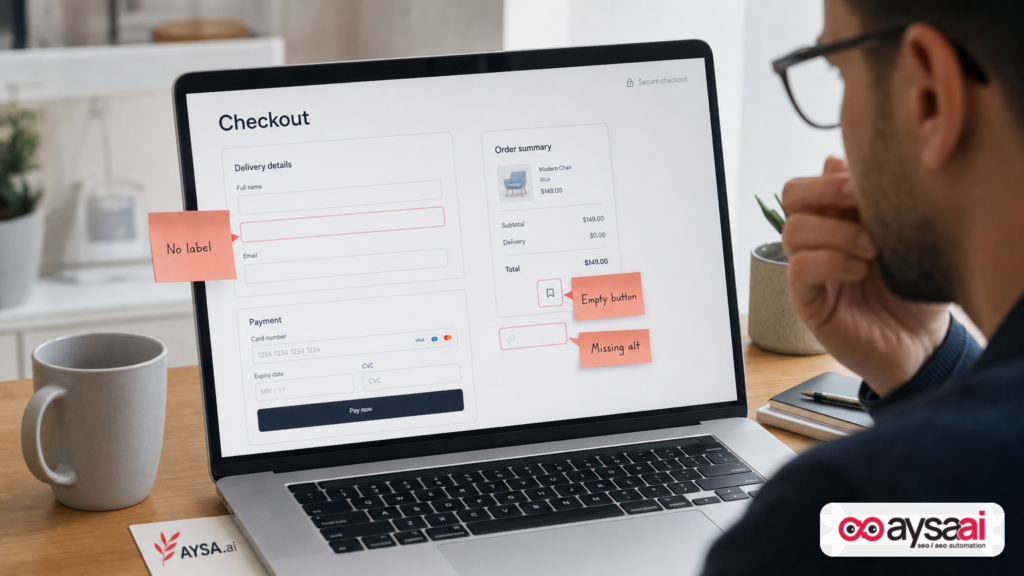
- Broken accessibility is now broken “agent UX.” Empty buttons, empty links, missing labels, and misused ARIA turn into dead ends for automated visitors acting on behalf of humans.
- “Add ARIA” is not a strategy. Standards bodies emphasize native HTML semantics first; bolt-on ARIA can increase errors when applied incorrectly.
- SMEs don’t need a redesign to win. You can materially improve agent readability through focused fixes: native elements, labels, accessible names, language, and server-rendered critical content.
- Execution matters more than advice. Monitoring, change proposals, approvals, and controlled deployment is how you keep these improvements from regressing—this is where AYSA’s model fits.
What changed in 2026: accessibility became an AI interface, not a checkbox
For years, accessibility has been framed as:
- a legal/compliance requirement,
- a moral imperative (which it is), and
- a QA checklist item teams often postpone.
That framing is outdated. Not because the ethics or compliance concerns disappeared—they didn’t—but because a new audience arrived at scale: AI agents that read pages on behalf of humans.
The core idea (and the reason I’m writing this now) is simple:
Accessibility is increasingly the machine-readable user interface of the web.
Search Engine Journal’s reporting highlights how AI agents frequently read the accessibility tree rather than pixels and cites Cloudflare Radar data showing automated traffic exceeding human traffic for HTML requests in a measured period. I’m not going to re-litigate every number here, but the business implication is straightforward: you should assume a meaningful portion of “users” interacting with your pages are software.
And software doesn’t “get the gist” the way a person does. Software needs:
- clear structure (headings, landmarks, lists),
- clear identity of actions (button vs link vs input),
- clear naming (“Add to cart” vs a blank icon), and
- clear states (disabled, expanded, selected).
That’s what the accessibility tree is supposed to provide.
If your accessibility tree is degraded, your AI performance degrades: fewer reliable citations, more task failures, more “I can’t find the price” moments, more abandoned checkouts, more support tickets, and more lost demand routed to whoever is easier for agents to interpret.
The accessibility tree: the browser’s semantic model of your site
The accessibility tree is not a plugin. It’s not a third-party crawler format. It’s something the browser computes from your page structure so non-visual consumers can understand it.
Search Engine Journal describes the pipeline clearly: HTML → DOM → accessibility tree → consumers (assistive technologies and, now, AI agents).
To ground that in reputable definitions:
- W3C WAI-ARIA defines an accessibility tree as a “tree of accessible objects” representing UI structure, exposed through accessibility APIs used by assistive technologies. (See the W3C ARIA specification: WAI-ARIA 1.2.)
- MDN explains that browsers create an accessibility tree based on the DOM tree. (See MDN’s accessibility documentation hub: Web accessibility on MDN.)
What matters operationally is what the tree includes and excludes. In practice, it:
- collapses thousands of DOM nodes into a smaller set of meaningful objects (headings, links, buttons, inputs, landmarks),
- exposes the role and name of these objects, and
- captures states and relationships that software can act on (expanded menus, checked boxes, selected options).
In other words: the accessibility tree is a compact, structured map of the page—exactly what an agent needs to decide what to click, what to fill out, and what content is important.
What an agent needs (and what the accessibility tree provides)
At a minimum, an agent trying to complete a task needs to identify:
- Role: What is this thing? (button, link, textbox, navigation region)
- Name: What is it called? (the label it can reference)
- State: Can it be used right now? (disabled, expanded, selected)
- Description/context: Extra instructions or hints, when available
If a “Buy” control has no accessible name, an agent can’t confidently choose it over other buttons. If the “Email” input has no label, the agent can’t reliably map the field to the right data. If a menu is “expanded” visually but not reflected structurally, the agent may never discover the content a human can see.
Why AI agents prefer the accessibility tree over pixels and raw HTML
There are three main ways an AI system can “read” a web page:
- Raw HTML parsing (fast, but messy; can miss dynamic content and can be noisy)
- Vision/screenshot understanding (more human-like, but expensive and error-prone)
- Accessibility tree consumption (compact, semantically meaningful, and action-oriented)
Search Engine Journal notes that some agents and tools explicitly prefer accessibility trees because they are cheaper (fewer tokens than images) and more reliable for identifying interactive controls than pixel guessing.
It’s also consistent with the direction vendors signal publicly. Search Engine Journal references OpenAI’s guidance that improving accessibility (ARIA labels/roles) helps agents interpret structure and interactive elements. When a vendor says “make your ARIA good,” they are effectively saying: we’re reading the semantic interface of your page, not your marketing design.
However—and this will be a theme—standards and accessibility practitioners also emphasize native semantics first, because ARIA is easy to misuse.
Business implication: your “agent UX” is now part of conversion rate
In the past, Conversion rate optimization lived mostly in the visual layer:
- button color,
- hero copy,
- social proof placement,
- layout and spacing.
All still important. But if an agent can’t reliably identify the primary action, it doesn’t matter how beautiful that action looks.
Increasingly, there are two UX stacks:
- Human UX (pixels)
- Agent UX (semantics)
Strong teams ship both.
Why a markdown copy is not an agent-ready website
A lot of teams are reacting to AI discovery by creating alternate representations of content:
- markdown versions of pages,
- LLM-friendly “reader mode” endpoints,
- documentation portals,
- copy-only feeds.
Search Engine Journal makes a critical point: markdown is great for reading and citing, but it’s not sufficient for operating a website.
Markdown can tell an agent what you say. It can’t reliably tell an agent what it can do:
- Which control is a button?
- Which buttons are disabled?
- Which field is “email” vs “phone”?
- Which dropdown changes shipping price?
And there’s a bigger trust problem: if you maintain a separate markdown copy, you’ve created a second “truth.” It can drift. It can accidentally contradict the live page. Or it can be interpreted as Cloaking if it diverges too much from user-visible reality.
The accessibility tree avoids that because it’s computed from the same page humans render. There’s less room for divergence and less ongoing maintenance.
How to view (and test) your accessibility tree in minutes
You don’t need a specialized crawler to see the problem. You can inspect what an agent sees using common tools.
Option 1: Chrome DevTools
Chrome DevTools includes an Accessibility panel where you can inspect the computed role/name/state for a selected element. It also allows viewing an accessibility tree representation for the page. (See Chrome DevTools accessibility docs: Chrome DevTools: Accessibility features reference.)
Practical test you can run on your most important pages:
- Can you find your primary CTA in the accessibility tree as a button with a clear name?
- Do your navigation and key sections appear as landmarks (header/nav/main/footer) or at least as logically grouped headings?
- Do your form fields have labels that match what customers would call them?
Option 2: Automated snapshots (Playwright)
Search Engine Journal references Playwright ARIA snapshots—structured representations of a page’s accessibility tree. This is important for teams because it turns “accessibility tree quality” into something you can test in CI, not just eyeball once per quarter.
Even if you’re not implementing automated accessibility snapshots today, the lesson is simple: the accessibility tree is observable. You can inspect it, measure it, and improve it.
The uncomfortable trend: the web is getting harder for machines to parse
Search Engine Journal highlights a point I think too many teams want to ignore: accessibility quality (and overall structural clarity) has not been steadily improving.
It cites the WebAIM Million report, which annually analyzes the home pages of the top one million websites for detectable accessibility issues. SEJ notes the report’s findings about regression and growing complexity, and—crucially—connects that to what agents depend on.
I want to be careful here: automated scans don’t capture the entire accessibility reality, and correlation isn’t causation. But the directional signal matters: more complexity and more errors create more ways for the accessibility tree to become incomplete or misleading.
Why this is happening now (my take)
SEJ discusses two drivers WebAIM suggests: increasing reliance on frameworks/libraries and AI-assisted coding (“vibe coding”). Without adding new statistics, I’ll add an operational lens:
- Component abstraction hides semantics. Teams ship reusable UI components that look right but don’t always expose correct roles/names/states.
- Velocity outruns QA. Faster shipping means less time for structured testing (accessibility tree checks rarely exist in release gates).
- JavaScript-first rendering increases uncertainty. If critical content/actions depend on client-side execution, some consumers won’t see them as intended.
- Teams optimize for screenshots, not structure. Design review catches pixel issues; it doesn’t catch “empty button” semantics.
The result is a web that may look polished to humans but is structurally ambiguous to machines.
The most common failures that make AI agents “go blind”
Search Engine Journal lists common WebAIM-detected failures and explains how they degrade the accessibility tree. Here’s the business version—what these failures mean when an agent is trying to complete a task on your site.
1) Empty links and empty buttons
An empty button in the accessibility tree is like a door with no sign. A human may infer meaning from an icon or surrounding layout. An agent often can’t. If there are multiple icon buttons in a row (wishlist, compare, share, cart), and only one matters, an agent needs a reliable accessible name to pick the right one.
Common cause: icon-only buttons without accessible labels, or links styled as buttons with missing text content.
Fix pattern: ensure an accessible name exists—typically via actual text, an associated label, or a carefully applied ARIA label when necessary (with native semantics preferred).
2) Missing form labels
If your form fields don’t have proper labels, an agent doesn’t know what to put where. This matters for:
- checkout and payment flows,
- appointment booking,
- quote requests,
- login and account creation,
- newsletter subscriptions.
Humans can sometimes guess based on placeholder text. Agents should not have to guess at all.
Fix pattern: real <label> elements tied to inputs; consistent naming; avoid relying solely on placeholders.
3) Missing alt text (and meaningless alt text)
Not all images need detailed alt text, but when an image carries meaning (product image context, step-by-step instructions, icons used as the only label), missing alt text means missing information.
Also: meaningless alt text (“image123”) is effectively missing.
Fix pattern: use alt text where the image conveys content; use empty alt (alt="") for purely decorative images; don’t overload alt with keywords.
4) Missing document language
Language is not just for screen readers. It’s also a clue for any system selecting the right model, voice, or parsing assumptions. SEJ notes missing document language as a recurring error category.
Fix pattern: set lang on the <html> element and use correct language codes for multilingual pages.
5) Low contrast (more relevant than you think)
Low contrast is often framed as a visual-only issue. It is—but it can also impact vision-based agents that do screenshot analysis. Even if your preferred agent approach is “structured tree,” you don’t control what every tool uses.
Fix pattern: fix contrast at design system level; validate across states (hover, disabled, focus).
The ARIA paradox: why “adding accessibility” can make things worse
Here’s the trap: once teams learn agents and assistive tech use ARIA-exposed semantics, they start sprinkling ARIA everywhere.
Search Engine Journal cites WebAIM findings that pages with ARIA present can show more detected errors than pages without it—an observation frequently summarized as “more ARIA correlates with more errors.” That doesn’t mean ARIA is bad. It means ARIA is often used as a patch rather than as a precision tool.
The standards body guidance is blunt. W3C’s “First Rule of ARIA” (as cited widely by accessibility experts) is essentially:
- If you can use a native HTML element with built-in semantics and behavior, do that instead of repurposing another element and adding ARIA.
Why this matters for AI agents:
- Wrong ARIA is worse than missing ARIA. It can confidently mislead the tree.
- Native elements carry behavior + semantics together. A
<button>is more than a styled box; it’s a promise about interaction, focus, keyboard behavior, and accessibility exposure. - ARIA requires ongoing correctness. States like
aria-expandedmust match reality. If your JavaScript changes UI but not ARIA state, the agent gets a false model of the page.
My recommendation is consistent with the standards direction: make the markup mean what it says. Use ARIA when native HTML cannot express the requirement—then treat ARIA as code that must be tested, not decoration.
How to structure content for AI search and agent comprehension
Accessibility-tree fixes get agents to operate your site. But there’s another layer: getting AI systems to understand and cite your content accurately (AEO/GEO).
This is where Technical SEO overlaps with content architecture.
1) Build content with explicit structure (not vibes)
Agents do better when your content has:
- one primary topic per page,
- clear H2/H3 hierarchy,
- short definitional sections (“What it is,” “Who it’s for,” “How it works”),
- lists and tables for comparisons,
- explicit constraints, pricing ranges, and availability rules where appropriate.
This isn’t “write for robots.” It’s write so a machine can be accurate.
2) Avoid structural cloaking (accidental or intentional)
If the human-visible page has a “Book now” button but the accessibility tree doesn’t expose it (or exposes it as an unnamed generic element), you’ve created an experience mismatch.
Even if you didn’t intend to cloak, the outcome looks the same: the machine can’t verify what the human can see.
3) Server-render what matters
SEJ emphasizes that content that only appears after client-side JavaScript runs may never reach the tree an agent reads in the way you expect. This is not a blanket argument against modern frameworks; it’s a reminder to be intentional about what you render where.
Critical items to prioritize for server rendering (or at least guaranteed accessibility exposure):
- product title, price, availability, and primary CTA,
- appointment availability and booking CTA,
- contact paths (phone, address, email),
- terms that materially change the offer (shipping thresholds, cancellation rules),
- the content you want cited in AI answers.
4) Treat semantics as brand consistency
Most brands obsess over voice and visual identity. Few define “structural identity.”
But in AI-first discovery, your “structural identity” becomes:
- how reliably your headings identify what you do,
- how consistently your CTAs are named across pages,
- how predictable your forms are,
- how cleanly your navigation groups intent.
That consistency is what makes an agent say, “I know what to do here.”
A concrete SME scenario: when agents can’t checkout, nobody wins
Let’s make this real with a scenario that matches how SMEs actually operate.
Business: a mid-sized ecommerce brand selling specialty supplements with a subscription option.
Team: founder + marketer + contracted dev. They ship a new theme built with a modern component library. Everything looks great.
What breaks:
- The “Add to cart” control is visually a button, but implemented as a
<div>with click handlers. - The icon-only “Checkout” button in the cart drawer has no accessible label.
- The subscription selector is a custom widget that never updates its ARIA state correctly.
Human experience: fine. Most customers can complete checkout.
Agent experience: unreliable. An agent cannot confidently map the cart actions, fails to select subscription options, and may abandon. If the agent is part of a broader AI shopping flow, the system may decide the merchant is “hard to transact with” and route the user elsewhere.
The fix isn’t a redesign. It’s semantic repair:
- Use native
<button>for actions. - Add accessible names for icon-only controls.
- Ensure the subscription selector exposes state correctly (or replace it with a native control pattern).
This is the new conversion battleground: not just what humans can click, but what machines can safely operate.
An action plan SMEs can execute in 30 days (without a redesign)
Most SMEs don’t have the luxury of a six-month accessibility program. They need a plan that fits reality: limited dev capacity, competing priorities, and the requirement to keep revenue stable.
Here’s a pragmatic 30-day approach I recommend.
Week 1: Identify “money pages” and inspect the tree
- Pick 10–20 pages that drive revenue or leads: home, top category pages, top product pages, pricing, booking, contact, checkout steps.
- In Chrome DevTools, inspect: primary CTA, navigation, forms, and key content sections.
- Create a simple issue list: empty buttons/links, missing labels, incorrect roles, missing language, hidden content.
If you want a systemized workflow, start with monitoring and baselines. That’s exactly what we build into AYSA’s monitoring layer: AYSA Monitoring.
Week 2: Fix the highest-impact failures first
Prioritize fixes that:
- block primary actions (buy/book/quote),
- block forms (lead capture, checkout, login),
- break navigation discoverability,
- hide key content.
Concrete tasks:
- Replace clickable
<div>and<a>-as-button patterns with<button>where appropriate. - Add labels to inputs (not just placeholders).
- Ensure every interactive element has an accessible name.
- Set document language properly.
Week 3: Establish guardrails so you don’t regress
This is where most teams fail. They fix issues once, then ship a new component release and re-break everything.
Guardrails can include:
- a checklist for new UI components (role/name/state),
- PR review criteria (native elements first),
- basic automated testing using accessibility snapshots or tooling,
- design system rules: icon buttons require labels, form fields require labels.
Week 4: Expand to templates and scale wins
- Fix template-level components used sitewide (header nav, footer, product card, cart drawer, modal dialogs).
- Standardize CTA naming (“Book appointment” vs “Schedule” vs “Start” across pages).
- Re-check your top flows end-to-end.
What agencies should change in 2026 (deliverables, QA, and accountability)
If you run an agency, you’re likely being asked about AEO/GEO, AI visibility, and “how do we show up in AI answers?”
Here’s the uncomfortable truth: a lot of that success depends on technical legibility, not clever prompts.
1) Add “accessibility tree readiness” to definition of done
Not as a vague promise. As a concrete deliverable:
- Primary actions appear in the accessibility tree with correct role and name.
- Forms have labels; errors are announced; focus management works.
- Menus and dialogs expose expanded/hidden states correctly.
2) Audit component libraries like they’re SEO infrastructure
Component libraries are often where semantics die. Agencies should build or select libraries that ship accessible patterns by default—because retrofitting later is expensive and fragile.
3) Treat JavaScript rendering choices as discoverability choices
When core offer content or primary actions only exist after client-side JS runs, you introduce risk for:
- assistive technologies,
- automation tooling,
- agents operating in constrained environments,
- systems extracting content for AI answers.
Agencies should be ready to justify SSR/CSR decisions with business consequences—not just developer preference.
4) Sell ongoing monitoring + execution, not one-off audits
The web is not static. Accessibility tree quality is not static. AI systems evolve, and your site changes weekly.
This is why we built AYSA as an execution system, not a “PDF audit generator.” Monitoring plus controlled change deployment is the only sustainable approach for SMEs who can’t staff this internally.
Relevant resources:
Where AYSA fits: monitoring + approved execution for AI-ready websites
Most businesses are stuck between two bad options:
- Do nothing and hope future AI systems “figure it out.”
- Do everything (big rebuild) and blow up timelines, budgets, and revenue stability.
AYSA is built for the third option: continuous, approved improvements that compound over time.
In practice, an “accessibility tree readiness” program inside AYSA looks like this:
- Monitor: Identify pages and templates where structure breaks and where changes (themes, plugins, deployments) introduce regressions. Start here: AYSA Monitoring.
- Prepare: Generate a prioritized set of recommended changes (semantic fixes, labeling, element replacements, rendering recommendations), tied to business outcomes (checkout completion, lead form completion, AI citation readiness).
- Ask for approval: No surprise deploys. Business owners and teams see proposed changes and approve what ships.
- Execute: Implement accepted changes safely and track impact over time.
Because the accessibility tree is derived from your actual markup, “agent readiness” can’t be solved in a doc. It has to be solved in production code—carefully.
If you want to explore how we think about AI visibility and structured readiness, start here: AI Search Visibility.
For ongoing education and practical playbooks, we publish more at: AYSA Blog.
What to do next
- Pick 10 money pages and inspect their accessibility tree in Chrome DevTools.
- List the top blockers: empty buttons/links, missing form labels, wrong roles, missing language, hidden primary actions.
- Fix semantics first: use native HTML elements for buttons/links/inputs; reserve ARIA for true gaps.
- Make interactive elements nameable: every button/link needs an accessible name that matches user intent.
- Ensure critical content renders reliably (especially offer terms, pricing, availability, and primary CTAs).
- Install guardrails: add component-level rules and tests so new releases don’t re-break your tree.
- Operationalize it: use monitoring and approved execution so improvements keep compounding rather than decaying.
If you want help turning this into an ongoing system instead of a one-time scramble, start with AYSA monitoring and AI search visibility:
Sources and further reading
- Search Engine Journal: The Accessibility Tree Is How AI Agents Read Your Site & It’s Breaking
- W3C: WAI-ARIA 1.2 Specification
- MDN: Web Accessibility
- Chrome DevTools: Accessibility features reference
- WebAIM: The WebAIM Million (annual accessibility analysis)
Note: Search Engine Journal’s article references additional vendor guidance and tooling specifics (e.g., agent behavior and browser automation). Where a primary source link wasn’t included in the supplied research context, I avoided adding direct claims beyond what’s presented and focused on actionable, standards-aligned practices.
Continue the AI search topic inside AYSA.
Use these pages to connect the article with AI SEO tools, AI visibility monitoring, AI Overviews and approved website execution.
Turn this topic into a website action plan.
Use these AYSA hubs to move from reading to technical fixes, AI visibility monitoring, research, glossary context and approval-first SEO execution.

