
Google Performance Max network controls: What the new Partners (Alpha) setting changes—and how to use it without breaking performance
Google is testing a new Performance Max control that lets advertisers opt in or out of Search Partners and the Display Network. This sounds like a small toggle, but it changes how you diagnose PMax performance, how you structure experiments, and how you protect budgets—especially for SMEs that can’t afford “black box” waste.

Google is testing a small but meaningful change in Performance Max (PMax): a new Partners (Alpha) setting that lets some advertisers choose whether PMax can serve on Search Partners and/or the Google Display Network (GDN). That’s notable because PMax’s value proposition has always been “one campaign, all the inventory,” and historically it hasn’t offered a clean, campaign-level way to exclude those networks.
I’m not writing this as a product announcement. I’m writing it as an operator—because for most small and mid-sized businesses, PMax is either:
- a growth engine that quietly expands reach and conversions, or
- a budget vacuum that’s hard to diagnose because results are blended across networks.
This new toggle is the kind of control that looks basic on the surface, but changes how you should test, attribute, report, and protect performance. If you’ve ever tried to explain why a “Search campaign” is actually getting conversions from a long tail of partner sites—or why lead quality suddenly dropped—this matters.
Primary source: Search Engine Land: Google tests Performance Max network controls with new Partners (Alpha) setting.
Concise summary
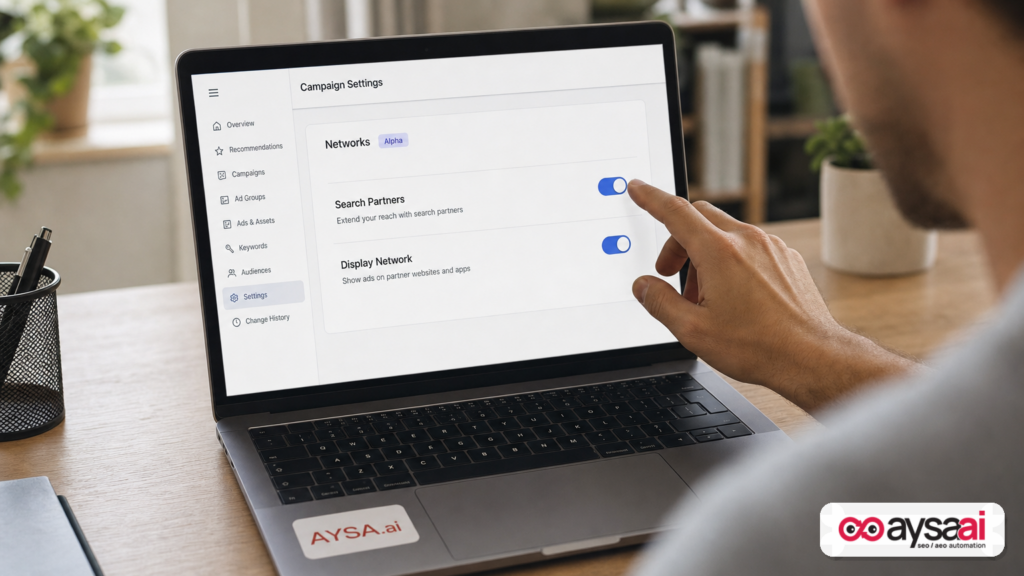
- Google is testing a Partners (Alpha) setting in Performance Max that allows opting in/out of Search Partners and the Google Display Network.
- This is a meaningful shift: it makes PMax more testable and gives advertisers a lever to isolate where performance is really coming from.
- The risk: if you flip the wrong switch without a plan, you can “improve ROAS” while reducing new customer volume or breaking your funnel mix.
- SMEs and agencies should treat this as an experimentation opportunity, not a permanent preference—at least until you’ve measured impact.
- AYSA’s role: help you monitor outcomes, prepare site changes that improve conversion quality, then ask for approval and execute—so marketing teams don’t have to choose between speed and governance.
Table of contents

- What changed: a new Partners (Alpha) switch inside Performance Max
- Why this matters (more than it sounds): PMax is becoming “less black box”
- Context: why network mixing creates reporting and quality problems
- Search Partners vs Display: what you’re actually opting in/out of
- Who benefits most from this control (and who should be cautious)
- The risk: you can “improve ROAS” and still harm growth
- How to test the new setting responsibly (a practical experiment blueprint)
- What to monitor beyond ROAS and CPA (lead quality, incrementality, and lag)
- A concrete SME scenario: local clinic + PMax + lead quality drop
- Agency operations: what you need to change in reporting and governance
- Where AYSA fits: monitoring + approved execution for landing pages and AEO/SEO
- What to do next (action list)
- Sources and further reading
What changed: a new Partners (Alpha) switch inside Performance Max

According to Search Engine Land, Google is testing a new Partners (Alpha) setting inside PMax that allows advertisers to choose whether to include:
- Search Partners
- Google Display Network (GDN)
Historically, one of the core frustrations with Performance Max has been the lack of explicit controls over where ads show. If you wanted “PMax but without Display-ish placements,” you were mostly stuck with indirect methods and inference: shifting creative, changing goals, refining audiences, sculpting product feeds, or using account-level exclusions where possible—without a clean “off” switch at the campaign layer.
This test suggests Google is willing to add at least one of the most requested levers: the ability to decide whether PMax can run on these networks. It’s labeled Alpha, which signals limited availability and a feature still being validated.
What not to assume: Alpha does not mean “coming to everyone next week.” It means “some advertisers get it, Google watches behavior and impact, and the final version may differ—or may not roll out widely.”
Why this matters (more than it sounds): PMax is becoming “less black box”
PMax is built to optimize across inventory automatically. That’s its strength and its tradeoff. For years, advertisers have complained about:
- limited placement transparency (where did my ad actually show?)
- blended performance (which network drove the result?)
- quality variability (great CPA, questionable lead quality)
- diagnostic paralysis (what lever do I pull when it goes wrong?)
When you can’t isolate networks, you can’t run clean experiments. And when you can’t run clean experiments, you end up optimizing to whatever metric looks stable—usually ROAS or CPA—without understanding whether you’re buying the right conversions.
A network control toggle doesn’t solve everything, but it creates something the best marketing teams demand: falsifiable hypotheses.
Example hypothesis you can now test more directly:
- “If we remove Display inventory from PMax, then lead quality will improve while total conversions remain within X%.”
- “If we keep Search Partners on but remove GDN, we’ll reduce junk leads while maintaining incremental volume.”
- “If we remove both, PMax will behave more like a high-intent engine; we’ll accept lower volume for higher margin.”
That’s not just a PPC feature. It’s a business control.
Context: why network mixing creates reporting and quality problems
Let’s translate the core issue for non-SEO, non-PPC business owners.
Performance Max is not one channel. It’s a bundle of channels. Even if your goal is “sales” or “leads,” the system can pursue that goal across different types of attention:
- People explicitly searching with intent
- People browsing content
- People watching videos or consuming media
- People encountering ads in places that are not your primary “search results” mental model
That mix can be great. It can also distort your understanding of what’s working:
- Attribution gets blended: Your reports show one CPA, but the CPA can be “carried” by one network while another network is inefficient.
- Conversion quality gets blurred: Display-like environments can drive low-intent Clicks that still convert (especially for soft conversion actions), creating false confidence.
- Optimization loops can drift: If you feed the algorithm low-quality conversions (or noisy conversion definitions), it may scale the wrong behavior.
When you’re running a small business, you don’t have the luxury of guessing. You need levers that make cause-and-effect clearer.
Search Partners vs Display: what you’re actually opting in/out of
Search Engine Land’s reporting is specifically about controls over Search Partners and GDN within PMax.
Search Partners (in plain English)
Search Partners generally refers to placements where your ads can appear on partner properties related to search (not only on Google’s main search results). In many accounts, Search Partners can perform well—but it can also be a source of “mystery conversions,” especially if your Conversion tracking is too permissive.
Common SME concern: “My leads increased, but sales says they’re unqualified.” Search Partners is one of the usual suspects worth testing.
Google Display Network (GDN)
GDN is the broader display ecosystem where ads appear across many sites and apps. It can be effective for remarketing, awareness, and sometimes direct response—if your funnel, creative, and conversion tracking are designed for that.
Common SME concern: “We’re paying for clicks that don’t behave like buyers.” If you’re a high-consideration business (legal, medical, B2B services), display inventory can be a mixed bag unless carefully managed.
Important nuance: Turning off GDN is not a moral victory. It’s a strategic choice. If you rely on remarketing-like behavior for revenue, removing GDN could reduce assisted conversions or brand lift—sometimes invisibly in last-click reporting.
Who benefits most from this control (and who should be cautious)
This toggle matters most when any of the following are true:
1) You’re an SME with tight margins and limited testing budget
When budgets are small, one “bad month” isn’t a rounding error. It’s payroll. The ability to reduce wasted inventory quickly is meaningful—but only if you do it with measurement discipline.
2) Your conversion action is vulnerable to spam or low intent
If you count conversions like:
- “Contact form started”
- “Call button clicked” (without call duration thresholds)
- “Chat opened”
- “Newsletter signup”
…then broader inventory can create the illusion of performance. The more you expand reach, the more you must defend conversion quality.
3) You sell a product where intent is everything
Some categories are just more sensitive: emergency services, high-ticket B2B, regulated verticals, appointment-based local services. If the buyer journey depends on genuine intent, you want more control over where your system hunts for conversions.
4) You’re an agency managing client trust
Agencies aren’t only accountable for results; they’re accountable for explanations. A toggle that helps isolate networks can reduce conflict and improve client reporting integrity—if you document experiments properly.
Who should be cautious?
- Brands with strong remarketing economics who might unintentionally reduce assisted conversions.
- Ecommerce teams where PMax’s cross-network reach helps discover new product demand.
- Any account with weak measurement. If you can’t trust your conversion data, a network toggle won’t save you; it may just change where the noise comes from.
The risk: you can “improve ROAS” and still harm growth
I’ve seen this pattern repeatedly in performance marketing:
- You tighten targeting or restrict placements.
- ROAS and CPA improve.
- Everyone celebrates.
- Three to six weeks later, pipeline softens, new customer count dips, and leadership asks why growth slowed.
This happens because efficiency and growth are different jobs.
Network restrictions often:
- Reduce “top-of-funnel” exposures (some of which were incremental)
- Concentrate spend on people already likely to buy (which looks efficient)
- Lower the system’s ability to find new pockets of demand
If you’re a mature brand with plenty of Branded Search and repeat buyers, maybe you want that. If you’re trying to grow into new segments, you might be trading long-term expansion for short-term cleanliness.
The right mindset is not “Display is bad” or “Search Partners is junk.” The right mindset is:
“Which inventory supports our objective, and how do we prove it?”
How to test the new setting responsibly (a practical experiment blueprint)
If you’re one of the advertisers who gets access to the Partners (Alpha) setting, treat it like a controlled experiment—not a preference toggle.
Step 1: Write the hypothesis in one sentence
- Efficiency hypothesis: “Excluding GDN will reduce CPA by 15% while keeping qualified lead volume within 5%.”
- Quality hypothesis: “Excluding Search Partners will reduce unqualified leads as measured by sales-accepted lead rate.”
- Incrementality hypothesis: “Keeping GDN increases new-to-brand customers even if ROAS declines.”
Step 2: Define the success metrics before you touch settings
Do not decide the metric after the fact. That’s how teams accidentally optimize narratives.
Pick:
- Primary KPI (e.g., qualified leads, revenue, margin)
- Guardrail KPI (e.g., total conversion volume, impression share, cost volatility)
- Quality KPI (e.g., lead-to-sale rate, refund rate, call duration)
Step 3: Keep the rest of the system stable
If you change networks, don’t simultaneously change:
- conversion actions
- budgets
- bidding strategy
- creative assets
- landing pages
Otherwise you won’t know what caused what.
Step 4: Use a long enough window to avoid false conclusions
I won’t invent a universal “correct” test duration (it depends on volume), but the principle is simple: run long enough to capture weekday/weekend behavior, conversion lag, and sales cycle realities.
Step 5: Document changes like a release log
For SMEs, this is the easiest “professionalization” win: keep a plain change log. Date, change, hypothesis, expected outcome, actual outcome.
That discipline is how you build a marketing machine that survives staff changes, agency transitions, and platform volatility.
What to monitor beyond ROAS and CPA (lead quality, incrementality, and lag)
Network controls will tempt people to chase the cleanest ROAS. Don’t. Build a more complete measurement set.
1) Conversion quality (not just volume)
If you run lead gen, you need a definition of “good lead” that is not controlled by the ad platform.
- Sales-accepted lead rate
- Appointment show rate
- Call duration thresholds
- Refunds/cancellations (for services)
2) New customer rate
If you’re ecommerce, track whether network changes shift the mix toward existing customers. That can inflate ROAS while shrinking acquisition.
3) Margin-aware performance
ROAS is not profit. If network changes alter product mix (e.g., promoting discounted items), your profit can drop while ROAS looks fine.
4) Conversion lag and assisted behavior
Display-like inventory can contribute to assisted conversions. If you remove it, you may see short-term improvement and mid-term softness. Watch the lag.
5) On-site engagement signals (as guardrails)
Even without perfect attribution, your site can tell you if traffic quality changes:
- Bounce Rate / engagement rate (interpret carefully)
- time to first meaningful action
- form completion rate
- multi-page sessions on key service pages
This is also where SEO/AEO work becomes relevant: if the traffic mix changes, your landing pages must do more of the qualification work.
A concrete SME scenario: local clinic + PMax + lead quality drop
Let’s make this real.
Business: A local physical therapy clinic with two locations.
Goal: Book evaluations.
Current setup: They run Performance Max with a “Leads” goal. Conversion actions include “form submit” and “call click.” The owner is happy because cost per lead is down. The front desk is unhappy because many callers are price-shopping, out-of-area, or asking for services the clinic doesn’t offer.
What might be happening:
- Broader inventory is generating more top-of-funnel actions.
- Conversion actions are too easy to trigger.
- PMax is optimizing toward volume rather than booked appointments.
How the new Partners (Alpha) setting changes the playbook:
- Run a controlled test excluding GDN first (if access exists), leaving Search Partners on.
- Measure not only CPL, but booked evaluations and show rate.
- If quality improves but volume drops, decide whether to accept lower volume or invest in better landing page qualification to recover volume.
What the clinic should do regardless of the toggle:
- Clarify services and insurance coverage on landing pages.
- Add “who we help / who we don’t” sections.
- Improve call tracking definitions (e.g., only count calls above a duration threshold—if your tooling supports that).
That last point is where “paid search” and “SEO/AEO execution” become the same discipline: you’re not just buying clicks; you’re shaping the customer’s decision.
Agency operations: what you need to change in reporting and governance
If you’re an agency, this alpha control is a gift—and a trap.
The gift
- You can finally run clearer experiments.
- You can align placements with client objectives (efficiency vs growth).
- You can reduce “mystery traffic” arguments.
The trap
- Clients will ask for blanket rules: “Turn that off everywhere.”
- Your team might “optimize” toward the metric the client yells about, not the metric that matters.
- You might remove inventory that was quietly delivering incremental volume.
What to change operationally
- Update your reporting template: Add a section for “Network configuration” and note when it changed.
- Update your onboarding: Ask clients what they prefer to optimize for when there’s a tradeoff: ROAS vs new customers vs pipeline.
- Update your conversion governance: Tighten what counts as a conversion. If you can’t, you’ll keep having the same quality fights.
This is also an org-chart problem. Search Engine Land recently highlighted the idea that SEO and PPC alignment starts with org structure (linked from the same publication context). Even without reading that piece, the truth holds: when teams are siloed, measurement and landing page quality lag behind spend changes.
Where AYSA fits: monitoring + approved execution for landing pages and AEO/SEO
At AYSA, our bias is simple: marketing performance improves when measurement and execution become a loop—not a set of disconnected tasks.
This PMax network control is a perfect example. The toggle is in Google Ads, but the outcomes often show up on the website:
- traffic quality shifts
- conversion rates change
- lead quality feedback reveals mismatch
- content and landing pages need to qualify and convert better
AYSA’s role is not to “manage Google Ads.” Our role is to make your site the best possible destination for whatever demand you create—and to do it in a way that’s safe, auditable, and fast.
1) Monitor what matters when you change networks
When you flip Search Partners or Display on/off, you need Monitoring that answers: “Did this help the business?” not just “Did it change ROAS?”
- Track visibility and demand signals tied to pages that PMax sends users to
- Watch for conversion rate shifts by landing page group
- Detect content decay and mismatch between ad promise and page reality
Explore: AYSA Monitoring
2) Prepare improvements that increase qualification and conversion
Once network mix changes, you often need to adjust:
- landing page clarity (who it’s for, what it includes, pricing expectations)
- internal linking to supportive pages (FAQ, testimonials, service detail)
- structured data where appropriate (to improve entity clarity for AI search and traditional search)
- content modules that reduce unqualified inquiries
AYSA helps prepare those changes, present them for review, and then execute accepted updates—so you don’t get stuck in the “we should update the page” meeting loop.
Relevant AYSA resources:
3) Approved execution: fast changes without chaos
The biggest operational gap in SMEs is not ideas—it’s execution with accountability. AYSA’s model is: monitor → prepare → ask for approval → execute.
That matters when:
- PPC teams need landing page changes quickly
- Founders want to approve messaging changes
- Agencies need an audit trail of what changed and when
If you want to understand how this fits your team size and budget: AYSA pricing.
What to do next (action list)
Here’s the practical checklist I’d follow if you run PMax today—whether or not you have access to the alpha setting yet.
1) Audit your conversion actions for quality
- Are you counting micro-actions as conversions?
- Do you have any offline quality signal (sales-accepted, booked, paid)?
- Can you separate “inquiry” from “qualified inquiry” in reporting?
2) Create a network hypothesis before you touch settings
- What do you believe Search Partners is doing?
- What do you believe GDN is doing?
- What will you accept as a tradeoff (volume vs quality)?
3) If you get the Alpha toggle, run one test at a time
- Test excluding GDN first or excluding Search Partners first—don’t change both simultaneously.
- Hold budgets and creative constant.
- Keep a change log.
4) Strengthen landing pages to handle broader traffic (or to qualify tighter traffic)
- Add clarity: pricing ranges, service areas, requirements, expected timelines.
- Add proof: testimonials, case studies, before/after, certifications (where appropriate).
- Add friction intentionally: if low-quality leads are killing you, require a key qualifying field.
5) Use AYSA to operationalize monitoring and execution
- Set up monitoring to catch performance shifts quickly: AYSA Monitoring
- Build AI search and traditional search visibility together (AEO/GEO + SEO): AI Search Visibility
- Use AYSA tools to identify and prepare site updates: AI SEO Tools
6) Align stakeholders on what “better” means
If your founder wants growth, your finance lead wants efficiency, and your sales team wants quality, you need an explicit priority order. Otherwise every network test becomes a political argument instead of a learning cycle.
Sources and further reading
- Search Engine Land: Google tests Performance Max network controls with new Partners (Alpha) setting
- Search Engine Land: Microsoft Ads adds Ad Preview Hub to Performance Max (context on the broader “PMax everywhere” trend)
- Search Engine Land: ChatGPT Ads adds conversion bidding, geo exclusions and bulk campaign tools (context on platforms adding controls to automation)
- Search Engine Land: SEO and PPC alignment starts with your org chart (organizational context for cross-team execution)
- AYSA Monitoring
- AYSA AI Search Visibility
- AYSA AI SEO Tools
- AYSA Pricing
AYSA perspective: controls are useful—but only if you can execute the next steps
Google giving advertisers more control inside Performance Max is directionally good. But the real advantage won’t go to the teams who toggle features first. It’ll go to the teams who can:
- measure what changed,
- interpret it with business context, and
- execute improvements on the site quickly—with approvals and accountability.
That’s exactly the gap AYSA is built to close.
Continue the AI search topic inside AYSA.
Use these pages to connect the article with AI SEO tools, AI visibility monitoring, AI Overviews and approved website execution.
Turn this topic into a website action plan.
Use these AYSA hubs to move from reading to technical fixes, AI visibility monitoring, research, glossary context and approval-first SEO execution.

