
Google Search Console Indexing Delays: What to Trust, What to Do, and How to Keep Shipping SEO Anyway
When Google Search Console’s Page indexing report stops updating, the worst move is pausing decisions. Here’s a practical reliability ladder for validating indexing, a triage playbook for SMEs and agencies, and how an approval-based execution system keeps technical SEO moving even when dashboards lag.

Google Search Console (GSC) is the closest thing SEO has to an “official record” of how Google is discovering, Crawling, and Indexing your site. That’s why it’s unsettling when a core report stops updating—especially the Page indexing report that many teams use as their daily heartbeat.
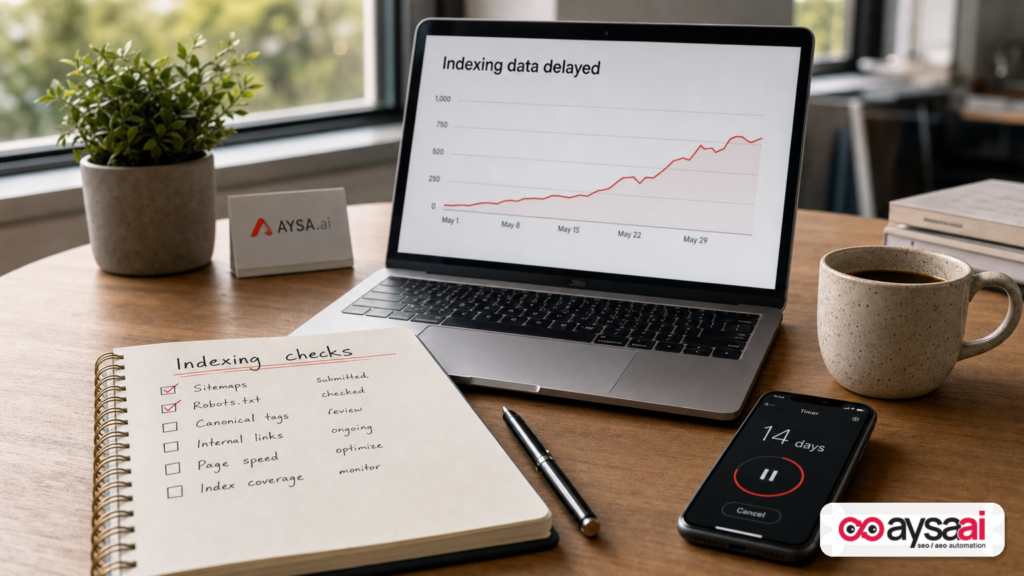
In late June 2026, Search Engine Land reported that the Page Indexing report had been delayed by roughly two weeks, leaving site owners without a recent view of indexed vs. not-indexed pages. The headline is simple. The operational impact is not: when your “main dashboard” lags, it’s easy to either panic or freeze.
I’m Marius Dosinescu, and this is my opinionated take: the real risk isn’t that Google’s reporting is delayed. The real risk is that your organization has built an SEO program that can’t function without a fresh chart. Businesses that win in search don’t “watch dashboards.” They run a repeatable operating system: monitor, validate, ship improvements, and manage risk with approvals.
Concise summary
- GSC reporting delays are a data problem, not automatically an indexing problem. Your pages may still be crawled and indexed normally.
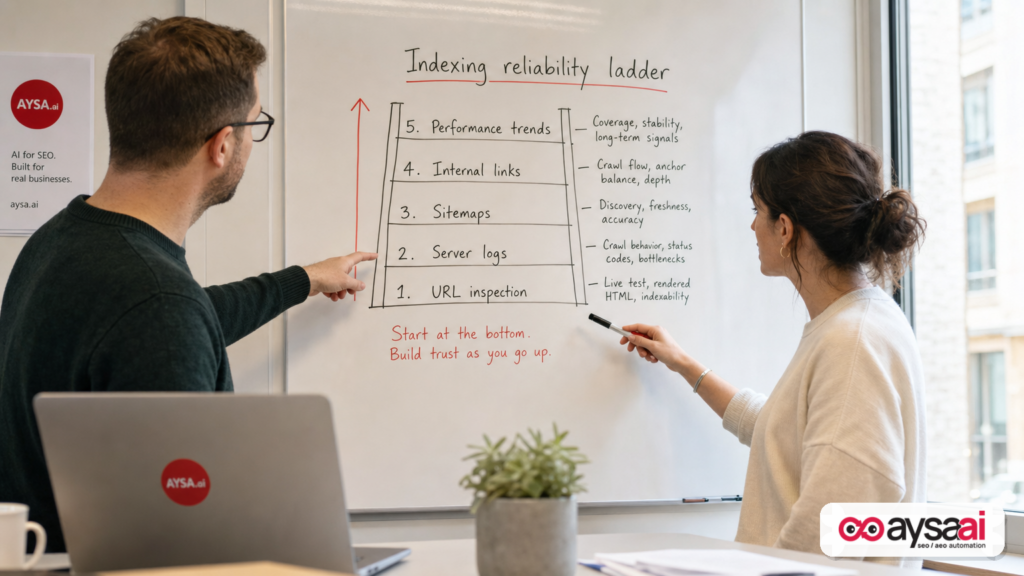
- When the Pages report is stale, fall back to a reliability ladder: URL Inspection sampling, sitemap processing checks, server logs (if available), Internal linking validation, and Performance trends.
- Don’t “fix” what you haven’t verified. Panic edits to robots, canonicals, redirects, and Noindex are how you turn a reporting delay into a real incident.
- SMEs need an indexing SOP. Agencies need a client-ready incident communication template. Both need execution discipline.
- AYSA.ai fits as an approval-based execution system: it monitors, prepares changes, asks for approval, and executes accepted fixes—so SEO keeps shipping even when Google’s charts lag.
Key takeaways (the business version)
- Indexing is not traffic. Indexing means eligible to appear; it doesn’t guarantee rankings or Clicks.
- A delayed report doesn’t equal “de-indexing.” Treat it like delayed accounting—verify with other instruments.
- When uncertain, do low-risk, high-upside work. Internal linking, template cleanliness, sitemap hygiene, and duplication control are defensible even without fresh aggregate counts.
- One-page triage beats 30 Slack threads. Put your checks in a sequence and timebox them.
- Execution under approval is the unlock. Monitoring is awareness; approved execution is compounding progress.
Table of contents

- What’s happening: the Page indexing report is delayed (and why that’s not rare)
- What the Page indexing report is (and what it isn’t)
- Why it matters: the real risks for SMEs, ecommerce, and agencies
- Indexing basics for non-SEO operators: discovered vs crawled vs indexed vs ranking
- The reliability ladder: what to check when GSC reporting is stale
- How to use URL Inspection without wasting your week
- Indexing triage: what actually blocks indexing (and what’s just noise)
- Ecommerce and indexing: where duplication quietly explodes
- SME scenarios: ecommerce, local services, and publishers
- A practical playbook: 48 hours, 7 days, 14 days (and 30 days)
- What agencies should do differently during data gaps
- Where AYSA.ai fits: monitoring + approved execution beats “dashboard watching”
- What to do next (action list)
- Sources and further reading
What’s happening: the Page indexing report is delayed (and why that’s not rare)
The issue is specific: GSC’s Page indexing report (Search Console → Indexing → Pages) can show a last updated timestamp that’s weeks behind. Search Engine Land called out a roughly two-week lag at the time of publication and noted that this kind of delay is not unheard of.
Operationally, here’s what that means:
- Google’s indexing systems may still be operating. Crawling and indexing can continue even if the reporting UI is behind.
- Your team loses a familiar control panel. The Pages chart is a popular “single pane of glass” for technical SEO—when it’s stale, teams feel blind.
- Decisions get delayed—or get made based on assumptions. Both are expensive in different ways.
And here’s the uncomfortable truth: if your SEO program cannot function when one Google report lags, that’s not Google’s failure. That’s a process design failure.
What the Page indexing report is (and what it isn’t)
When it’s fresh, the Page indexing report is extremely useful because it aggregates patterns across your site:
- How many URLs Google considers indexed vs not indexed (as Google defines those buckets)
- Common exclusion reasons (duplicates, alternate canonical, soft 404, blocked by robots, etc.)
- A way to see changes over time and spot structural issues
But it’s important to understand what it isn’t:
- It’s not real-time. Even in normal times, GSC is not a live log stream. It’s a reporting layer.
- It’s not a ranking report. “Indexed” does not mean “ranks well.”
- It’s not page-by-page truth. It’s an aggregate model with categories that are helpful but sometimes blunt.
If you want to anchor your process in primary sources, start with Google’s official documentation hub: Google Search Console Help. For crawling and indexing mechanics, the most reliable public references live under Google Search Central (e.g., sitemap documentation). Even then, remember: documentation describes intended behavior, not the day-to-day timeliness of every report.
Why it matters: the real risks for SMEs, ecommerce, and agencies
When GSC data lags, the main cost isn’t confusion. It’s the decisions that confusion triggers.
Risk #1: SMEs freeze execution (and lose compounding gains)
Small businesses commonly run SEO in the margins—between inventory, hiring, customer support, and cash flow. When a familiar report looks “wrong,” teams pause everything “until we know what’s happening.” Two weeks later, you’ve lost two weeks of compounding improvements.
In search, momentum matters. Template improvements, internal linking upgrades, pruning duplicates, consolidating thin pages—these are rarely one-and-done tasks. They’re a cadence.
Risk #2: Panic changes create real damage
Here are the most common panic moves that turn a reporting delay into a real indexing incident:
- Robots.txt edits made without review, accidentally blocking key sections
- Broad noindex rollouts because “Google isn’t indexing, so let’s clean things up,” removing pages that were actually performing
- Canonical changes across templates that inadvertently point to the wrong version (or to non-existent pages)
- Redirect chain “cleanup” that creates loops or breaks internal links
- Mass resubmission behavior that wastes time but doesn’t address root causes
In other words: when the map is stale, don’t start bulldozing roads.
Risk #3: Agencies report the wrong story to clients
For agencies, a GSC reporting delay is a professionalism test. If your client update is a screenshot of a stale chart and a shrug, you’re not managing the account—you’re relaying a platform issue.
Clients hire agencies to reduce uncertainty, not amplify it. Your job is to validate reality with alternate signals, communicate risk clearly, and keep shipping changes that are defensible.
Indexing basics for non-SEO operators: discovered vs crawled vs indexed vs ranking
When a report is delayed, it helps to simplify the mental model so business owners can make decisions without needing perfect data.
1) Discovered
Google learns a URL exists—through internal links, sitemaps, external links, redirects, past crawls, or other signals.
2) Crawled
Googlebot requests the URL and retrieves the page content (or an error). Crawl does not guarantee index.
3) Indexed
Google decides the page is eligible to be stored and potentially shown in search results. Google may also decide the page is a duplicate and choose a different canonical.
4) Ranking (and getting impressions/clicks)
Even if indexed, the page might rank poorly, rank for different queries than expected, or get few clicks due to competition, intent mismatch, or SERP features.
This distinction is why a Pages report delay is not the same as a traffic incident. If your performance (impressions/clicks) is stable, your immediate risk is usually lower—even if you still need to fix technical issues.
For performance interpretation, reference Google’s documentation for the GSC Performance report: Performance report.
The reliability ladder: what to check when GSC reporting is stale
When the Page indexing report is behind, replace “one chart” with a ladder of signals—from highest confidence to lowest.
1) URL Inspection (high confidence, low scale)
Search Engine Land’s advice to rely on the URL Inspection tool page-by-page is directionally right—but with one caveat: you must use it as a sampling system, not as a replacement for aggregated reporting.
Primary reference: Google’s URL Inspection tool documentation.
2) XML sitemap processing (high confidence for discovery hygiene)
Sitemaps don’t guarantee indexing, but they are a strong operational lever for discovery and for telling Google which URLs you consider canonical and important.
When the Pages report is stale, sitemap hygiene becomes more important—not less. Ensure that your sitemap includes:
- Canonical URLs only
- Index-eligible URLs only (no noindex pages)
- Clean status codes (avoid 3xx/4xx/5xx)
Primary reference: Google Search Central: Sitemaps overview.
3) Server logs (high confidence, higher effort)
If you can access server logs (or CDN/WAF logs), they can answer: “Is Googlebot crawling the pages we care about?” That’s often more actionable than “How many pages are indexed?”
Things to look for:
- Sudden drop in Googlebot hits to key directories
- Spikes in 5xx errors or timeouts
- Crawl traps (Googlebot spending time on infinite URL patterns)
SME note: if your dev or hosting provider can’t provide logs, treat it as an operational gap. You don’t need logs to rank, but you do need them to debug quickly under uncertainty.
4) Internal linking and navigation validation (high leverage, under your control)
When reporting is uncertain, focus on what you control: making sure your important pages are easy to discover.
Quick checks:
- Are new pages linked from relevant hubs (categories, services, guides)?
- Do templates consistently link “up” and “across” (breadcrumbs, related items, next/prev where appropriate)?
- Are you accidentally orphaning pages during redesigns?
5) Performance trends (medium confidence, outcome-based)
If impressions, clicks, and query coverage remain stable, you likely don’t have a sitewide indexing catastrophe. You can still have localized issues (e.g., a new folder not being indexed), but it helps you prioritize.
6) “site:” queries and spot checks (low-medium confidence)
Use site:yourdomain.com as a rough spot check (e.g., “Do any new URLs appear?”). Do not use it as a precise index count. It’s noisy, incomplete, and easily misinterpreted.
How to use URL Inspection without wasting your week
The wrong way to use URL Inspection is to inspect 200 URLs manually because you feel blind without the Pages chart. The right way is to treat it like quality control sampling.
Step 1: Choose samples by business priority, not by randomness
- Money pages sample: top categories, top services, top landing pages that drive leads/sales
- New/changed pages sample: anything published or updated in the last 14 days
- Risk-pattern sample: parameter URLs, filtered pages, pagination, tag pages, internal search pages
Step 2: Record the fields that actually drive action
For each inspected URL, capture:
- Index status: indexed / not indexed
- Canonical: user-declared vs Google-selected
- Robots and noindex signals: any blocks or directives
- Last crawl timestamp: directional, not absolute truth
Step 3: Look for patterns, not one-offs
One URL not indexed doesn’t mean an incident. A pattern—like Google consistently choosing a different canonical across a template—is a lead.
Step 4: Create a decision from the sample
Your sampling should lead to a simple conclusion:
- “No evidence of incident; continue planned work.”
- “Localized issue; fix template X.”
- “High risk; escalate and freeze risky deployments until resolved.”
That decision is what prevents panic.
Indexing triage: what actually blocks indexing (and what’s just noise)
When teams say “indexing problem,” they often mean “we don’t see the result we want.” But indexing has concrete blockers. Start with deterministic causes, then move into probabilistic ones.
A) Deterministic blockers (fix these first)
- Noindex meta tag added to templates
- X-Robots-Tag header noindex on server/CDN
- Robots.txt disallow blocking important sections
- Authentication / paywalls / geo blocks preventing Googlebot access
- Persistent 4xx/5xx errors on important URLs
If any of these are present, you don’t need fresh aggregate reporting to act. You have a clear technical incident.
B) Canonicalization and duplication (the silent confusion tax)
Many “not indexed” states are really “Google picked a different canonical.” This can be fine (if Google picked the correct canonical) or a problem (if Google picked the wrong one).
Common duplication sources:
- HTTP vs HTTPS remnants
- www vs non-www inconsistency
- Trailing slash vs non-trailing slash
- Parameters: sort, filter, tracking
- Category page variants (e.g., /shoes and /shoes?color=black)
When GSC is delayed, canonical issues become harder to “see” in aggregate—which is exactly why disciplined sampling matters.
C) Quality and intent mismatch (Google chooses not to index)
Google can crawl a page and still decide it’s not worth indexing (or not worth keeping indexed). Typical causes:
- Thin content at scale (thousands of near-identical pages)
- Soft 404 patterns (pages that exist but provide little real value)
- Programmatic pages with weak differentiation
- Pages that don’t satisfy search intent (too salesy, too empty, too repetitive)
This is where technical SEO intersects with content strategy. It’s also where a delayed report can trick you: the problem might not be “Google isn’t indexing,” it might be “Google doesn’t want to index these pages.” Two different fixes.
D) Discovery and internal linking (indexing is downstream of findability)
If Google can’t reliably discover or prioritize your pages, indexing becomes inconsistent. Discovery issues come from:
- Orphan pages (no internal links)
- Pages only reachable via internal search
- Deep click depth (buried 6+ clicks from the homepage)
- Inconsistent nav after redesigns
My bias: internal linking is the most underused technical lever for SMEs. It’s also a low-risk improvement you can ship even during a reporting delay.
Ecommerce and indexing: where duplication quietly explodes
If you run ecommerce, indexing uncertainty is usually a symptom of a larger issue: URL sprawl. Ecommerce sites generate URLs like rabbits. If you don’t govern the patterns, Google spends crawl resources on low-value duplicates.
Common ecommerce patterns that create indexing chaos
- Faceted navigation creating crawlable, indexable combinations (color, size, brand, price)
- Pagination that creates many near-duplicate category pages
- Variant URLs where each variant is its own page with little unique content
- Sort parameters generating duplicates of the same category listing
- Internal search URLs being crawled/indexed
What to do when GSC reporting is stale
During a delay, you can still improve your fundamentals:
- Ensure canonicals point to the preferred category/product URL
- Ensure your sitemap includes only canonical URLs
- Make sure your navigation links prioritize canonical versions (don’t link to parameter variants)
- Audit “infinite” URL patterns that trap crawlers
Notice what’s missing: you don’t need the Pages report to start cleaning URL governance. You need discipline and a plan.
SME scenarios: ecommerce, local services, and publishers
Let’s translate this into situations real operators face, so the “what do we do?” is obvious.
Scenario 1: Ecommerce—“Google isn’t indexing our new collection”
Business: A home goods ecommerce store launches a seasonal collection (1 category + 60 products) and updates internal linking modules. They check GSC and see the Pages report hasn’t updated in two weeks. The team concludes: “Google isn’t indexing our new pages.”
Bad move: They remove noindex directives from filter pages “to get more indexed,” and now Google crawls thousands of low-value parameter URLs.
Mature response:
- Inspect the category page + 10 new products via URL Inspection.
- Confirm the new category is linked from the homepage and top categories.
- Confirm sitemap includes canonical URLs for those products.
- Watch Performance impressions for the brand + collection terms.
- Keep shipping: improve product template uniqueness, FAQs, specs, and internal linking.
Result: no accidental crawl trap, no panic changes, continued momentum.
Scenario 2: Local services—“Our service pages show as ‘not indexed’”
Business: A dental clinic network creates 25 city pages and 10 service pages, each with similar structure. The Pages report is stale, and a marketer starts worrying the pages “aren’t indexed.”
What’s actually likely: Some pages are thin or too similar, and Google may consolidate or ignore duplicates. The fix is not “submit again.” It’s to increase differentiation and authority signals per location/service.
What to do during a delay:
- Use URL Inspection sampling across 5 locations + 5 services.
- Strengthen internal linking from high-authority pages (homepage, main services) to each city page.
- Add unique proof per location: staff bios, photos, driving directions context, service availability, FAQs.
Even without fresh aggregate reporting, you can still execute improvements that make indexing more likely and rankings stronger.
Scenario 3: Publisher / blog—“Our latest posts aren’t showing”
Business: A niche publisher posts daily. The Pages report is stale, and editors fear Google stopped indexing new posts.
Reality check: Publishing cadence often creates many similar pages, tag archives, and thin category pages. Indexing issues often come from duplication and weak internal linking to new posts.
What to do:
- Inspect 5 recent posts and their canonical signals.
- Make sure new posts are linked from category hubs and evergreen guides.
- Keep tags and archives under control so you don’t generate infinite thin pages.
Again: the Pages report delay is not your bottleneck. Site architecture and editorial linking discipline are.
A practical playbook: 48 hours, 7 days, 14 days (and 30 days)
When there’s uncertainty, the winning move is to timebox your response and separate verification from execution. Here’s a playbook that works for SMEs and scales for agencies.
In the next 48 hours: establish reality and prevent damage
- Confirm it’s not an outage or deployment incident: check uptime, error rates, and recent releases that touched templates, headers, or robots rules.
- Run URL Inspection sampling: 10 money pages, 10 new/changed pages, 10 risk-pattern pages.
- Check deterministic blockers: robots.txt, meta robots, x-robots headers, status codes.
- Check sitemap hygiene: canonical URLs only; no index-ineligible URLs.
- Write a one-paragraph internal update: “Pages report delayed; sampling indicates X; risks are Y; actions are Z.”
In the next 7 days: ship structural improvements that are defensible
- Internal linking upgrades: ensure priority pages are linked from high-authority hubs and nav elements.
- Canonical governance: standardize canonical rules across templates; remove inconsistent URL generation.
- Reduce URL sprawl: limit crawlable parameter patterns; stop linking to non-canonical variants.
- Template uniqueness improvements: add truly unique content blocks (FAQs, specs, comparisons, location proof).
In the next 14 days: build your “dashboard-independent” indexing SOP
- Define an indexing verification routine: monthly URL Inspection sampling, sitemap audits, internal linking checks.
- Decide what triggers escalation: sudden crawl drops, widespread canonical mismatch, spikes in 5xx, sharp performance drops.
- Document risky-change approvals: robots.txt edits, noindex, canonical rewrites, migrations, parameter handling changes.
In the next 30 days: reduce your dependence on any single platform view
- Build redundancy: combine GSC insights with logs (if possible) and consistent internal QA checks.
- Improve measurement thinking: track outcomes (impressions/clicks) alongside technical eligibility (indexability).
- Systematize execution: treat SEO changes like product changes—requests, approvals, deployment, validation.
If you want a broader process cadence for SEO teams, the Search Engine Land ecosystem also points to workflow discipline. For example, this piece is a useful research lead: How to build a 120-minute weekly SEO workflow that gets results. The important part isn’t the exact schedule—it’s the idea that SEO needs a repeatable operating rhythm.
What agencies should do differently during data gaps
When GSC reporting lags, agencies should move from “reporting” to “verification + decision.” Here’s the standard I’d hold any agency to.
1) Deliver a verification memo, not a screenshot
Your client update should include:
- What changed: GSC Pages report appears delayed.
- What it does not prove: not proof of de-indexing.
- What we verified: URL Inspection sampling outcomes, sitemap processing checks, performance trend review, any log evidence if available.
- Risk level: low / medium / high, and why.
- What we’re shipping anyway: low-risk improvements and their expected benefits.
2) Maintain an “uncertainty-safe backlog”
Agencies should always have a backlog of changes that are safe to deploy even under imperfect data, such as:
- Internal linking improvements to priority pages
- Schema cleanup and consistency checks (where applicable)
- Sitemap hygiene improvements
- Template speed/stability work (when you can validate impact safely)
What should not be deployed casually during uncertainty: broad robots/noindex/canonical changes, URL migrations, large-scale pruning without analysis, or any change that can wipe out discoverability in one push.
3) Make approvals explicit—especially for high-blast-radius changes
If you’re changing anything that can deindex large sections of the site, you need a written approval step. Not because you’re slow—because you’re professional.
Search is too intertwined with revenue to “YOLO” a robots file.
Where AYSA.ai fits: monitoring + approved execution beats “dashboard watching”
This is where I’m going to be direct: most SEO tools are built to observe. Observation is necessary. It’s not sufficient. The companies that win are the ones that can reliably execute improvements without taking reckless risks.
AYSA is designed as an execution system with guardrails:
- Monitor: identify anomalies and opportunities without depending on a single delayed report. See AYSA Monitoring.
- Prepare: propose concrete website changes (technical and on-page) tied to outcomes.
- Ask for approval: stakeholders control risk; nothing high-impact ships silently.
- Execute accepted changes: improvements get implemented—so you keep compounding progress.
During a GSC reporting delay, this matters because your team still needs to move. You can keep shipping improvements that are defensible (internal linking, sitemap hygiene, template cleanup) while using URL Inspection sampling to validate key pages.
If you’re also thinking beyond classic SEO into how brands appear in AI-driven discovery environments, it’s worth aligning your technical foundation with modern visibility goals. That’s the rationale behind AYSA AI Search Visibility—because search is not only “ten blue links” anymore, and the cost of technical instability is higher when visibility is fragmented across experiences.
If you want to explore the tooling angle, start here: AYSA AI SEO Tools. For budget planning and fit, see AYSA Pricing. For ongoing playbooks, updates, and operating principles, browse the AYSA Blog.
What to do next (action list)
- Stop treating the Pages report as a live control panel. It’s valuable, but it’s not real-time.
- Run a 30-URL sampling audit with URL Inspection across money pages, new pages, and risk-pattern pages.
- Check deterministic blockers immediately: robots.txt, meta robots, x-robots headers, status codes.
- Clean your sitemap inputs so only canonical, index-eligible URLs are included.
- Strengthen internal linking so Google can consistently discover what matters.
- Watch outcomes while you wait: impressions and clicks in the Performance report (directionally).
- Create an indexing SOP so the next delay doesn’t create panic or paralysis.
- Adopt monitoring + approved execution so your SEO program keeps shipping under uncertainty: start with AYSA Monitoring.
Sources and further reading
- Search Engine Land: Page indexing report in Google Search Console delayed
- Google Search Console Help (official documentation hub)
- Google: URL Inspection tool documentation
- Google: Performance report documentation
- Google Search Central: Sitemaps overview
- Search Engine Land: How to build a 120-minute weekly SEO workflow that gets results
- Search Engine Land: The new SEO stack: What replaces your old toolset
- Search Engine Land: Why AI search is forcing global SEO teams to rethink ownership
Editorial note from AYSA: If you’re reading this while the GSC Pages report is still delayed, treat it as a forcing function. Upgrade your process so you’re never dependent on one chart again. The businesses that win in search are the ones that keep executing when data is imperfect—because it often is.
Continue the AI search topic inside AYSA.
Use these pages to connect the article with AI SEO tools, AI visibility monitoring, AI Overviews and approved website execution.
Turn this topic into a website action plan.
Use these AYSA hubs to move from reading to technical fixes, AI visibility monitoring, research, glossary context and approval-first SEO execution.

