
Performance Max Household Income Exclusions: What Changed, Why It Matters, and How to Use It Without Breaking Your Growth
Google appears to be rolling out household income exclusions in Performance Max—one of the most meaningful levers added to PMax in years. Here’s what it changes, when to use it (and when not to), how to validate impact, and how AYSA helps connect paid targeting decisions to SEO/AEO execution.

Performance Max (PMax) is built on a promise: give Google broad access to inventory and signals, and its automation will find incremental conversions you would have missed. The tradeoff has always been control—especially around audiences.
That’s why a new setting reportedly spotted inside PMax is a big deal: household income exclusions at the campaign level. If it rolls out broadly, it’s one of the most meaningful “steering wheel” additions PMax advertisers have seen in a while.
This isn’t just a paid-media toggle. Audience gating changes which prospects enter your funnel, which changes what your website learns, what your conversion data looks like, and ultimately which messages you should publish and optimize across SEO, AEO, and (increasingly) AI-driven discovery.
Below is a practical, operator-first guide: what changed, why it matters, the upside and risks, and how to implement it with a measurement plan that protects growth. I’ll also explain where AYSA fits: not as another dashboard, but as an execution system that monitors performance, prepares the right website changes, asks for approval, and executes the accepted updates.
Concise summary
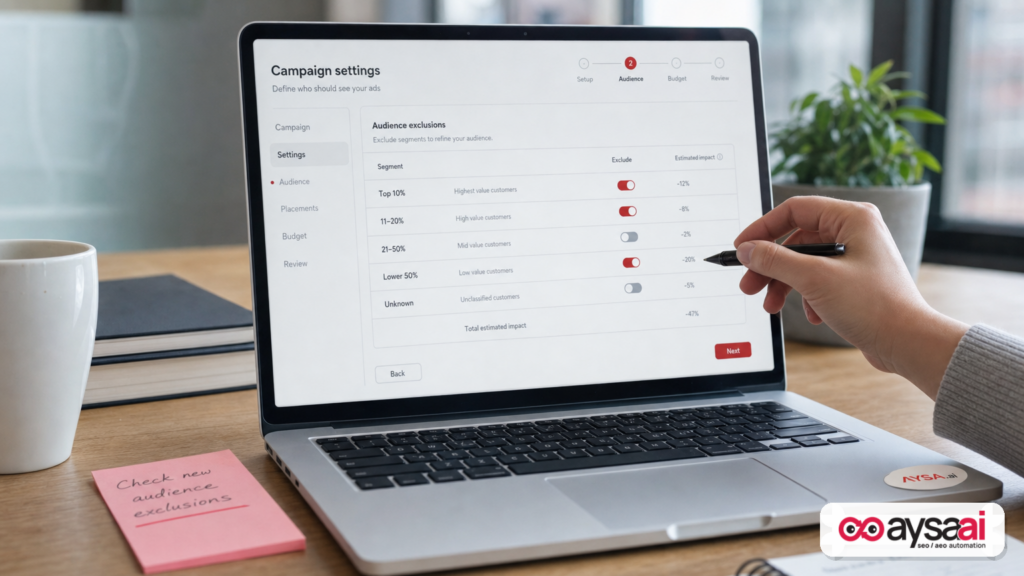
- What’s new: Google appears to be rolling out household income exclusions in Performance Max, letting advertisers exclude income brackets (including “Unknown”) while keeping PMax automation.
- Why it matters: This can reduce wasted spend and improve lead quality in categories where income strongly correlates with purchase intent (luxury, premium services, certain financial products, higher-end automotive, etc.).
- Main risk: It can also hide funnel problems (offer, messaging, landing page), reduce learning volume, and create brand/compliance concerns depending on industry and geography.
- What to do: Treat it like a controlled experiment. Start with conservative exclusions, define success metrics beyond CPA, and validate downstream outcomes in CRM or post-conversion signals.
- Where AYSA fits: As you change who enters the funnel, AYSA helps you keep your site aligned—Monitoring, proposing improvements (SEO/AEO/GEO), routing approvals, and executing changes so paid learnings translate into durable organic growth.
Table of contents

- What Google appears to have changed in Performance Max
- Why this change is happening now (and why PMax needed it)
- Who benefits most: industries and business models
- The strategic upside: cleaner economics, less waste, better lead quality
- The “Unknown income” segment: the most underrated (and dangerous) option
- The risks: fairness, brand damage, and measurement illusions
- How to test household income exclusions without wrecking learning
- Measurement plan: what to watch in Google Ads, GA4, and your CRM
- Creative and landing pages: what must change when your audience changes
- Concrete SME scenario: premium local service vs value brand
- Agency and in-house ops: governance, documentation, and approvals
- How AYSA fits: connect paid audience choices to SEO/AEO/GEO execution
- What to do next (action list)
- Sources and further reading
What Google appears to have changed in Performance Max

According to reporting by Search Engine Land, a new setting has been spotted in a European PMax campaign that lets advertisers exclude users by Google’s estimated household income at the campaign level while still using PMax’s automated optimization.
The available exclusion options reportedly include:
- Top 10% of household income
- 11–20%
- 21–30%
- 31–40%
- 41–50%
- Lower 50%
- Unknown household income
In other words: you may be able to keep PMax’s “black box” optimization, but with a more explicit way to say, “Don’t show ads to these income segments.” That’s different from simply adding audience signals (which are guidance) or relying on creative/offer mismatch to self-select users (which is expensive).
Source: Search Engine Land: “Household income exclusions spotted in Performance Max campaigns”.
Why this change is happening now (and why PMax needed it)
PMax has been on a steady trajectory: more inventory, more automation, and gradual additions of controls—typically after advertisers complain loudly enough that “automation-only” becomes unworkable for real businesses.
If income exclusions become widely available, it signals something important: Google is acknowledging that some audience constraints are not “nice-to-have,” they’re fundamental to business fit.
Why would that be true today?
- Rising acquisition costs: As more brands automate, auctions get more efficient and less forgiving. Waste is more expensive than it used to be.
- Lead quality pressure: For lead gen in particular, “more conversions” isn’t the KPI. It’s qualified conversions that close.
- Broader inventory = broader mismatch risk: PMax spans multiple placements. The broader the reach, the more likely you’ll hit segments that can convert but shouldn’t (refunds, tire-kickers, wrong fit).
- More competition from alternative ad platforms: When other platforms offer controls (even if imperfect), advertisers expect at least guardrails.
Seen in the broader ecosystem, this looks like a pattern: ad platforms keep their AI Optimization, but add selective “business rules” so owners can prevent obvious misalignment. Search Engine Land has also covered other PMax evolution topics, including Local Services Ads integration via Performance Max, and related Google Ads tooling updates like Google Ads Editor updates supporting AI-driven formats. The direction is clear: more automation, then more guardrails.
Who benefits most: industries and business models
Income exclusions are not universally “good.” They’re highly dependent on whether household income is a meaningful proxy for willingness/ability to buy in your category and whether you can measure downstream quality.
High-likelihood fit categories
- Luxury and premium retail: High AOV categories where demand is real but concentrated.
- Premium home services: Remodels, custom installations, high-end landscaping, specialized contractors.
- Higher-end automotive: Not just “cars,” but certain new models, specialty services, and lease offers with strict qualification.
- Select financial services: Some offerings have explicit qualification thresholds; others can create compliance concerns (more on that later).
- High-ticket B2B lead gen with consumer targeting overlap: When founders/owners are the buyers and personal income can correlate with ability to purchase (still a proxy, but sometimes relevant).
Lower-likelihood fit categories
- Everyday ecommerce: Many products sell across income levels; excluding can shrink volume and distort learning.
- Healthcare and essential services: The business and ethical risks often outweigh the efficiency gains.
- Subscription SaaS for teams: Company budget and use case matter more than household income.
Even within a “fit” industry, income exclusions may only make sense for certain campaigns. For example, a home services brand might run:
- “Emergency repair” campaigns where speed matters and income segmentation may be irrelevant, and
- “Premium upgrade” campaigns where income segmentation could correlate with willingness to pay.
The strategic upside: cleaner economics, less waste, better lead quality
When income is genuinely correlated with purchase behavior, exclusions can improve performance in ways that matter to owners, not just ad dashboards.
1) Fewer unqualified leads (the real cost center)
Most lead-gen businesses don’t suffer because Google Ads can’t drive leads. They suffer because the business can’t process the volume of bad leads without bleeding time, morale, and reputation.
If exclusions reduce mismatched leads—people who can’t afford the service, aren’t in the buying stage, or will never close—your sales team gets back hours of productive time. That’s an ROI lever that never shows up in “CPA” alone.
2) Better signal quality for automated bidding
Automation is only as good as the signals you feed it. If your conversion action includes low-quality outcomes (e.g., “lead form submitted” with no validation), PMax will optimize toward those outcomes—fast.
Income exclusions can act like a crude filter that improves average lead quality, which improves the data that drives smart bidding. It’s not perfect, but sometimes it’s enough to stop the bleeding while you fix measurement.
3) Cleaner alignment between offer and audience
A premium offer shown to the wrong audience forces your creative to do too much work. You either:
- Hide price and get leads you can’t close, or
- Show price and pay for a lot of “bounce learning” that doesn’t convert.
In the right scenario, exclusions make it easier for your offer to land with the right prospects and for your landing page to speak plainly.
The “Unknown income” segment: the most underrated (and dangerous) option
If the reported options include “Unknown household income,” that may be the most important choice on the list.
In practice, “unknown” can include:
- Users with limited ad personalization signals available
- Users in contexts where Google can’t confidently estimate income
- Users who block cookies/signals or use privacy-focused settings
Why it’s underrated: Excluding “Unknown” can sometimes clean up performance if that segment has low intent or poor conversion quality.
Why it’s dangerous: Excluding “Unknown” can also eliminate high-value prospects—especially in privacy-conscious markets, among higher-income users who manage settings aggressively, or in B2B-like behavior patterns. It can also reduce volume enough to destabilize bidding.
Operator rule: Treat “Unknown” as its own experiment. Don’t exclude it on day one unless you have strong evidence it’s harming outcomes.
The risks: fairness, brand damage, and measurement illusions
More control is not always better. Household income exclusions come with risks that business owners should take seriously—especially SMEs that don’t have legal, compliance, and analytics teams.
1) You can accidentally “optimize away” future customers
Income is not destiny. People stretch for big purchases, finance upgrades, or buy premium for specific reasons (health, family, safety, time). Exclusions can block motivated buyers who don’t fit the stereotype.
This matters most for:
- Seasonal businesses
- Fast-changing local markets
- New product launches (where you don’t yet know who will buy)
2) You might hide a funnel problem instead of fixing it
If you’re drowning in low-quality leads, income exclusions can feel like a solution—until you realize the root cause was:
- Ambiguous pricing or qualification criteria on the landing page
- Wrong conversion action (counting unqualified micro-conversions)
- No post-lead quality feedback loop (CRM data never informs bidding)
- Weak copy that attracts bargain hunters to a premium offer
Exclusions can lower the symptom (bad lead volume) while the disease (funnel misalignment) stays untreated.
3) Ethics, reputation, and compliance concerns
Different categories have different sensitivity levels. In certain verticals (housing, employment, credit-related), demographic targeting and exclusions can intersect with regulatory expectations. I’m not making a legal claim here—just pointing out that income-based gating is not merely “performance optimization.” It can have real-world fairness implications and brand perception consequences.
SME-safe stance: If you operate in a regulated or sensitive category, get counsel and document your intent. Even in non-regulated categories, ask: would you be comfortable explaining this decision publicly?
4) Platform estimates are proxies, not ground truth
Google’s household income segments are estimates. That means they can be wrong at the user level and vary by market. Build your process assuming imperfect classification.
How to test household income exclusions without wrecking learning
If you treat this feature like a “set-and-forget” knob, you’ll either over-tighten and kill scale, or under-tighten and see no difference.
Instead, use a controlled rollout approach.
Step 1: Decide what you’re optimizing for (not just CPA)
Before exclusions, define your primary business metric:
- Booked calls (not form fills)
- Qualified leads (defined by revenue threshold, service area, or product fit)
- Net revenue (not gross, if refunds/chargebacks are common)
- Margin contribution (if product mix varies by segment)
If you can’t measure your real KPI, exclusions are guesswork.
Step 2: Start with a single, reversible change
Don’t exclude three brackets at once. Start with one exclusion that matches your strongest hypothesis, such as:
- Excluding “Lower 50%” for a luxury product, or
- Excluding “Top 10%” for a deeply value-positioned offer (only if it truly correlates with worse outcomes for you).
Step 3: Protect learning volume
PMax needs conversion volume to learn. If you already run near the minimum threshold for stable results, exclusions can destabilize performance.
Practical safeguards:
- Don’t layer multiple restrictions at once (geo + device + income + tight budget).
- Avoid making daily changes. Give the system time to adapt.
- Document the date/time of the change and keep everything else stable (creative, landing page, bidding goal) during the test window.
Step 4: Use split logic where possible (without pretending it’s perfect)
True A/B testing in PMax is difficult. But you can still approximate:
- Run a separate campaign (or a controlled segment) with exclusions while holding budgets comparable.
- Compare not only top-line conversions, but also downstream quality metrics (call length, appointment show rate, revenue per lead).
The goal is not statistical purity; it’s decision-grade confidence.
Measurement plan: what to watch in Google Ads, GA4, and your CRM
Income exclusions are only useful if you can see what they changed beyond “the CPA went down.” Here’s a business-first measurement checklist.
In Google Ads: watch mix, not just totals
- Conversions: total and by primary conversion action
- Conversion value / ROAS: if you have reliable values
- Search term insights / category trends: any noticeable shift in intent (PMax limits visibility, but watch what you can)
- Placement and asset performance signals: directional changes in where performance is coming from
In GA4: validate landing experience changes
If your audience changes, their behavior on site should change too. Monitor:
- Engagement and bounce indicators on key landing pages
- Path exploration (are users reaching pricing, FAQ, qualification pages?)
- Form start vs form submit gaps (are you attracting more serious prospects?)
In your CRM: this is where the truth lives
The best advertisers don’t optimize to “leads.” They optimize to “closed revenue” or “qualified pipeline.” Even if you can’t automate offline conversion imports, you can still track quality manually.
Minimum viable CRM feedback loop:
- Tag each lead as qualified/unqualified
- Record reason codes (out of budget, out of area, wrong service, etc.)
- Track time-to-close and close rate
Then ask: after exclusions, did the reason codes change? If “can’t afford” declines meaningfully, you’re likely moving in the right direction.
Creative and landing pages: what must change when your audience changes
Here’s a mistake I see constantly: teams change targeting, but keep the same creative and landing pages. That’s like changing the type of customer you invite to your store but refusing to update the signage.
If you exclude lower-income segments for a premium offer
- Be more explicit about premium differentiators (materials, warranty, experience, white-glove service).
- Make pricing frameworks clearer (starting at, typical ranges, financing options if relevant).
- Strengthen trust elements: proof, reviews, guarantees, before/after galleries.
If you exclude higher-income segments for a value offer
- Lean into clarity: what’s included, what’s not, and why the price is low (efficiency, volume, simplified options).
- Make the next step frictionless (fast checkout, clear shipping, easy booking).
- Reduce “premium cues” that might repel value-focused shoppers (overly polished luxury language can backfire).
The targeting lever changes the audience composition. The website must do the rest of the work.
Concrete SME scenario: premium local service vs value brand
Let’s make this real with a scenario you can picture.
Scenario A: Premium kitchen remodeling company (local services)
Problem: The company runs PMax for leads. They get lots of form fills, but sales reports: “Most prospects want a $5,000 refresh; our minimum viable project is much higher.” The owner is frustrated because ad spend is up, but closed deals aren’t.
What income exclusions could do:
- Reduce exposure to segments less likely to afford full remodels (proxy, not certainty).
- Improve the average lead quality, giving sales fewer dead-end calls.
What could go wrong:
- Volume drops too far and PMax learning degrades.
- The real issue is unclear qualification on the landing page; exclusions only mask it.
Best-practice paired website change: Add a clear “Project minimum” qualifier, publish a transparent “Typical investment ranges” section, and build an FAQ that answers financing, timelines, and what drives cost. This reduces bad leads regardless of targeting—and improves organic/AEO clarity too.
Scenario B: Budget-friendly tire shop (high volume, value positioning)
Problem: The shop wants as many appointments as possible, and they win on price and convenience. They don’t want to accidentally filter out customers who need value.
What income exclusions could do: Potentially harm scale with little upside, because the product-market fit crosses incomes—especially in emergencies (flat tires don’t check income).
Better move: Focus on service area accuracy, inventory availability messaging, and appointment flow friction. In many cases, improving the booking funnel beats demographic gating.
Agency and in-house ops: governance, documentation, and approvals
If you run paid media for clients—or you’re an in-house marketer reporting to a founder—household income exclusions introduce a new governance requirement: you need a documented rationale for who you chose not to advertise to, and why.
What to document (minimum)
- Business hypothesis: “Lower-income leads rarely qualify for projects above X.”
- Success metric: qualified lead rate, close rate, revenue per lead.
- Test window: start date, expected stabilization period, decision date.
- Guardrails: minimum conversion volume, max CPA, budget thresholds.
- Rollback plan: what signals trigger reverting the exclusion.
Why approvals matter more with demographic-like controls
Even if a control is available, it’s not automatically wise. Organizations should treat demographic and proxy-demographic settings as “sensitive changes” requiring explicit approval.
This is exactly the kind of operational gap AYSA is built to close on the website side: you don’t want random unreviewed edits going live. You want a queue of proposed changes, a clear rationale, and an approval step before execution.
How AYSA fits: connect paid audience choices to SEO/AEO/GEO execution
At AYSA.ai, we spend a lot of time on a simple truth: marketing performance is mostly execution.
Paid targeting changes like household income exclusions can improve efficiency, but they also change the audience mix—and that forces a website and content response:
- If you’re leaning more premium, your pages must communicate premium value.
- If you’re filtering out bargain hunters, your qualification content must be clearer.
- If you’re seeing a shift in questions users ask, your FAQ and service pages should adapt for SEO and AEO.
AYSA is designed as an Approved Execution system:
- Monitor: Track visibility and performance signals that matter to your business, not just rankings. See how your search presence changes over time via AYSA Monitoring.
- Prepare: Identify what needs to change on the site—content clarity, technical hygiene, structured information, Internal linking, or landing page improvements—so your funnel matches the audience you’re paying to acquire.
- Ask for approval: Nothing goes live until you accept it. This is critical for SMEs that can’t afford accidental website breakage or off-brand changes.
- Execute accepted changes: Once approved, AYSA executes the website updates, turning insights into durable improvements—supporting both paid and organic performance.
If you want to explore how this connects to AI-driven discovery and recommendation surfaces, start here: AYSA AI Search Visibility. To see the tooling angle, visit AYSA AI SEO Tools. For packaging and cost, see AYSA Pricing. And for more operator-focused guidance, browse the AYSA blog.
My point of view: PMax controls will keep expanding, but the competitive advantage won’t come from toggles. It will come from the teams that can run tight experiments and then translate the learnings into website clarity and authority—fast, safely, and with approvals. That’s the gap AYSA is designed to fill.
What to do next (action list)
- 1) Confirm availability: Check if household income exclusions appear in your PMax campaign settings (rollouts can be gradual and market-specific).
- 2) Write a one-sentence hypothesis: “Excluding segment X will improve qualified lead rate by reducing unqualified inquiries.”
- 3) Choose one exclusion first: Avoid stacking multiple brackets immediately. Don’t start with “Unknown” unless you have evidence.
- 4) Lock a test window: Keep budgets, creative, and landing pages stable during the initial learning period.
- 5) Measure beyond CPA: Track lead qualification outcomes in your CRM (even manually) and watch reason codes.
- 6) Update landing pages to match the new audience mix: Clarify pricing, qualification, and value. This protects both paid and organic performance.
- 7) Operationalize execution: Use a monitored, approval-based workflow so changes don’t get stuck in “we should update the site” purgatory. AYSA is built for exactly that workflow: monitor → prepare → approve → execute.
Sources and further reading
- Search Engine Land: Household income exclusions spotted in Performance Max campaigns
- Search Engine Land: Local Services Ads come to Google Ads via Performance Max
- Search Engine Land: Google Ads Editor 2.13 brings AI Max support to Shopping campaigns
- Search Engine Land: ChatGPT Ads adds conversion bidding, geo exclusions and bulk campaign tools
- AYSA: AI Search Visibility
- AYSA: AI SEO Tools
- AYSA: Monitoring
- AYSA: Pricing
- AYSA: Blog
Disclosure and accuracy note: The household income exclusions feature discussed above was reported as “spotted” in a specific account/campaign context. Platform rollouts can be limited, region-specific, or subject to change. Treat this as an operational playbook for when the feature is available in your Google Ads environment.
Continue the AI search topic inside AYSA.
Use these pages to connect the article with AI SEO tools, AI visibility monitoring, AI Overviews and approved website execution.
Turn this topic into a website action plan.
Use these AYSA hubs to move from reading to technical fixes, AI visibility monitoring, research, glossary context and approval-first SEO execution.

