
Stop Treating Google Search Console Like a To‑Do List: A Practical Playbook for Real SEO Signals in 2026
Google says many Search Console “errors” aren’t problems. Here’s how to separate noise from risk, build a monitoring mindset, and turn true issues into approved, measurable fixes—without burning hours on phantom bugs.

Google Search Console (GSC) has become the busiest “inbox” in SEO. It sends alerts, flags “errors,” and shows long lists of pages that aren’t indexed. And for a lot of small and mid-sized businesses, that experience creates a reflex: see red label → assume something’s broken → demand a fix.
But Google is now publicly reiterating something seasoned operators have learned the hard way: many Search Console “errors” aren’t problems at all—and treating the tool like a checklist can waste time, create risk, and distract from revenue-driving work.
This editorial is a practical playbook for using Search Console as a Monitoring system—one that surfaces patterns, not perfection—and for turning the right signals into approved, measurable execution. That’s also where AYSA fits: we monitor, prepare changes, ask for approval, and execute accepted updates so you can stop chasing noise and start fixing what actually matters.
Concise Summary
- Search Console is not a to-do list. Many “errors” (like 404s and non-indexed pages) are normal outcomes on real websites.
- Use GSC to spot patterns and unexpected change. Sudden spikes, trend breaks, and mismatches with your intent are the real signals.
- Some issues are still urgent. The goal is triage: know which warnings are harmless, which are investigative, and which are fire drills.
- Execution is the bottleneck. Monitoring without a disciplined “propose → approve → deploy” workflow leads to either panic-fixing or analysis paralysis.
Table of Contents

- What Changed: Google Downplays Many GSC “Errors”
- Why This Matters for SMEs, Agencies, and In-House Teams
- The Big Misunderstanding: “Error” Doesn’t Mean “You Broke Something”
- A Monitoring Mindset: Use Search Console to Spot Patterns, Not Perfection
- Page Indexing Reports: How to Read Them Without Spiraling
- Redirects, Migrations, and “Not Indexed” Pages: When It’s a Good Sign
- The 404 Reality: When “Not Found” Is Healthy—and When It’s a Fire
- A Simple Triage Framework: Ignore, Investigate, or Fix
- Concrete SME Scenario: The Local Clinic With 600 “Errors”
- What Agencies Should Rethink: Reporting, SLAs, and Incentives
- Better SEO KPIs Than “Zero Errors”
- AYSA’s Take: Turn Search Console Noise Into Approved, Measurable Execution
- What to Do Next (Action List)
- Sources and Further Reading
What Changed: Google Downplays Many GSC “Errors”

In a recent discussion, Google’s John Mueller and Martin Splitt addressed a behavior they see constantly: site owners and SEOs using Search Console as the place to find “errors” to fix—when often there’s nothing meaningful to fix.
The point wasn’t “ignore Search Console.” The point was: treat it as an observability tool—a system that helps you understand what Google is seeing and doing over time—rather than a checklist that must be reduced to zero.
In particular, they called out two common panic triggers:
- Pages not indexed (often interpreted as “my site is broken”).
- 404 “errors” (often interpreted as “Google is punishing me”).
This is covered in Search Engine Journal’s report, which is worth reading for the direct context: Google Downplays Search Console “Error” Reports. Says Many Aren’t Real Problems (Search Engine Journal).
There’s also a subtle product insight in what they said: Google acknowledges the Search Console UI and messaging can unintentionally train users to overreact—especially when emails and “mark as fixed” workflows make everything feel like a defect ticket.
Why This Matters for SMEs, Agencies, and In-House Teams
This isn’t a semantic argument about what the word “error” means. It’s an operational problem that affects budgets, velocity, and risk.
1) SMEs waste money on “phantom fixes”
Small teams have limited time and technical help. If you spend your monthly budget chasing non-issues—mass-redirecting old URLs, rewriting robots rules, tweaking canonical tags everywhere—you’re not investing in the levers that typically move the business: product pages that convert, local landing pages that rank, content that answers buying questions, and site improvements that reduce friction.
2) Agencies get trapped by the wrong incentives
If your monthly report is built around “reducing errors,” you’ll optimize for optics, not outcomes. The temptation becomes:
- Close tickets quickly instead of validating impact.
- Chase “clean” reports instead of better search demand capture.
- Spend hours explaining why something is fine (or worse—fixing it to avoid the conversation).
3) “Over-fixing” can create real SEO problems
Here’s the uncomfortable truth: a large portion of SEO damage comes from well-intentioned changes made too quickly. Improper redirect mappings, canonical mistakes, internal link overhauls, or “Indexing hacks” can cause crawl inefficiency and Ranking Volatility.
So yes—GSC can be noisy. But reacting to noise can be worse than ignoring it.
The Big Misunderstanding: “Error” Doesn’t Mean “You Broke Something”
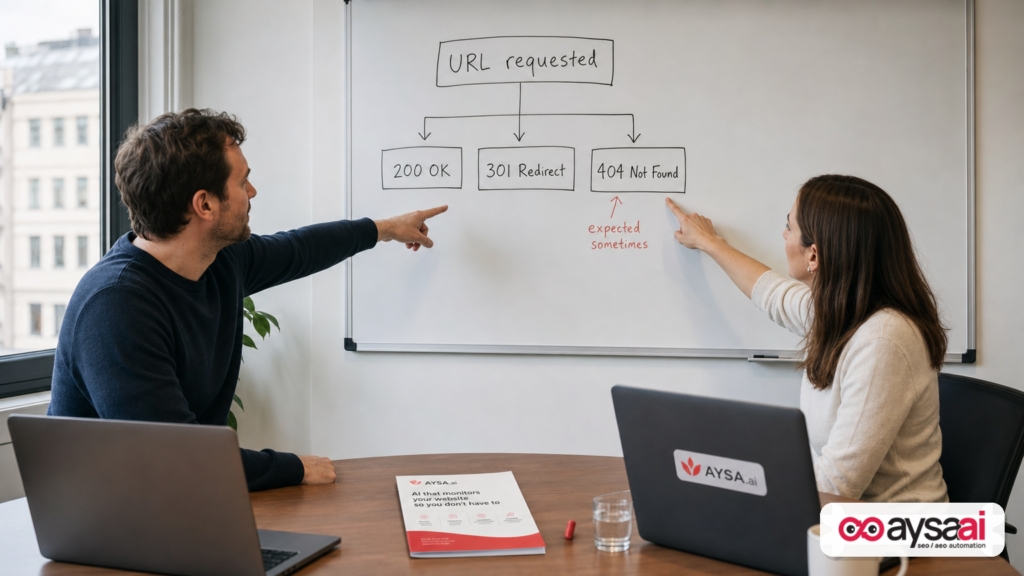
To use Search Console well, you need a basic mental model of how the web works. When a crawler requests a URL, the server responds with a status:
- 200 OK: the page exists and can be served.
- 301/302: the URL redirects elsewhere.
- 404 Not Found: the server can’t find it.
From a protocol standpoint, 404 is literally an “error response.” But that doesn’t automatically mean it’s a business or SEO problem. Pages come and go. Products get discontinued. Events end. Blog posts get consolidated. Old URLs are requested by bots, scrapers, and outdated links for years.
What matters is intent:
- If you want the URL to exist (or it used to be important), a 404 may signal a Broken internal link, a migration bug, or a missing redirect.
- If you don’t want the URL to exist, a 404 may be the cleanest, most honest response.
This is exactly the nuance Mueller and Splitt were emphasizing: a 404 is often expected; “not indexed” is often expected. Your job is to identify what’s unexpected.
A Monitoring Mindset: Use Search Console to Spot Patterns, Not Perfection
The most profitable way to use Search Console is as a pattern detection tool. You’re looking for changes over time that suggest:
- Google’s understanding of your site shifted.
- Your site structure, redirects, or Internal linking changed.
- Your content footprint expanded (or shrank).
- Your crawl accessibility or indexation behavior changed in a way that doesn’t match your intention.
That’s why “zero errors” is an unrealistic goal for most active sites. If you run an ecommerce store with products coming in and out of stock, you will have URL churn. If you publish content weekly, you will have URLs Google discovers and evaluates. If you run a local service business, you may have old campaign pages, old PDFs, and legacy URLs that still get requested.
So the real question becomes:
Is Search Console showing a pattern that suggests we’re losing visibility, wasting Crawl budget, or confusing Google about what should rank?
In practice, the best operators establish a rhythm:
- Weekly: scan for spikes and trend breaks.
- Monthly: audit patterns against business intent (what pages should drive leads/sales).
- During changes (migrations, redesigns, platform moves): monitor daily with a dedicated checklist.
Page Indexing Reports: How to Read Them Without Spiraling
The Page Indexing / Coverage-style reports are among the most misunderstood parts of Search Console because they look like inventory. People assume:
“If a page exists on my site, it should be indexed.”
That’s not how Google works, and it’s not even how you should want it to work. Indexing is a selection process. Some pages are thin duplicates, filter URLs, session variants, internal search pages, tag archives, or staging remnants. In many cases, the correct outcome is: not indexed.
What “not indexed” can mean (in plain English)
- Google found the URL but doesn’t think it’s valuable enough to store and serve.
- Google found it but considers it a duplicate of another URL.
- Google discovered it through a link or sitemap but hasn’t prioritized it yet.
- The URL is an intentional redirect, alternate, or parameterized variant.
The key is not to argue with the report line-by-line. The key is to ask: Are the pages I care about indexed and performing?
Use URL-level tools carefully
One trap: people test a single URL, see “indexed,” then look at the report and see “not indexed,” and assume Search Console is “wrong.” In reality, you might be looking at data from different times, different processing states, or different canonical interpretations.
If you’re going to investigate, do it with a business lens:
- Pick a sample of high-intent URLs (top products, top service pages, key category pages).
- Confirm indexing/canonical behavior aligns with your intent.
- Only then expand into broader cleanup.
For official reference on how Search Console is intended to be used, Google’s own Search Console documentation is the primary resource: Google Search Console Help (Google).
Redirects, Migrations, and “Not Indexed” Pages: When It’s a Good Sign
One of the most practical examples from Google’s discussion was about migrations and redirects. When you change URLs, you often implement redirects. Those old URLs should not remain indexed forever; instead, Google should process the redirects and consolidate signals to the destination URLs.
So, seeing a rise in “page with redirect” (or similar classifications) during a migration may be a sign that:
- Google is discovering the old URLs.
- The redirects are being seen.
- Processing is underway.
The bad version of that pattern is when you see:
- A spike in redirects that you didn’t implement.
- Redirect chains (URL A → B → C) increasing.
- Important URLs redirecting to irrelevant pages (a classic “soft 404” symptom).
This is why “pattern first” beats “label first.” A redirect label can be normal; a redirect trend that violates intent is what matters.
The 404 Reality: When “Not Found” Is Healthy—and When It’s a Fire
Let’s get very concrete. Imagine three different 404 situations:
Situation A: A retired product
You had a seasonal product page (e.g., “Valentine’s Day Bouquet 2025”). It’s gone now. A 404 is perfectly fine. You might choose to redirect if there’s a close evergreen replacement—but you don’t have to redirect every expired URL “just because.”
Situation B: Broken internal navigation
Your header menu links to /services/teeth-whitening but the page slug changed to /services/whitening. Now you have a 404 that customers can hit, not just bots. That’s a real problem: it hurts conversion, trust, and crawl efficiency. Fix the link, and consider a redirect.
Situation C: Site migration missed a URL folder
You migrated from /blog/ to /resources/ but forgot to redirect the old URLs. Now important backlinks, bookmarks, and Google’s historical signals hit 404. That’s a high-priority SEO risk.
All three can show up as “404 errors” in GSC. Only two are clearly actionable. One is normal.
So what should you actually do with 404s?
- Check whether the URL has value. Did it get traffic, links, or conversions historically?
- Check internal links. Are you causing the 404 with your own navigation or sitemap?
- Decide the correct intent. Restore, redirect, or let it 404.
If you’re unsure what Google expects for removed content and status codes, Google’s Search Central documentation is the best primary source. This editorial won’t claim specific directives without quoting those docs directly—but the correct general principle is that status codes should reflect reality and intent. See Google Search Central (primary): Google Search Central (Developers).
A Simple Triage Framework: Ignore, Investigate, or Fix
To stop Search Console from becoming a treadmill, you need a consistent triage framework. Here’s the one I recommend to SMEs and agencies because it’s easy to operationalize.
Step 1: Classify the item by business impact
- Revenue pages: product, category, service, location, lead-gen pages.
- Support pages: policies, FAQs, blog posts that assist conversion.
- Low-value pages: tag archives, filters, internal search results, minor variants.
Step 2: Decide whether the signal is expected
- Expected: you migrated URLs, discontinued products, blocked certain URL parameters, or launched new content.
- Unexpected: spikes without a known change, or important pages suddenly classified differently.
Step 3: Choose an action category
- Ignore (monitor only): expected, low-value, no user impact.
- Investigate (validate): unclear intent, potential misclassification, potential quality/duplication signals.
- Fix (execute): broken internal links, incorrect redirects, index blocking mistakes, server errors, canonical disasters.
Step 4: Require proof before a “fix”
“Proof” doesn’t mean perfect certainty. It means answering two questions:
- What’s the failure mode? (user impact, crawl waste, ranking loss risk)
- What’s the smallest safe change? (least invasive update that corrects intent)
This is also where a disciplined execution system matters. A chaotic “just fix it” approach creates more SEO incidents than it solves.
Concrete SME Scenario: The Local Clinic With 600 “Errors”
Let’s use a realistic scenario: a multi-location dental clinic.
The owner gets a Search Console email: “Increase in 404 errors.” They log in and see hundreds of URLs. Panic sets in. They message their web vendor: “Google says our site is broken. Fix immediately.”
Here’s what’s usually happening:
- The clinic ran ads or posted on social a year ago with UTM parameters and campaign URLs; bots still request them.
- An old PDF brochure was removed; third-party sites still link to it.
- A few staff members copied a link incorrectly in a blog post (real internal broken link problem).
- A plugin auto-generated thin tag pages and then removed them; Google still crawls remnants.
Now apply triage:
What can be ignored (monitor)
- URLs that were never meant to be permanent and have no internal links.
- Obscure parameter URLs with no conversions and no backlinks.
What should be investigated
- 404s that appear in clusters under a folder that used to matter (e.g., /locations/).
- Non-indexed spikes for core service pages (teeth cleaning, implants, emergency dental).
What should be fixed
- Internal nav or footer links pointing to missing pages.
- Missing redirects for old high-value URLs (especially those with citations/backlinks).
- Any server-side issues producing 5xx errors (rare, but urgent).
The outcome: instead of “fixing 600 errors,” the clinic fixes five internal links, implements ten targeted redirects, and leaves the rest as monitored noise. That’s how you protect performance without wasting budget.
What Agencies Should Rethink: Reporting, SLAs, and Incentives
Agencies didn’t invent checklist SEO—clients demand certainty, and “errors” feel like certainty. But agencies can evolve their model.
Replace “Errors Reduced” with “Risk Reduced”
Instead of reporting the count of “errors,” report:
- How many revenue URLs were affected by a given issue.
- Whether internal links were broken (user-impact) versus external noise (bot-impact).
- Whether indexation changes align with the content strategy.
Build a shared language with clients
Clients don’t need SEO jargon, but they do need an operating model. I like this simple framing:
- Expected signals: normal web behavior, no action needed.
- Drift signals: things changed; we need to check why.
- Break signals: something is broken; we will fix it.
Define approval thresholds
Some changes should never be rushed, even if they look like quick wins:
- Mass redirects
- Robots.txt and noindex changes
- Canonical template changes
- URL structure changes
Those should require explicit approval and rollback planning—because the downside is huge.
Better SEO KPIs Than “Zero Errors”
If you stop using Search Console as a checklist, you need replacement KPIs that make sense for a business.
Here are practical, non-hallucinated, measurable alternatives you can track with Search Console plus your broader analytics stack:
Visibility and demand capture
- Clicks and impressions for high-intent queries (brand + non-brand where relevant)
- Coverage of top products/services: are your priority pages indexed and appearing?
- CTR changes on pages you improved (titles, snippets, structured data)
Technical stability
- Trend stability: no unexplained spikes in 404s, redirects, or “not indexed” for key directories
- Internal link integrity: broken internal links reduced (measured via crawls or monitored changes)
- Change auditability: you can tie issues to deployments/releases
Execution speed with governance
- Time from detection → proposal → approval → deployment
- Change success rate (how often a fix resolves the intended problem without creating another)
Those KPIs align with how businesses operate: outcomes, risk, and speed.
AYSA’s Take: Turn Search Console Noise Into Approved, Measurable Execution
I’ll say it directly: most teams don’t have a monitoring problem. They have an execution and prioritization problem.
Search Console can tell you a lot. But it doesn’t:
- Tell you which signals matter for your business model.
- Create a disciplined change plan.
- Protect you from over-fixing.
- Ship the work.
AYSA is built for that gap. As an SEO/AEO/GEO execution system, AYSA:
- Monitors your website’s search visibility and technical signals in an ongoing way: AYSA Monitoring
- Prepares recommended changes based on patterns and intent—so you don’t chase every alert.
- Asks for approval before changes go live (especially for risky technical actions).
- Executes accepted changes and keeps a clean operational record of what changed and why.
This model matters more in 2026 than it did in 2016 because search visibility isn’t only “10 blue links” anymore. Businesses are trying to win across classic Google Search, AI-driven discovery, and new answer interfaces. That requires steady, reliable website operations—not panic-driven SEO.
If you want the broader framework for how we think about visibility in AI-driven search surfaces, start here: AYSA AI Search Visibility and AYSA AI SEO Tools.
And if you’re evaluating whether an “approved execution” model fits your team’s workflow, pricing and scope are here: AYSA Pricing.
For additional editorials like this, see: AYSA Blog.
What to Do Next (Action List)
- Pick your revenue pages. List the 20–50 URLs that must perform (services, categories, top products, location pages).
- Define “expected” behaviors for the next 30 days. Are you migrating, launching new pages, pruning content, changing navigation?
- In Search Console, look for trend breaks. Ignore totals; focus on spikes and unusual patterns that affect priority URLs or directories.
- Triage every alert into: Ignore / Investigate / Fix. Don’t allow a fourth bucket (“panic”).
- Require proof for fixes. Before changing anything, document: what’s impacted, why it matters, smallest safe change, and how you’ll verify success.
- Create an approval workflow. Even if you’re a tiny team, write down who approves redirects, indexation rules, and template-level changes.
- Operationalize execution. If execution is slow or inconsistent, use a system that can monitor, propose, request approval, and implement—without turning your site into an experiment.
Sources and Further Reading
- Search Engine Journal: Google Downplays Search Console “Error” Reports. Says Many Aren’t Real Problems
- Google: Search Console Help
- Google Search Central (Developers)
- Search Engine Journal: SEO section (ongoing context)
- Search Engine Journal: Latest news (ongoing context)
AYSA internal resources:
Continue the AI search topic inside AYSA.
Use these pages to connect the article with AI SEO tools, AI visibility monitoring, AI Overviews and approved website execution.
Turn this topic into a website action plan.
Use these AYSA hubs to move from reading to technical fixes, AI visibility monitoring, research, glossary context and approval-first SEO execution.

