
The DebugBear DNS Hijack Is a Wake‑Up Call: How Third‑Party Scripts Can Become Your Biggest SEO, Revenue, and Trust Risk
When a monitoring vendor’s DNS is hijacked, the “harmless” performance tag on your site can turn into a distribution channel for malicious JavaScript. Here’s what changed, why it matters for SEO and business risk, and a practical playbook for SMEs and agencies to prevent, detect, and recover—plus how AYSA’s approved execution model helps you ship fixes safely.

Third-party scripts are the invisible plumbing of modern websites. We add them for analytics, A/B tests, chat widgets, performance Monitoring, affiliate programs, personalization, and Conversion tracking. Most of the time they work—and we forget they’re even there.
Then an incident like the DebugBear DNS hijack lands, and it becomes painfully clear: your website’s risk surface isn’t just your CMS and your code. It’s every external domain you allow to execute JavaScript in your customers’ browsers.
This editorial is written from my perspective as Marius Dosinescu at AYSA.ai. My goal isn’t to sensationalize security headlines. It’s to give business owners, marketers, and SEO teams a practical playbook—because in 2026 and beyond, SEO performance and security posture are tied together. If your site becomes a malware distribution point or user sessions get abused, your rankings aren’t the first thing you lose. You lose trust, revenue, and often time you can’t get back.
Concise summary
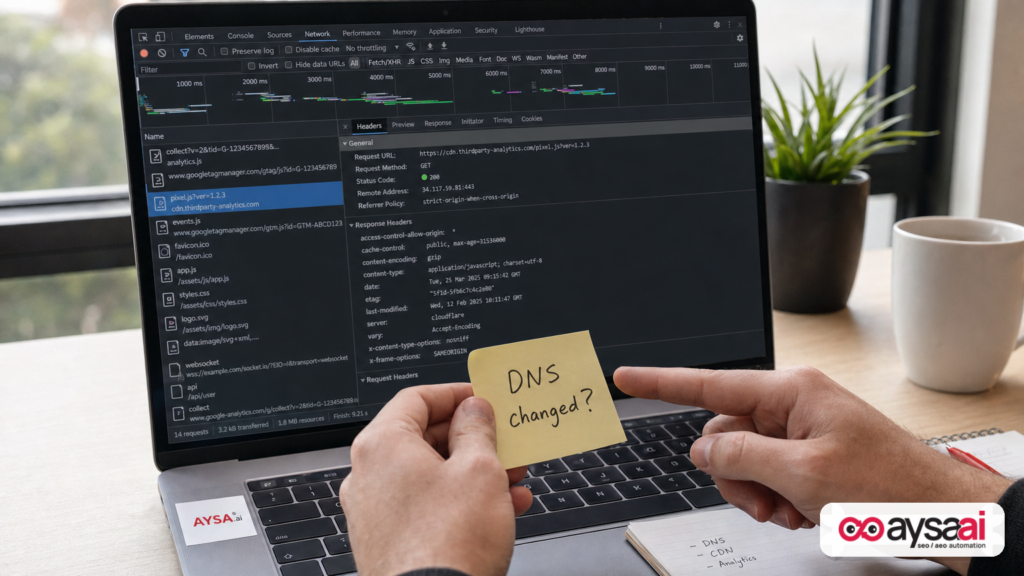
- A reported security incident involving DebugBear’s Real User Monitoring (RUM) script highlighted how DNS/registrar compromise can turn a trusted monitoring tag into a malicious JavaScript delivery channel.
- If your site loads third-party scripts, you’re accepting a supply-chain risk: the vendor’s infrastructure can become your incident.
- SEO teams must treat this as an operational SEO issue (not “just security”): compromised scripts can break UX, damage brand trust, trigger browser warnings, reduce conversions, and create long-term crawl/Indexing and reputation fallout.
- Your immediate priorities in a similar event are: remove/disable the script, invalidate sessions, review changes, and hunt for persistence.
- Long-term, you need governance: script inventory, approval workflows, least privilege, DNS hardening, Subresource Integrity where possible, monitoring for unexpected changes.
- AYSA fits here as an execution system that monitors, prepares recommended fixes, asks for approval, and executes accepted website changes—helping teams move fast without “everyone editing production in a panic.”
Table of contents

- What changed: the DebugBear DNS hijack story (and why DNS matters)
- The DebugBear incident (in plain English)
- Why this matters for SEO (and why it’s not just “a security problem”)
- The real threat model: third-party scripts + logged-in users
- Who’s exposed: SMEs, ecommerce, publishers, SaaS, agencies
- The SME scenario: a “simple” tag becomes a real incident
- Immediate actions: the first 60 minutes, 24 hours, 7 days
- The practical playbook: prevent, detect, respond, and recover
- Script hygiene for SEO teams: inventories, environments, and change control
- DNS and registrar hardening: boring, essential, and often ignored
- SEO fallout and communications: what to document, what to check, what to say
- Where AYSA fits: approved execution for safer, faster remediation
- What to do next (action list)
- Sources and further reading
What changed: the DebugBear DNS hijack story (and why DNS matters)

The trigger for this editorial is reporting from Search Engine Journal about a security alert: DebugBear, a Real User Monitoring tool used by many SEO teams, instructed customers to remove its monitoring script after malicious JavaScript was detected in the script delivered from DebugBear’s infrastructure. DebugBear later stated that attackers compromised its DNS records through its domain registrar, and the company recommended customers remove the embed while investigating.
Here’s the core business lesson: DNS is the address book of the internet. When DNS is compromised for a vendor domain that you trust, attackers don’t need to break into your website. They can potentially redirect where your browser fetches scripts from. If your pages load <script src="HTTPS://vendor.com/script.js">, and vendor.com gets pointed somewhere malicious, your visitors run attacker-controlled code.
That’s why DNS/registrar compromise is uniquely dangerous. It doesn’t look like “malware on your server.” It looks like normal web behavior—your website is doing what it was told to do: load a script from a domain you whitelisted.
Cited source: Search Engine Journal – Hackers Hijacked DebugBear’s DNS To Serve Malicious JavaScript.
The DebugBear incident (in plain English)
Let’s strip this down to the minimum moving pieces:
- Websites embedded DebugBear’s RUM snippet to track Core Web Vitals and real-user performance.
- A malicious payload was found being served from a DebugBear script URL (as reported by SEJ’s source context, including third-party analysis referenced there).
- DebugBear later said attackers compromised DNS records via the registrar (meaning traffic could be redirected at the domain level).
- DebugBear told customers to remove the script and investigate for unauthorized access/changes.
What’s important for most businesses isn’t the exact payload details in one case. The durable takeaway is this:
If you run third-party JavaScript on your site, you are effectively letting external parties execute code in your customers’ browsers. The moment that supply chain is compromised—even briefly—your site can become the distribution mechanism.
Why this matters for SEO (and why it’s not just “a security problem”)
Too many teams have an outdated org chart approach to the internet:
- Security handles hacks.
- SEO handles rankings and traffic.
- Marketing handles conversions.
- Engineering handles uptime.
In reality, incidents triggered by third-party scripts collapse those silos in minutes. Here’s how an injected script becomes an SEO problem fast:
1) User trust damage leads to measurable SEO decline
If users get redirected, see suspicious popups, or experience unauthorized actions while logged in, they bounce. They complain. They stop returning. Branded Search demand falls. Reviews turn negative. Support tickets spike. These are all downstream signals that correlate with weaker organic performance over time.
2) Performance and UX breakage can hit Core Web Vitals and conversions
Even non-malicious script disruptions can add latency or render-blocking behavior. A malicious script can do worse: it can block main thread, inject heavy resources, or create cascading failures. The result is slower pages, worse engagement, fewer completed checkouts, and fewer leads.
3) Indexability and crawlability risks appear indirectly
You might take emergency measures—maintenance mode, disabling JS features, rolling back templates—that inadvertently break Internal linking, canonical tags, structured data, or navigation. The incident response itself can cause SEO regressions if changes aren’t controlled.
4) Reputation and browser safety systems are not “SEO tools,” but they impact traffic
We can’t claim a specific browser warning happened here beyond the SEJ context, but generally, malicious behavior can lead to safe browsing warnings, blocked scripts, or flagged domains, which can crater traffic regardless of your rankings.
In short: security incidents are organic growth incidents. Not because Google is “punishing” you, but because customers stop behaving like customers.
The real threat model: third-party scripts + logged-in users
One of the most sobering points in the SEJ source context is the risk associated with a compromised script running inside a browser session where the user is already authenticated. Attackers don’t necessarily need passwords if they can act within a session context in the browser.
Even without going beyond what we can responsibly state from the provided research, the concept matters for every business:
- If a visitor is logged into your site (customer account, patient portal, booking system, banking dashboard, B2B admin), a malicious script can potentially perform actions as that user within the permissions they already have.
- If the user is an admin, the blast radius can be much larger: content edits, plugin installs, tag manager changes, redirects, new users, settings changes.
This is why “it’s just a performance monitoring tag” is the wrong framing. In the browser, a script is a script. It inherits trust because you put it on the page.
Who’s exposed: SMEs, ecommerce, publishers, SaaS, agencies
Any site loading third-party scripts is exposed. But the business impact varies by model:
Ecommerce
- Cart and checkout sessions are high-value.
- Logged-in users have stored addresses, order history, and sometimes payment tokens (depending on PSP setup).
- Even fear of compromise increases chargebacks and reduces conversion rate.
Local services (clinics, legal, home services)
- Appointment and lead forms are sensitive.
- Reputation damage hits word-of-mouth and reviews fast.
- Teams often have limited technical capacity—response time is slower unless a plan exists.
Publishers and media
- High traffic makes them attractive as distribution vectors.
- Ad tech stacks include many scripts; supply-chain complexity is higher.
- Incidents can trigger advertiser pullback, not just SEO problems.
SaaS
- Account takeover risk and data exposure are existential.
- Admin users and role-based access compound the risk.
Agencies
- Agencies inherit client risk through tag deployment practices.
- One compromised vendor can affect multiple clients.
- The agency’s credibility becomes part of the incident fallout.
The pattern: the more your site relies on authenticated sessions and on-page actions, the more dangerous third-party script compromise becomes.
The SME scenario: a “simple” tag becomes a real incident
Consider a realistic example: a 12-person ecommerce brand selling specialty supplements.
- The marketing manager adds a RUM script to better understand mobile performance and Core Web Vitals.
- Two months later, the vendor has an infrastructure incident (DNS, CDN, account compromise—doesn’t matter which).
- For a few hours, the script delivered to the ecommerce storefront is altered.
What happens next in the real world isn’t “Google drops you 3 positions.” It’s operational:
- Support gets emails: “Your site tried to do something weird.”
- Conversion rate dips because checkout feels unsafe or breaks.
- Leadership asks marketing to “turn off whatever you added.”
- Engineering scrambles to locate where the script was embedded: theme? GTM? a plugin? multiple templates?
- People start making fast production changes—often without a clean audit trail.
The SEO risk shows up later: performance regressions from hasty changes, broken structured data, and the brand trust decline that reduces repeat visits and branded queries.
This is why the core message is governance, not panic: you need the ability to remove, verify, and recover quickly.
Immediate actions: the first 60 minutes, 24 hours, 7 days
Search Engine Journal’s source context included practical steps for site owners using DebugBear—remove the script, check for exposed accounts, and investigate unauthorized changes/persistence. I agree with that direction, and I’d broaden it into an incident timeline any business can follow.
The first 60 minutes: stop the bleeding, preserve evidence
- Disable the third-party script fast. Remove it from templates, tag managers, plugins, and CMS injection fields. Then purge caches so old HTML doesn’t keep serving it.
- Confirm it’s gone. Use your browser network panel and a simple page view to verify the script no longer loads. Repeat on key templates (home, category, product, checkout, account pages).
- Restrict access changes. Temporarily limit who can edit tag managers, DNS, CMS, and deployment pipelines. In incidents, well-meaning teammates can worsen the situation.
- Capture a minimal snapshot. Record when you disabled the script, which versions/templates were changed, and which pages were known to load it. This helps later analysis.
Within 24 hours: assume exposure, reduce blast radius
- Session invalidation strategy. If admin users or privileged users might have loaded affected pages, invalidate sessions. Don’t assume password changes automatically kill sessions—many systems keep sessions alive.
- Credential review. Rotate sensitive credentials that could have been exposed or misused (API keys, tokens, webhook secrets) based on what the site can access client-side and what privileged sessions can do.
- Change audit. Review recent changes in your CMS, tag manager, templates, plugins, and user accounts for unauthorized modifications.
- Log review. Look for unusual logins, new admin accounts, file changes, and suspicious traffic patterns during the exposure window.
Within 7 days: validate cleanliness and close governance gaps
- Persistence hunt. Confirm no backdoors or injected scripts remain. In practice, this means comparing against a known-good baseline: theme files, custom plugins, template overrides, header injections, and tag manager containers.
- Root-cause your process, not just the vendor incident. Where did the script live? Who could deploy it? Was there an approval step? Is there an inventory?
- Implement long-term controls. See the playbook sections below: inventory, least privilege, DNS/registrar hardening, and monitoring.
Important: these are generalized best-practice actions consistent with the SEJ guidance direction. Your specific response should be directed by your security and engineering teams.
The practical playbook: prevent, detect, respond, and recover
To stop repeating this class of incident, you need four capabilities:
- Prevent unnecessary exposure
- Detect anomalies early
- Respond quickly without creating new failures
- Recover with documentation and improved controls
Prevent: reduce script exposure by design
1) Maintain a script inventory (yes, literally a list). Every third-party domain that can execute JavaScript should be documented:
- Vendor name
- Purpose (what business metric it supports)
- Where it is deployed (GTM container, Shopify theme file, WordPress plugin, head injection, custom app)
- Owner (person accountable)
- Removal procedure (exact steps)
2) Apply least privilege to the people and systems that can deploy scripts. Tag managers are often “open season” in organizations. That’s convenient until it’s catastrophic. Restrict:
- Who can publish tag containers
- Who can change website templates
- Who can add plugins
3) Use strong authentication everywhere. While the provided SEJ context doesn’t list specific control recommendations like 2FA, it’s broadly accepted that registrar, DNS, CMS, and tag manager access should be protected with strong authentication and minimal shared accounts.
4) Consider whether you need the script at all. Many teams add RUM scripts because “Core Web Vitals.” That’s a real goal, but you should be honest: do you need it in production all the time? Or could you run it on a smaller sample of pages, or behind a feature flag, or in short measurement windows?
Detect: shorten time-to-awareness
Most businesses don’t fail at incident response because they’re lazy. They fail because they find out too late.
Detection isn’t only a SOC function. SEO teams can contribute by building monitoring around the user experience layer:
- Change monitoring: alerts when templates, header injections, or tag containers change unexpectedly.
- Uptime and synthetic checks: alerts when key pages behave differently (unexpected redirects, new external script domains, sudden performance spikes).
- Google Search Console monitoring: watch for spikes in indexing errors, manual actions, or security issues reporting.
AYSA’s monitoring philosophy is aligned with this: monitor what matters, then prepare recommended actions and route them through approval so execution is controlled and auditable.
Respond: fast disable, careful verification
Response has two failure modes:
- Too slow: users remain exposed longer.
- Too chaotic: you break the site while “fixing” it.
The fix is process: a rehearsed rollback plan for third-party tags. The best teams can disable a compromised tag in minutes because they already know:
- where it lives
- how to publish the change
- how caching affects propagation
- how to confirm removal
Recover: restore confidence and tighten governance
Recovery includes:
- cleaning any persistence mechanisms
- rotating credentials where appropriate
- documenting what happened and what changed
- closing the governance gap that made rapid response hard
Even if the vendor incident is outside your control, your readiness isn’t.
Script hygiene for SEO teams: inventories, environments, and change control
SEO teams often sit at the center of “add one more tag” decisions. That’s not a criticism—it’s reality. The modern SEO stack touches performance monitoring, analytics, experimentation, heatmaps, attribution, and increasingly AI search visibility tooling.
Here’s what I want SEOs and marketing leads to internalize: you don’t need to be a security engineer to practice safe script hygiene. You need discipline.
1) Treat script additions like code changes
- Require a ticket, an owner, and an approval step.
- Document “what success looks like” (metric impacted) and a removal plan.
2) Separate environments when possible
If your platform supports staging, use it to validate that a new tag doesn’t break rendering, consent flows, checkout, or performance budgets.
3) Know your injection points
Most organizations have more than one way to inject scripts:
- Tag manager
- Theme templates
- Plugins/modules
- Server-side includes
- Edge/CDN rules
- Marketing platform embeds
During an incident, forgetting even one injection point creates the illusion of removal while the script keeps loading on specific templates.
4) Prefer fewer vendors over “best-of-breed sprawl”
Every vendor adds risk. Consolidation is not trendy, but it’s practical. Fewer scripts means fewer attack paths and simpler audits.
5) Put an owner on every script
“Nobody owns it” is how “we can’t remove it” happens. If a tool no longer has an owner, it should be treated as suspect and prioritized for removal.
DNS and registrar hardening: boring, essential, and often ignored
The SEJ source context states DebugBear’s DNS records were compromised through its domain registrar. That detail matters because it’s not the usual “someone hacked the app” storyline—it’s the internet’s control plane.
If you own a business website, you must treat your registrar and DNS provider like critical infrastructure. Practical steps to discuss with your IT/security team include:
- Lock down registrar access (strong authentication, minimal admins, no shared logins).
- Audit DNS change history and set up alerts where available.
- Reduce the number of people who can change DNS.
- Document emergency rollback: if DNS changes unexpectedly, who can restore the last known good records and how quickly?
Even if you outsource IT, you still need to own the question: “If our DNS is altered at 2 a.m., who gets paged and what’s the rollback plan?”
SEO fallout and communications: what to document, what to check, what to say
After any third-party script incident—whether it’s your vendor, your tag manager, or your own code—teams tend to underinvest in documentation because “we just want it to be over.” That’s a mistake.
What to document (minimum viable incident record)
- Exposure window (when the script was active on production pages)
- Pages/templates affected
- Removal steps taken
- Credential/session actions taken
- What was reviewed (tag history, CMS users, deployments)
What to check in Google Search Console
Google Search Console (GSC) is not an incident response tool, but it’s one of the best visibility layers an SEO team has. Keep an eye on:
- Indexing anomalies (sudden spikes in “Page with redirect,” “Blocked by robots,” 4xx/5xx patterns)
- Performance drops on key queries and pages
- Any security-related messaging available in GSC
If your response includes a temporary maintenance page, ensure it’s implemented correctly (for example, using HTTP 503 for temporary downtime, as referenced in SEJ’s guidance direction) so you don’t accidentally signal permanent removal.
What to say publicly (and what not to)
Don’t speculate. Don’t overpromise. If you need to communicate with customers:
- State what you did immediately (disabled the tag, investigated changes)
- State what users should do (e.g., re-login, monitor accounts), but only when you have a justified reason
- Provide a clear support channel
This is an area where legal and security teams should guide final messaging, but marketing should be involved early so communication doesn’t create more confusion.
Where AYSA fits: approved execution for safer, faster remediation
This is the uncomfortable truth: most businesses don’t struggle because they lack tools. They struggle because they can’t execute changes fast and safely.
AYSA is built around an “approved execution” model:
- We help you monitor site health and visibility signals (Monitoring).
- We help you prepare changes (technical, content, and on-site SEO/AEO improvements) in a controlled way.
- We ask for approval before execution—so changes are accountable and reviewable.
- We execute accepted changes reliably, reducing the chaos of ad-hoc production edits.
In a third-party script incident, that model matters because the riskiest time is the scramble:
- Someone removes the script from one template but forgets the checkout template.
- Someone disables a tag but cached pages keep serving it for hours.
- Someone “temporarily” adds a workaround that becomes permanent technical debt.
AYSA’s role isn’t to replace security tooling. It’s to make the website change process more disciplined—especially when the stakes are high.
If you want the broader context of how we think about AI-era visibility, these resources are relevant:
- AI search visibility (AEO/GEO readiness requires reliable site operations)
- AI SEO tools (the tooling only matters if execution is controlled)
- Pricing (for teams deciding what to operationalize now)
- AYSA blog (ongoing playbooks and implementation patterns)
What to do next (action list)
If you’re a business owner, CMO, head of marketing, or agency lead, here’s a concrete checklist you can run this week—without waiting for the next headline.
1) Build your third-party script inventory
- List every third-party script and domain loaded on key templates.
- Assign an owner and business purpose to each.
- Delete or disable the ones nobody can justify.
2) Audit who can publish changes
- Tag manager publish permissions
- CMS admin accounts
- Plugin installation access
- DNS/registrar access
3) Create a “kill switch” plan for any critical vendor tag
- Where is it embedded?
- What’s the fastest disable method?
- How do you verify it’s gone across caches and templates?
4) Decide how you will monitor “unexpected script behavior”
- At minimum: periodic checks of external script domains loaded on critical pages.
- Better: change alerts + synthetic monitoring + GSC watchlists.
5) Adopt approved execution for site changes
- Stop letting production edits happen in Slack threads.
- Route changes through an approval queue so rollbacks and audits are possible.
- Use systems like AYSA to operationalize monitoring → recommendations → approval → execution.
Sources and further reading
- Search Engine Journal: Hackers Hijacked DebugBear’s DNS To Serve Malicious JavaScript
- Search Engine Journal: Technical SEO section (broader context on operational SEO and site health)
- Search Engine Journal: SEO (ongoing SEO and site operations coverage)
Note on sources: The provided research context references additional analyses (e.g., third-party incident analysis and related reporting). I have not independently verified those materials here because they were not included as primary links in the supplied context. Where relevant, I framed those points as general risk concepts rather than hard claims.
Closing thought
For years, SEO teams were trained to treat security as “someone else’s problem.” That era is over. The same browser runtime that renders your title tags and structured data also executes every third-party script you include. If one vendor is compromised, your brand inherits the blast radius.
The winning organizations won’t be the ones who never face an incident—they’ll be the ones who can disable fast, verify clean, and recover without breaking the site. That’s operational excellence. And in 2026 search, operational excellence is SEO.
Continue the AI search topic inside AYSA.
Use these pages to connect the article with AI SEO tools, AI visibility monitoring, AI Overviews and approved website execution.
Turn this topic into a website action plan.
Use these AYSA hubs to move from reading to technical fixes, AI visibility monitoring, research, glossary context and approval-first SEO execution.