
Google’s AI Search Reporting Is Expanding—But It Still Hides the Only Metric That Matters
Google is adding AI search reporting in Search Console and piloting AI performance insights in Merchant Center—yet clicks, query-level detail, and clean attribution still aren’t there. Here’s what changed, what it means for SMEs and agencies, and the practical measurement + execution system you need now.

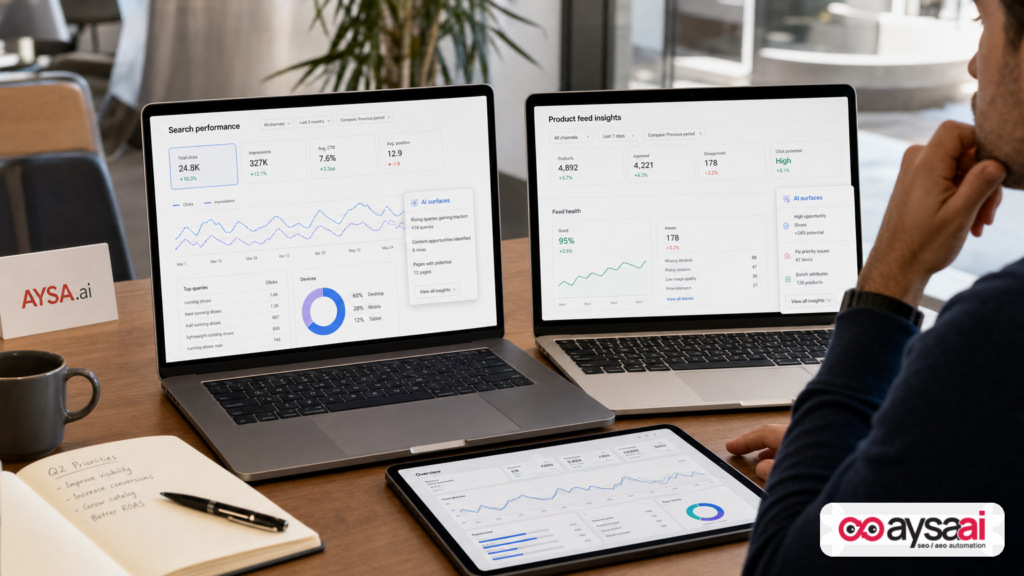
Google is slowly turning on the lights inside AI Search. But it’s still leaving businesses in the dark about the single metric that actually decides budgets: Clicks.
In the last two months, Google has expanded AI reporting in two places:
- Search Console (limited rollout): generative AI performance reporting focused on Impressions.
- Merchant Center (pilot): “AI performance insights” for shopping-related discovery, including grouped query themes, product terms, and Share of Voice—but still no clicks.
If you’re an SME owner, an ecommerce operator, or an agency trying to explain performance to a client, this is both progress and a problem. Progress, because it confirms AI surfaces are now a first-class discovery channel. A problem, because the reporting is incomplete, fragmented across dashboards, and easy to misinterpret—especially when executives ask the inevitable question: “So… did it drive traffic or revenue?”
This editorial is my practical take—what changed, what it means for decision-making, and what you should do now even if Google won’t give you the clean Attribution you want yet. I’ll also explain where AYSA.ai’s AI search visibility approach fits: monitor, prepare fixes, ask for approval, execute accepted changes, then re-measure.
Concise summary
- Google is adding AI reporting in Search Console and piloting richer AI discovery insights in Merchant Center, especially for ecommerce.
- The biggest missing piece is still clicks/CTR for AI surfaces, plus query-level reporting (especially outside product feeds).
- Merchants get a new kind of demand signal (grouped shopping questions and “product terms”), but it’s not a keyword list—and it won’t settle traffic attribution debates.
- Agencies need new reporting guardrails: share-of-voice can look definitive while being based on incomplete competitor sets and impression thresholds.
- The winning play in 2026 is execution speed + measurement discipline: fix product data, clarify entities, structure content for AI answers, and build a KPI stack that separates “visibility” from “outcomes.”
Table of contents

- What changed: Google is adding AI reporting in two places (and for two different audiences)
- Why this is happening now: AI search is becoming “search,” not a side feature
- Merchant Center’s AI Performance Insights: what you get (and what you don’t)
- Search Console’s AI reporting: why impressions-only is a strategic constraint
- The measurement gap: impressions are not outcomes (and grouped queries aren’t keywords)
- A practical KPI stack for AI search in 2026 (what you can measure today)
- Concrete SME scenario: an ecommerce brand vs. a local clinic (and why the dashboards treat them differently)
- What agencies should change: reporting, forecasting, and the “share of voice” trap
- What to do right now: an execution-first AI search action plan
- Where AYSA fits: measure, prepare, ask for approval, execute—then re-measure
- What to do next
- Sources and further reading
What changed: Google is adding AI reporting in two places (and for two different audiences)
Let’s start with the reality most businesses are living in right now:
- You can see your brand show up in AI Overviews or AI Mode…
- You can feel the shift in click patterns…
- But you can’t reliably tie “AI visibility” to “business results” in a single, trusted place.
According to reporting covered by Search Engine Journal, Google has shipped:
1) Search Console AI performance reporting (limited rollout)
Google began testing dedicated generative AI performance reports in Google Search Console for some sites (initially reported as a subset of UK sites). The key detail: the reporting is centered on impressions with breakdowns like page, country, device, and date—but without clicks and without query-level metrics.
This matters because Search Console has long been the “source of truth” for organic search performance. Putting AI data there signals that Google wants AI visibility to be treated as part of search visibility—not as an external product.
2) Merchant Center AI performance insights (pilot)
Google also opened a pilot inside Merchant Center called AI performance insights. It’s designed for merchants and product feeds, and it shows how a brand is discovered across AI Mode and AI Overviews. It includes new types of “query-like” data—especially shopping question themes and “product terms”—but in grouped form rather than individual queries.
In plain English: merchants get hints about what people ask AI for when shopping, but they still don’t get the click data that would tell them if AI actually sent traffic to their website.
Why this is happening now: AI search is becoming “search,” not a side feature
There’s an old habit in marketing: treat new surfaces as “experimental” until measurement becomes easy. That logic used to work when new surfaces were optional. AI search isn’t optional anymore.
Here’s the strategic shift: generative AI isn’t just another box on the results page. It’s becoming a decision layer—summarizing options, narrowing choices, and sometimes answering questions without a click.
When the interface changes, reporting has to change. Google is clearly aware that marketers are asking two questions:
- Am I showing up? (visibility)
- Is it driving results? (engagement + revenue)
Right now, Google is mostly answering question #1—and only partially answering it, depending on whether you’re a merchant with a product feed or not.
And that creates a new operational reality: businesses must optimize for AI discovery before they get perfect measurement. That’s uncomfortable. But it’s also normal. In every platform shift—mobile, local packs, featured snippets—execution leaders moved first and asked for cleaner reporting later.
Merchant Center’s AI Performance Insights: what you get (and what you don’t)
Merchant Center’s AI pilot is important not because it’s “complete,” but because it reveals how Google wants ecommerce operators to think about AI discovery.
What you get
Based on the source coverage and Google’s described positioning, the report includes:
- Shopping question themes categorized by “query type” (for example: exploring categories, researching specs, looking for reviews).
- Phase of shopping journey groupings (how far along the customer is).
- Product terms (the words people use to describe what they want—attributes and needs).
- Share of voice calculated from impressions (your AI impressions divided by total impressions across you and a competitor set).
The standout: product terms + attribute completeness can become a direct operational checklist for product feeds. If AI-mode shoppers keep asking about “arch support,” “maximum cushioning,” “compatible with X,” “battery life,” “washable cover,” or “vegan leather” and your feed doesn’t express those attributes clearly, that’s a fix you can make quickly.
What you don’t get (and why it matters)
- No clicks, no CTR: you can’t prove traffic impact from AI surfaces.
- No individual queries: you see grouped themes, not actual search terms.
- Competitor set opacity: share-of-voice is relative to a set you can’t freely edit, and edge cases can produce misleading “0%” or “100%” values.
- Limited scope: organic AI traffic only (paid not included), category filters may be one-at-a-time, and only shopping/brand-intent conversational queries count.
This is the central tension: the reporting is operationally useful for feed optimization, but it is strategically insufficient for revenue attribution or forecasting.
Search Console’s AI reporting: why impressions-only is a strategic constraint
Search Console is where most teams go to answer: “What pages are winning, what queries are driving it, and what did it do for traffic?”
So when AI reporting appears there—but without clicks and query detail—it creates a strange new workflow:
- You can identify pages that are getting AI impressions.
- You can compare by country/device/date.
- You can’t tie those impressions to visits.
- You can’t see which questions/queries triggered the AI surface.
In practice, that means teams will over-index on proxy indicators: impressions, rankings, mentions, and “we think it’s working.” That’s risky for SMEs, because SMEs don’t have unlimited runway to run “visibility experiments” that can’t be tied to pipeline or revenue.
It’s also risky for agencies, because clients will ask for clarity you can’t provide—and they will blame the agency for what is actually a platform reporting constraint.
That doesn’t mean you can’t act. It means you need a better framework for what to measure and how to execute changes safely.
The measurement gap: impressions are not outcomes (and grouped queries aren’t keywords)
The temptation right now is to treat AI impressions as the new “rankings.” But impressions are closer to “opportunity” than “performance.”
Impressions vs. clicks: the boardroom problem
If you’re a founder or operator, you don’t fund impressions. You fund results. Yet Google’s AI reporting is currently strongest at the “seen” layer, not the “acted” layer.
Here’s the practical danger:
- A page can gain AI impressions because it’s being referenced in an AI overview…
- …while total clicks decline because the answer is being satisfied on-SERP.
Without click reporting for AI surfaces, it’s easy to tell the wrong story either way:
- False positive: “AI impressions are up, so we’re winning.”
- False negative: “Clicks are down, so SEO is failing.”
Both can be wrong at the same time depending on the query category and intent.
Grouped queries aren’t keywords (and shouldn’t be treated like them)
Merchant Center’s grouped question themes and “product terms” are best treated as:
- Language patterns customers use to express needs
- Attribute gaps in your product data
- Content cues for product detail pages and buying guides
They are not a “keyword list” in the traditional SEO sense because they don’t provide:
- the exact query,
- the exact volume,
- the query-to-page mapping,
- or the click yield.
Use them to improve coverage and clarity, not to build a spreadsheet of “keywords to rank for.”
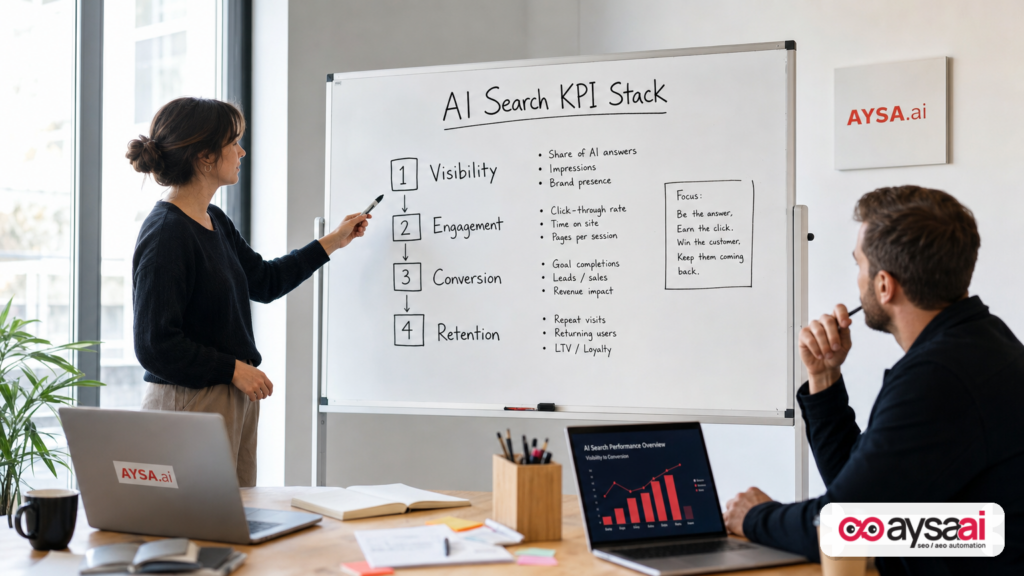
A practical KPI stack for AI search in 2026 (what you can measure today)
When a platform withholds a key metric, serious operators don’t guess—they build a KPI stack with layers, so no single metric becomes a lie.
Here’s the KPI stack I recommend for SMEs and agencies navigating AI Overviews/AI Mode with incomplete reporting.
Layer 1: Visibility (what Search Console and Merchant Center are best at today)
- AI impressions by page (Search Console AI report where available)
- AI impressions trend by device/country/date
- Share of voice (impression-based) in Merchant Center AI performance insights (with guardrails)
- Coverage of product attributes indicated by Merchant Center product terms and attribute completeness prompts
How to use it: identify which pages/products are “eligible” and where you’re missing critical attributes or clarity.
Layer 2: Engagement proxies (what you can measure without AI click reporting)
- Total organic clicks and CTR (standard Search Console) for pages likely to be affected
- Brand search trends (in Search Console query reporting where applicable; interpret cautiously)
- On-site engagement from organic search in GA4 (landing page engagement, scroll depth events if implemented, key event rates)
How to use it: watch for “impressions up + clicks flat/down” patterns and separate informational from commercial pages.
Layer 3: Business outcomes (what the CFO will care about)
- Lead quality (form submissions that convert to sales, not raw form fills)
- Revenue from organic landing pages (ecommerce purchases; assisted conversions where relevant)
- Margin-aware product performance (don’t optimize AI visibility for low-margin items if your operations can’t support it)
How to use it: treat AI visibility gains as a hypothesis until you see stable outcome movement on a sensible time window.
Layer 4: Execution velocity (the metric most teams ignore)
The teams that win platform shifts aren’t always the best analysts—they’re the fastest responsible executors.
- Time to ship product feed improvements
- Time to update titles/descriptions/spec tables
- Time to add missing FAQs, comparisons, and policies
- Time to fix technical crawl/index issues blocking AI eligibility
How to use it: if you can’t ship improvements weekly, you’ll lose to competitors who can—no matter how good your strategy deck looks.
Concrete SME scenario: an ecommerce brand vs. a local clinic (and why the dashboards treat them differently)
To make this real, let’s compare two businesses competing for the same customer attention—but with different access to Google’s AI reporting.
Scenario A: A 12-person ecommerce brand selling running shoes
This brand has a Merchant Center account and a product feed. In the AI performance insights pilot (when available), they might see:
- Shoppers asking AI questions about “maximum cushioning,” “arch support,” “stability,” “wide toe box,” or “best for plantar fasciitis.”
- Those concepts appearing as product terms.
- Attribute completeness prompts indicating they’re missing “heel drop,” “weight,” “support type,” or “terrain.”
Action they can take immediately: improve product titles, descriptions, and structured attributes in the feed and on product pages. Add comparison blocks (“best for…”, “not ideal for…”). Add FAQs that match the shopping questions.
What they still can’t do cleanly: prove whether AI surfaces drove incremental clicks vs. cannibalized them. They’ll need to infer impact via overall organic landing page performance and downstream conversion metrics.
Scenario B: A local clinic (physical therapy) competing for “best treatment for plantar fasciitis”
This clinic likely does not have Merchant Center product feeds. Their visibility in AI Overviews might be driven by:
- Service pages (plantar fasciitis treatment)
- FAQ content
- Author expertise signals and clarity of medical disclaimers
- Local reputation signals (reviews, listings consistency, etc.)
What they get today: mainly impressions-based AI reporting in Search Console (where available) without query/click detail, plus their standard Search Console/GA4 performance.
The unfairness: they compete for the same AI answers, but they don’t get the same discovery insights merchants might get in Merchant Center.
What to do anyway: build pages that are unambiguously useful for AI summarization—clear definitions, step-by-step treatment options, “when to see a clinician,” pricing ranges where appropriate, and location/service area clarity. Then measure outcomes via leads and booked appointments, not AI clicks.
What agencies should change: reporting, forecasting, and the “share of voice” trap
If you’re an agency, AI reporting is going to create a new category of client tension: numbers that look official but don’t behave like traditional SEO metrics.
Why share of voice can mislead (even when it’s “true”)
In the Merchant Center pilot, share of voice is based on impressions and competitor sets defined by what’s available in Merchant Center. That creates three common problems:
- Edge-case optics: 0% can reflect insufficient impressions rather than failure.
- Empty-competitor optics: 100% can reflect a missing competitor set rather than dominance.
- Deck-ready, conversation-hostile: it fits neatly in slides but invites the wrong interpretation.
Agency guardrail: every share-of-voice chart must ship with a plain-English definition and a “how to interpret” note. If you can’t explain the denominator, don’t headline the metric.
Stop forecasting AI traffic like classic SEO traffic
Classic SEO forecasting assumptions (rank → CTR curve → clicks → conversion rate → revenue) break when:
- AI answers satisfy intent without a click,
- citations/links may be present but clicked less,
- and the platform doesn’t provide AI clicks/CTR reporting.
Instead, forecast in scenarios:
- Visibility scenario: AI impressions increase X% on target page set.
- Engagement scenario: organic clicks remain flat/down, but branded demand and conversion rate change.
- Outcome scenario: net revenue from organic landing pages changes across the period.
This is more work, but it’s honest—and it prevents agencies from being trapped by a click model Google may not support in AI surfaces for some time.
What to do right now: an execution-first AI search action plan
Here’s the part that matters most: what should an SME actually do this week?
Even without AI click reporting, you can systematically improve AI discovery and reduce the chance that AI summaries misrepresent you.
1) Treat AI visibility as “search visibility,” not a side project
Operationally, that means AI work goes into your SEO backlog, not a separate experimental doc. It also means your core pages—not just blog posts—must be AI-ready:
- category pages
- product detail pages
- service pages
- pricing pages
- policies (shipping/returns/warranty)
- about/brand trust pages
AI often pulls “trust anchors” from policies and brand pages when summarizing options.
2) For ecommerce: use Merchant Center insights as an attribute backlog, not a keyword list
When you see grouped shopping questions and product terms, translate them into:
- feed attribute additions (where supported)
- title/description improvements
- spec table expansions
- FAQ blocks that mirror shopper concerns
- comparison content (A vs B, “best for…”) where legitimate
And keep it honest: don’t invent specs or over-claim benefits. AI surfaces can amplify inaccuracies quickly.
3) Make your content “AI-readable” without dumbing it down
AI summaries favor content that is:
- structured (clear headings, short sections, bullet lists where appropriate)
- specific (numbers and constraints when you can verify them)
- complete (answers common follow-ups)
- consistent (same claims across site, feed, and docs)
If you have a “best running shoes for flat feet” guide, don’t stop at product blurbs. Add the decision logic: what flat feet implies, what to look for, what to avoid, how sizing works, return policy, and how to pick between two models.
4) Create an AI monitoring routine that doesn’t depend on one Google report
Because Google’s AI reporting is incomplete, your monitoring should blend:
- Search Console standard performance trends
- Search Console AI impressions trends (where available)
- GA4 landing page outcomes
- Merchant Center feed health and attribute completeness
This is exactly why we built AYSA monitoring as part of an execution system: you don’t just need dashboards—you need a loop that turns signals into changes.
5) Reduce “AI confusion risk” with entity clarity
AI systems summarize brands and products. If your site is ambiguous, AI can be ambiguous too.
Practical steps that help:
- one canonical brand name and consistent usage
- clear product naming conventions
- clean internal linking from guides → categories → products
- explicit definitions (what your product/service is, who it’s for, who it’s not for)
When your content is unambiguous, AI has less room to improvise.
6) Build “click resilience” with deeper conversion paths
If AI reduces clicks for top-of-funnel informational queries, the businesses that survive will be those with:
- strong mid-funnel pages (comparisons, calculators, pricing explainers)
- clear trust proof (policies, reviews, credentials)
- fast, clean UX on landing pages
- conversion offers that match intent (consult, quote, sample, booking, demo)
In other words: you can’t control whether AI answers. You can control whether your site converts the traffic you still get.
Where AYSA fits: measure, prepare, ask for approval, execute—then re-measure
AI search has created a new SEO reality: the advantage goes to the teams that can ship improvements fast, safely, and continuously—without turning their website into an uncontrolled experiment.
That’s the exact problem AYSA.ai is designed to solve.
AYSA’s loop for AI search optimization
- Monitor visibility and performance signals (including AI search visibility indicators where available). See: AI search visibility and monitoring.
- Prepare recommended changes (content improvements, internal linking, technical fixes, product page clarity, feed-related enhancements where applicable).
- Ask for approval so nothing risky ships silently—this is non-negotiable for serious businesses.
- Execute the accepted changes quickly, then re-measure impact.
This approved execution model matters even more in AI search because teams are under pressure to “do something” while the data remains incomplete. AYSA makes it possible to move fast without moving recklessly.
What AYSA helps you do in practice
- Turn AI discovery hints (like product-term themes) into site and feed-aligned content.
- Keep your “AI-readable” content consistent across templates and product/service pages.
- Operationalize updates as a system, not a one-off sprint.
- Give SMEs a way to improve visibility without needing a full-time SEO engineer.
If you want the toolset overview, start here: AYSA AI SEO tools. If you’re evaluating cost and fit, see pricing. For ongoing tactics, browse the AYSA blog.
What to do next
- Audit your current AI exposure: Identify which pages/products are most likely to appear in AI Overviews/AI Mode and track impression trends where available.
- If you sell products: treat AI Performance Insights (when available) as an attribute backlog—fix missing attributes in your feed and on product pages first.
- Upgrade your “answer quality”: restructure key pages with clearer headings, FAQs, and decision logic that mirrors real customer questions.
- Set reporting guardrails: don’t let AI impressions or share-of-voice become “performance” without outcome context.
- Build an execution cadence: commit to weekly improvements—small, approved, measurable.
- Adopt an approved-execution system: if your team struggles to ship consistently, use a workflow like AYSA that prepares changes and asks for approval before executing.
Sources and further reading
- Search Engine Journal: Google’s AI Search Data Is Growing, But The Gaps Remain
- Search Engine Journal: Latest news (research lead)
- Search Engine Journal: SEO section (research lead)
- Search Engine Journal: Local SEO section (research lead)
- Search Engine Journal: Enterprise SEO section (research lead)
Note: The source coverage references Google help documentation and platform specifics (Search Console and Merchant Center). Because those primary URLs were not included in the supplied research context, I’ve avoided quoting or linking to them directly here. If you have the official Google documentation links you rely on internally, you should add them to this section for a stronger primary-source trail.
Continue the AI search topic inside AYSA.
Use these pages to connect the article with AI SEO tools, AI visibility monitoring, AI Overviews and approved website execution.
Turn this topic into a website action plan.
Use these AYSA hubs to move from reading to technical fixes, AI visibility monitoring, research, glossary context and approval-first SEO execution.

