
Google Just Made Local Inventory Ads the Default: What It Breaks, What It Fixes, and How to Stay in Control
Google is enabling Local Inventory Ads by default for eligible Shopping campaigns and removing the legacy “Local products” setting. Here’s what changes on Aug. 31, why it matters for budgets and reporting, and how SMEs and agencies should rebuild control using the Inventory filter (plus how AYSA helps monitor and execute the fixes safely).

Google’s latest Shopping update looks small on the surface—one default flips on, one legacy setting disappears. But for any business that sells both online and in-store, this change can quietly rewrite your campaign economics.
Per Search Engine Land, Google will (1) enable Local Inventory Ads (LIAs) by default for eligible Shopping campaigns connected to Merchant Center accounts that have the Local Inventory Ads add-on enabled and (2) remove the “Local products” setting, replacing it with management via the “Inventory filter” using Channel = Local or Channel = Online. The change is slated to begin Aug. 31.
My point of view: default-on changes aren’t “UI tweaks.” They are incentives. They nudge spend, reshape reporting narratives, and push teams toward Google’s preferred campaign operating model. If you don’t proactively define how your budgets and measurement should behave, the platform will define it for you.
This editorial is your playbook: what changed, what can break, how to regain control (without overcomplicating your account), and how AYSA helps you monitor and execute the non-negotiables with approval-based safety.
Concise summary
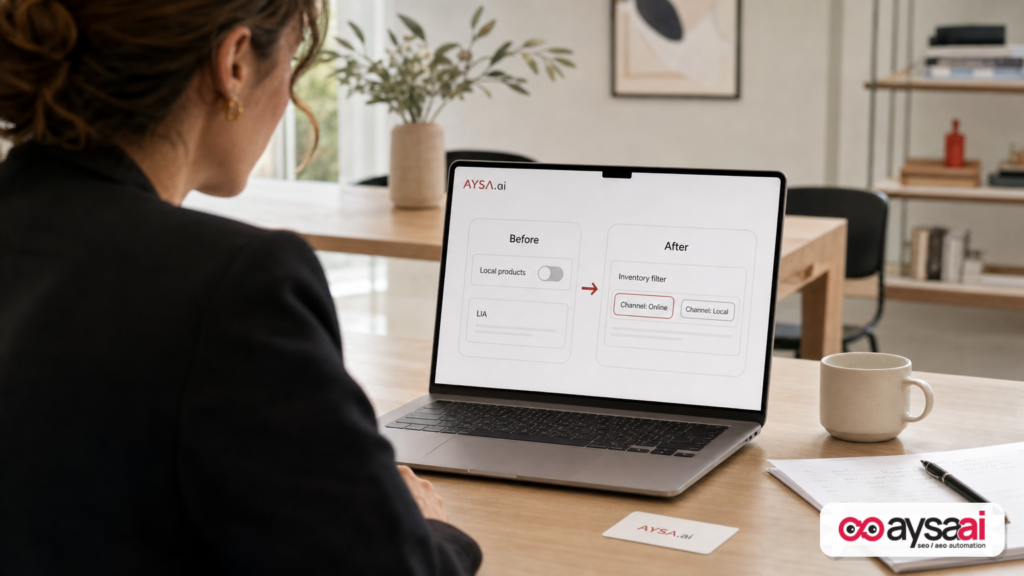
- What changed: LIAs will be enabled by default for eligible Shopping campaigns; the “Local products” campaign setting is removed; control moves to an Inventory filter (Channel: Local vs Online).
- Why it matters: If you previously used separate campaigns/budgets or relied on the old setting to prevent in-store inventory from entering certain campaigns, your spend mix and performance reporting can shift.
- What to do: Audit which campaigns are eligible, decide whether you want blended or separated local/online strategy, set Inventory filters intentionally, and validate reporting before/after Aug. 31.
- Where AYSA fits: AYSA monitors site + search visibility signals, prepares prioritized change sets (feeds/landing pages/local content), asks for approval, and executes accepted website changes to support omnichannel performance.
Key takeaways

- Defaults change outcomes. “Enabled by default” is effectively a migration for many accounts—treat it like one.
- Inventory filters become the control plane. If you’re not managing Channel = Local/Online intentionally, you’re leaving budget allocation to chance.
- Measurement is the silent casualty. When local and online inventory mix differently, ROAS and “what worked” narratives can become misleading.
- SMEs need fewer knobs, not fewer rules. Keep the structure simple, but lock down the rules that protect margins, fulfillment, and reporting clarity.
- Execution speed matters. It’s not enough to understand the change—you have to implement and validate fixes before the deadline.
Table of contents

- What changed: Local Inventory Ads become the default + “Local products” goes away
- Local Inventory Ads (LIAs) in plain English
- Why this matters (even if you “don’t run local”)
- The budget problem: when “default-on” changes campaign economics
- The new control surface: Inventory filter and Channel logic
- What can go wrong: 10 failure modes we expect to see
- A concrete SME scenario: the home goods retailer with two margin models
- Agency implications: restructure SOPs, reporting, and guardrails
- Measurement reality: don’t let blended performance lie to you
- A practical action plan before Aug. 31 (SMEs + agencies)
- Where AYSA fits: monitoring + approved execution for omnichannel growth
- What to do next
- Sources and further reading
What changed: Local Inventory Ads become the default + “Local products” goes away
According to Search Engine Land, Google notified advertisers that starting Aug. 31:
- If you run Shopping campaigns linked to a Merchant Center account with the Local Inventory Ads add-on enabled, LIAs will be enabled by default (for eligible campaigns).
- The legacy campaign setting “Local products” (previously found under “Other settings”) will be removed.
- Advertisers will instead manage local vs online inventory using an Inventory filter, with Channel = Local and Channel = Online options.
Google’s stated intent (as summarized by Search Engine Land) is to remove duplicate/overlapping controls and centralize management under the Inventory filter. That is a rational platform design. But rational design and predictable business outcomes are not the same thing—especially when your account structure was built around the old control scheme.
Think of this update as a “permission change.” If local inventory starts participating by default, the burden of proof flips: you now have to explicitly restrict what you don’t want, rather than explicitly enabling what you do want.
Local Inventory Ads (LIAs) in plain English
If you’re an SME owner reading this and thinking, “We do ecommerce—why should I care about local inventory ads?” here’s the simple version.
Local Inventory Ads help show shoppers what’s available near them in a physical store. In practice, LIAs are part of the broader Shopping experience, where Google tries to answer: “Can I buy this now, nearby, with minimal friction?”
The key is not the ad format—it’s the fulfillment expectation. Local inventory implies different customer intent:
- “I want it today.”
- “I want to pick it up.”
- “I want to see if it’s in stock before I drive over.”
That intent often converts differently than “ship to me in 2–5 days.” Which means local and online inventory can produce very different:
- conversion rates
- average order values
- refund/return rates
- support load
- profit per order
So when Google changes what inventory can participate by default, it’s not just “more reach.” It’s a potential shift in the type of demand you’re buying.
Why this matters (even if you “don’t run local”)
Three reasons this update matters far beyond big-box retail:
1) Omnichannel is now the default assumption
Google increasingly behaves as if every product business is omnichannel—even if you’re not trying to be. If you have stores, Google wants to route demand to the closest fulfillment path.
This aligns with broader platform trends we see across search and ads: the system optimizes for user satisfaction and speed, not necessarily for your internal accounting categories.
2) If you separate budgets, the default can blur them
If you deliberately separated online vs local strategies—because margins differ, inventory differs, or staffing differs—default-on behavior can make your carefully separated system leaky unless you update Inventory filters.
3) You can’t fix what you can’t see
Many SMEs rely on a handful of dashboards or monthly reports. If local inventory begins participating where it didn’t before, you can see “performance changes” without understanding that the underlying traffic mix changed.
That leads to bad decisions like:
- killing ads that are actually profitable in-store
- scaling ads that only look good due to channel mix
- changing pricing based on misleading blended ROAS
In other words: the biggest risk isn’t spend—it’s interpretation.
The budget problem: when “default-on” changes campaign economics
Let’s get blunt: budget is strategy in Google Ads.
When LIAs become default for eligible Shopping campaigns, two “budget realities” can shift:
Budget reality #1: Auction pressure can move
If your local inventory suddenly becomes eligible in a campaign that previously skewed online, your impression eligibility, auction mix, and CPC distribution can change—without you changing bids, creative, or product selection.
I’m not claiming CPCs will go up or down (that depends on competition and market). I’m saying: the system now has more ways to spend your budget.
Budget reality #2: Demand routing affects profitability
A $100 online order might carry:
- shipping costs
- packing labor
- higher return rates
A $100 in-store pickup might carry:
- lower fulfillment cost
- higher add-on purchases
- staff time at pickup counter
If you treat them as identical “revenue,” your ad strategy will drift away from profit. Default-on makes that drift more likely unless you reassert boundaries.
The new control surface: Inventory filter and Channel logic
Search Engine Land reports that the “Local products” setting is being removed and replaced with management via an Inventory filter where you can configure campaigns using:
- Channel = Local
- Channel = Online
Conceptually, that’s cleaner. Operationally, it means your campaign architecture needs to answer one question clearly:
Do we want this campaign to spend on online inventory, local inventory, or both?
Two valid strategies (and when each is right)
Strategy A: Blended (Online + Local together)
- Best for: single margin model, consistent pricing, simple operations, limited team bandwidth
- Risk: you may lose visibility into which channel is driving performance shifts
Strategy B: Separated (Online vs Local in different campaigns)
- Best for: different margins, different inventory availability, distinct KPIs (e.g., shipping vs pickup), franchise/location reporting needs
- Risk: more complexity; you must keep feeds, landing pages, and measurement aligned
The mistake is not choosing blended or separated. The mistake is letting a default choose for you.
What can go wrong: 10 failure modes we expect to see
When platforms consolidate settings, failure rarely looks like “everything broke.” It looks like subtle drift. Here are 10 practical ways this update can create problems if you don’t intervene.
1) Your “online-only” Shopping campaign starts serving local intent
If your campaign was implicitly protected by the old “Local products” setting behavior, you may now see traffic that behaves differently (shorter path to purchase, different device mix, different GEO distribution).
2) Budget separation becomes accidental rather than intentional
Many accounts separate budgets to ensure the website business doesn’t get starved by local demand (or vice versa). Default-on can blur that split.
3) Reporting becomes less honest—even if numbers look “better”
Blended conversion reporting can improve while profit declines. Why? Because you’re mixing different fulfillment economics and potentially different Attribution behavior.
4) Creative and landing pages mismatch the customer journey
Local shoppers need clarity: store availability, pickup options, hours, location confidence signals. If they land on a generic PDP with no store context, conversion can suffer—and support requests increase.
5) Geo performance becomes confusing
If more local demand appears, you may see unexpected strength near store areas and weakness elsewhere. Teams might “optimize” by cutting geos that actually matter for online shipping.
6) Inventory accuracy becomes a brand risk
Local inventory ads create a promise: “It’s in stock nearby.” If your local inventory data isn’t tight, you risk unhappy customers and store staff frustration.
7) Promotions and pricing strategy get messy
If in-store pricing differs from online pricing, the experience can feel inconsistent. Even if the platform allows it, your customers may not.
8) Teams optimize toward the easiest conversion, not the best profit
When “local” converts easily, algorithms and humans both can over-allocate spend—unless you define guardrails.
9) Agencies inherit more operational liability
Clients don’t care that a setting moved. They care that performance shifted. Agencies need new QA checklists and pre-deadline migrations.
10) The real problem hides behind “automation” narratives
When defaults change, people often blame “the algorithm.” The fix is usually simpler: declare channel intent with Inventory filters and align the downstream experience (store pages, PDPs, schema, local landing pages).
A concrete SME scenario: the home goods retailer with two margin models
Let’s make this real with a scenario I see constantly.
Business: A regional home goods retailer with 4 storefronts and an ecommerce site.
Reality:
- Online orders have shipping and handling costs and a higher damage/return rate.
- In-store pickup has lower fulfillment cost and often leads to add-on purchases.
- The owner wants to grow ecommerce and increase store traffic, but needs to track each separately.
Before the change: They run Standard Shopping campaigns and “keep local controlled” using the old “Local products” setting logic plus structural habits: one campaign for ecommerce scale, one for local testing.
After the change (if they do nothing): Local inventory becomes default-on for eligible campaigns. Now the ecommerce campaign starts absorbing more local-intent demand, which:
- changes Conversion rate (often up)
- changes AOV (unclear)
- changes fulfillment mix (more pickup)
- makes ROAS look “healthier”
The executive mistake: They conclude the ecommerce campaign “finally works” and scale it aggressively—then wonder why warehouse ops don’t grow with it, why online shipping revenue didn’t scale proportionally, or why stores feel understaffed at pickup.
The fix: Use the Inventory filter to explicitly define which campaigns should run Channel = Online vs Channel = Local, then align landing pages and reporting around the chosen strategy.
Notice what’s happening: the fix is not “more optimization.” It’s restoring a truthful system where each campaign means what you think it means.
Agency implications: restructure SOPs, reporting, and guardrails
If you’re an agency or consultant, this update is a reminder that “platform operations” is now a core deliverable.
Google is collapsing multiple controls into fewer “master” controls. That’s normal in mature platforms. But it means your internal documentation can become outdated overnight.
Update your SOPs (and don’t wait for tickets)
- Pre-deadline audit: Identify Merchant Center accounts with the Local Inventory Ads add-on enabled and map impacted Shopping campaigns.
- Architecture decision: Decide blended vs separated strategy per client (margin model + reporting requirements).
- Inventory filter standardization: Make Channel selection explicit and documented.
- Post-change validation: Compare channel mix, geo distribution, and conversion quality for 2–4 weeks after the change.
Fix how you report, not just what you report
Search Engine Land also links to industry guidance about reporting honestly in PPC contexts (see: How to report PPC performance without lying to yourself (or your boss)). The principle matters here: if the inventory mix changes, your reporting story must change too.
At minimum, annotate reports around the Aug. 31 shift and explain how channel eligibility changed. Otherwise you’ll spend months arguing about “what happened” instead of improving performance.
Measurement reality: don’t let blended performance lie to you
When local inventory becomes more present, measurement challenges show up fast—especially for SMEs with lean analytics setups.
Two measurement truths you should adopt immediately
Truth #1: Revenue isn’t profit. If local and online have different fulfillment costs, you need at least a simple way to interpret performance through a profit lens (even if you can’t fully implement profit-based bidding today).
Truth #2: Attribution narratives are fragile. If channel mix changes, “what gets credit” can change too—especially if local shoppers convert through different paths.
What to monitor after you implement Inventory filters
- Spend split: Are you actually allocating spend the way you intended after setting Channel filters?
- Geo concentration: Did spend begin clustering around store radii unexpectedly?
- Search terms / product mix: Are different SKUs suddenly dominating because they’re in-stock locally?
- Operational KPIs: Store pickup volume, support tickets, out-of-stock complaints (if you track them)
Even if you don’t have perfect instrumentation, you can still avoid self-deception by watching directionally relevant signals and documenting the change.
A practical action plan before Aug. 31 (SMEs + agencies)
Treat this as a controlled migration. Here’s a practical checklist you can implement without turning your account into a science project.
Step 1: Identify eligibility and exposure
- List Shopping campaigns linked to Merchant Center accounts where the Local Inventory Ads add-on is enabled (as noted in the Search Engine Land report).
- Mark any campaigns where local vs online budget separation is important (margin differences, staffing, geography, franchise requirements).
Step 2: Choose your operating model (blended vs separated)
- Blended if: you want simplicity and don’t have strong reasons to split.
- Separated if: you need budget control, reporting clarity, or operational differences by channel.
Step 3: Implement Inventory filters intentionally
Based on Search Engine Land’s description, use the Inventory filter to specify:
- Channel = Online for ecommerce-only strategy
- Channel = Local for store/in-stock-nearby strategy
If you’re separating, document the intent in plain English inside your campaign notes or internal docs: “This campaign is online shipping only” vs “This campaign is local in-store availability.”
Step 4: Validate landing pages for local intent
If you plan to run Channel = Local, your website experience must support local shoppers. That usually means:
- clear store locations and hours
- store-specific availability (even if basic)
- pickup or reservation messaging if offered
- fast mobile UX
This is where SEO and paid search stop being separate disciplines. Your ads create promises; your pages must keep them.
Step 5: Adjust reporting and annotate the change
- Add an account annotation for Aug. 31.
- Compare pre/post channel mix and geo performance.
- Report the change as an inventory eligibility shift, not as “we optimized.”
Step 6: Build a monitoring habit for platform defaults
This will not be the last default change. Create a recurring monthly check for campaign settings that can silently alter eligibility and spend routing.
If you want help systematizing this kind of vigilance beyond ads—especially where the website must be updated to match intent—AYSA is built for exactly that operational loop.
Where AYSA fits: monitoring + approved execution for omnichannel growth
When Google changes defaults, most teams do one of two things:
- They ignore it until performance shifts.
- They overreact, rebuild everything, and create fragile complexity.
AYSA is designed for the third path: monitor → prepare changes → ask for approval → execute what’s accepted. That model matters because omnichannel performance is not only an Ads setting—it’s also:
- local landing pages
- PDP clarity (availability, pickup, location trust)
- technical performance (mobile speed, Indexability)
- content that answers “near me” and “in stock” intent
Here’s how to apply AYSA to this moment:
1) Monitor the signals that precede revenue problems
Use AYSA Monitoring to keep an always-on view of visibility and site signals that influence conversion outcomes—especially around store pages, product pages, and local content that supports “available nearby” intent.
2) Align with how search is evolving (SEO + AEO + GEO)
Local intent increasingly shows up across classic search and AI-driven discovery surfaces. AYSA focuses on search visibility holistically through AI Search Visibility so your business isn’t blind to how customers actually find you.
3) Use AI SEO tools for prioritization—not guesswork
With AYSA AI SEO Tools, you can prioritize the website work that supports paid efficiency: local store pages, product page enhancements, Internal linking, structured content, and technical fixes that reduce friction.
4) Keep control with approved execution
The real cost in marketing isn’t ideas—it’s implementation. AYSA prepares recommended changes, requests approval, and executes the changes you accept. That matters for busy SMEs and agencies that need speed without losing governance.
5) Make it operationally sustainable
If you’re evaluating how to resource this kind of ongoing execution, see AYSA Pricing, and for more playbooks like this one, browse the AYSA Blog.
To be clear: AYSA doesn’t replace your paid media strategy. It makes sure the website and visibility work that supports that strategy actually gets done—consistently and safely.
What to do next
- Before Aug. 31: Audit which Shopping campaigns are eligible for default-on LIAs (Merchant Center add-on enabled + linked campaigns).
- Decide your intent: Blended (Online + Local) or separated budgets (Online-only vs Local-only).
- Set Inventory filters explicitly: Use Channel = Online or Channel = Local based on campaign purpose.
- Update your reporting narrative: Annotate the change and report channel-mix shifts as a structural update, not “optimization.”
- Validate the customer journey: Ensure store pages and product pages support local intent (availability, hours, pickup messaging).
- Adopt ongoing Monitoring: Platform defaults will keep changing; build a habit and a system.
- Use AYSA to execute the site-side work: Start with Monitoring, then prioritize fixes via AI SEO Tools and track outcomes through AI Search Visibility.
Sources and further reading
- Search Engine Land: Google changes default Local Inventory Ads behavior
- Search Engine Land: How to report PPC performance without lying to yourself (or your boss)
- Search Engine Land: Google Tag Manager adds guided setup for Google Ads purchase tracking
- Search Engine Land: Local Services Ads come to Google Ads via Performance Max
- Search Engine Land: Why the SEO vs. PPC debate is finally over
- Search Engine Land: How to run a local GEO baseline audit
- Search Engine Land: AI-driven personalized search: A practical guide
Note: This editorial relies on the supplied Search Engine Land report for the specifics of the LIA default behavior and the replacement of “Local products” with the Inventory filter. For the most current implementation details and UI locations, consult official Google Ads/Merchant Center documentation inside your account or Google’s help resources (not provided in the supplied research context).
Continue the AI search topic inside AYSA.
Use these pages to connect the article with AI SEO tools, AI visibility monitoring, AI Overviews and approved website execution.
Turn this topic into a website action plan.
Use these AYSA hubs to move from reading to technical fixes, AI visibility monitoring, research, glossary context and approval-first SEO execution.

