
From Google Search Console to Growth: An AI-Driven Action System for SMEs (That Doesn’t Die in a Spreadsheet)
Google Search Console is overflowing with clues about what customers want—but most businesses can’t turn thousands of queries into decisions. Here’s a practical, AI-assisted workflow to translate GSC data into prioritized actions, approvals, and executed website changes.

Google Search Console (GSC) is one of the most honest datasets in marketing: it shows what people actually typed, how often Google showed your pages, and whether anyone clicked. But most businesses don’t have a data problem—they have a decision problem.
You can export a thousand queries, build a pivot table, argue about CTR, and still end the week with no meaningful changes shipped to your website. And in 2026 search, “no meaningful changes shipped” isn’t neutral—it’s decline.
This editorial is my practical, business-first take on how to use AI to turn GSC into actions you can approve and execute. It’s inspired by the excellent Search Engine Land piece on using AI with GSC data, but it’s not a rewrite. I’m expanding the conversation into an operating system for SMEs and teams that need outcomes, not just analysis. Source for reference: Search Engine Land: 7 ways AI can turn Google Search Console data into action.
Concise summary
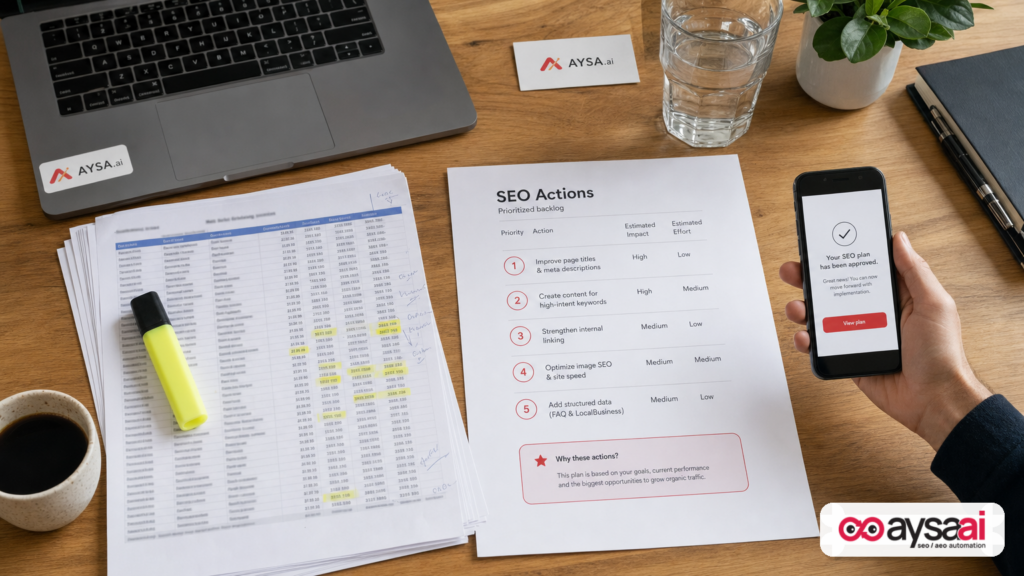
GSC tells you what happened. AI can help you explain why it happened, group thousands of queries into intent-driven themes, spot emerging topics early, and prioritize “striking distance” wins. The real unlock is building a workflow where insights become approved tasks—and tasks become executed site changes. That’s where AYSA fits: Monitoring, preparing recommended fixes, requesting approval, and executing accepted changes in a controlled way.
Key takeaways

- Stop auditing keywords one by one. Use AI to cluster queries into intent and themes so you can make page-level decisions.
- Regex is now a plain-English skill. You describe patterns; AI drafts the regex; GSC becomes filterable at scale.
- Look for “hidden BOFU” inside informational queries. Pricing, alternatives, implementation, and comparisons often hide in plain sight.
- Trends show up in your GSC before they show up in your favorite tools. Use AI to detect terminology shifts early.
- Execution beats insight. The best workflow ends with a backlog, approvals, and shipped updates—weekly.
Table of contents

- The real problem isn’t data. It’s decisions.
- What changed in search—and why GSC interpretation matters more now
- What AI is actually good at in GSC workflows (and what it’s not)
- A practical AI + GSC workflow (the AYSA way): monitor → interpret → prioritize → approve → execute
- Setup: GSC exports, regex filters, and guardrails
- 1) Move from keywords to intent segmentation
- 2) Mine question clusters that shape content, sales, and support
- 3) Identify queries that need “answer formats” (AEO) and AI-ready structure
- 4) Detect emerging topics before competitors do
- 5) Find conversion intent hiding in informational traffic
- 6) Discover audience and industry-specific demand (GEO in practice)
- 7) Scale striking-distance SEO without drowning in rows
- What can go wrong (and how to prevent it)
- SME scenario: a local clinic losing clicks while impressions grow
- What agencies should rethink: from reporting to shipping
- Where AYSA fits: turning analysis into approved execution
- What to do next (a 14-day action plan you can actually finish)
- Sources and further reading
The real problem isn’t data. It’s decisions.
Every business I talk to has some version of the same situation:
- They log into Search Console, see thousands of queries and pages.
- They spot a few anomalies: “CTR dropped,” “impressions spiked,” “position changed.”
- Then they get stuck, because the next step isn’t obvious—or it’s obvious but feels too time-consuming.
Historically, the workaround has been spreadsheets: exports, pivots, filters, and manual tagging. It works, but it’s slow and fragile. It breaks the moment you change the question you’re asking.
The new approach is not “AI replaces SEO.” The new approach is: AI replaces the slowest part of SEO—pattern-finding—so humans can spend more time deciding and executing.
What changed in search—and why GSC interpretation matters more now
GSC hasn’t stopped being valuable. If anything, it’s become more strategic.
Why? Because modern search visibility is increasingly split across:
- Classic blue links (still vital for many businesses),
- Answer-like experiences where format and clarity matter as much as ranking,
- Multi-surface discovery (web, local, video/social surfaces, etc.).
You don’t need to guess what users want—GSC is literally the record of demand meeting your site. But the value of GSC depends on interpretation: the ability to convert query patterns into decisions like “update this page,” “create this comparison,” “add FAQs,” “fix internal links,” or “build a dedicated landing page for this audience segment.”
Search Engine Land’s article focuses on practical ways AI can help interpret GSC at scale. I agree with the premise—and I’ll go further: the winners will be the teams that operationalize this into a recurring, approval-based execution system.
What AI is actually good at in GSC workflows (and what it’s not)
AI shines in GSC workflows when it’s used for translation and organization:
- Turning raw queries into intent categories and themes.
- Detecting language shifts (new terms, new concerns, new “how do I…” patterns).
- Recommending content formats (definition, comparison table, step-by-step guide, FAQ block).
- Summarizing a messy dataset into a prioritized backlog.
AI is not reliably good at:
- Knowing your margins, sales cycle, constraints, compliance rules, or brand risks.
- Making final calls about what to publish or how to position a claim.
- Guaranteeing causality (“this caused that”) based only on GSC exports.
So the right model is: AI proposes, humans decide, systems execute.
A practical AI + GSC workflow (the AYSA way): monitor → interpret → prioritize → approve → execute
If you want this to work for an SME (or any team with limited time), you need a loop. Not a one-off analysis.
Here’s the loop I recommend:
- Monitor: Track key GSC patterns (queries, pages, CTR changes, impressions changes, positions, and anomalies).
- Interpret: Use AI to cluster and label what’s happening (intent, themes, audiences, trend terms).
- Prioritize: Convert clusters into a ranked list of page-level actions with estimated effort and impact.
- Approve: Put changes behind an approval step (especially for regulated industries and brand-sensitive sites).
- Execute: Ship the changes quickly—then monitor again.
This is exactly why we built AYSA as an execution system—not just an “insights” tool. AYSA is designed to help you monitor, prepare improvements, request approval, and execute accepted website changes in a controlled way. If you want the product context, start here: AYSA Monitoring and AYSA AI Search Visibility.
Setup: GSC exports, regex filters, and guardrails
Before we get into the seven tactics, get the mechanics right. The goal is repeatable exports that an AI can analyze without guessing.
Your baseline GSC export checklist
- Pick a time range that matches your decision horizon (often 28 days vs previous 28 days for operations; 3 months for trend validation).
- Pull both Queries and Pages reports—because query insights should map to specific landing pages.
- Include at least: clicks, impressions, CTR, Average position.
- If possible, export separate slices by country/device if your business depends on them.
Regex isn’t optional anymore—but it’s easy now
GSC filtering is powerful, but regex historically scared people off. The shift: you can describe the pattern in plain English, and AI drafts the regex. Search Engine Land highlighted this explicitly, and it’s a big deal because it makes GSC analysis accessible to non-technical teams.
Examples of patterns you can ask AI to create regex for:
- Queries that start with question words (who/what/why/how…)
- Queries that indicate comparisons (vs, best, top, review…)
- Queries that mention pricing, alternatives, or implementation
- Queries that include audience terms (industry names, job roles, locations)
Guardrail: treat regex as a sampling tool, not a truth machine. You’re creating a lens to focus on a subset of demand.
1) Move from keywords to intent segmentation
Most SEO reporting still reads like this: “We’re up for Keyword A, down for keyword B.” That’s not how customers behave—and it’s not how executives fund marketing.
Customers have intents:
- Informational: learning concepts, definitions, how-to steps.
- Navigational: trying to find a brand or specific site section.
- Commercial investigation: comparing options, reading reviews, shortlisting.
- Transactional: ready to buy, book, sign up.
- Local: “near me,” city modifiers, service area intent.
Here’s the action shift: don’t optimize for one keyword—optimize for an intent cluster. You’ll update a page (or set of pages) to satisfy that intent better than competitors.
How to do it with GSC + AI
- Use regex filters in GSC to isolate “investigation” style queries (patterns like best/top/vs/review/compare).
- Export the query set (include clicks, impressions, CTR, position).
- Ask your AI tool to classify queries by intent and return a CSV with confidence labels.
Why this matters: when you look at intent, you can diagnose real problems. For example:
- If informational impressions rise but commercial investigation falls, you might be attracting curiosity but losing evaluators.
- If transactional positions are strong but CTR is low, the issue is often snippet messaging, trust, or mismatch (not “more content”).
- If comparison queries drive impressions but you lack comparison pages, you’re visible but not competitive.
That’s a business conversation—not a keyword argument.
2) Mine question clusters that shape content, sales, and support
Question queries are not just blog fuel. They’re friction logs.
When people ask:
- “How much does X cost?”
- “Is X worth it?”
- “How long does X take?”
- “X vs Y for [industry]”
…they’re telling you what prevents them from moving forward.
Workflow
- Filter queries in GSC for question starters (who/what/where/when/why/how/can/does/should/will).
- Export the list.
- Ask AI to group into themes and flag likely “unanswered” topics.
What you build from this (beyond blog posts)
- FAQ blocks on service pages (high intent, low friction).
- Sales enablement (battlecards, objection-handling pages, comparison tables).
- Support content that reduces tickets (especially for SaaS and ecommerce).
- On-page clarity upgrades (shipping, returns, lead times, insurance, compliance).
In other words: question clusters are cross-functional. Treat them that way.
3) Identify queries that need “answer formats” (AEO) and AI-ready structure
One of the most important shifts for content teams is that ranking is no longer the only win condition. For many informational queries, the winner is the page that provides the clearest, most extractable answer.
This is where AEO (Answer Engine Optimization) becomes practical. You don’t need to chase buzzwords; you need to shape content so it answers cleanly.
Use GSC to find “format demands”
Filter for patterns that often signal a definitional or instructional answer:
- “what is …”
- “how to …”
- “best …”
- “difference between …”
- “vs …”
Export and ask AI a specific question: “What content format would satisfy each cluster best?” You’re not asking for a rewrite; you’re asking for structure recommendations.
Common structure upgrades that help
- Definition at the top (plain language, 2–3 sentences)
- Step-by-step procedures with clear headings
- Comparison tables with criteria that matter to buyers
- “Who this is for” and “When not to use this” sections
- FAQ sections that mirror the exact questions in GSC
- Internal links to next-step pages (pricing, demos, booking, product categories)
AYSA’s perspective: structure is often a faster win than net-new content. The best teams upgrade their existing pages first, then expand.
4) Detect emerging topics before competitors do
Traditional keyword research is inherently delayed. It shows you what’s already obvious. GSC can show you early signals—because it’s what users are typing right now.
The challenge is that “emerging” terms are messy. Spelling varies. People use different phrases. That’s exactly what AI is good at parsing.
A trend method that doesn’t rely on luck
- List 5–20 “concept buckets” relevant to your market (new tech terms, regulations, competitor categories, new product types).
- Ask AI to create a regex pattern that catches variants of those concepts.
- Filter queries in GSC using that regex.
- Export two time ranges (e.g., last 28 days vs previous 28 days) and ask AI to identify terms gaining traction.
Decision output
AI should not just say “this term is trending.” It should help answer:
- Is this a new page or an update to an existing page?
- Where do we already have topical authority, and where are we thin?
- What is the likely intent (learning vs comparing vs buying)?
- What internal links should point into this topic?
This is also where GEO (Generative Engine Optimization) becomes real: you’re not just chasing rankings; you’re building clear topical coverage and navigability so your brand is easier to recommend and cite in AI-mediated discovery. See AYSA’s angle here: AI Search Visibility.
5) Find conversion intent hiding in informational traffic
SMEs often make a costly assumption: “This page is informational, so it can’t drive leads.”
GSC frequently shows the opposite. Users may land on an educational guide and still be in evaluation mode. They just phrase the query like a researcher.
Signals worth filtering for
Use regex (AI can draft it) for terms like:
- pricing, cost, price
- alternative, vs, compare
- implementation, migration, setup
- best tool, best service, best provider
- reviews, ratings
What to change on-page (without ruining the educational experience)
- Add a “next step” CTA (book, quote, demo) that fits naturally.
- Link to pricing, packages, or service pages with context (not “click here”).
- Add a short comparison section or table if investigation intent is present.
- Include trust elements: certifications, guarantees, outcomes, case studies.
- Answer “implementation” questions with a simple process section.
Done well, this doesn’t turn a guide into a sales page. It turns a guide into a decision-support page.
6) Discover audience and industry-specific demand (GEO in practice)
Most SMEs think in products and services. Customers often think in “people like me.”
That means demand often shows up as:
- “for dentists”
- “for nonprofits”
- “for property managers”
- “for Shopify stores”
- “for small clinics”
You can uncover these segments directly in GSC by filtering for audience terms: industries, job roles, use cases, compliance terms, or location modifiers.
What you get when you do this right
- A list of segments that already “pull” your site via search.
- Their unique question clusters and pain points.
- Clarity on whether you need dedicated landing pages, case studies, or simply better internal linking.
This also supports a GEO mindset: if AI systems (and humans) look for “best [solution] for [segment],” you want clear segment coverage on-site.
7) Scale striking-distance SEO without drowning in rows
“Striking distance” is the classic SEO play: identify queries where you rank in the middle of page one (or early page two), then make upgrades to win top positions.
The problem is volume. Once you have hundreds of candidates, teams either:
- Do nothing because it feels overwhelming, or
- Make tiny keyword tweaks that don’t move the needle.
A better approach: page-level, theme-level improvements
- Filter GSC queries by average position (commonly 5–15 as a starting lens).
- Within that set, add a regex filter for your current focus (questions, comparisons, pricing, audience segments).
- Export, then ask AI to recommend page-level actions, not keyword edits.
What page-level actions often look like:
- Expand missing subtopics that competitors cover.
- Add a comparison section where comparison intent exists.
- Improve internal linking from high-authority pages to the target page.
- Strengthen titles and descriptions to match intent and improve CTR.
- Consolidate overlapping pages that cannibalize each other (if applicable).
This is how you turn 300 “opportunities” into 10 meaningful actions.
What can go wrong (and how to prevent it)
AI-assisted analysis is powerful, but it introduces new failure modes. Here are the big ones I see—and how to avoid them.
Pitfall #1: Overtrusting AI labels
Intent classification and clustering are probabilistic. Use confidence scoring, spot-check samples, and don’t let one model output dictate strategy.
Pitfall #2: Regex bias (you filtered out the truth)
If your regex is too narrow, you’ll miss demand. If it’s too broad, you’ll include noise. Treat regex like a microscope: great for a focused question, not for understanding the whole ecosystem.
Pitfall #3: Confusing correlation with causation
A CTR drop could be driven by SERP changes, new competitors, seasonality, or shifts in intent. GSC tells you what happened; it rarely proves why. Use AI to propose hypotheses—not conclusions.
Pitfall #4: Creating a “beautiful report” with no owner
If nobody owns execution, nothing changes. This is why you need a backlog and a weekly shipping cadence.
Pitfall #5: Moving too slowly
In modern search, slow execution is a strategic disadvantage. The point of AI is speed-to-decision and speed-to-ship—while still keeping approvals and quality control.
SME scenario: a local clinic losing clicks while impressions grow
Let’s make this real. Imagine a multi-location physical therapy clinic.
They open GSC and see:
- Impressions are up 25% (people are seeing them more).
- Clicks are flat (people aren’t choosing them).
- Average position improved slightly (so it’s not purely a rankings collapse).
Without a workflow, this becomes a vague frustration.
Here’s the AI + GSC approach
- Filter for question queries: “how long does physical therapy take,” “do you need a referral,” “how much is physical therapy.”
- Cluster themes: insurance/referrals, pricing, time-to-results, appointment availability, conditions treated.
- Map to pages: which landing pages are getting impressions for these themes?
- Decide actions:
- Add a short “Referral & insurance” FAQ on every location page.
- Add a “What to expect” section on the core service page.
- Add internal links from blog guides to the booking page.
- Improve titles/meta to reflect “no referral required” (if true) and “same-week appointments” (if true).
- Approve and ship: changes go live, then monitor CTR and conversions.
No new blog series required. Just intent-match and clarity upgrades—based on what patients were already asking.
What agencies should rethink: from reporting to shipping
If you run an agency (or an internal marketing team that behaves like one), your deliverable can’t be “insights.” Your deliverable must be implemented improvements.
AI changes the agency model in two ways:
- Analysis gets cheaper and faster. Clients won’t pay for time-consuming spreadsheet archaeology.
- Execution becomes the differentiator. The team that can safely ship changes weekly wins.
So the strategic shift is to productize your loop:
- Weekly monitoring
- Biweekly prioritization
- Monthly thematic initiatives
- Continuous, approved execution
AYSA was built to support this operational model: less time in spreadsheets, more time driving outcomes. If you’re exploring how that looks, start with AYSA AI SEO Tools and browse more workflows at AYSA Blog.
Where AYSA fits: turning analysis into approved execution
Let’s be blunt: most SEO programs underperform because the feedback loop is broken. Insights don’t become changes, or changes take months, or approvals never happen.
AYSA’s approved-execution model is designed to close that loop:
- Monitor: Keep watch on search visibility signals and performance shifts.
- Prepare: Turn patterns (including from GSC workflows) into specific recommendations tied to pages.
- Ask for approval: You stay in control—especially important for regulated or brand-sensitive businesses.
- Execute: Once approved, changes are implemented without waiting for a backlog battle.
If you’re evaluating how to operationalize this, relevant starting points are:
Important: AYSA doesn’t replace strategy. It replaces the execution bottleneck that keeps strategy theoretical.
What to do next (a 14-day action plan you can actually finish)
If you’re an SME, you don’t need a grand transformation. You need a short sprint that produces shipped improvements.
Days 1–3: Build your first “lens” export
- Pick one lens: questions, comparisons, pricing/alternatives, or one audience segment.
- Use AI to draft a regex for that lens.
- Export GSC query data and the associated top pages.
Days 4–6: Cluster and map to pages
- Have AI cluster queries into 5–15 themes.
- Map each theme to 1–3 pages that should win that theme.
- Write down what’s missing: sections, FAQs, comparisons, internal links, CTA alignment.
Days 7–10: Prioritize a backlog (10 items max)
- Rank actions by expected impact and effort.
- Assign an owner to every item.
- Define what “done” means (e.g., “FAQ section added,” “comparison table added,” “internal links updated from 10 pages”).
Days 11–14: Approve and ship
- Route changes through approvals (especially if legal/compliance matters).
- Ship the first batch.
- Set your next monitoring checkpoint (7–14 days) and keep the loop going.
If you want a system to support this cadence, this is where AYSA is meant to help: monitor, prepare improvements, request approval, execute accepted changes.
Sources and further reading
- Search Engine Land — 7 ways AI can turn Google Search Console data into action
- Search Engine Land — Google Search Console gains reporting on social and video platforms (context on broader reporting surfaces)
- Search Engine Land — Winning the AI decision layer: From AI discovery to agentic commerce (strategic context for AI-mediated discovery)
- Search Engine Land — Gemini Intelligence signals a new era for search and commerce (industry context; interpret cautiously as editorial analysis)
- AYSA — AI Search Visibility
- AYSA — AI SEO Tools
- AYSA — Monitoring
- AYSA — Blog
My closing opinion: GSC is not a reporting tool. It’s demand intelligence. AI doesn’t make it magical; it makes it usable. But the business advantage only shows up when interpretation becomes execution—fast, repeatable, and controlled. Data doesn’t improve SEO. Better decisions do. And better decisions without execution are just nicer spreadsheets.
Continue the AI search topic inside AYSA.
Use these pages to connect the article with AI SEO tools, AI visibility monitoring, AI Overviews and approved website execution.
Turn this topic into a website action plan.
Use these AYSA hubs to move from reading to technical fixes, AI visibility monitoring, research, glossary context and approval-first SEO execution.

