
Build AI-Powered SEO Tools That Work Like Your Best Analyst (Not the Internet’s Average)
Generic AI gives generic SEO advice. The win is packaging your workflow, thresholds, and business context into repeatable AI assistants—then connecting those insights to approved execution. Here’s a practical playbook for SMEs and agencies to turn processes into AI-powered tools, with guardrails that keep quality high.
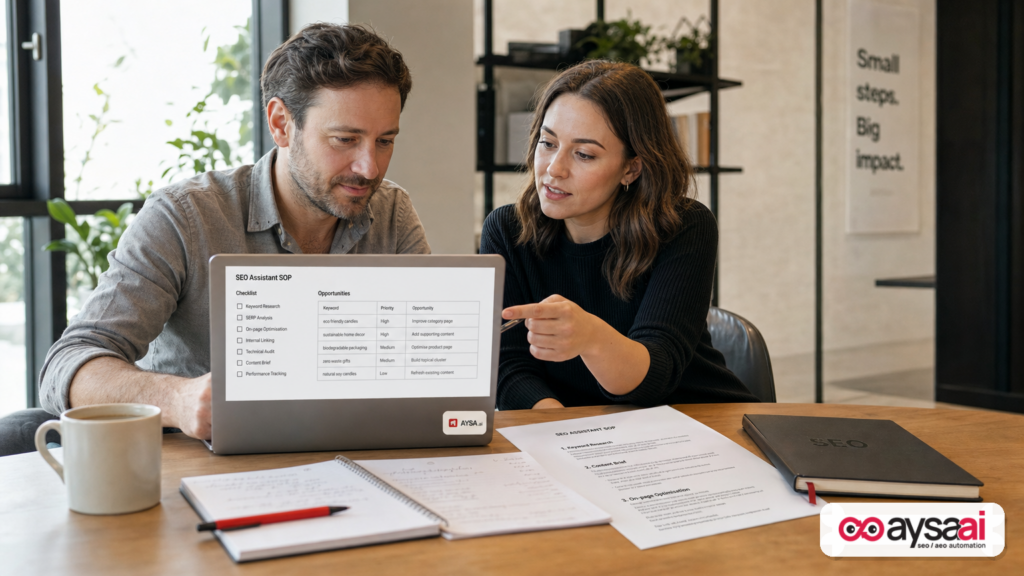
AI didn’t kill SEO. But it did expose something uncomfortable: most SEO “best practices” are so widely repeated that when you ask a generic AI model for help, you get the same generic output your competitors get.
The opportunity isn’t to prompt harder. It’s to productize your SEO process—your thresholds, your judgment calls, your business context—into AI assistants that work the way your best analyst works. Then you connect those assistants to an operational system that can ship changes reliably, with approvals and guardrails.
This editorial expands on the idea of turning SEO workflows into AI-powered tools (inspired by Search Engine Land) and takes it further: what changed, why it matters for real businesses, what can go wrong, and how to build an execution loop that compounds results over time.
Concise summary
- Generic AI outputs average advice because it lacks your business context, priorities, and standards.
- The practical win is building small, reusable AI assistants for repetitive tasks (Search Console triage, on-page first pass, Internal linking checks, reporting prep).
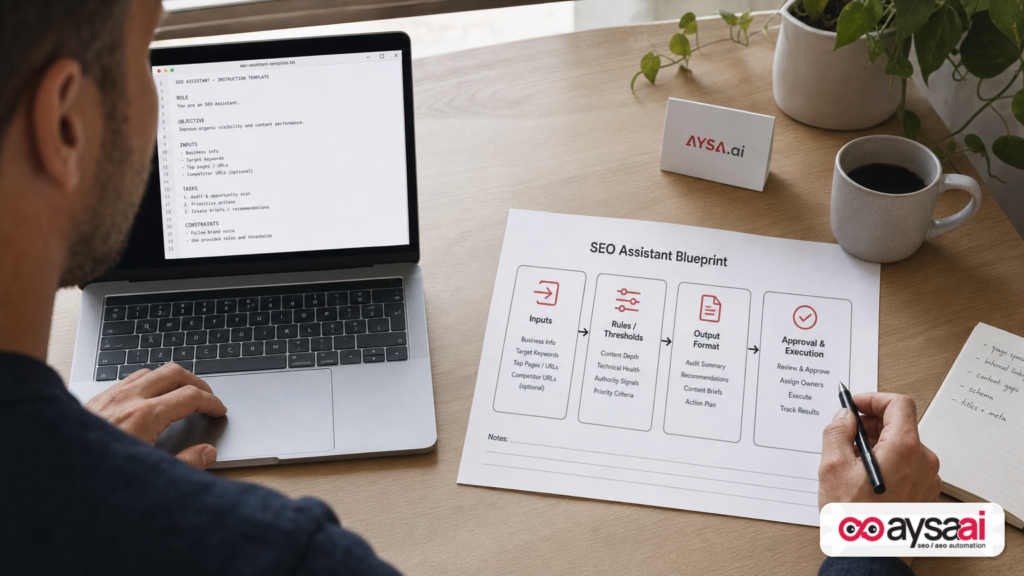
- To keep quality high, you need explicit thresholds, output formats, and guardrails (e.g., “use only provided data”).
- The biggest SEO gap for SMEs and agencies is not ideas—it’s execution capacity. If changes don’t ship, nothing compounds.
- AYSA fits as an execution system: monitor, prepare recommendations, ask for approval, and execute accepted website changes—consistently and transparently.
Key takeaways
- AI assistants are SOPs with a brain. If you can write a good checklist for a team member, you can build a useful assistant.
- Automation should target repetition, not judgment. Let AI do the legwork; keep strategy and prioritization human-led.
- Guardrails are not optional. They prevent hallucinations, overconfident recommendations, and brand-damaging changes.
- Measure outcomes, not activity. Tie assistant outputs to decisions, shipping velocity, and business KPIs.
Table of contents
- What changed (and why AI “out of the box” disappoints)
- The real shift: from “prompting” to productizing your SEO process
- What to automate (and what to keep human)
- Choosing your assistant stack: GPTs, Gems, Projects, scripts
- A practical build: the “Search Console Quick Wins” assistant
- Knowledge files that stop generic output
- Guardrails that keep AI honest (and useful)
- Concrete SME scenario: ecommerce “good data, no time” trap
- What agencies should rethink: deliverables vs. systems
- How to measure success: from rankings to shipped improvements
- Where AYSA fits: from monitoring to approved execution
- What to do next (30/60/90-day action plan)
- Sources and further reading
What changed (and why AI “out of the box” disappoints)
In the old SEO world, the differentiator was often access to information: who had better tools, better data, better playbooks. Today, everyone has access to strong tools and decent playbooks—and everyone can ask a chatbot for “an on-page SEO checklist.”
So why does generic AI feel underwhelming?
- It lacks your business context. It doesn’t know what you sell, what you refuse to sell, where your margins are, what your customers actually ask on sales calls, or what “good” looks like for your brand.
- It outputs the internet’s average. Large language models generate likely responses based on what they’ve seen—useful, but often unoriginal and non-specific.
- SEO is operational. The work is a chain of small decisions and shipped changes. Advice doesn’t move metrics unless it becomes execution.
The strategic implication: if AI makes generic knowledge cheap, your differentiator becomes your process—and how quickly you can ship improvements safely.
The real shift: from “prompting” to productizing your SEO process
Most teams are still treating AI like a smarter search bar. That mindset leads to inconsistent results:
- One person gets a helpful response because they provided great context.
- Another gets fluff because they didn’t paste the context.
- Everyone loses time re-explaining the same constraints in every chat.
Productizing flips the model. Instead of repeatedly prompting, you build small assistants that bake in:
- Role: what kind of analyst/writer/QA reviewer it should emulate.
- Process: your step-by-step method and checks.
- Thresholds: what counts as meaningful (Impressions, CTR, position, trend, revenue impact).
- Output format: so results are scannable and comparable over time.
- Guardrails: what it must not do, and when it should ask questions.
This is exactly the direction highlighted by Marcus Miller’s piece on Search Engine Land: take your workflows, expertise, and context and package them into AI assistants (e.g., GPTs, Gemini Gems, Claude Projects) so AI works the way you work, not the way “SEO on the internet” works (source).
My editorial stance: this is the future of practical SEO operations. Not because it’s flashy, but because it’s the simplest way to create leverage without lowering standards.
What to automate (and what to keep human)
Here’s the rule I use when advising SMEs and teams: automate repetition, not judgment.
Best candidates for AI assistants
- Repetitive triage: Search Console exports, Keyword Clustering, cannibalization checks, internal linking opportunities.
- First-pass reviews: on-page QA, title/meta improvement suggestions, Schema validation checklists (the checklist, not the final implementation).
- Reporting prep: turning raw metrics into plain-English summaries and “what changed” narratives.
- Content refresh discovery: identifying pages with declining clicks or impressions and suggesting refresh paths.
What should stay human-led
- Strategy and prioritization: what matters to the business this quarter (product line, location, margins, retention).
- Brand voice and compliance: regulated industries, medical/financial sensitivity, legal review constraints.
- Final editorial calls: what claims you can make, what you can’t, and what you’re willing to stand behind.
- Tradeoffs: when improving one page could hurt another, or when internal links should reflect business priorities, not just “SEO juice.”
AI can draft, rank, sort, flag, and propose. Humans decide what to ship.
Choosing your assistant stack: GPTs, Gems, Projects, scripts
In practice, you don’t need “one AI.” You need a stack of small tools that map to recurring workflows. Search Engine Land’s article points to several popular ways to package assistants (GPTs, Gemini Gems, Claude Projects) and—when necessary—graduate to tools that can build software or scripts (source).
How to choose:
- Use a no-code assistant (GPT/Gem/Project) when: the workflow is mostly reading, reasoning, and formatting outputs based on your SOPs.
- Use a script/app approach when: you’re processing huge exports (tens of thousands of rows), you need repeatable transformations, or you need to integrate multiple data sources.
What matters isn’t the platform. It’s whether you can encode your standards and reliably get usable outputs.
A practical build: the “Search Console Quick Wins” assistant
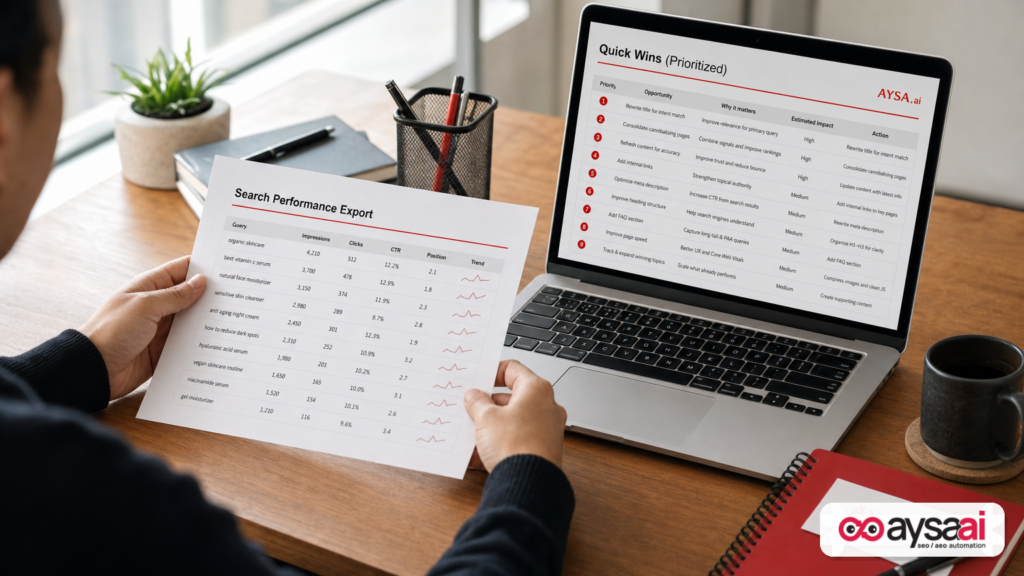
Let’s build a concrete assistant you can implement quickly: a Search Console Quick Wins analyzer. This is a perfect automation candidate because it’s repetitive, process-driven, and data-heavy.
Goal: review Search performance data and produce a prioritized list of opportunities and actions, without inventing metrics.
Step 1: Define the job in one sentence
“Review Search performance data and identify prioritized quick-win opportunities with recommended actions.”
Step 2: Document your process (your real thresholds)
Your assistant needs a playbook. Here’s a practical, SME-friendly set of checks you can adapt:
- Striking distance queries: queries ranking just off the best positions where small improvements can move a lot of clicks.
- High impressions, low CTR: you’re visible but not winning the click (often a title/description mismatch or SERP competition).
- Declining pages/queries: anything trending down that deserves attention before it becomes a bigger problem.
- Query–page mismatch: the wrong page ranking for a query, or multiple pages competing.
- Unexpected queries: signals for new content, better FAQs, or category expansion.
Now add your judgment calls:
- What’s “meaningful impressions” for your site—100/month, 500/month, 2,000/month?
- What CTR is “low” for a given average position?
- What counts as “declining”—week-over-week, month-over-month, seasonality considered?
The assistant is only as good as these thresholds. This is where your experience becomes operational.
Step 3: Write the assistant instructions
Use a consistent template:
- Role (e.g., “experienced SEO analyst, skeptical, prioritizes commercial impact”)
- Task (what you provide, what it must produce)
- Process (the checks and thresholds)
- Output (table, max rows, summary)
- Guardrails (no invented data, ask clarifying questions)
That last line—guardrails—is not fluff. It’s what prevents overconfident nonsense from getting treated like insight.
Step 4: Add knowledge files (optional but powerful)
Upload a short “business context” doc so the assistant can prioritize what matters:
- Top products/services
- Top converting pages
- Geographies served
- Brand voice rules
- Constraints (compliance, claims you can’t make, promotions, seasonality)
This turns the assistant from “SEO helper” into “your SEO helper.”
Step 5: Test with a real export and iterate
Run one month of data. Then ask: did this output drive decisions? Did it produce actions your team would actually ship? If not, refine thresholds and output format until it does.
Knowledge files that stop generic output
Most teams under-invest here. They’ll spend hours prompting and minutes documenting. Flip that. The assistant becomes valuable when it has institutional knowledge.
High-leverage knowledge files include:
1) A one-page “what matters” brief
- Business model (lead gen vs ecommerce vs subscription)
- Primary conversions
- Top revenue drivers (or proxies if you can’t share revenue)
- Customer segments and pain points
2) Your on-page checklist
Not an internet checklist—your checklist. What you always check (and what you ignore because it’s noise).
3) Your title/meta style guide
So the assistant’s suggested rewrites don’t sound like a generic marketing generator.
4) Your internal linking rules
What anchors you prefer, which pages deserve links, and what you consider “over-optimization.”
5) A “no-go” list
Claims you can’t make, competitor comparisons you don’t do, topics you don’t want to be associated with.
Guardrails that keep AI honest (and useful)
Here’s the uncomfortable truth: AI can be wrong in ways that look confident. In SEO operations, that creates risk—especially if you move fast and copy/paste outputs into production.
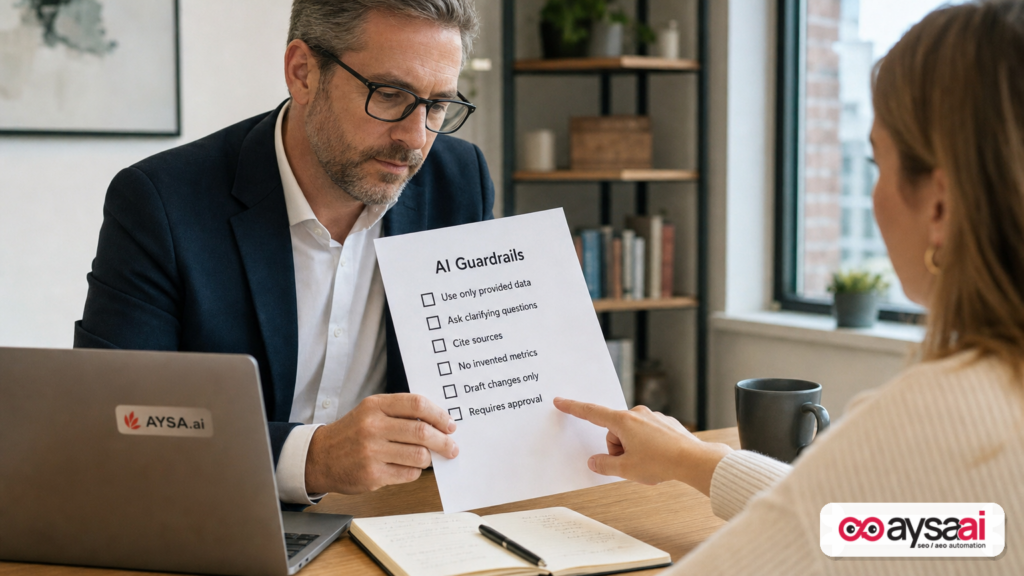
Your guardrails should cover four categories:
1) Data integrity
- Use only the data provided.
- Never invent metrics, URLs, or queries.
- Call out missing columns or unclear definitions.
2) Scope control
- Max rows (e.g., 10–20 opportunities)
- “Quality over quantity” requirement
- Explicit priority framework (commercial impact first)
3) Brand and compliance
- Voice constraints
- Regulated claims constraints
- Disallowed topics/positioning
4) Execution safety
- Draft changes only; require approval to publish.
- Maintain a change log
- Rollback plan
Search Engine Land emphasized that “garbage in, garbage out” still applies and that persisting context via instructions and knowledge reduces generic output (source). I’ll add one more layer: guardrails + approvals are what make AI safe at scale.
Concrete SME scenario: ecommerce “good data, no time” trap
Consider a realistic scenario: a 12-person ecommerce brand selling specialty home goods. They have:
- Decent organic traffic.
- Search Console data showing hundreds of queries with impressions.
- A content manager who updates product pages when there’s time.
- Two developers who are always busy with checkout and inventory systems.
What’s the problem? It’s not that they lack ideas. It’s that they lack an operational loop to turn insights into shipped improvements.
What the AI assistant does well
- Flags 10 queries sitting in striking distance.
- Finds 6 pages with high impressions but weak CTR.
- Identifies 3 cases of query cannibalization between category and blog pages.
Where teams get stuck
- No one knows which changes are safe.
- No one owns the backlog.
- Recommendations live in a doc that never becomes a ticket.
What “good” looks like
- Weekly: assistant generates a small prioritized list.
- Weekly: someone approves 3–5 changes.
- Weekly: changes ship, and the results are monitored.
The compounding effect comes from consistency, not heroics.
What agencies should rethink: deliverables vs. systems
If you run an agency, AI assistants change how you should productize your service.
The old model: “We deliver audits, keyword research, content briefs, and monthly reporting.”
The new model: “We deliver a system that produces and ships improvements every week.”
Here’s why this matters:
- Clients don’t pay for insights; they pay for outcomes.
- Insights are now cheap. Your client can get a generic audit from a chatbot or a standard tool.
- Execution capacity is scarce. If you can move from recommendations to approved changes, you become far harder to replace.
AI assistants help you standardize quality across the team—especially for junior analysts—by making your thresholds and SOPs explicit. But you still need a dependable path from “assistant output” to “shipped work.”
How to measure success: from rankings to shipped improvements
If you want these assistants to be more than a novelty, track metrics tied to execution and business results.
Operational metrics (leading indicators)
- Time-to-insight: how long from export to prioritized opportunities?
- Time-to-ship: how long from opportunity to live change?
- Approval rate: what percentage of recommendations get approved?
- Change velocity: number of meaningful improvements shipped per week/month.
Outcome metrics (lagging indicators)
- Clicks and impressions for targeted pages/queries
- CTR changes after title/meta updates
- Leads/sales attributable to organic landing pages
- Conversion rate improvements on organic entry pages
Most SMEs over-index on rank tracking while under-investing in shipping. Shipping is the multiplier.
Where AYSA fits: from monitoring to approved execution
At AYSA, our view is simple: SEO/AEO/GEO success is operational. Monitoring and recommendations matter, but execution is where compounding happens.
That’s why AYSA is built as an approved execution system:
- Monitor site and search visibility signals so issues and opportunities surface early: AYSA Monitoring
- Prepare changes and recommendations in a structured way (titles, content adjustments, internal links, technical fixes) that aligns with your standards.
- Ask for approval so businesses keep control and compliance remains intact.
- Execute accepted website changes reliably—so work doesn’t die in a spreadsheet.
This is also why we focus on AI search visibility as a practical business problem, not a buzzword. If you’re trying to understand how your brand shows up across emerging AI-driven discovery, explore: AI Search Visibility.
For teams that want a toolkit view, start here: AI SEO Tools.
If you’re evaluating fit and operational cost, pricing is transparent: AYSA Pricing.
And for more execution-focused editorials, see the blog: AYSA Blog.
What to do next (30/60/90-day action plan)
Next 30 days: build one assistant and prove it saves time
- Pick one repetitive workflow (Search Console quick wins is ideal).
- Write a one-page SOP: checks, thresholds, output format.
- Implement guardrails (“use only provided data,” “ask clarifying questions”).
- Run it weekly and track time saved vs. your old process.
Next 60 days: connect the output to a real execution backlog
- Convert assistant outputs into tickets with acceptance criteria.
- Define approval owners (marketing, legal, product) and timeboxes.
- Ship small, safe improvements weekly (titles, internal links, content refreshes).
Next 90 days: standardize and scale safely
- Add knowledge files: brand brief, priorities, do/don’t list.
- Create 2–3 more assistants (on-page QA, internal link opportunities, monthly narrative reporting).
- Build a change log and measure outcomes per change type.
What can go wrong (and how to avoid it)
AI assistants can increase speed—and speed can amplify mistakes. Watch for these common failure modes:
1) “More recommendations” becomes the goal
Teams celebrate big lists. But big lists don’t ship. Cap outputs, force prioritization, and require a “top 3 actions” summary.
2) The assistant optimizes for SEO metrics, not business outcomes
If your knowledge files don’t include commercial priorities, AI will chase impressions that don’t convert. Add conversion proxies and priority pages.
3) Hallucinations sneak into planning
This is why “use only provided data” is non-negotiable. If the export is insufficient, the assistant should say so.
4) Automation without approvals damages the brand
Especially in healthcare, finance, and high-trust categories. Keep humans in the loop for final copy and claims.
5) Execution bottlenecks remain unchanged
If your dev queue is the bottleneck, no assistant fixes that by itself. You need an execution model that can ship changes safely and consistently.
Editorial perspective: this is less about AI and more about management
My strongest view: the real advantage is not AI capability—it’s operational clarity.
When you document your process well enough to teach it to an assistant, you often discover:
- Where your team disagrees on thresholds
- Where “best practices” don’t match your business
- Where quality standards were implicit, not explicit
That’s a management win disguised as an AI project. The assistant is just the forcing function that makes your organization’s SEO knowledge real, reusable, and scalable.
Sources and further reading
- Search Engine Land: Turn your SEO process into AI-powered tools
- Search Engine Land: Stop trying to replace people with AI
- Search Engine Land: ChatGPT recommendations drive more brand website visits: Study
- Search Engine Land: A 13-word edit can steer what deep-research AI agents recommend
- Search Engine Land: Google’s LLM patent suggests a new goal for SEO: Teaching AI who you are
- Search Engine Land: Google AI Overviews cite self-serving listicles, but recommend competitors 69% of the time
What to do next
- Pick one workflow you do weekly (Search Console quick wins is best).
- Write the SOP with thresholds and “what good looks like.”
- Build the assistant (GPT/Gem/Project) with an enforced output format.
- Add guardrails: “use only provided data,” “draft only,” “ask questions.”
- Create an execution loop: who approves, who ships, how you measure.
- Operationalize monitoring so opportunities and regressions don’t rely on someone remembering to check.
If your goal is not just to generate recommendations, but to run SEO as a system that monitors, prepares, requests approval, and executes accepted changes, start with AYSA’s monitoring and AI visibility resources:
Note: This article uses Search Engine Land’s discussion of packaging SEO workflows into AI assistants as research input and expands it into an operational playbook with an execution-first perspective.
Continue the AI search topic inside AYSA.
Use these pages to connect the article with AI SEO tools, AI visibility monitoring, AI Overviews and approved website execution.
Turn this topic into a website action plan.
Use these AYSA hubs to move from reading to technical fixes, AI visibility monitoring, research, glossary context and approval-first SEO execution.

